✅ WPF 데이터 바인딩(Data Binding)
UI 요소(View)와 데이터(ViewModel 또는 Model)를 연결하는 기능으로 이를 통해 UI가 자동으로 데이터 변경을 반영하고, 사용자의 입력도 데이터에 전달된다.
Binding Modes (바인딩 모드)
- OneWay → 데이터 변경 시 UI 업데이트 (읽기 전용)
- TwoWay → 데이터와 UI가 서로 업데이트됨 (입력 양방향)
- OneTime → 처음 한 번만 데이터 바인딩
- OneWayToSource → UI에서 데이터로만 전달됨
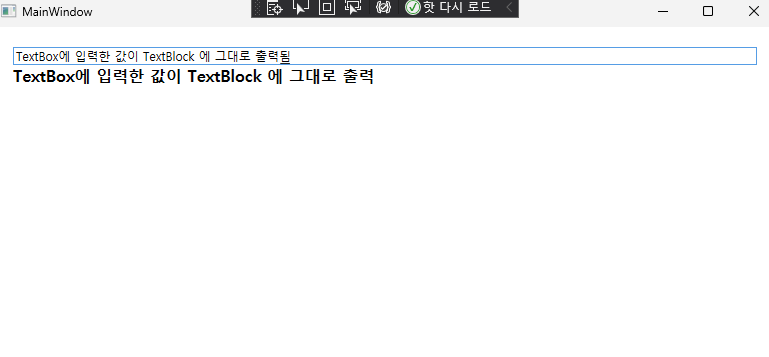
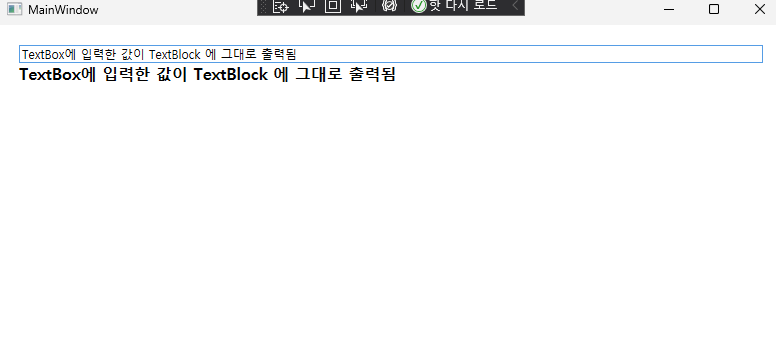
예제(name 실시간 변경)
viewmodel
namespace BindingExample
{
    // ViewModel : UI 와 데이터를 연결하는 중간계층
    public class MainViewModel : INotifyPropertyChanged
    {
        private string _name; //내부 필드


        public event PropertyChangedEventHandler PropertyChanged;
        // INotifyPropertyChanged 상속 시 구현해야 하는 필수 이벤트
        // UI 와 데이터 간의 변경을 감지

        // 바인딩할 프로퍼티 설정
        public string Name
        {
            get { return _name; } // 값 가져오기
            set
            {
                if (_name != value)  // 값이 변경되었을 때만 실행
                {
                    _name = value;
                    OnPropertyChanged(nameof(Name)); // UI에 변경 사항 알림
                }
            }
        }


        // 속성이 변경되었을 때 호출되는 메서드
        protected void OnPropertyChanged(string propertyName)
        {
            PropertyChanged?.Invoke(this, new PropertyChangedEventArgs(propertyName));
        }
    }

}
INotifyPropertyChanged
- 데이터 변경을 UI에 알리기 위해 필요한 인터페이스
View
<!-- ViewModel과 UI를 연결 -->
    <Window.DataContext>
        <local:MainViewModel />

    </Window.DataContext>

    <StackPanel Margin="20">
        <!-- 사용자가 입력할 수 있는 TextBox, 입력값이 변할 때 마다 ViewModel 의 Name프로퍼티에 저장
        (TwoWay 바인딩 : UI 와 ViewModel 을 쌍방향으로 이동함) -->
        <TextBox Text="{Binding Name, Mode=TwoWay, UpdateSourceTrigger=PropertyChanged}" />

        <!-- 입력한 값(Name) 실시간으로 반영되는 TextBlock -->
        <TextBlock Text="{Binding Name}" FontSize="16" FontWeight="Bold" />
    </StackPanel>
결과
✅ Command(커맨드)
Command(커맨드)는 WPF에서 버튼 클릭 등의 UI 이벤트를 ViewModel에서 처리할 수 있도록 하는 기능
- MVVM 패턴에서는 버튼 클릭 이벤트를 직접 처리하지 않고 Command를 사용함.
- ICommand 인터페이스를 구현한 RelayCommand(또는 DelegateCommand)를 사용하여 명령을 정의.
- UI(Button)에서 ViewModel의 Command를 바인딩하면 직접 코드 숨김 파일(MainWindow.xaml.cs)에서 이벤트를 다룰 필요 없음.
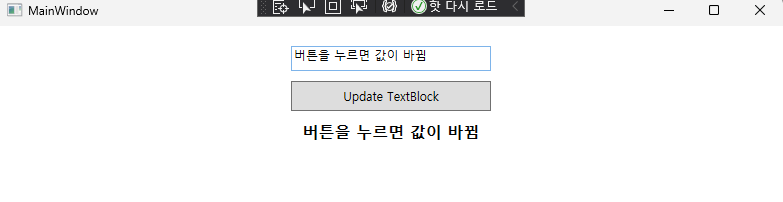
예제(버튼으로 name 변경)
ViewModel
    public class MainViewModel : INotifyPropertyChanged
    {
        private string _inputText;
        private string _displayText;

        // 1️⃣ 사용자가 TextBox에 입력한 값을 저장하는 속성
        public string InputText
        {
            get { return _inputText; } // TextBox에서 읽을 때 실행
            set
            {
                _inputText = value; // 사용자가 입력한 값 저장
                OnPropertyChanged(nameof(InputText)); // UI에 변경 사항 알림
            }
        }

        // 2️⃣ TextBlock에 표시될 문자열을 저장하는 속성
        public string DisplayText
        {
            get { return _displayText; } // TextBlock에서 읽을 때 실행
            set
            {
                _displayText = value; // 변경된 값 저장
                OnPropertyChanged(nameof(DisplayText)); // UI 업데이트
            }
        }

        // 3️⃣ 버튼 클릭 시 실행될 ICommand 객체
        public ICommand UpdateTextCommand { get; }

        public MainViewModel()
        {
            // 4️⃣ RelayCommand를 사용하여 UpdateTextCommand 초기화
            UpdateTextCommand = new RelayCommand(UpdateDisplayText);
        }

        // 5️⃣ 버튼 클릭 시 실행될 메서드
        private void UpdateDisplayText()
        {
            DisplayText = InputText; // TextBox의 값을 TextBlock에 반영
        }

        // 6️⃣ UI와 데이터 바인딩을 위한 INotifyPropertyChanged 구현
        public event PropertyChangedEventHandler PropertyChanged;
        protected void OnPropertyChanged(string propertyName)
        {
            PropertyChanged?.Invoke(this, new PropertyChangedEventArgs(propertyName));
        }
    }

    // 7️⃣ ICommand 구현 (RelayCommand)
    public class RelayCommand : ICommand
    {
        private readonly Action _execute;
        private readonly Func<bool> _canExecute;

        public RelayCommand(Action execute, Func<bool> canExecute = null)
        {
            _execute = execute;
            _canExecute = canExecute;
        }

        public bool CanExecute(object parameter)
        {
            return _canExecute == null || _canExecute();
        }

        public void Execute(object parameter)
        {
            _execute();
        }

        public event EventHandler CanExecuteChanged
        {
            add { CommandManager.RequerySuggested += value; }
            remove { CommandManager.RequerySuggested -= value; }
        }
    }
🔹 코드 상세 설명
1️⃣ InputText (TextBox와 바인딩)
✔ TextBox와 바인딩됨 (Mode=TwoWay)
✔ 사용자가 입력한 값을 _inputText에 저장
✔ OnPropertyChanged(nameof(InputText))를 호출하여 UI에 변경 사항 알림
2️⃣ DisplayText (TextBlock과 바인딩)
✔ TextBlock과 바인딩됨
✔ 버튼 클릭 후 DisplayText = InputText;가 실행되면 UI가 자동 업데이트됨
3️⃣ UpdateTextCommand (버튼 클릭 이벤트)
✔ 버튼과 연결될 ICommand 속성
✔ 생성자에서 RelayCommand로 초기화됨
4️⃣ 생성자 (MainViewModel())
✔ UpdateTextCommand를 RelayCommand 객체로 초기화
✔ 버튼이 클릭되면 UpdateDisplayText() 메서드 실행
5️⃣ UpdateDisplayText() (버튼 클릭 시 실행)
✔ TextBox.InputText 값을 TextBlock.DisplayText에 복사
✔ TextBlock이 자동 업데이트됨 (INotifyPropertyChanged 때문)
6️⃣ INotifyPropertyChanged (UI 자동 업데이트)
✔ WPF에서는 속성이 변경되면 UI를 업데이트해야 함
✔ OnPropertyChanged()를 호출하면 UI가 변경 사항을 감지하여 자동 업데이트
7️⃣ RelayCommand (ICommand 구현)
✔ ICommand 인터페이스 구현
✔ Execute() → 버튼 클릭 시 실행할 메서드 (UpdateDisplayText())
✔ CanExecute() → 버튼을 활성화할지 결정 (여기서는 항상 true)
🔹 실행 흐름
단계 동작
1️⃣ 사용자가 TextBox에 문자열 입력 (InputText 값 변경)
2️⃣ OnPropertyChanged(nameof(InputText)) 실행 → UI 업데이트
3️⃣ 사용자가 버튼 클릭 (UpdateTextCommand.Execute())
4️⃣ UpdateDisplayText() 실행 → DisplayText = InputText;
5️⃣ TextBlock이 자동 업데이트됨 (OnPropertyChanged(nameof(DisplayText)))
view
<Window.DataContext>
        <local:MainViewModel />
    </Window.DataContext>

    <StackPanel Margin="20">
        <!-- 사용자 입력을 받을 TextBox -->
        <TextBox Text="{Binding InputText, Mode=TwoWay, UpdateSourceTrigger=PropertyChanged}"
                 Width="200" Height="25" Margin="0,0,0,10"/>

        <!-- 버튼 클릭 시 Command 실행 -->
        <Button Content="Update TextBlock" Command="{Binding UpdateTextCommand}"
                Width="200" Height="30" Margin="0,0,0,10"/>

        <!-- TextBlock에 DisplayText 속성의 값을 표시 -->
        <TextBlock Text="{Binding DisplayText}" FontSize="16" FontWeight="Bold"
                   Width="200" Height="30" TextAlignment="Center"/>
    </StackPanel>
결과
✅ 의존성 주입(Dependency Injection, DI)
의존성 주입(Dependency Injection, DI)은 객체 간의 의존성을 외부에서 주입하는 방식으로, 코드의 결합도를 낮추고 유지보수를 쉽게 만드는 디자인 패턴
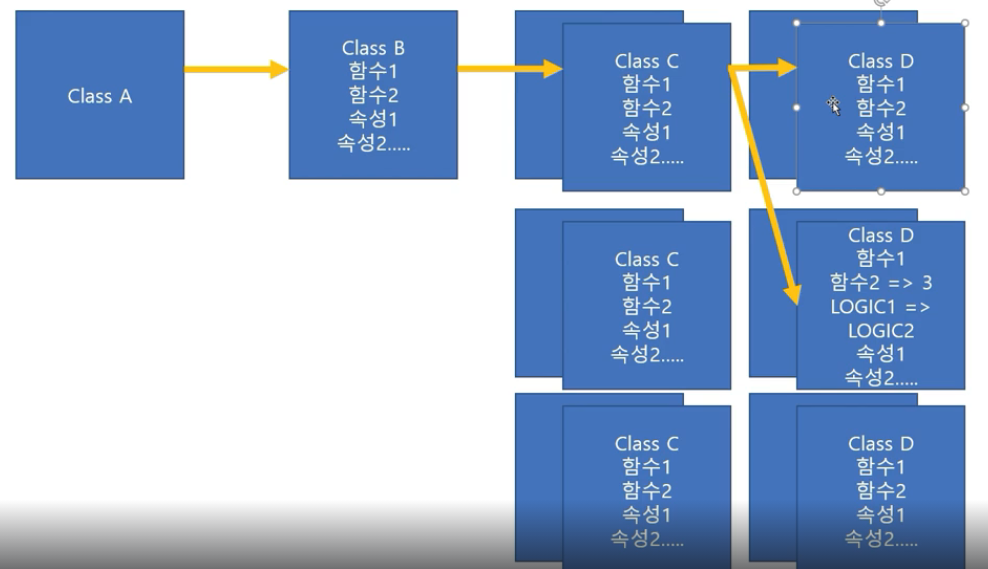
이처럼 여러 클래스 간에 유기적으로 연결되어 있는 경우 하나의 클래스를 변경하면 그 클래스에 의존하는 여러 클래스들이 영향을 받아서 유지보수가 매우 힘듬

자신이 필요로 하는 서비스를 생성하지 않고 외부에서 주입(생성자 형태)받아 사용한다.