윈도우 폼(winform)
프로젝트 생성
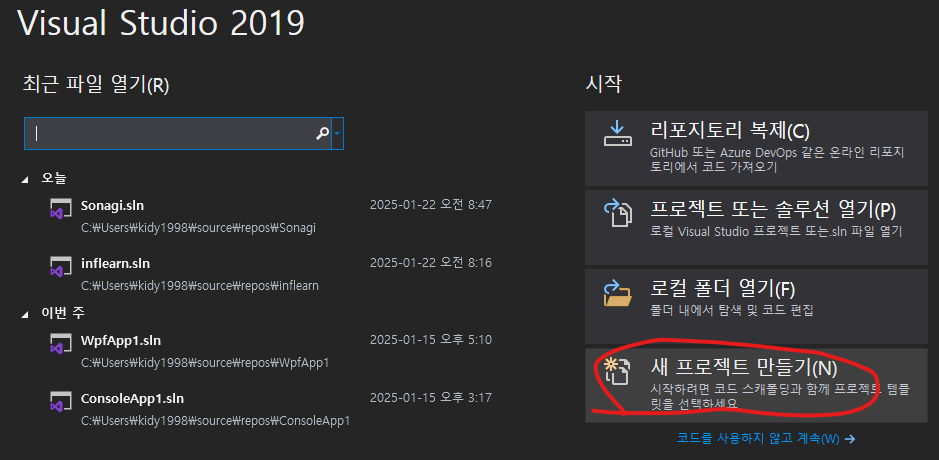
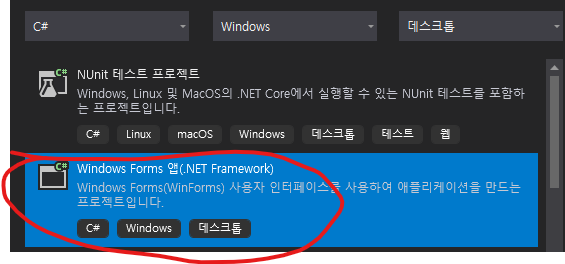
프로젝트 시작 시 흰색 창이 하나 생기고 도구 상자에서 각 요소를 추가하여 화면을 구성할 수 있다.
예제(입력)
1. 도구 상자에서 textBox, Button 생성
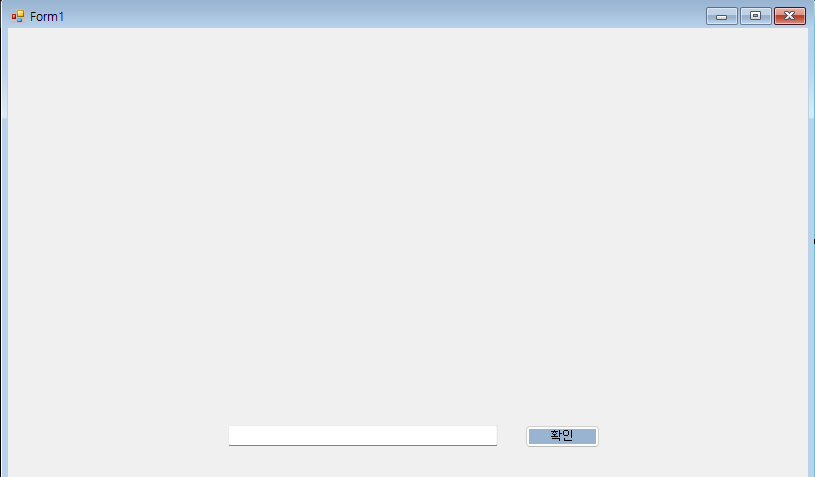
2. 확인 버튼과 textBox 연결
=> 텍스트 박스의 id(고유값) 을 요소로 가져와야 한다.
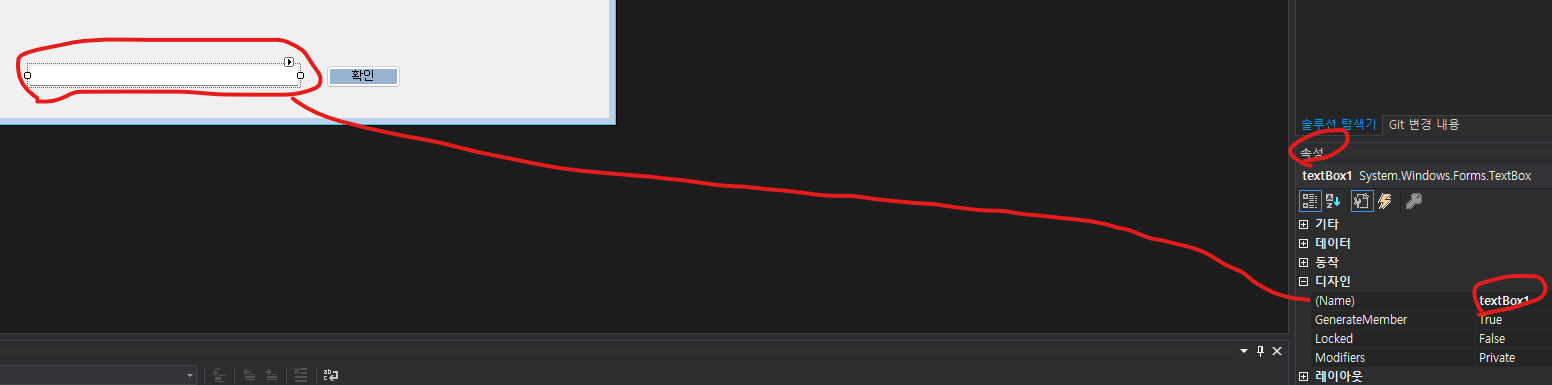
textBox 클릭 후 속성 -> 디자인 -> NAME 을 통해 해당 요소의 이름을 알 수 있다 (textBox1).
이후 이 값을 이용하여 버튼을 클릭했을 때 내용을 출력하게끔 코드 작성
3. 확인 버튼의 코드 작성(버튼 마우스 우클릭 -> 코드 보기)
 public partial class Form1 : Form
    {
        public Form1()
        {
            InitializeComponent();
        }

        private void Form1_Load(object sender, EventArgs e)
        {

        }

        private void button1_Click(object sender, EventArgs e)
        {

            Console.WriteLine(textBox1.Text); // Name.Text 를 이용해 내용을 출력
            textBox1.Text = "";	// 출력 후 초기화
            textBox1.Focus(); // 출력 한 뒤에도 textBox 에 포커스가 가 있게 설정
        }
    }
예제 : 산성비
 public partial class Form1 : Form
    {
        private Random random = new Random(); // 랜덤 위치 생성용
        private List<Label> labels = new List<Label>(); // 라벨 관리 리스트
        private Timer moveTimer = new Timer(); // 라벨 이동 타이머
        private Timer createLabelTimer = new Timer(); // 라벨 생성 타이머

        public Form1()  //생성자
        {
            InitializeComponent();

            // 텍스트 박스의 KeyDown 이벤트 등록
            textBox1.KeyDown += TextBox1_KeyDown;
        }

        private void Form1_Load(object sender, EventArgs e)
        {
            // 라벨 이동 타이머 설정
            moveTimer.Interval = 100; // 100ms마다 라벨 이동
            moveTimer.Tick += MoveTimer_Tick;
            moveTimer.Start();

            // 라벨 생성 타이머 설정 (1초에 한 번 라벨 생성)
            createLabelTimer.Interval = 1000; // 1000ms = 1초
            createLabelTimer.Tick += CreateLabelTimer_Tick;
            createLabelTimer.Start();
        }

        // 텍스트 박스의 KeyDown 이벤트 핸들러
        private void TextBox1_KeyDown(object sender, KeyEventArgs e)
        {
            // 엔터키가 눌렸을 때
            if (e.KeyCode == Keys.Enter)
            {
                e.SuppressKeyPress = true; // 엔터키 입력 방지(텍스트 박스에 줄바꿈 안되게)
                ProcessUserInput(); // 사용자 입력 처리
            }
        }

        // 라벨 생성 타이머 이벤트
        private void CreateLabelTimer_Tick(object sender, EventArgs e)
        {
            CreateLabel(); // 1초마다 라벨 생성
        }

        // 라벨 생성 메서드
        private void CreateLabel()
        {
            Label newLabel = new Label
            {
                Text = GetRandomWord(), // 랜덤 단어 설정
                Location = new Point(random.Next(0, this.ClientSize.Width - 100), 0), // 랜덤 위치
                AutoSize = true,
                Font = new Font("Arial", 10, FontStyle.Regular),
                ForeColor = Color.Black,
                BackColor = Color.Transparent
            };

            labels.Add(newLabel); // 리스트에 추가
            this.Controls.Add(newLabel); // 폼에 추가

            // this.Controls : 현재 폼(Form)에 추가된 모든 컨트롤(Control)을 관리하는 컬렉션
            // 컨트롤 추가: this.Controls.Add(control)
            // 컨트롤 제거: this.Controls.Remove(control)
            // 컨트롤 검색: this.Controls["컨트롤 이름"]
        }

        // 라벨 이동 타이머 이벤트
        private void MoveTimer_Tick(object sender, EventArgs e)
        {
            for (int i = labels.Count - 1; i >= 0; i--)
            {
                // 라벨을 아래로 이동
                labels[i].Top += 2;

                // 화면 아래로 벗어난 라벨 제거
                if (labels[i].Top > this.ClientSize.Height)
                {
                    this.Controls.Remove(labels[i]);
                    labels.RemoveAt(i);
                }
            }
        }

        // 사용자 입력 처리 (엔터키와 확인 버튼에서 공용으로 사용)
        private void ProcessUserInput()
        {
            string userInput = textBox1.Text.Trim(); // 입력값 (양끝 공백 제거)
            Console.WriteLine($"textBox1 의 출력 : {userInput}");

            // 입력값과 라벨 텍스트 비교
            for (int i = labels.Count - 1; i >= 0; i--) // 뒤에서부터 확인
            {
                if (labels[i].Text == userInput)
                {
                    this.Controls.Remove(labels[i]); // 폼에서 제거
                    labels.RemoveAt(i); // 리스트에서 제거
                }
            }

            textBox1.Text = ""; // 텍스트 박스 초기화
            textBox1.Focus(); // 텍스트 박스에 포커스
        }

        // 확인 버튼 클릭 이벤트
        private void button1_Click(object sender, EventArgs e)
        {
            ProcessUserInput(); // 사용자 입력 처리
        }

        // 랜덤 단어 생성 (20개의 샘플 단어)
        private string GetRandomWord()
        {
            string[] words = {
                "acid", "rain", "game", "fun", "code",
                "label", "winform", "random", "object", "method",
                "event", "button", "textbox", "form", "array",
                "string", "integer", "mouse", "keyboard", "timer"
            };

            return words[random.Next(words.Length)];
        }
	}