CRDs 설치
❯ k create namespace argocd
namespace/argocd created

❯ k apply -n argocd -f https://raw.githubusercontent.com/argoproj/argo-cd/stable/manifests/install.yaml
customresourcedefinition.apiextensions.k8s.io/applications.argoproj.io created
customresourcedefinition.apiextensions.k8s.io/applicationsets.argoproj.io created
customresourcedefinition.apiextensions.k8s.io/appprojects.argoproj.io created
serviceaccount/argocd-application-controller created
serviceaccount/argocd-applicationset-controller created
serviceaccount/argocd-dex-server created
serviceaccount/argocd-notifications-controller created
serviceaccount/argocd-redis created
serviceaccount/argocd-server created
role.rbac.authorization.k8s.io/argocd-application-controller created
role.rbac.authorization.k8s.io/argocd-applicationset-controller created
role.rbac.authorization.k8s.io/argocd-dex-server created
role.rbac.authorization.k8s.io/argocd-notifications-controller created
role.rbac.authorization.k8s.io/argocd-server created
clusterrole.rbac.authorization.k8s.io/argocd-application-controller created
clusterrole.rbac.authorization.k8s.io/argocd-server created
rolebinding.rbac.authorization.k8s.io/argocd-application-controller created
rolebinding.rbac.authorization.k8s.io/argocd-applicationset-controller created
rolebinding.rbac.authorization.k8s.io/argocd-dex-server created
rolebinding.rbac.authorization.k8s.io/argocd-notifications-controller created
rolebinding.rbac.authorization.k8s.io/argocd-redis created
rolebinding.rbac.authorization.k8s.io/argocd-server created
clusterrolebinding.rbac.authorization.k8s.io/argocd-application-controller created
clusterrolebinding.rbac.authorization.k8s.io/argocd-server created
configmap/argocd-cm created
configmap/argocd-cmd-params-cm created
configmap/argocd-gpg-keys-cm created
configmap/argocd-notifications-cm created
configmap/argocd-rbac-cm created
configmap/argocd-ssh-known-hosts-cm created
configmap/argocd-tls-certs-cm created
secret/argocd-notifications-secret created
secret/argocd-secret created
service/argocd-applicationset-controller created
service/argocd-dex-server created
service/argocd-metrics created
service/argocd-notifications-controller-metrics created
service/argocd-redis created
service/argocd-repo-server created
service/argocd-server created
service/argocd-server-metrics created
deployment.apps/argocd-applicationset-controller created
deployment.apps/argocd-dex-server created
deployment.apps/argocd-notifications-controller created
deployment.apps/argocd-redis created
deployment.apps/argocd-repo-server created
deployment.apps/argocd-server created
statefulset.apps/argocd-application-controller created
networkpolicy.networking.k8s.io/argocd-application-controller-network-policy created
networkpolicy.networking.k8s.io/argocd-dex-server-network-policy created
networkpolicy.networking.k8s.io/argocd-redis-network-policy created
networkpolicy.networking.k8s.io/argocd-repo-server-network-policy created
networkpolicy.networking.k8s.io/argocd-server-network-policy created
CLI 설치
❯ brew search argocd
==> Formulae
argocd               argocd-vault-plugin  argon2
argocd-autopilot     argo

❯ brew install argocd
Running `brew update --preinstall`...
==> Auto-updated Homebrew!
Updated 1 tap (homebrew/core).
==> Updated Formulae
Updated 2 formulae.

==> Downloading https://ghcr.io/v2/homebrew/core/argocd/manif
#=#=#
######################################################################## 100.0%
==> Downloading https://ghcr.io/v2/homebrew/core/argocd/blobs
==> Downloading from https://pkg-containers.githubusercontent

==> Pouring argocd--2.3.3.x86_64_linux.bottle.tar.gz
==> Caveats
Bash completion has been installed to:
  /home/linuxbrew/.linuxbrew/etc/bash_completion.d
==> Summary
🍺  /home/linuxbrew/.linuxbrew/Cellar/argocd/2.3.3: 8 files, 112.9MB
==> Running `brew cleanup argocd`...
Disable this behaviour by setting HOMEBREW_NO_INSTALL_CLEANUP.
Hide these hints with HOMEBREW_NO_ENV_HINTS (see `man brew`).
argocd-server 접근
- 로컬 환경이라 포트포워딩 사용.
- k9s:
shift+f - 브라우저로 접속하면 경고 뜨는데 무시하고 고급 창에서 접근 누르면 됨.
❯ k port-forward svc/argocd-server -n argocd 8080:443비밀번호 변경
❯ k -n argocd get secret argocd-initial-admin-secret -o jsonpath="{.data.password}" | base64 -d; echo
yhMPGXKNh2YscXDW

# 초기 로그인 - 포트포워딩 사용하는 경우
❯ argocd login localhost:8080
WARNING: server certificate had error: x509: certificate signed by unknown authority. Proceed insecurely (y/n)? y
Username: admin
Password: # 여기서 shift+ins로 위 비밀번호 복붙
'admin:login' logged in successfully
Context 'localhost:8080' updated

# 비밀번호 변경
❯ argocd account update-password
*** Enter password of currently logged in user (admin): # 여기서 shift+ins로 초기 비밀번호 복붙
*** Enter new password for user admin: # 새 비밀번호 (영문+숫자)
*** Confirm new password for user admin:
Password updated
Context 'localhost:8080' updated
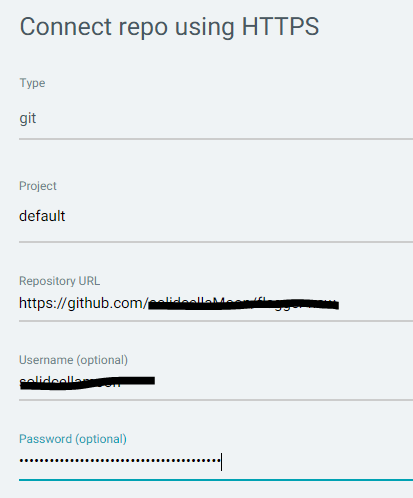
Git Repo 연결
- Settings → Repositories → Connect using HTTPS → 정보 입력
- Project :
namespace- Repository URL: Git Repo 주소 (.git 안붙어도 됐음)
- Username: Git 계정 아이디
- Password: Git access Token (비번이 아니라 토큰!!)
연동 확인


이 블로그의 모든 글은 수제로 짜여져 있습니다...