1. flagger stages
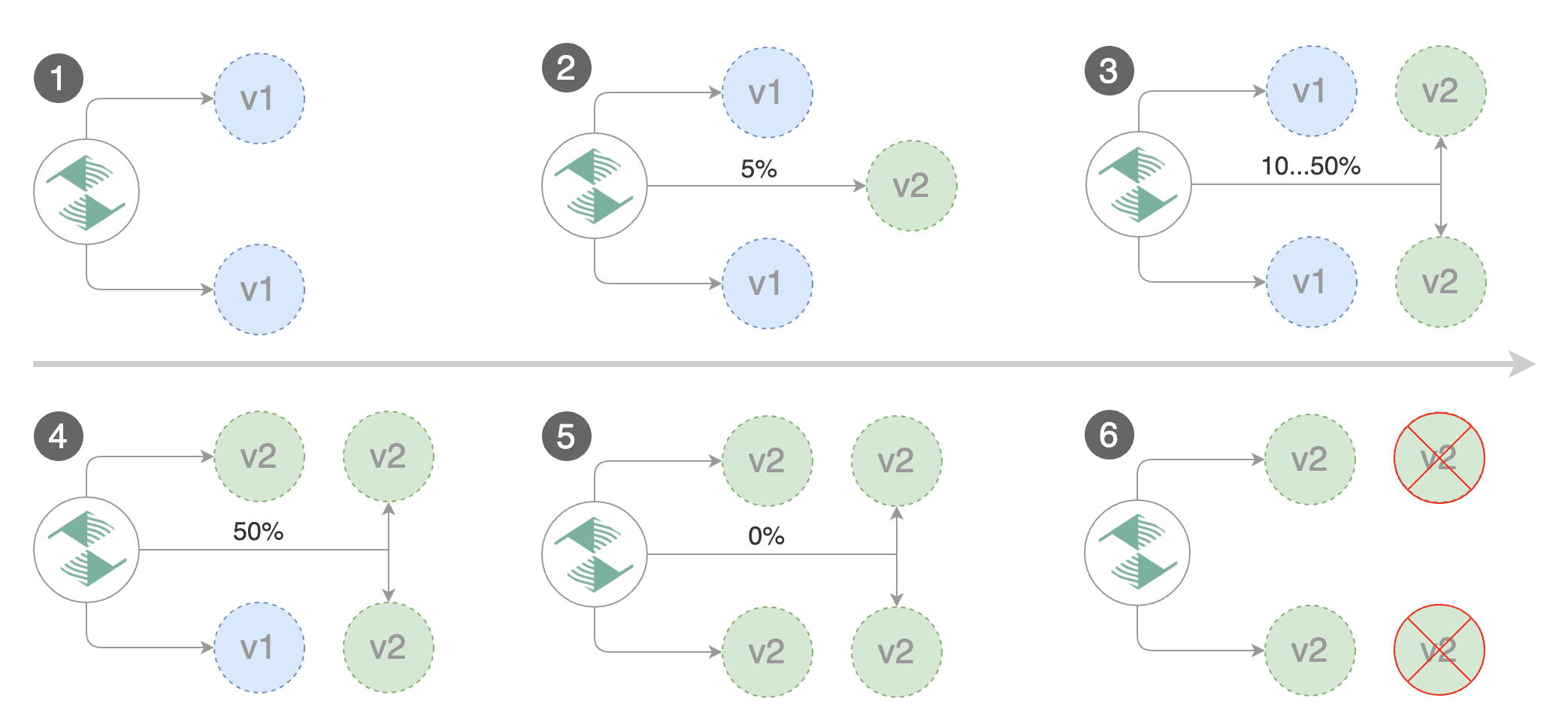
canary
primary: v1, canary: v2-test OK->primary: v2- 자동 생성되는 service와 virtualService를 통해 route.weight 설정
- manual-traffic-increase & rollback 가능
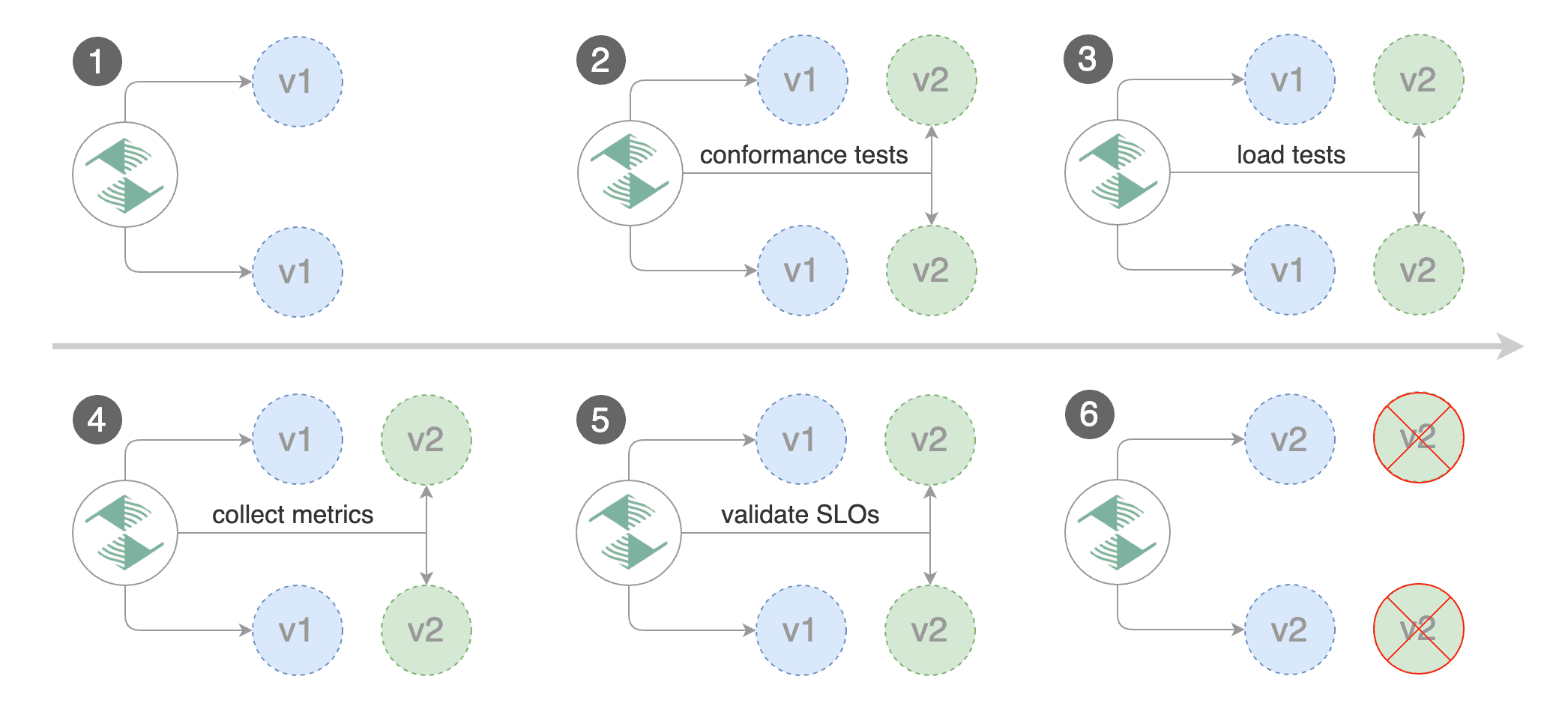
blue/green
- canary에 대한 load-test가 끝나면 primary를 v2로 업데이트
2. canary manifest
targetRef: 참조할 deployment/daemonset 정보service:targetRef의 리소스와 연동하는 service & virtualService 생성- flagger는 기존 service 정보를 사용하지 않음 (overwrite는 가능)
analysis: 테스트 설정- flagger에서 제공하는
loadtester사용으로webhook기반 manual 설정 가능 - loadtester helm 차트: https://github.com/fluxcd/flagger/tree/main/charts/loadtester
- flagger에서 제공하는
apiVersion: flagger.app/v1beta1
kind: Canary
metadata:
  name: test-api
spec:
  # deployment/daemonset를 참조
  targetRef:
    apiVersion: apps/v1
    kind: Deployment
    name: test-api

  # 참조한 리소스의 service를 생성 (deployment처럼 기존 리소스 정보를 참조하는게 아님)
  service:
    name: test-api-service # 해당 이름의 service & virtualService 생성
    port: 38080 # 포트는 하나만 지정 가능 (multi-port도 동일)
    delegation: true # istio VirtualService delegate
    portDiscovery: true # deployment spec.containers.ports 사용

  # testing 설정
  analysis:
    interval: 1m # 테스트 자동 수행 간격
    threshold: 5 # 최대 실패 횟수

    # 1. canary의 경우
    stepWeights: [10, 25, 50, 90]
      # canary(v2): 0 -> 25 -> 50 -> 90 -> promote
      # primary(v1): 100 -> 75 -> 50 -> 10 -> promote

    # 2. blue/green의 경우
    iterations: 10 # load-testing 횟수 = 10분간 수행 1m(interval) * 10(iterations)

    # webhook 설정으로 manual 및 호출 테스트 수행 가능
    webhooks:
      # traffic 생성 및 호출 테스트
      - name: "load test"
        type: rollout
        url: http://flagger-loadtester.flagger/
        timeout: 30s
        metadata:
          cmd: "hey -m POST -n 10 -z 10s -d '{test: ok}' http://test-api-service-canary.default:38080/echo"
          # cmd: "hey -m POST -n 10 -z 10s -d '{test: internal}' http://local.dev/test/int/echo"

      # manual rollback
      - name: "rollback"
        type: rollback
        url: http://flagger-loadtester.flagger-system/rollback/check

      - name: "close-rollback"
        type: post-rollout
        url: http://flagger-loadtester.flagger-system/rollback/close
3. service/virtualService
- flagger는 기존의 service/virtualService 정보를 사용하지 않음.
- canary.spec에서 service.name을 기존 이름과 동일하게 수정하여 overwrite는 가능.
변경되는 service 정보
- portName: 첫번째 포트는
http, 나머지는 정의한 이름 또는tcp-{DEPLOY_NAME}_{NUMBER}형식
	- name: http
    	port: 38080
        protocol: TCP
        targetPort: 38080
	- name: tcp-test-api-0
    	port: 38081
        protocol: TCP
targetPort: 38081- selector:
app={DEPLOY_NAME}-primary
selector:
app: test-api-primary- endpoint:
{DEPLOY_NAME}-primary를 향함
새로 생성되는 service 정보
{DEPLOY_NAME}-primary{DEPLOY_NAME}-canary
virtualService 정보
생성되는 vs 정보
- delegate: true
apiVersion: networking.istio.io/v1beta1
kind: VirtualService
metadata:
	name: test-api-service
    namespace: default
spec:
	hosts: []
    http:
    - route:
    	- destination:
        	host: test-api-service-primary
            port:
            	number: 38080
       	weight: 100
    	- destination:
        	host: test-api-service-canary
            port:
            	number: 38080
       	weight: 0
기존 vs - multiple port일 경우, 아래 형식으로 수정이 필요
apiVersion: networking.istio.io/v1beta1
kind: VirtualService
metadata:
  name: local-dev-test-api
spec:
  gateways:
    - local-dev
  hosts:
    - "local.dev"
  http:
    # use for canary test
    - name: internal
      match:
      - uri:
          prefix: /test/int/
      rewrite:
        uri: /
      delegate: # flagger에서 생성한 virtualService와 연동
        name: test-api-service
        namespace: default

    # others
    - name: external
      match:
      - uri:
          prefix: /test/ext/
      rewrite:
        uri: /
      route:
        - destination:
            port:
              number: 38081
            host: test-api-service
4. webhook 기반 테스트 구조
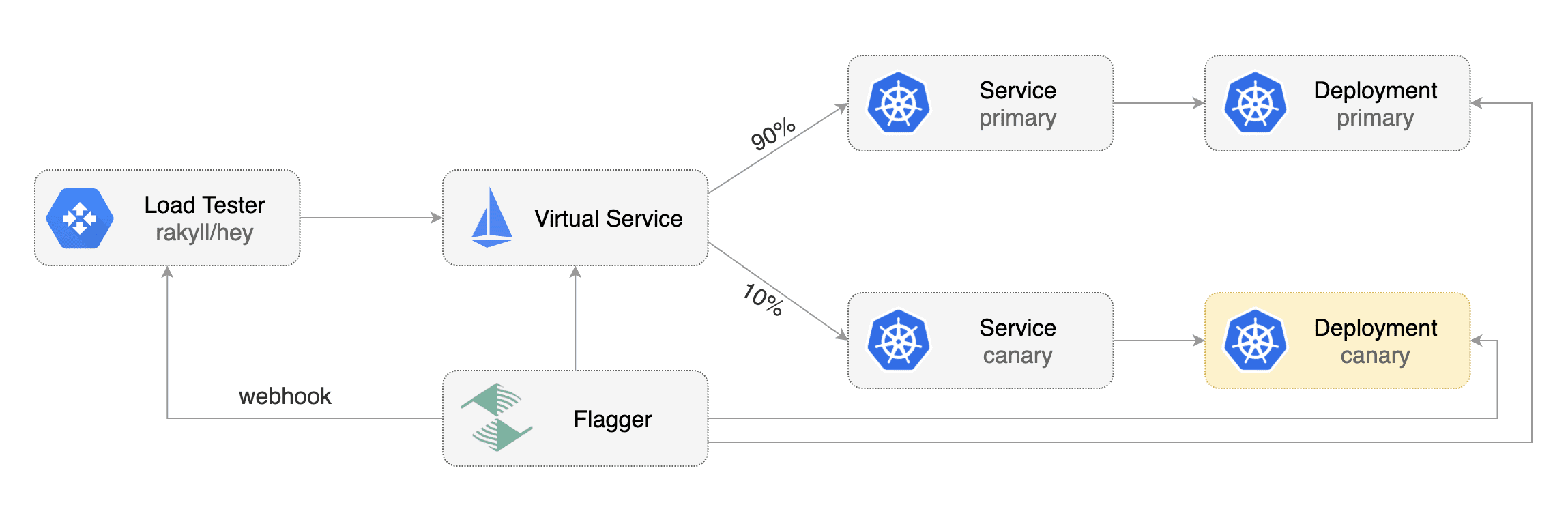
canary test 사이의 webhook 실행 주기
confirm-이 붙은 항목은 manual approve를 위함
confirm-rollout: canary test 실행에 대한 manual approvepre-rollout: rollout 이전에 수행rollout: 호출 테스트 수행confirm-traffic-increase: 트래픽 증가를 manual로 허용 (다른 confirm 타입과 같이 사용 불가능)confirm-promotion: promotion(새 버전 반영)에 대한 manual approvepost-rollout: rollout/rollback이 완료된 후 수행rollback: rollback webhook이 200 OK일 때 롤백 수행event: test 과정의 변동을 POST (Slack과 직접 연동은 불가능)
loadtester API
loadtester 설치 시 반영되는 gateway (virtualService 포함)
flagger-loadtester.flagger
API 리스트
1. manifest를 직접 수정하여 manual 관리하는 경우
/gate/halt403 error/gate/approve200 OK
2. POST API를 통하여 manual 관리하는 경우
/gate/checkopen일 경우 200, close일 경우 403 return/gate/open해당 canary 리소스에 대해 open (=approve)/gate/close해당 canary 리소스에 대해 close (=halt)/rollback/사용법은/gate/와 같음. rollback 관리를 위해 사용.
request body:
- 해당 정보는 loadtester pod의 in-memory로 관리됨
{"name": "CANARY_NAME", "namespace": "NAMESPACE"}사용 예시:
# 기본 상태는 close라서 403 return
❯ curl -d '{"name": "test-api", "namespace": "default"}' \
> http://flagger-loadtester.flagger/gate/check
Forbidden%

# 상태를 open으로 변경
❯ curl -d '{"name": "test-api", "namespace": "default"}' \
> http://flagger-loadtester.flagger/gate/open
202 Accepted

# open 상태일 경우 200 return
❯ curl -d '{"name": "test-api", "namespace": "default"}' \
> http://flagger-loadtester.flagger/gate/check
Approved%

# 상태를 close로 변경
❯ curl -d '{"name": "test-api", "namespace": "default"}' \
> http://flagger-loadtester.flagger/gate/close
202 Accepted

# 다시 check - 403 return
❯ curl -d '{"name": "test-api", "namespace": "default"}' \
> http://flagger-loadtester.flagger/gate/check
Forbidden%
공식 문서

이 블로그의 모든 글은 수제로 짜여져 있습니다...