참고
- https://tetratelabs.github.io/istio-0to60/ingress/
- istio 프로필 표: https://istio.io/latest/docs/setup/additional-setup/config-profiles/
istio를 설치하는 방법
- istioctl 바이너리를 통한 설치
1. 가장 간단한 설치 과정
- 환경: mac / linux / WSL
- homebrew: https://brew.sh/index_ko
#1. istioctl 검색 및 설치
❯ brew search istioctl
==> Formulae
istioctl
❯ brew install istioctl


#2. istioctl 버전 확인 (brew로 설치할 경우엔 latest 버전임)
❯ istioctl version
no running Istio pods in "istio-system"
1.13.4


#3.A istioctl의 default 설정으로 istio 설치
❯ istioctl install
This will install the Istio 1.13.4 default profile with ["Istio core" "Istiod" "Ingress gateways"] components into the cluster. Proceed? (y/N) y
✔ Istio core installed
✔ Istiod installed
✔ Ingress gateways installed
✔ Installation complete
Making this installation the default for injection and validation.

Thank you for installing Istio 1.13.
Please take a few minutes to tell us about your install/upgrade experience!
https://forms.gle/pzWZpAvMVBecaQ9h9

#3.B demo 설정으로 istio 설치
❯ istioctl install --set profile=demo -y
✔ Istio core installed
✔ Istiod installed
✔ Egress gateways installed
✔ Ingress gateways installed
✔ Installation complete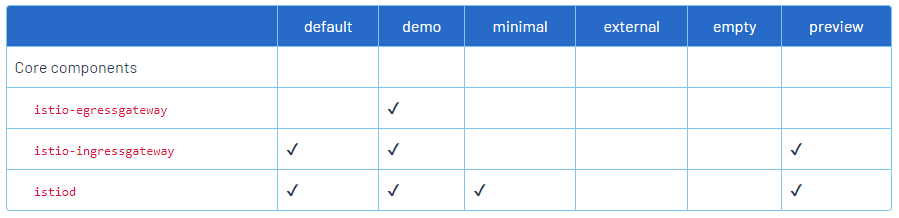
#4. 설치 확인
❯ k get ns
NAME              STATUS   AGE
default           Active   96d
istio-system      Active   2m43s # 👍
kube-node-lease   Active   96d
kube-public       Active   96d
kube-system       Active   96d

# 설치 정상일 경우 모두 체크 표시로 나옴
❯ istioctl verify-install
✔ Istio is installed and verified successfully

# 설치 후 버전 확인
❯ istioctl version
client version: 1.13.4
control plane version: 1.13.4
data plane version: 1.13.4 (4 proxies)
2. 특정 버전의 istioctl 설치
- release: https://github.com/istio/istio/releases
- 여기서 환경/버전에 맞는 istioctl 파일을 받아와 설치
❯ wget https://github.com/istio/istio/releases/download/1.8.2/istioctl-1.8.2-linux-amd64.tar.gz

❯ sudo tar xfz istioctl-1.8.2-linux-amd64.tar.gz -C /usr/local/bin istioctl

❯ which istioctl
/usr/local/bin/istioctl
3. samples + addons 포함 설치
❯ curl -L https://istio.io/downloadIstio | ISTIO_VERSION=1.13.2 sh -

❯ ls -al istio-1.13.2
total 24
drwxrwxrwx 1 user user   512 Mar  9 06:41 bin
-rwxrwxrwx 1 user user   880 Mar  9 06:41 manifest.yaml
drwxrwxrwx 1 user user   512 Mar  9 06:41 manifests
drwxrwxrwx 1 user user   512 Mar  9 06:41 samples
drwxrwxrwx 1 user user   512 Mar  9 06:41 tools

❯ ls istio-1.13.2/bin
istioctl
sidecar auto-injection
- istio 사이드카 컨테이너를 자동 생성하기 위함
❯ k label namespace default istio-injection=enabled
namespace/default labeled

# default 네임스페이스에 생성한 pod에는 istio 사이드카가 포함됩니다.
❯ k get ns -L istio-injection
NAME                   STATUS   AGE    ISTIO-INJECTION
default                Active   115d   enabled
istio-system           Active   40d
kube-node-lease        Active   115d
kube-public            Active   115d
kube-system            Active   115d
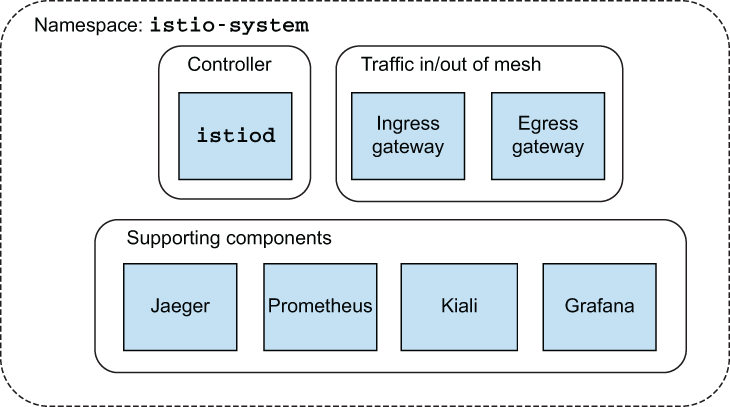
istio 구조
사용 예시
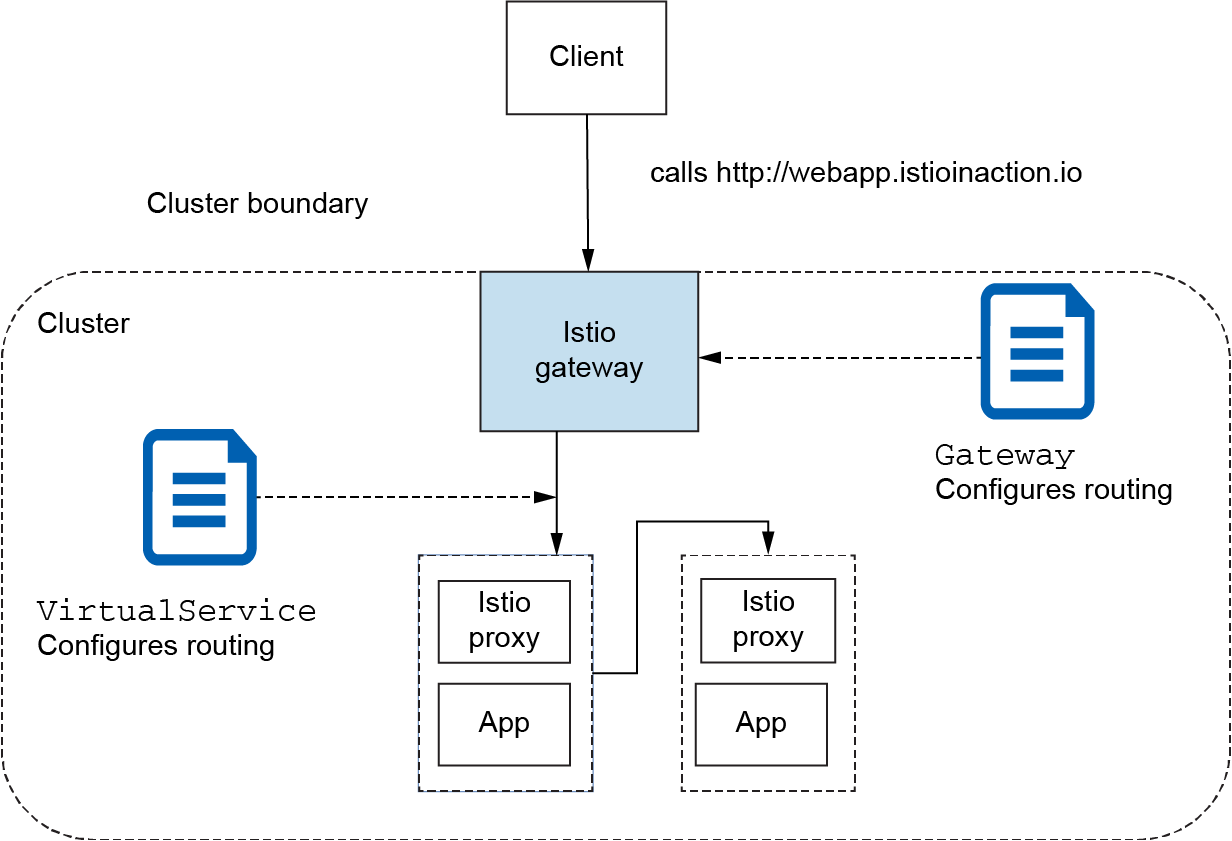
아래 내용을 일괄로 배포한다.
apiVersion: networking.istio.io/v1alpha3
kind: Gateway
metadata:
  name: www-sample-com
spec:
  selector:
    istio: ingressgateway
  servers:
    - port:
        number: 80
        name: http
        protocol: HTTP
      hosts:
        - "www.sample.com"
---
apiVersion: networking.istio.io/v1beta1
kind: VirtualService
metadata:
  name: www-sample-com-vs
spec:
  gateways:
    - www-sample-com
  hosts:
    - "www.sample.com"
  http:
    - match:
      - uri:
          prefix: /
      rewrite:
        uri: /
      route:
        - destination:
            host: sample-web-service
---
apiVersion: v1
kind: Service
metadata:
  name: sample-web-service
spec:
  selector:
    app: sample-web-pod
  ports:
  - name: http
    port: 9898
    protocol: TCP
    targetPort: 9898
---
apiVersion: apps/v1
kind: Deployment
metadata:
  labels:
    app: sample-web-pod
  name: sample-web-pod
spec:
  replicas: 1
  selector:
      matchLabels:
        app: sample-web-pod
  template:
    metadata:
      labels:
        app: sample-web-pod
    spec:
      containers:
        - image: ghcr.io/stefanprodan/podinfo:6.1.4
          name: sample-web-pod
          ports:
            - containerPort: 9898
              protocol: TCP
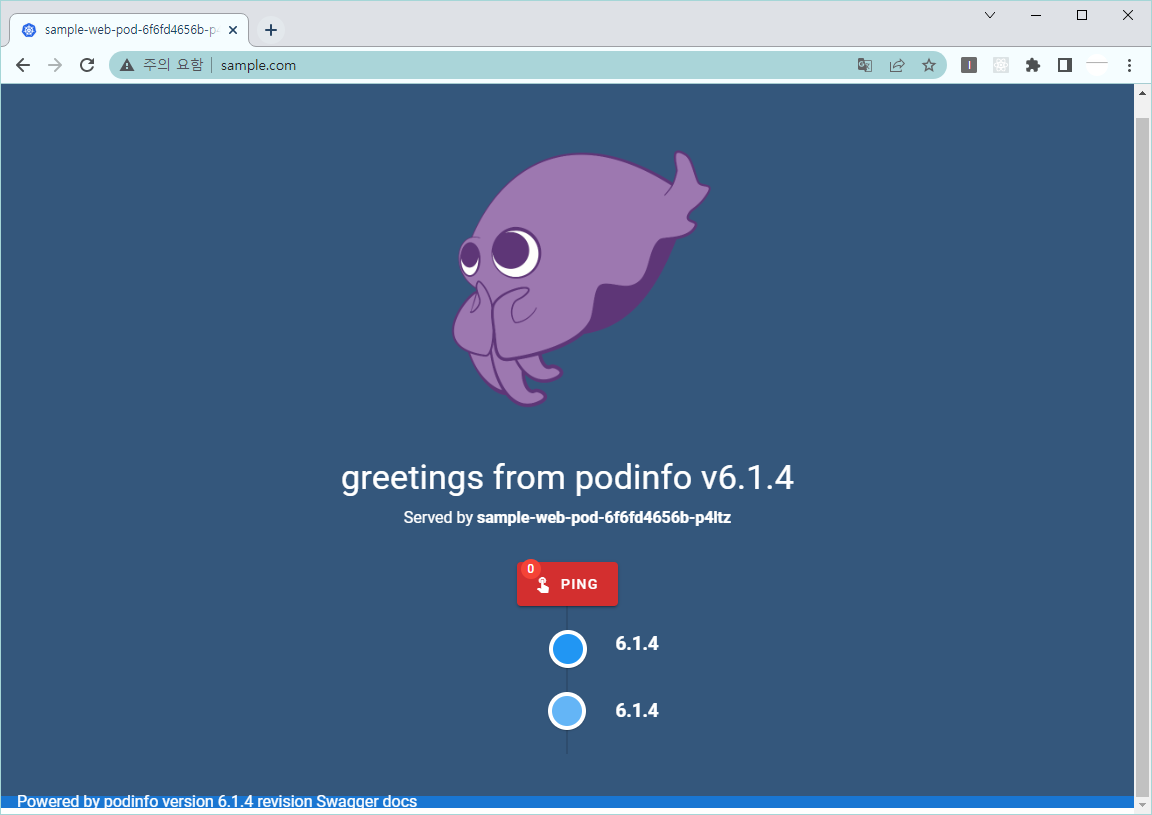
그리고 내 PC에서 저 도메인이 127.0.0.1을 쓰도록 설정하고 브라우저로 바로 호출하면 결과가 보인다.

이 블로그의 모든 글은 수제로 짜여져 있습니다...