아래 오픈소스를 초안으로 삼아 API 호출하여 주기적으로 모니터링하는 배치를 개발한다.
수정없이 그대로 실행한 결과
config.yml
urls:
  # test server 1
  - url: http://localhost:5051
    status_code: 200
    slack_token: "TOKEN/TOKEN/TOKEN" # for eg; TOKEN/TOKEN/TOKEN
    scheduler: "@every 9s"

  # test server 2
  - url: http://localhost:5052
    # status_code: 200
    slack_token: "TOKEN/TOKEN/TOKEN" # for eg; TOKEN/TOKEN/TOKEN
    scheduler: "@every 1s"

  # test server 3 (nginx)
  - url: http://localhost:8080/no
    status_code: 200
    slack_token: "TOKEN/TOKEN/TOKEN" # for eg; TOKEN/TOKEN/TOKEN
    scheduler: "@every 5s"
실행 결과
❯ go run main.go
19:49:46 :: DEBUG  HTTP start :: listening port: 38080
19:49:47 :: DEBUG  [200] -- http://localhost:5052
19:49:48 :: DEBUG  [200] -- http://localhost:5052
19:49:49 :: DEBUG  [200] -- http://localhost:5052
19:49:50 :: DEBUG  [200] -- http://localhost:5052
19:49:51 :: ERROR  [404] -- http://localhost:8080/no
19:49:51 :: NOTICE  Sending Message to Slack: {"text":"💔 404 Status in http://localhost:8080/no"}
19:49:51 :: DEBUG  [200] -- http://localhost:5052
19:49:52 :: DEBUG  [200] -- http://localhost:5052
19:49:53 :: DEBUG  [200] -- http://localhost:5052
19:49:54 :: DEBUG  [200] -- http://localhost:5052
19:49:55 :: DEBUG  [200] -- http://localhost:5052
19:49:55 :: ERROR  The server http://localhost:5051 is down
19:49:55 :: NOTICE  Sending Message to Slack: {"text":"💥 The server http://localhost:5051 is down"}
19:49:56 :: ERROR  [404] -- http://localhost:8080/no
19:49:56 :: NOTICE  Sending Message to Slack: {"text":"💔 404 Status in http://localhost:8080/no"}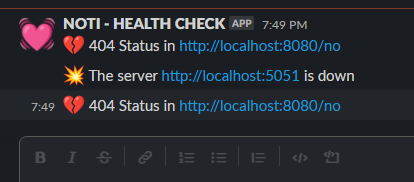
슬랙에도 잘 온다.
앞으로 해야할 일
- 이미지 용량 최적화
- config 별도 분리

이 블로그의 모든 글은 수제로 짜여져 있습니다...