Firebase authentication, firestore 세팅
해당 강의를 학습하면서 정리한 글입니다. (강력추천)
https://www.udemy.com/course/flutter-provider-essential-korean/
firebase 콘솔
- 기본적인 설정을 하고 인증 플러그인을 추가로 설치해줘야함.
- main을 async로 바꾸고 초기화 코드 사용
ensureInitialized를 사용하는 이유는 파이어베이스가 네이티브 코드를 사용하기 때문!
void main() async {
  WidgetsFlutterBinding.ensureInitialized();
  await Firebase.initializeApp();
  runApp(const MyApp());
}- ios, android 둘다 실행 되는지 먼저 확인 (ios 설치 에러가 나는 경우가 훨씬 많아서)
- 파이어베이스 콘솔에서 설치

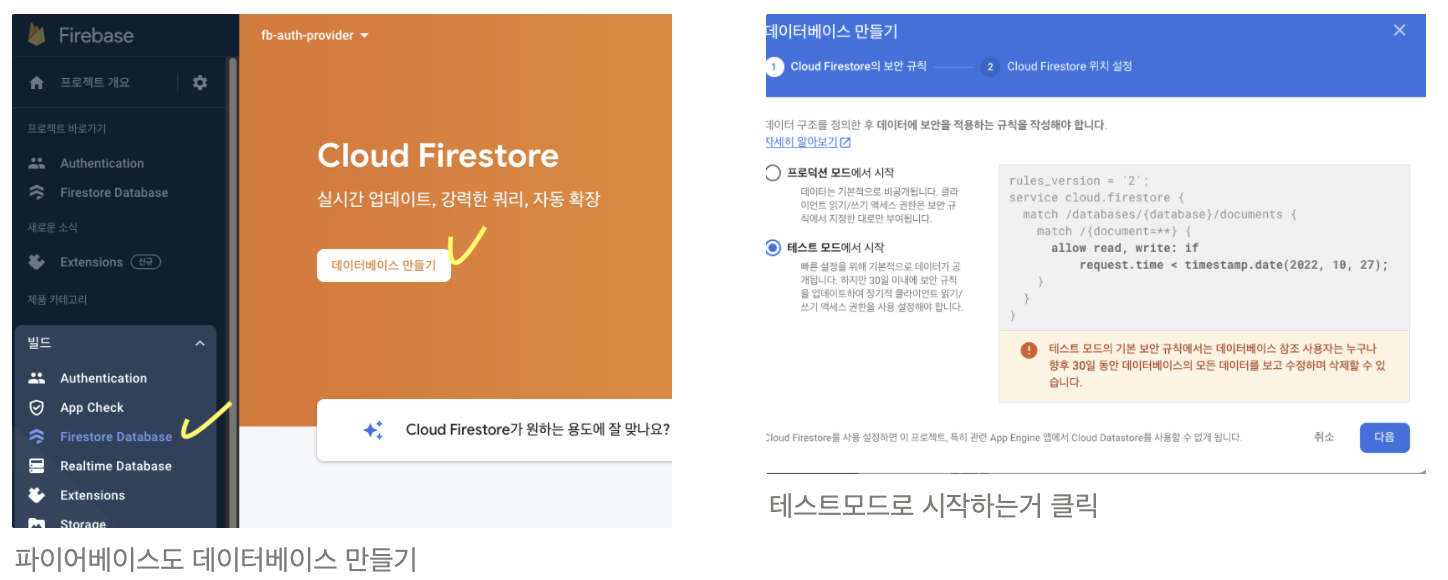
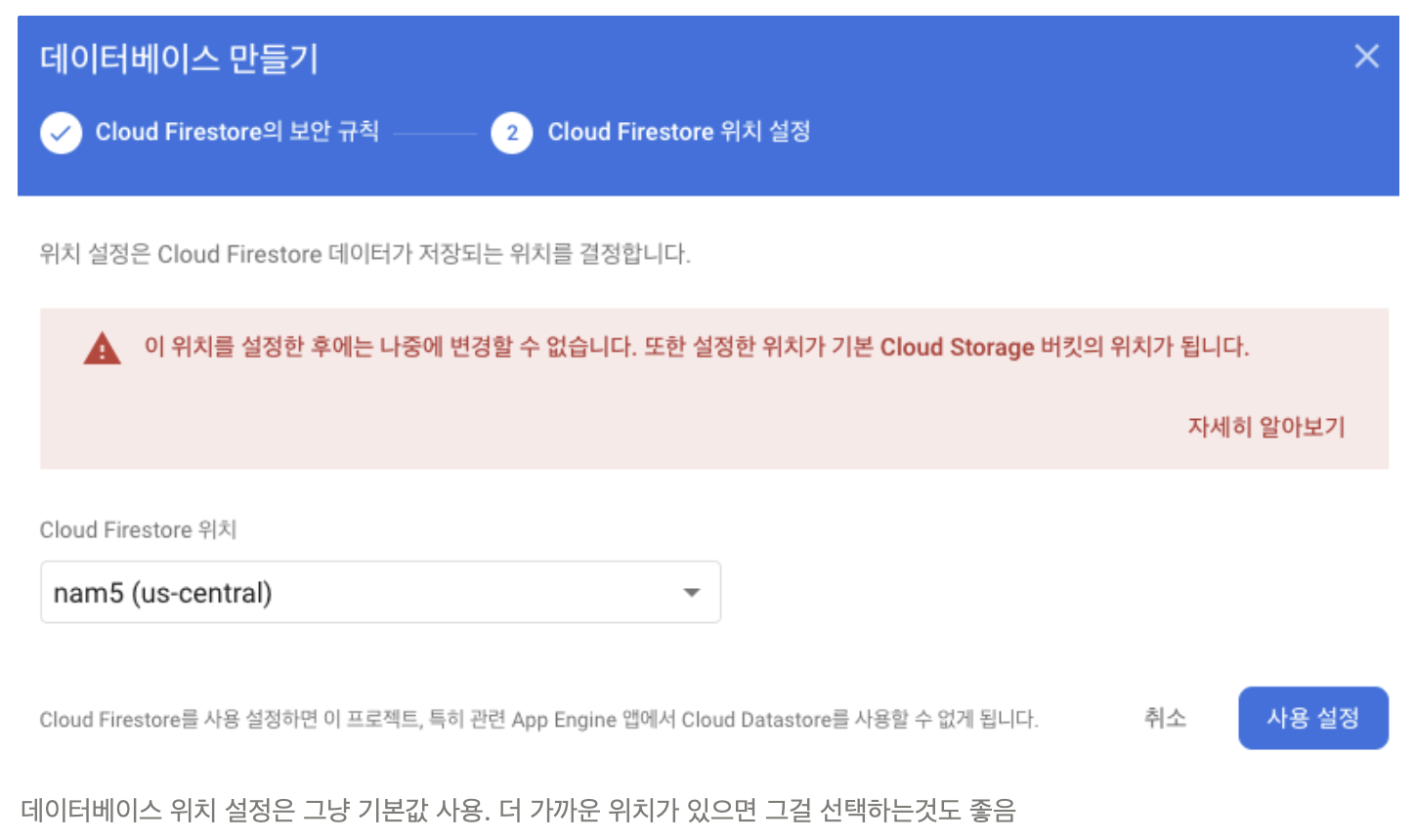
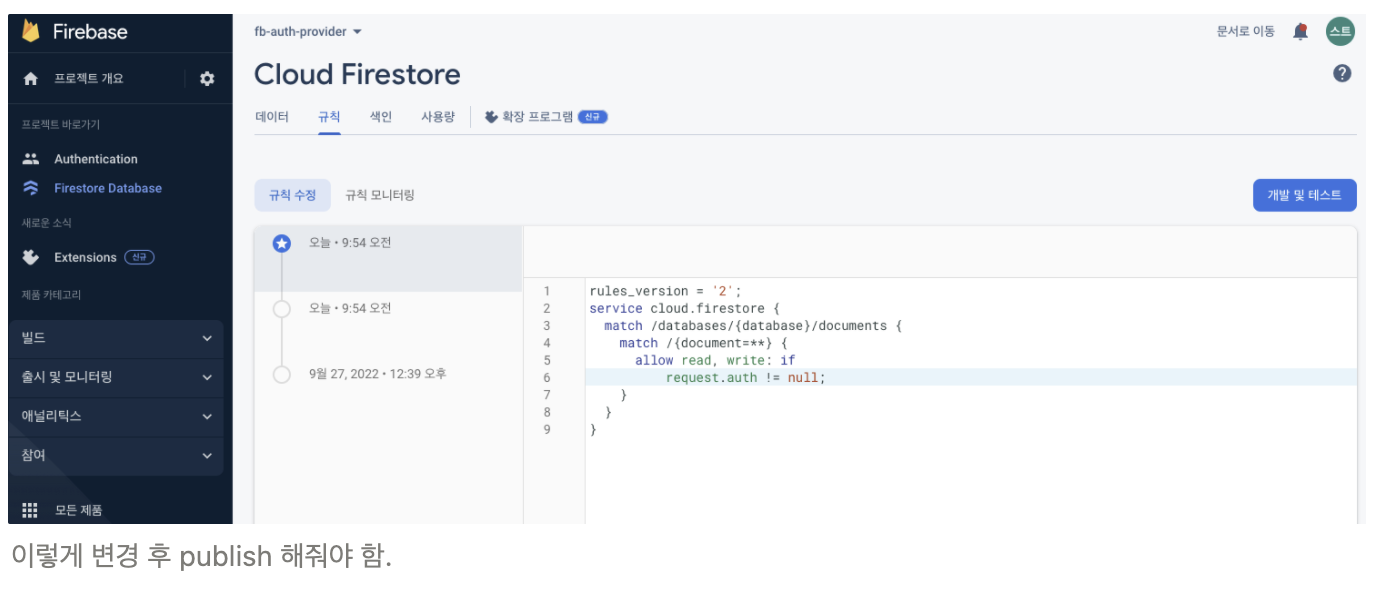
- 이후에 코딩 후 collection 생성되면 firestore 규칙 바꿔줘야함!
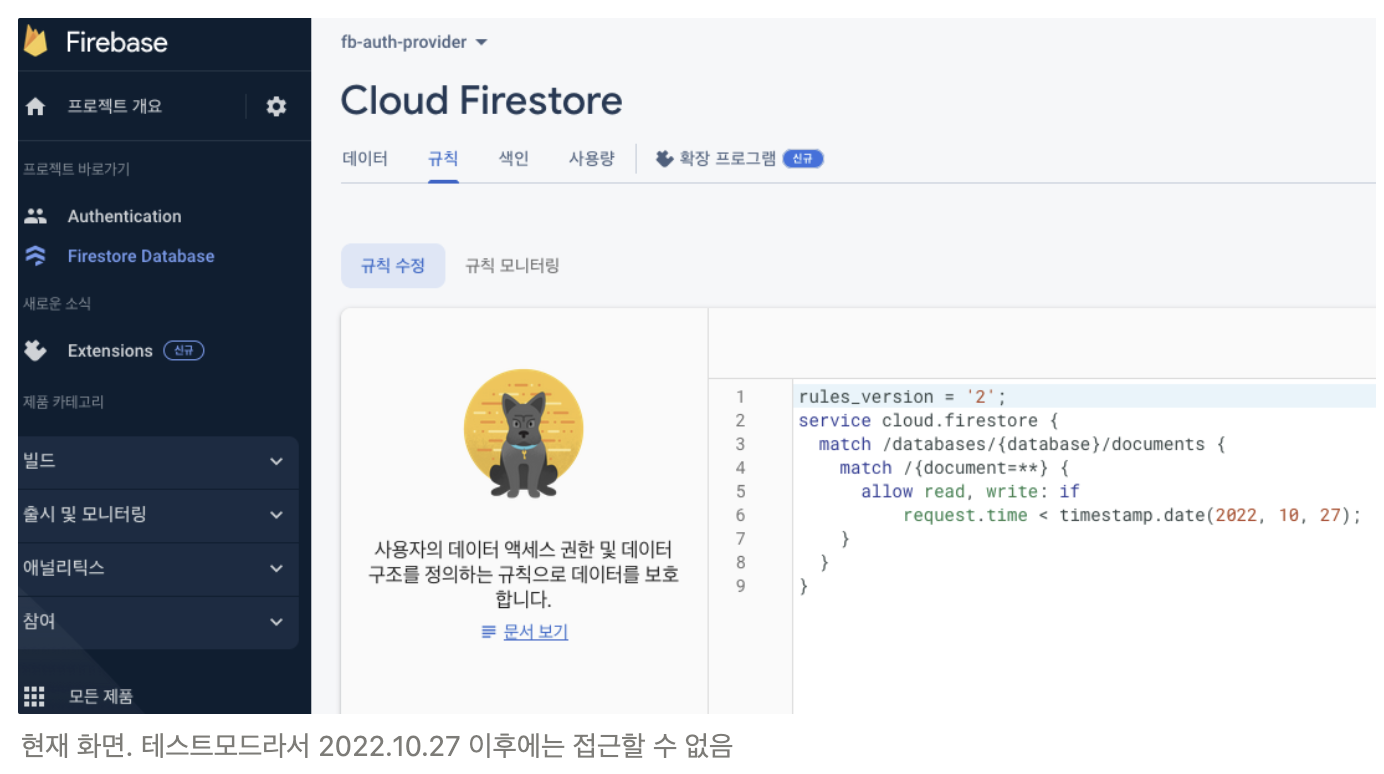
- authentication된 유저만 firestore에 접근할 수 있도록 룰 바꿈!
- 앞으로 할 패키지 구조는 다음과 같음.
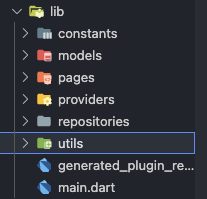
모델
모델 파일 작성 (user)
- freezed로 넣어줄 모델 파일 작성.
- freezed로 작성하면 equtable, tostring을 안해도 됨. json 다룰때만 fromJson 넣어주면 됨.
(여기서는 사실 fromJson 필요 없는데 다른 db 연동 가능성 때문에 추가함.)
- freezed로 작성하면 equtable, tostring을 안해도 됨. json 다룰때만 fromJson 넣어주면 됨.
- firestore에서 user document를 읽고 object로 변환해주는 factory 코드도 추가 (
User.fromDoc)- userDoc의 데이터함수를 호출하면 nullable object 타입의 데이터를 리턴해서, nullable 타입의 Map<String, dynamic>으로 캐스팅을 함.
- ←이게 User를 리턴하도록 작성.
- 아직 데이터가 오지 않았을 때 코드에서 user가 필요할 수 있으니까 초기화 factory도 작성(
User.initialUser) - 기타 코드 설명
- profileImage - dynamic하게 이미지를 생성하는 링크를 저장할 예정
- level - 유저 등급인데 수정하는 기능은 없음.
import 'package:cloud_firestore/cloud_firestore.dart';
import 'package:freezed_annotation/freezed_annotation.dart';
part 'user.freezed.dart';
part 'user.g.dart';
class User with _$User {
factory User({
required String id,
required String name,
required String email,
required String profileImage,
required int level,
}) = _User;
factory User.fromJson(Map<String, dynamic> json) => _$UserFromJson(json);
factory User.fromDoc(DocumentSnapshot userDoc) {
final userData = userDoc.data() as Map<String, dynamic>?;
return User(
id: userDoc.id,
name: userData!['name'],
email: userData['email'],
profileImage: userData['profileImage'],
level: int.parse(userData['level']),
);
}
factory User.initialUser() {
return User(
id: '',
name: '',
email: '',
profileImage: '',
level: -1,
);
}
}모델 파일 작성 (goods, post)
- user와 거의 비슷. 이미지 경로 리스트를 저장하는 것이 다름.
- 전체 코드
import 'package:cloud_firestore/cloud_firestore.dart'; import 'package:freezed_annotation/freezed_annotation.dart'; part 'goods.freezed.dart'; part 'goods.g.dart'; class Goods with _$Goods { factory Goods({ required String goods_id, required String goods_name, required List<String> imagePath, required String time, //새상품일 경우 구매 날짜, 중고 상품일 경우 등록 날짜 required String goods_status, //새상품, 중고 상품 required String user_id, }) = _Goods; factory Goods.fromJson(Map<String, dynamic> json) => _$GoodsFromJson(json); factory Goods.fromDoc(DocumentSnapshot goodsDoc) { final goodsData = goodsDoc.data() as Map<String, dynamic>?; List<dynamic> imagepathDynamic = goodsData!['imagePath']; List<String> imagepathString = imagepathDynamic.map((e) => e.toString()).toList(); return Goods( goods_id: goodsDoc.id, goods_name: goodsData['goods_name'], imagePath: imagepathString, time: goodsData['time'], goods_status: goodsData['goods_status'], user_id: goodsData['user_id'], ); } factory Goods.initialGoods() { return Goods( goods_id: "", goods_name: "", imagePath: [""], time: "", goods_status: "", user_id: "", ); } }import 'package:cloud_firestore/cloud_firestore.dart'; import 'package:freezed_annotation/freezed_annotation.dart'; part 'post.freezed.dart'; part 'post.g.dart'; class Post with _$Post { factory Post({ required String post_id, required String goods_id, //선택한 nft 굿즈 아이디 required String title, required String thumbnailImagePath, required List<String> imagePath, required String category, required String price, required String desc, required String time, //글 등록 날짜 required String post_status, //판매중, 판매완료 required String user_id, }) = _Post; factory Post.fromJson(Map<String, dynamic> json) => _$PostFromJson(json); factory Post.fromDoc(DocumentSnapshot postDoc) { final postData = postDoc.data() as Map<String, dynamic>?; List<dynamic> imagepathDynamic = postData!['imagePath']; List<String> imagepathString = imagepathDynamic.map((e) => e.toString()).toList(); return Post( post_id: postDoc.id, goods_id: postData['goods_id'], title: postData['title'], thumbnailImagePath: postData['thumbnailImagePath'], imagePath: imagepathString, category: postData['category'], price: postData['price'], desc: postData['desc'], time: postData['time'], post_status: postData['post_status'], user_id: postData['user_id'], ); } factory Post.initialPost() { return Post( post_id: "", goods_id: "", title: "", thumbnailImagePath: "", imagePath: [""], category: "", price: "", desc: "", time: "", post_status: "", user_id: "", ); } }
모델 파일 작성(custom error)
- code, message, plugin 모두 firebase exception과 관련이 있음.
- 다 하고 순서대로 1)Generate constructor 2)equatable 3)toString 적용!
- default 값은 전부 empty string.
// ignore_for_file: public_member_api_docs, sort_constructors_first
import 'package:equatable/equatable.dart';
class CustomError extends Equatable {
final String code;
final String message;
final String plugin;
CustomError({
this.code = '',
this.message = '',
this.plugin = '',
});
List<Object> get props => [code, message, plugin];
bool get stringify => true;
}상수 작성
- firestore에 만들 collection의 path가 앱에서 여러 곳에서 사용될 수 있어서 constant로 작성.
(코드 길이가 대폭 줄어듬!)- firestore, storage 모두 constant로 생성하면, 코딩하면서 데이터 추가하다가 마음에 안들어서 전체 collection을 firebase 콘솔에서 삭제해도 다시 자동 생성됨.
import 'package:cloud_firestore/cloud_firestore.dart';
import 'package:firebase_storage/firebase_storage.dart';

final usersRef = FirebaseFirestore.instance.collection('users');
final goodsRef = FirebaseFirestore.instance.collection('goods');
final postsRef = FirebaseFirestore.instance.collection('posts');

final storageRef = FirebaseStorage.instance.ref();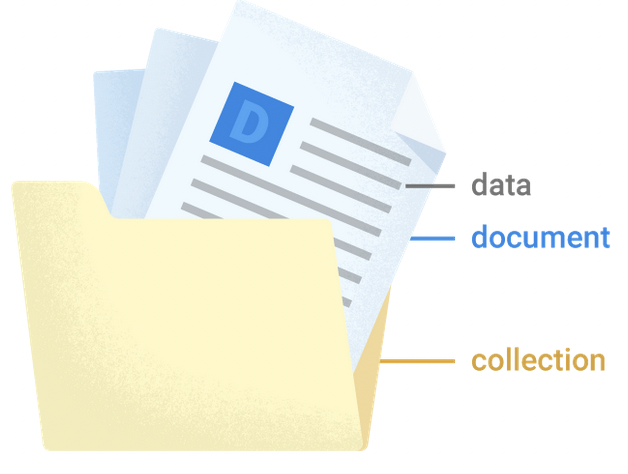
AuthRepository
-
fbAuth로 firebase_auth를 importimport 'package:firebase_auth/firebase_auth.dart' as fbAuth;- firebase에서 제공하는 user 모델과 내가 작성한 user 모델을 동시에 사용할때 충돌 발생 예방하기 위해서.
-
firebaseFirestore, firebaseAuth 변수 만들고 생성자 생성
- firebaseFirestore는 유저의 추가적인 정보를 저장하기 위해 사용됨. (아까 model에서 썼던것들)
-
firebaseAuth.userChanges: firebase의 유저 상태에 대한 정보를 stream 데이터로 알려주는 함수를 사용- firebase가 유저 상태를 변할때마다 알려줘서 listen해서 적절하게 다루면 됨.
- ex) logout 되면 유저는 null이 됨.
- firebase가 유저 상태를 변할때마다 알려줘서 listen해서 적절하게 다루면 됨.
-
signup 함수
-
name, email, password를 받음.
- firebase 인증은 name 없어도 되는데 firestore에 users collection을 만들어서 firebase 인증에서는 저장할 수 없는 별도의 정보를 저장하기 위해서 사용
-
try-catch 문을 만들어서 작업 수행.
-
firebaseAuth에러와 일반 에러를 분리해서 별도로 처리.
-
firebaseAuth에서 에러가 발생할 경우 FirebaseAuthException 오브젝트를 받음. 이 오브젝트에서는 code, message, plugin 세개의 프로퍼티가 있음. 이걸로 CustomError 만들어서 throw 할 예정.
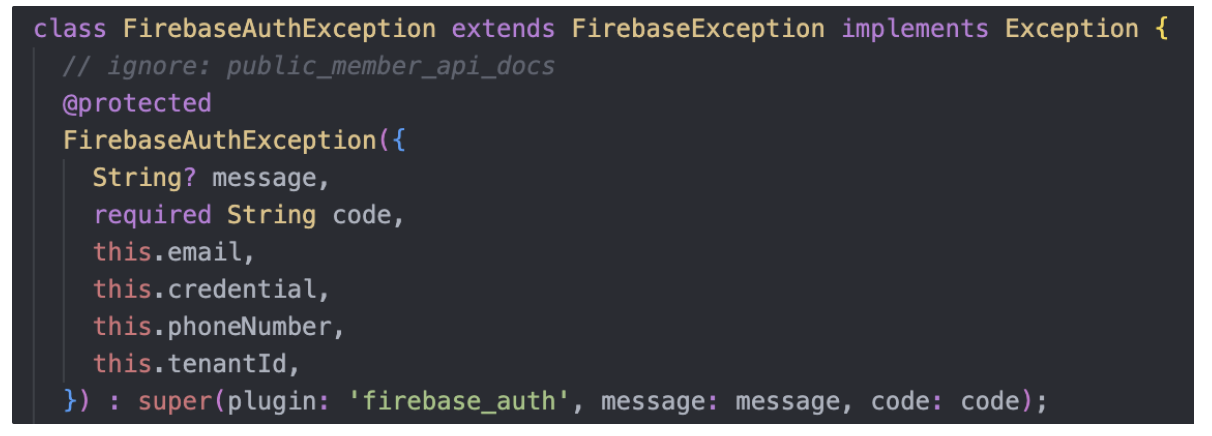
- 이때 message는 nullable이라서
!붙여서 사용 - 에러를 throw 한다 = 에러 처리를 호출한 쪽에 맡긴다
- 이때 message는 nullable이라서
-
일반 에러도 CustomError를 throw 함.
- 플러그인은 임의로 처리함.
- try-catch, try-on-catch 이해 안가서 추가로 정리함
try { // ... } on SomeException catch(e) { //Handle exception of type SomeException } catch(e) { //Handle all other exceptions }- 특정 타입의 에러를 핸들링하고 싶을때는 on 사용해서, 그냥 모든 에러는 catch.
- 자바에서
try {} catch(Exception e) {}== 다트에서try {} on Exception catch(e) {}
-
-
createUserWithEmailAndPassword호출.- 성공하면
UserCredential를 리턴하는데, 이걸 변수에 저장함. 또 성공하면 자동으로 로그인이 되고, 유저의 상태가 변함.
- 성공하면
-
UserCredential의 user 프로퍼티를signedInUser에 저장함. signup이 성공했기 때문에 user는 null이 아니라서!를 붙여서 저장. -
signedInUser.uid를 id로 하는 document를 users collections에 만듬.users.Ref는 constants 폴더에 만든 users collection에 대한 레퍼런스.profileImage는 랜덤하게 이미지 뽑아서 생성
⇒ signup 할때마다 users collections에 새로운 document를 생성
-
-
signin 함수
- form에서 입력받은 email, password를 매개변수로 받는 Future 타입의 async 함수.
- firebase auth의
signInWithEmailAndPassword를 호출. 이때도 성공하면 유저의 상태가 변함.
-
signout 함수
firebaseAuth.signOut();호출만 함. 이때도 성공하면 유저의 상태가 변함.
- 전체 코드
import 'package:cloud_firestore/cloud_firestore.dart';
import 'package:firebase_auth/firebase_auth.dart' as fbAuth;

import '../../constants/db_constants.dart';
import '../../models/custom_error.dart';

class AuthRepository {
  final FirebaseFirestore firebaseFirestore;
  final fbAuth.FirebaseAuth firebaseAuth;

  AuthRepository({
    required this.firebaseFirestore,
    required this.firebaseAuth,
  });

  Stream<fbAuth.User?> get user => firebaseAuth.userChanges();

  Future<void> signup({
    required String name,
    required String email,
    required String password,
  }) async {
    try {
      final fbAuth.UserCredential userCredential =
          await firebaseAuth.createUserWithEmailAndPassword(
        email: email,
        password: password,
      );
      final signedInUser = userCredential.user!;
      await usersRef.doc(signedInUser.uid).set({
        //user 클래스와 동일
        'name': name,
        'email': email,
        'profileImage': 'https://picsum.photos/300',
        'level': '1',
      });
    } on fbAuth.FirebaseAuthException catch (e) {
      throw CustomError(
        code: e.code,
        message: e.message!,
        plugin: e.plugin,
      );
    } catch (e) {
      throw CustomError(
        code: 'Exception',
        message: e.toString(),
        plugin: 'flutter_error/server_error',
      );
    }
  }

  Future<void> signin({
    required String email,
    required String password,
  }) async {
    try {
      await firebaseAuth.signInWithEmailAndPassword(
        email: email,
        password: password,
      );
    } on fbAuth.FirebaseAuthException catch (e) {
      throw CustomError(
        code: e.code,
        message: e.message!,
        plugin: e.plugin,
      );
    } catch (e) {
      throw CustomError(
        code: 'Exception',
        message: e.toString(),
        plugin: 'flutter_error/server_error',
      );
    }
  }

  Future<void> signout() async {
    await firebaseAuth.signOut();
  }
}