CSV 불러오기
CSV 파일을 불러올 때는 파일의 경로를 지정하여 데이터를 로드해야 합니다. 이때 사용하는 경로 표현 방식은 다음과 같습니다:
- . : 현재 파일이 위치한 디렉토리(현재 작업 디렉토리)를 나타냅니다.
- / : 디렉토리 내에서 하위 폴더로 이동하거나 특정 파일로 접근할 때 사용됩니다.
예시 코드는 다음과 같습니다.
csv_file_path = "./data/titanic_train.csv"
df_csv = pd.read_csv(csv_file_path)
info()
info()는 현재 데이터프레임의 정보를 확인할 수 있는 메서드입니다.
df_csv.info()위 코드의 실행 결과는 다음과 같습니다.
<class 'pandas.core.frame.DataFrame'>
RangeIndex: 891 entries, 0 to 890
Data columns (total 12 columns):
 #   Column       Non-Null Count  Dtype
---  ------       --------------  -----
 0   PassengerId  891 non-null    int64
 1   Survived     891 non-null    int64
 2   Pclass       891 non-null    int64
 3   Name         891 non-null    object
 4   Sex          891 non-null    object
 5   Age          714 non-null    float64
 6   SibSp        891 non-null    int64
 7   Parch        891 non-null    int64
 8   Ticket       891 non-null    object
 9   Fare         891 non-null    float64
 10  Cabin        204 non-null    object
 11  Embarked     889 non-null    object
dtypes: float64(2), int64(5), object(5)
memory usage: 83.7+ KB
head(), tail()
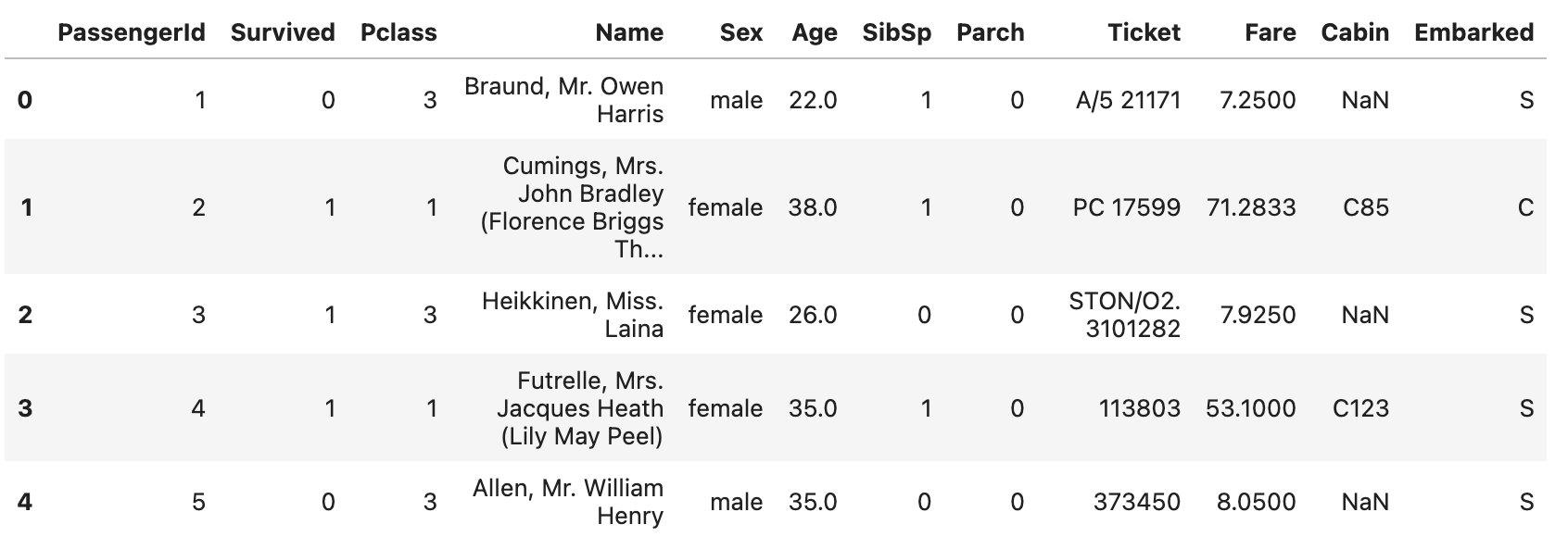
head() 와 tail() 는 데이터프레임의 정보를 일부만 확인할 수 있는 메서드입니다. head() 는 상위 일부를 tail()는 하위 일부를 확인할 수 있습니다. 두 함수 인수로는 보고싶은 데이터의 수를 받습니다.
df_csv.head()위 코드의 결과는 다음과 같습니다.
저장하기
처리된 데이터를 CSV 파일로 저장할 때는 to_csv() 메서드를 사용합니다.
코드 예시는 다음과 같습니다.
df_processed.to_csv("./data/kospi_processed_20240113.csv", encoding = 'utf-8')
꼬박꼬박