-
프로젝트에 imgui 관련 파일들을 넣는다.
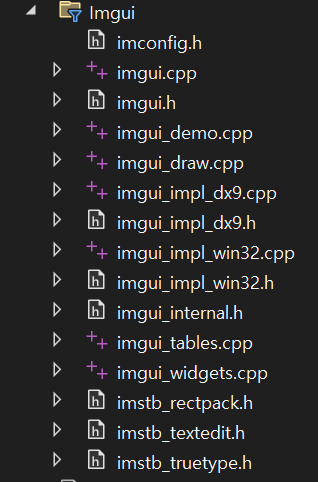
-
레벨의 이니셜라이저같은 게임 루프 시작 전 부분에 해당 코드를 넣는다.
// ImGui 초기화
IMGUI_CHECKVERSION();
ImGui::CreateContext();
ImGuiIO& io = ImGui::GetIO(); (void)io;
io.ConfigFlags |= ImGuiConfigFlags_NavEnableKeyboard;
io.ConfigFlags |= ImGuiConfigFlags_NavEnableGamepad;

// ImGui 스타일 고르기
ImGui::StyleColorsDark(); // 다크 모드
//ImGui::StyleColorsLight(); // 일반 모드

ImGui_ImplWin32_Init(g_hWnd);
ImGui_ImplDX9_Init(m_pGraphic_Device);- 게임 루프(update)에 해당 코드를 넣는다.
ImGui_ImplDX9_NewFrame();
ImGui_ImplWin32_NewFrame();
ImGui::NewFrame();

ImGui::Begin("Hello_World");

//여기에 gui 내용을 넣으면 된다.

ImGui::End();

//창을 여러 개 띄우고 싶으면 다시 begin을 하면 된다.
- 랜더링 직전(render)에 해당 코드를 넣는다.
ImGui::Render();
ImGui_ImplDX9_RenderDrawData(ImGui::GetDrawData());- 종료시(relese) 해당 코드를 넣어서 누수를 방지한다
ImGui_ImplDX9_Shutdown();
ImGui_ImplWin32_Shutdown();
ImGui::DestroyContext();- 여기서부터는 dx프레임워크에 맞춘코드
WndProc 함수 앞뒤로 코드를 넣는다.
extern IMGUI_IMPL_API LRESULT ImGui_ImplWin32_WndProcHandler(HWND hWnd, UINT msg, WPARAM wParam, LPARAM lParam);
LRESULT CALLBACK WndProc(HWND hWnd, UINT message, WPARAM wParam, LPARAM lParam)
{
    if (ImGui_ImplWin32_WndProcHandler(hWnd, message, wParam, lParam))
        return true;