20250813 - 학습일지 - js/css/html
javascript 개요
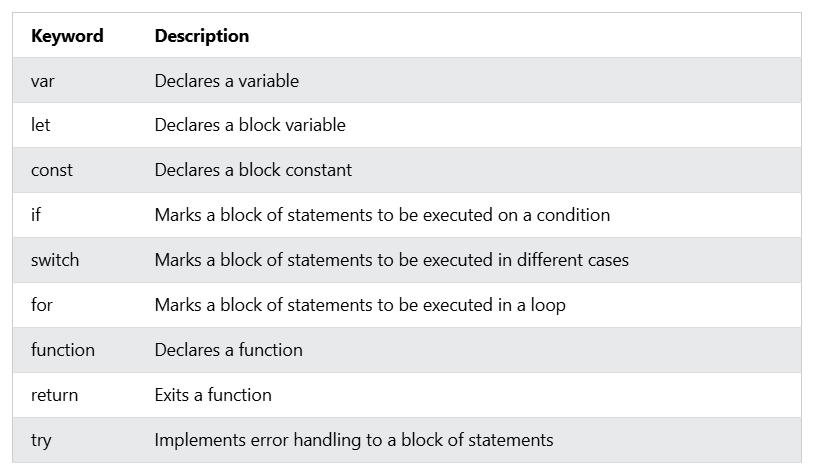
- The var keyword was used in all JavaScript code from 1995 to 2015.
- The let and const keywords were added to JavaScript in 2015.
- The var keyword should only be used in code written for older browsers.
JavaScript Identifiers / Names
Identifiers are JavaScript names.
Identifiers are used to name variables and keywords, and functions.
The rules for legal names are the same in most programming languages.
A JavaScript name must begin with:
- letter (A-Z or a-z)
- A dollar sign ($)
- Or an underscore (_)
Subsequent characters may be letters, digits, underscores, or dollar signs.
JavaScript uses the Unicode character set.
Constant Array
// You can create a constant array:
const cars = ["Saab", "Volvo", "BMW"];

// You can change an element:
cars[0] = "Toyota";

// You can add an element:
cars.push("Audi");

const cars = ["Saab", "Volvo", "BMW"];
cars = ["Toyota", "Volvo", "Audi"];    // ERROR
document.getElementById
<!DOCTYPE html>
<html>
<head>
<script>
function myFunction() {
  const demo = document.getElementById("demo");
  demo.innerHTML = (demo.innerHTML === "Paragraph changed.") ? "Try it." : "Paragraph changed.";
}

</script>
</head>
<body>

<h2>Demo JavaScript in Head</h2>

<p id="demo">A Paragraph.</p>

<button type="button" onclick="myFunction()">Try it</button>

</body>
</html>
유사참조 : document.getElementById("demo").innerText = "Hello World";
Using console.log()
<!DOCTYPE html>
<html>
<body>

<script>
console.log(5 + 6);
</script>

</body>
</html>
CSS
<section>
  <div>1. hello</div>
  <div>2. hello</div>
  <nav>n. hello</nav>
  <div>3. hello</div>
  <div>4. hello</div>
  <article>a. hello</article>
  <div>5. hello</div>
  <div>6. hello</div>
</section>


section, div{
  background-color: yellowgreen;
  display:inline-block;
}
section > div:nth-child(1){
  color:blue;
}
section > div:nth-of-child(2){
  background-color:blue;
}
section > div:last-child{
  color:green;
}
개념 - block 요소 좌측,가운데,우측 정렬하는 방법
div {
    width:100px;
    height:100px;
    background-color:red;
}
div:nth-child(2) {
    margin-left:auto;
    margin-right:auto;
}
div:nth-child(3) {
    margin-left:auto;
}
div {
width:100px;
height:100px;
margin-left:0; /* 이 코드는 사실 쓸 필요는 없다. 왜냐하면 원래 0 이니까 */
background-color:red;
}
div:nth-child(2) {
background-color:gold;
margin-left:auto;
margin-right:auto;
}
div:nth-child(3) {
background-color:green;
margin-right:0;
margin-left:auto;
}
section {
border:5px dotted gray;
}
한줄소개불가