20250814 - 학습일지 - js/css/html
let, const
Block Scope는 변수나 상수가 중괄호 {}로 둘러싸인 블록 내부에서만 접근 가능하다는 의미.
- Before ES6 (2015), JavaScript did not have Block Scope.
- JavaScript had Global Scope and Function Scope.
- ES6 introduced the two new JavaScript keywords: let and const.
- These two keywords provided Block Scope in JavaScript
const PI;
PI = 3.14159265359; // reference error

// You can create a constant array:
const cars = ["Saab", "Volvo", "BMW"]; // ok

// You can change an element: // ok
cars[0] = "Toyota";

// You can add an element: // ok
cars.push("Audi");

const cars = ["Saab", "Volvo", "BMW"];

cars = ["Toyota", "Volvo", "Audi"];    // ERROR
- const object
// You can create a const object:
const car = {type:"Fiat", model:"500", color:"white"};

// You can change a property:
car.color = "red";

// You can add a property:
car.owner = "Johnson";

{ //-- from the new block scope
  const car = {type:"Fiat", model:"500", color:"white"};

  car = {type:"Volvo", model:"EX60", color:"red"}    // ERROR
}
// -- from the new block scope
const x = 2; // Allowed
x = 2; // Not allowed
var x = 2; // Not allowed
let x = 2; // Not allowed
const x = 2; // Not allowed
{ //- from another new block scoppe
const x = 2; // Allowed
x = 2; // Not allowed
var x = 2; // Not allowed
let x = 2; // Not allowed
const x = 2; // Not allowed
}- javascript hositing sample
alert (carName);
const carName = "Volvo"; // ERROR
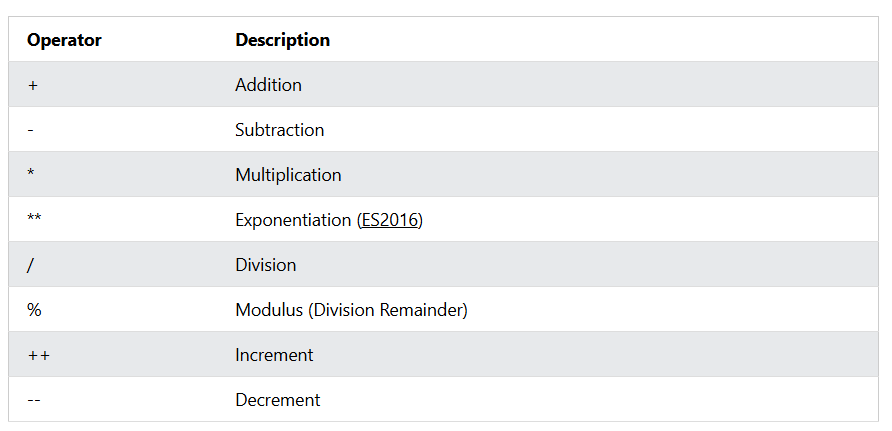
JavaScript Arithmetic Operators
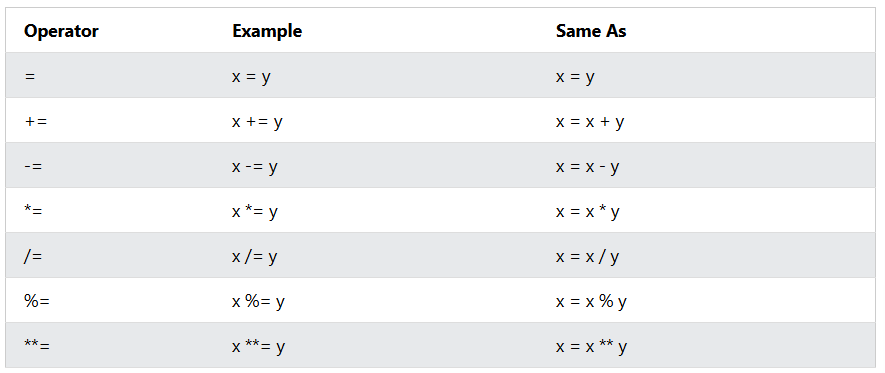
JavaScript Assignment Operators
JavaScript Comparison Operators
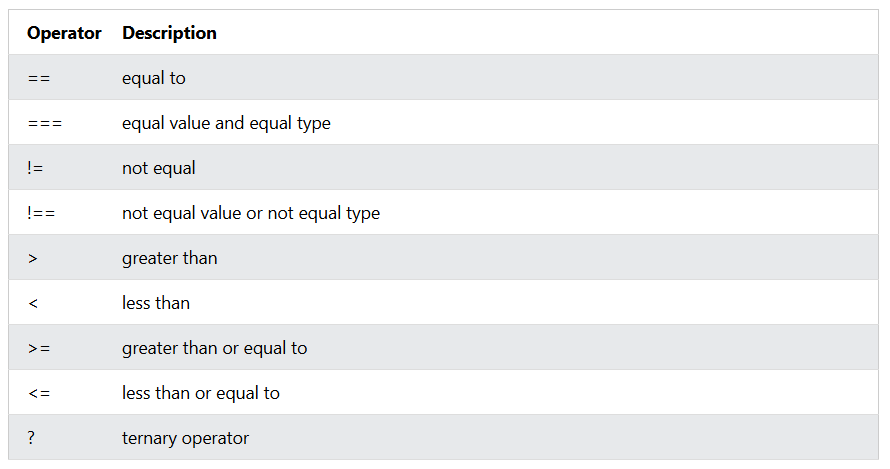
- javascript 삼항연산자(ternary operator) 예
// if-else 구문
let status;
if (age >= 18) {
  status = '성인';
} else {
  status = '미성년자';
}

// 삼항 연산자 사용
let status2 = age >= 18 ? '성인' : '미성년자';

// 중첩 예시
let grade = score >= 90
  ? 'A'
  : score >= 80
    ? 'B'
    : score >= 70
      ? 'C'
      : 'F';

 // 가독성 예시
// 1. 함수로 분리
function getGrade(score) {
  if (score >= 90) return 'A';
  if (score >= 80) return 'B';
  if (score >= 70) return 'C';
  return 'F';
}

// 2. 배열-반복 활용
const thresholds = [
  { min: 90, grade: 'A' },
  { min: 80, grade: 'B' },
  { min: 70, grade: 'C' },
];

function getGrade2(score) {
  const found = thresholds.find(t => score >= t.min);
  return found ? found.grade : 'F';
}
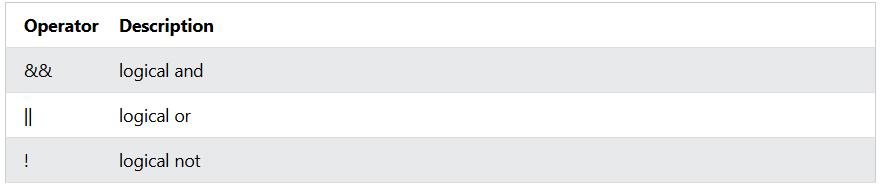
JavaScript Logical Operators
JavaScript Type Operators

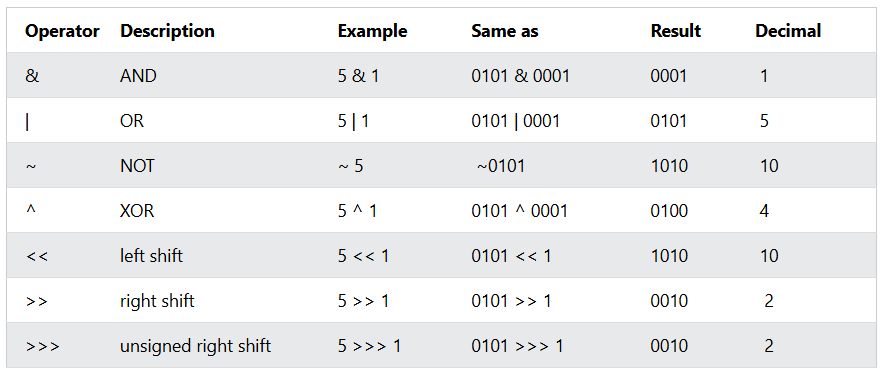
JavaScript Bitwise Operators

한줄소개불가