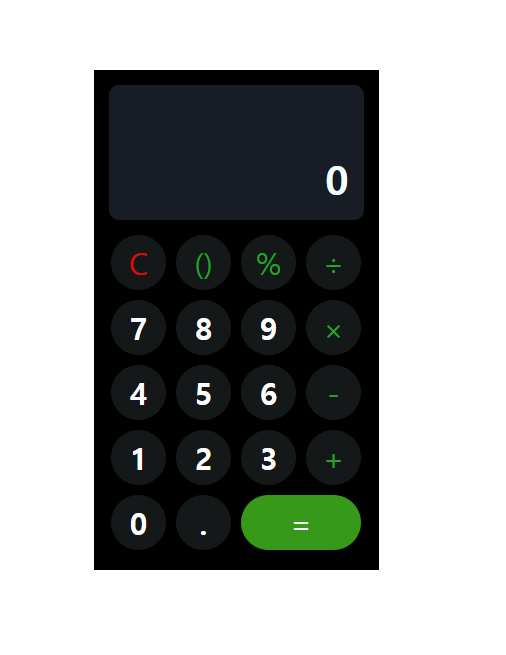
계산기 목업만들기
◆HTML
<!DOCTYPE html>
<html lang="en">
<head>
    <meta charset="UTF-8">
    <meta http-equiv="X-UA-Compatible" content="IE=edge">
    <meta name="viewport" content="width=device-width, initial-scale=1.0">
    <title>Document</title>
    <link rel="stylesheet" href="index.css">

</head>
<body>
    <div class="calculator">
      <div class="value">0</div>
   <div class="row">
     <div class="clear">C</div>
     <div class="operlater">()</div>
     <div class="operlater">%</div>
     <div class="operlater">÷</div>
   </div>
   <div class="row">
      <div class="number">7</div>
      <div class="number">8</div>
      <div class="number">9</div>
      <div class="operlater">×</div>
   </div>
   <div class="row">
      <div class="number">4</div>
      <div class="number">5</div>
      <div class="number">6</div>
      <div class="operlater">-</div>
   </div>
   <div class="row">
      <div class="number">1</div>
      <div class="number">2</div>
      <div class="number">3</div>
      <div class="operlater">+</div>
   </div>
    <div class="row">
      <div class="number">0</div>
      <div class="number">.</div>
       <div class="result">=</div>
    </div>


    </div>
</body>
</html>
◆CSS
.calculator {
    width: 285px;
    height: 500px;
    border: 5px solid rgb(0, 0, 0);
    background-color: rgb(0, 0, 0);
  }
  * {
    box-sizing: border-box;
  }

  body {
    display: flex;
    justify-content: center;
    align-items: center;
    border: 1px solid rgb(255, 0, 0);
    height: 100vh;
    margin: 0;
    padding: 0;
  }
  .value {
 height: 155px;
 font-size: 40px;
 display: flex;
 justify-content: flex-end;
 align-items: flex-end;
 padding: 15px 15px 15px 15px;
 color: azure;
background-color: rgb(24, 28, 37);
border: 10px solid black;
border-radius: 20px;
font-weight: bold;
}


  .row  {
    display: flex;
    justify-content: center;
    align-items: center;
  }

 .row > div {
    height: 55px;
    width: 55px;
    justify-content: center;
    align-items: center;
    font-size: 30px;
    display: flex;
    border-radius: 50%;
    margin: 5px;
    background-color: rgb(20, 24, 24);
    color: rgb(255, 255, 255);
    border: rgb(20, 24, 24) ;
}

.result {
    width: 120px !important;
    border-radius: 50px !important;
    background-color: rgb(55, 153, 25) !important;
}

.operlater  {
    color: rgb(36, 165, 36) !important;
    border: rgb(36, 165, 36);
}

.clear  {
    color: rgb(223, 11, 11) !important;
}

.number {
  font-weight: bold;
}
오늘 하루 느낀점 및 학습내용
◆ 느낀점
계산기를 만드는 과정에서 암기만 했던 것과 달리 각종 속성을 사용하면서 쉽게 와닿을 수 있었다. 중간엔 재밌기도 하고 시간가는 줄도 몰랐다. 역시 실습을 하면서 외우는게 최고인 것 같다. 만들 수 있을까라는 걱정과 달리 결과는 만족스러웠다. 앞으로에 비하면 아무 것도 아닌 결과물이지만 이 계기로 성취감을 맛볼 수 있었다.
◆ 학습내용
VSCODE에 필요한 각종 단축키들을 외울 수 있었다.
HTML 시작할때 !만 입력해주면 기본적인 형식이 입력된다.
또 !important를 사용하면 해당 속성이 우선순위가 된다.