
이 게시글에서는 Stable Diffusion WebUI(AUTOMATIC1111)를 설치하는 방법을 다루며, Ubuntu 20.04 환경을 이용합니다. Stable Diffusion WebUI는 말 그대로 생성 모델인 Stable Diffusion을 웹(Web)에서 조작할 수 있도록 해주는 인터페이스입니다.
-
아래의 코드를 이용하여 Dependency들을 설치합니다.
sudo apt install wget git python3 python3-venv libgl1 libglib2.0-0
-
원하는 경로로 이동 후, 아래의 코드를 실행하여
webui.sh파일을 다운로드합니다.cd [원하는 경로] wget -q https://raw.githubusercontent.com/AUTOMATIC1111/stable-diffusion-webui/master/webui.sh
-
아래의 명령어로 다운로드 된
webui.sh파일을 실행하여 WebUI 구동을 위한 환경을 설치합니다.bash webui.sh -f혹시라도 환경을 설치하는 도중에
TimeoutError: The read operation timed out또는HTTPSConnectionPool(host='files.pythonhosted.org', port=443): Read timed out.과 같은 에러가 발생하는 경우 파일stable-diffusion-webui/modules/launch_utils.py에 있는 두 개의 함수 코드를 수정해줘야 합니다.
-
함수
run_pipreturn run(f'"{python}" -m pip {command} --prefer-binary{index_url_line}', desc=f"Installing {desc}", errdesc=f"Couldn't install {desc}", live=live)위의 코드를 아래 코드로 수정해주세요.
return run(f'"{python}" -m pip {command} --prefer-binary{index_url_line} --timeout 5000',
desc=f"Installing {desc}", errdesc=f"Couldn't install {desc}", live=live)
-
함수
prepare_environmentif args.reinstall_torch or not is_installed("torch") or not is_installed("torchvision"): run(f'"{python}" -m {torch_command}', "Installing torch and torchvision", "Couldn't install torch", live=True) startup_timer.record("install torch")위의 코드를 아래 코드로 수정해주세요.
if args.reinstall_torch or not is_installed("torch") or not is_installed("torchvision"):
    run(f'"{python}" -m {torch_command} --timeout 5000', "Installing torch and torchvision", "Couldn't install torch", live=True)
    startup_timer.record("install torch")
- 환경 설치가 완료되면 터미널에
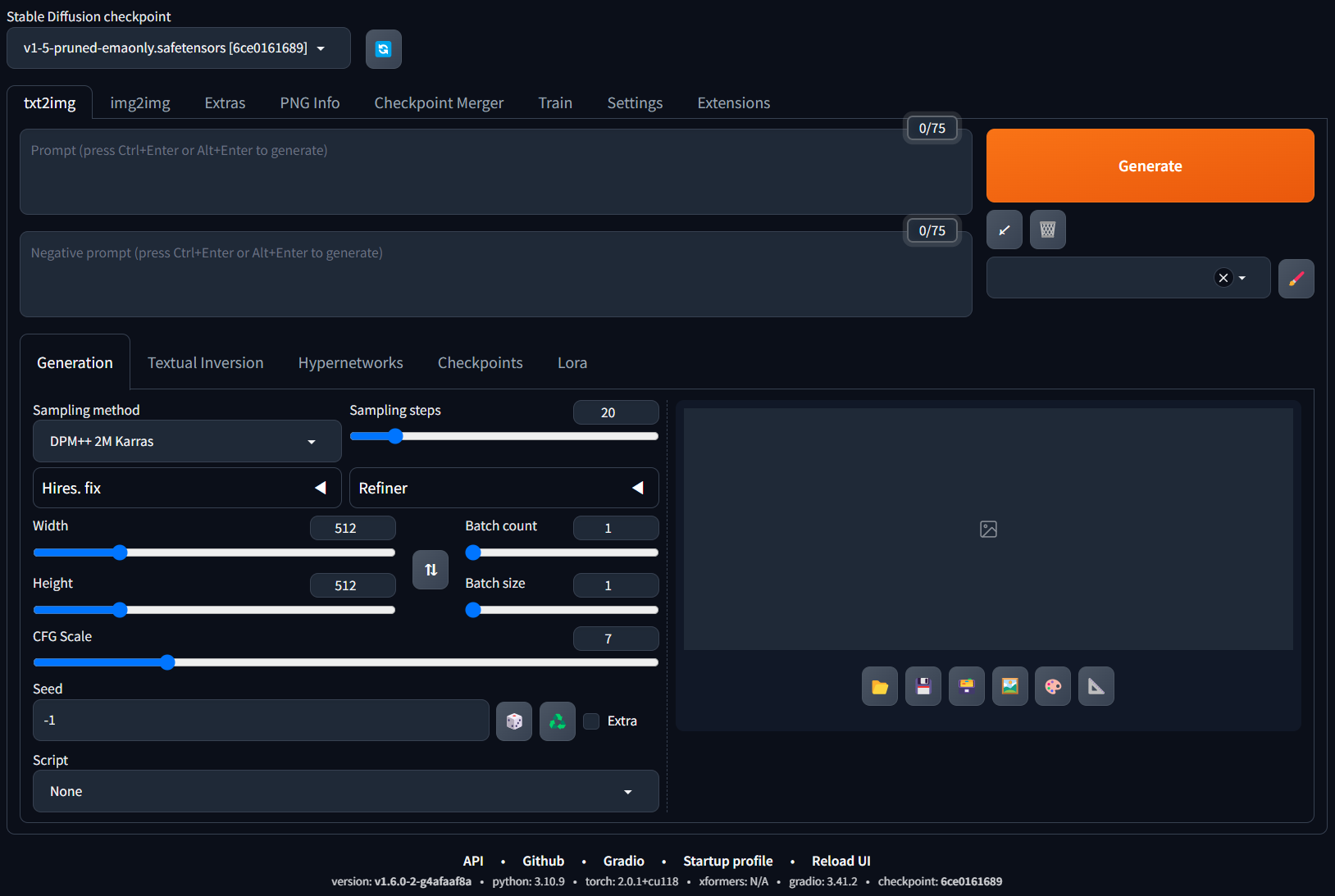
Running on local URL: https://127.0.0.1:7860이라는 주소가 뜹니다. 웹 브라우저를 통해127.0.0.1:7860이나localhost:7860주소로 접속하면 아래 사진과 같이 Stable Diffusion WebUI를 이용할 수 있습니다. 환경을 설치하는 과정에서 이미 Stable Diffusion 1.5버전의 가중치를 다운로드하기 때문에 바로 사용 가능합니다. (혹시라도 접속이 안되는 경우에는 포트포워딩을 해주세요.)
- Prompt에
Elon musk holding an apple.라고 입력 후, 우측에 있는Generate버튼을 누르면 아래와 같이 프롬프트에 맞는 이미지가 생성됩니다.

-
종료된 이후에 다시 실행하고 싶다면 아래의 코드로 실행하면 됩니다.
bash webui.sh -f기본 서비스 포트는 7860으로 설정되어 있습니다만, 아래의 명령어를 통해 임의의 포트를 변경할 수 있습니다. (단, 사용 가능한 포트여야 합니다.)
bash webui.sh -f --port [원하는 포트 번호]

이렇게 에러 뜨는건 어떻게 해야 하나요?
johnshin@JohnsCom:~/Downloads$ bash webui.sh -f
################################################################
Install script for stable-diffusion + Web UI
Tested on Debian 11 (Bullseye)
################################################################
################################################################
Running on johnshin user
################################################################
################################################################
Create and activate python venv
################################################################
################################################################
Launching launch.py...
################################################################
Using TCMalloc: libtcmalloc_minimal.so.4
Python 3.8.9 (default, Sep 13 2022, 06:15:32)
[GCC 11.2.0]
Version: v1.6.1
Commit hash: 4afaaf8a020c1df457bcf7250cb1c7f609699fa7
Launching Web UI with arguments: -f
no module 'xformers'. Processing without...
no module 'xformers'. Processing without...
Traceback (most recent call last):
File "launch.py", line 48, in
main()
File "launch.py", line 44, in main
start()
File "/home/johnshin/Downloads/stable-diffusion-webui/modules/launch_utils.py", line 432, in start
import webui
File "/home/johnshin/Downloads/stable-diffusion-webui/webui.py", line 13, in
initialize.imports()
File "/home/johnshin/Downloads/stable-diffusion-webui/modules/initialize.py", line 33, in imports
from modules import shared_init
File "/home/johnshin/Downloads/stable-diffusion-webui/modules/shared_init.py", line 5, in
from modules import shared
File "/home/johnshin/Downloads/stable-diffusion-webui/modules/shared.py", line 5, in
from modules import shared_cmd_options, shared_gradio_themes, options, shared_items, sd_models_types
File "/home/johnshin/Downloads/stable-diffusion-webui/modules/options.py", line 74, in
class Options:
File "/home/johnshin/Downloads/stable-diffusion-webui/modules/options.py", line 77, in Options
def init(self, data_labels: dict[str, OptionInfo], restricted_opts):
TypeError: 'type' object is not subscriptable