iOS의 UI 구현 방식
iOS에서 UI를 구현하기 위해 3가지 방식을 이용
1. 스토리보드로 구현
2. 코드로 구현
3. NIB, XIB로 구현
NIB
NIB(Nextstep Interface Builder)란 iOS/MacOS에서 애플리케이션의 유저 인터페이스를 저장하는 파일
화면을 구성하는 클래스들을 바이너리 형태의 압축파일로 저장하고 있는 것
XIB
XIB(XML Interface Builder)란 iOS 애플리케이션에서 사용자 인터페이스를 디자인하고 구성하기 위한 통합 개발 환경.
XIB는 XML기반의 파일 형식으로 NIB파일로 컴파일 되어 iOS 디바이스에서 로드 됨
바이너리로 저장하지 않고 xml 형태로 저장되기 때문에 수정된 부분을 알 수 있어서 파일관리가 아닌 소스코드로 관리가 가능
XIB를 컴파일 하면 NIB가 만들어 짐
XIB 파일 생성
File -> New -> File -> View
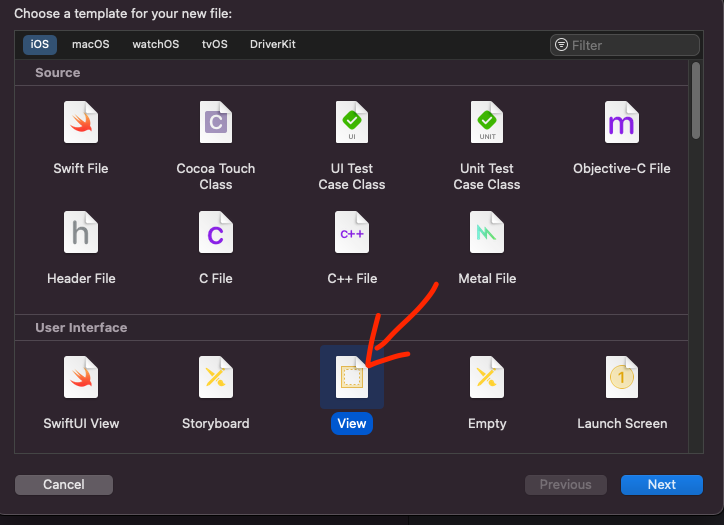
- XIB 코드 UI화면으로 보기 : XIB파일 오른쪽 버튼 클릭 -> Open As -> Interface Builder
- XIB 코드 XML로 보기 : XIB파일 오른쪽 버튼 클릭 -> Open As -> Source Code
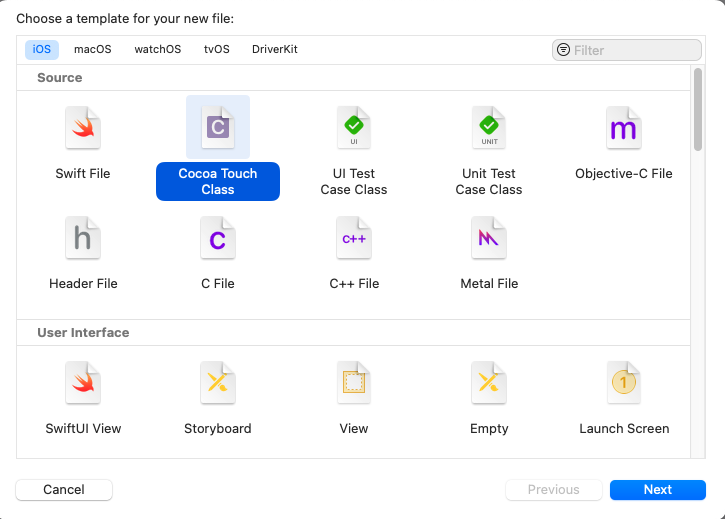
ViewController 생성
File -> New -> File -> Cocoa Touch Class -> ViewController 선택
CustomView XIB 연결하기
File's Owner 세팅
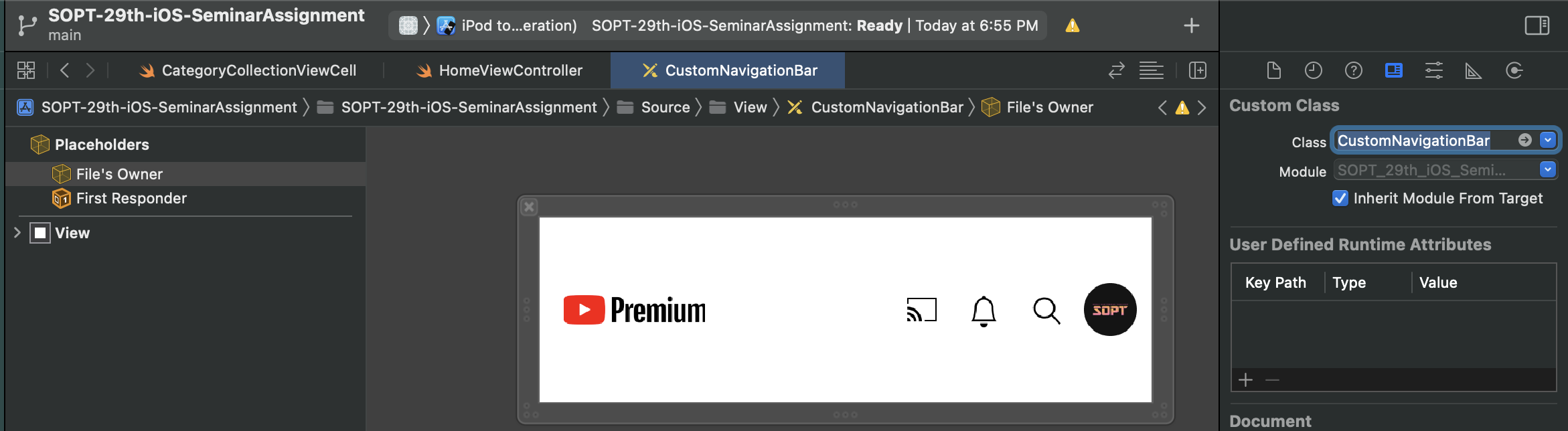
1. File's Owner로 XIB를 세팅하고 나서 해당 뷰를 가져오기 위해서는 UIView 클래스에서 nib 형태로 가져와야함. 이때 두가지 방법으로 가져올 수 있음.
class CustomNavigationBar: UIView {

    override init(frame: CGRect) {
        super.init(frame: frame)
        customInit()
        //alternativeCustomInit()
    }

    required init?(coder: NSCoder) {
        super.init(coder: coder)
        customInit()
        //alternativeCustomInit()
    }

    //방법 1: loadNibNamed(_:owner:options:) 사용
    func customInit() {
        if let view = Bundle.main.loadNibNamed("CustomNavigationBar", owner: self, options: nil)?.first as? UIView {
            view.frame = self.bounds
            addSubview(view)
        }
    }

    //방법 2: UINib 생성 후 instantiate
    func alternativeCustomInit() {
        if let view = UINib(nibName: "CustomNavigationBar", bundle: nil).instantiate(withOwner: self, options: nil).first as? UIView {
            view.frame = self.bounds
            addSubview(view)
        }
    }
}
1.1 loadNibNamed(_ :owner:options:)
receiver's bundle에 위치하는 nib 파일의 컨텐츠를 언아카이브 한다.
(Xib 파일이 저장되면 Xib 파일을 아카이브하는데 아카이브한 데이터로부터 객체를 다시 만드는것이 언아카이브)
- name : nib 파일 이름
- owner : nib의 File's Owner로 할당할 객체
- options : nib 파일을 열 때 사용할 옵션이 포함된 dictionary
1.2.1 init(nibName:bundle:)
특정 번들의 nib 파일로부터 nib 객체를 반환
- nibName : nib 파일의 이름
- bundle : nil 설정시 main bundle에서 nib 파일을 찾는다.
1.2.2 instantiate(withOwner:options:)
nib 객체의 nib 파일에 있는 메모리내 컨텐츠를 언아카이브하고 고유한 객체 트리와 top-level 객체 집합을 만든다.(부모 객체를 가지지 않는 것들. 윈도우, 메뉴 바, 커스텀 컨트롤러 객체)
- withOwner : nib 파일의 owner로 사용할 객체
- options : nib 파일을 열 때 사용할 옵션이 포함된 dictionary
- XIB에서 설정한 Custom Class는 소유할 클래스의 타입을 설정한 것이고(이것으로 IBAction, IBOutlet등 연결가능.) 위의 코드로 owner 의 instance를 설정한다.
- .first : 위의 메서드들은 반환 값이 배열. XIB가 여러개의 View를 가질 수 있기 때문.
따라서 .first를 사용해 첫 번째 View를 가져옴(첫번째가 아닌 원하는 타입의 객체를 가져오기 위해서 is 연산자로 찾을 수 있다.)
2. 스토리보드에서 커스텀뷰를 설정
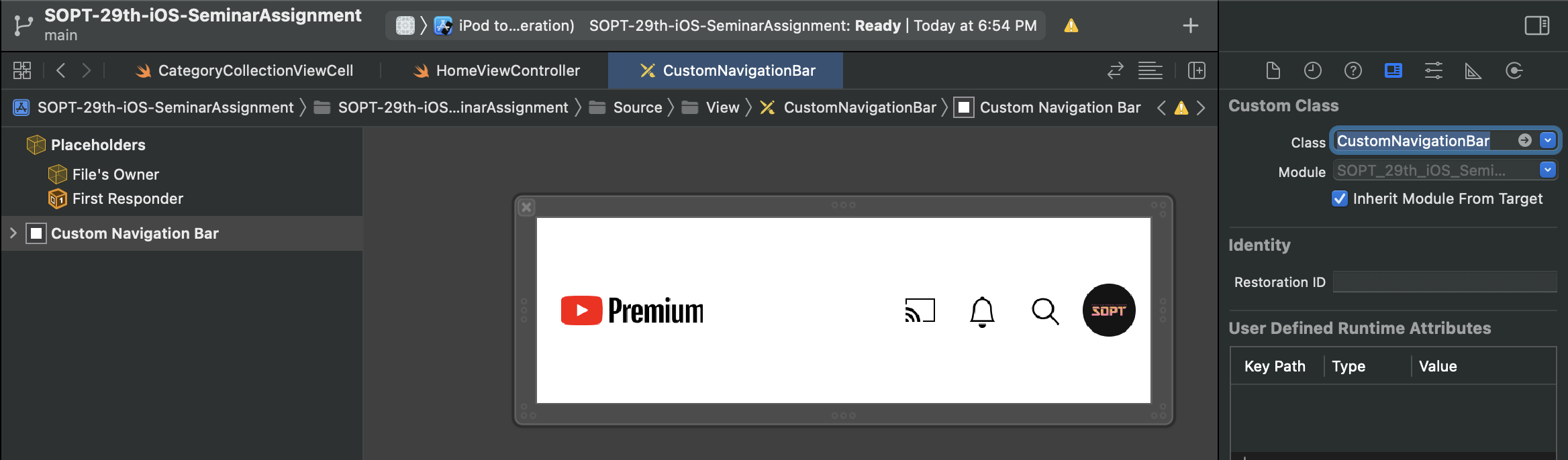
스토리보드에서 커스텀 클래스를 설정했기 때문에 nib파일을 언아카이브하고 커스텀뷰의 init(coder: NSCoder)를 호출.(init을 직접 호출하지 않아도 됨)
View에서 Custom Class 설정
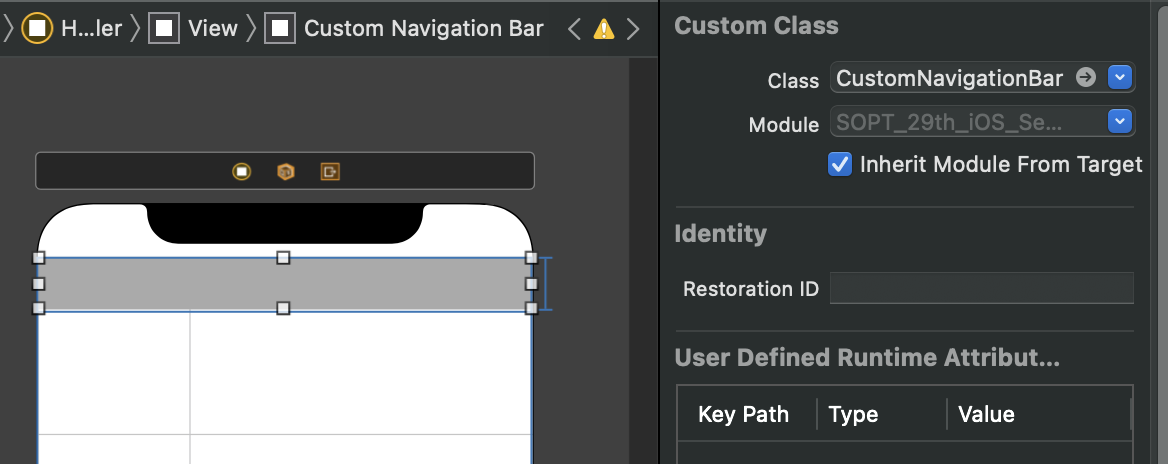
- View의 Custom Class로만 변경하고 실행했을 경우 앱이 죽음
-> customInit() 과 init(coder:)의 반복으로 앱이 죽음
-> 뷰 컨트롤러가 로딩된 후 커스텀 뷰의 init(coder: NSCoder) 호출
-> 커스텀 뷰의 customInit()호출
-> loadNibName으로 Xib로드
-> Xib 의 first View의 Custom Class는 커스텀 뷰로 설정된 상태. 커스텀뷰의 init(coder: NSCoder) 재호출
-> 다시 커스텀 뷰의 customInit()호출 = 무한루프
해결
init 매서드에서 같은 클래스의 Xib로드 하지 않기. 대신 부모 클래스나 뷰 컨트롤러에서 Xib 로드
// ViewController.swift

@IBOutlet weak var customNavigationBar: UIView!

// ...

override func viewDidLoad() {
        super.viewDidLoad()
        // ...

        // ✅ 이번에는 nib 파일 이름을 String(describing:) 으로 가져와봤어요!
        guard let loadedNib = Bundle.main.loadNibNamed(String(describing: CustomNavigationBar.self), owner: self, options: nil) else { return }
        guard let navigationBar = loadedNib.first as? CustomNavigationBar else { return }
        navigationBar.frame = CGRect(x: 0, y: 0, width: customNavigationBar.frame.width, height: customNavigationBar.frame.height)
        customNavigationBar.addSubview(navigationBar)
}
추가
-
애플개발자 문서에서는 File's Owner 에 대한 설명으로 nib 파일의 top-level 객체를 참조한다고 하는데! UIView 는 top-levle 의 조건을 만족하지 못함
-
Xib 는 다양한 UIView 객체를 가질 수 있게 만들어졌다. 근데 File's Owner 는 하나만 을 가질 수 있다. 그러면 다양한 UIView 객체를 Xib 가 가질 때 File's Owner 는 한개의 UIView 클래스이면서 다수의 UIView 클래스 타입이라는 말인가? 아이디어가 모순
-
아카이빙 : iOS에서 모델 객체를 저장하는 가장 흔한 방법 중 하나
객체의 프로퍼티들을 모두 기록하고 파일 시스템에 그 내용을 저장하는것을 포함 -
언아카이빙 : 아카이브한 데이터로부터 객체를 다시 만든다
