ansible 명령과 ansible-playbook 명령은 Ansible에서 작업을 실행하는 데 사용되는 두 가지 주요 도구입니다.
이 두 명령은 Ansible로 작업을 수행한다는 점에서는 같지만, 사용 목적이나 실행 방식에서 주요한 차이점이 있습니다.
<ansible과 ansible-playbook 차이점>
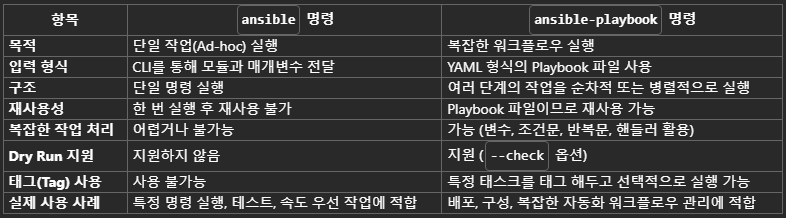
위와 같이 ansible-playbook 명령은 재사용 가능하고 복잡한 작업을 자동화할 때 유용합니다.
이제 여러 단계의 작업을 YAML 파일 기반의 Playbook에 작성해서, 자동화 작업을 원격에서 수행하는 방법을 설명하겠습니다.
<ansible playbook 작성>
다수의 서버에 여러 단계의 작업을 하나의 명령으로 전달하고자 할 때, playbook에 각 작업을 task로 나누어 작성합니다.
Grafana config 배포 자동화
로컬 /grafana 디렉터리에 있는 Grafana Agent 설정 파일(agent-config.yaml)을 Windows 서버의 Grafana 설치 디렉터리에 복사한 뒤,
Grafana Agent 서비스를 재시작하는 작업을 수행하는 예시입니다.
- name: Ansible Playbook for copy the modified grafana agent-config file to Windows Server
  hosts: all
  tasks:
    - name: Copy agent-config files in /grafana to the remote server
      win_copy:
        src: "{{ item }}"
        dest: "C:\\Program Files\\Grafana Agent\\"
      with_fileglob:
        - "/grafana/agent-config.yaml"

    - name: Stop Grafana Agent service
      win_shell: |
        Stop-Service -Name "Grafana Agent"
      args:
        executable: powershell

    - name: Start Grafana Agent service
      win_shell: |
        Start-Service -Name "Grafana Agent"
      args:
executable: powershell- hosts: all
- 이 Playbook이 실행될 호스트를 지정합니다.
- inventory 파일 내all그룹에 속한 모든 호스트에 대해 Playbook을 실행함을 의미합니다.
<첫 번째 작업> : Grafana 설정 파일을 원격 서버에 복사
- win_copy:
- Windows 환경의 파일을 복사하는 모듈 사용 - src: "{{ item }}"
- "{{ item }}"은with_fileglob항목으로 반복 작업을 수행함을 의미합니다. - with_fileglob:
- 로컬에서 복사할 특정 파일을 명시합니다.
<두 번째 작업> : Grafana Agent 서비스를 중지
- win_shell:
- Windows용 명령 모듈인 win_shell을 사용하여 PowerShell 명령 실행 - Stop-Service -Name "Grafana Agent"
- PowerShell 명령을 통해 Grafana Agent 서비스를 중지하는 명령 실행 - executable: powershell
- PowerShell을 명령 실행 환경으로 지정합니다.
<세 번째 작업> : Grafana Agent 서비스를 시작
<ansible playbook 실행>
<명령 구문>
ansible-playbook -i <서버 인벤토리 파일> <playbook파일>-
Playbook 파일 실행
ansible-playbook -i inventory.yaml grafana_config_deploy.yaml
-
특정 그룹에만 Playbook 실행
ansible-playbook -i inventory.yaml grafana_config_deploy.yaml --limit os__windows
-
Dry Run (작업 시뮬레이션)
ansible-playbook -i inventory.yaml grafana_config_deploy.yaml --check
위와 같이 ansible을 이용하면, 대규모 인프라 환경에서 단순 반복의 작업을 원격에서 간단히 수행할 수 있게 됩니다.