도커 이미지가 어떤 커밋까지 반영된 것인지 확인해야할 때가 간혹 있습니다. 이미지 이름과 git tag를 맞춰 사용하는 것이 가장 좋겠지만 그렇지 못한 경우 사용하는 방법입니다.
1. 도커 이미지에서 jar 추출하기
도커 이미지에서 컨테이너를 생성합니다.
$ docker create --name temp-container <이미지명>도커 컨테이너에서 jar 파일을 복사합니다.
$ docker cp temp-container:/path/to/your/file.jar /local/path2. jar 파일 열기
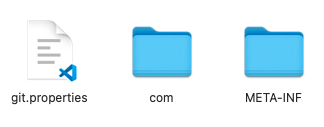
jar 파일은 zip 파일로 압축된 파일입니다. zip 파일과 동일하게 압축을 해제하면 git.properties 파일이 있는 것을 확인할 수 있습니다.
3. git.properties 확인하기
git.properties 파일을 열어보면 git.commit.id를 확인할 수 있습니다.
...
git.closest.tag.name=<가장 가까운 태그명>
git.commit.id=<commit id(해시)>
git.commit.id.abbrev=<commit id의 앞 7글자>
git.commit.id.describe=
git.commit.message.full=<commit message>
...
"Life isn't about finding yourself. Life is about creating yourself."