개요
오늘은 Unity Hierarchy 커스텀을 배웠다.
배운 코드를 주석으로 정리하면서 복습하고, 나의 기능을 추가해보자
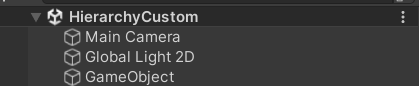
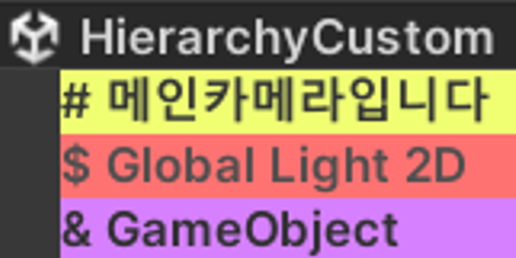
Hierarchy 안의 내용물이 많아지면 구분이 힘들어질 수 있다.
그런데...
이렇게!

이번에 배운 것으로 쉬운 구분을 할 수 있다.
코드
using System.Collections;
using System.Collections.Generic;
using UnityEditor;
using UnityEngine;

public class CustomHierarchy : MonoBehaviour
{
#if UNITY_EDITOR //Unity Editor에서만 돌아가야 함
    private static Dictionary<Object, CustomHierarchy> coloredObject = new Dictionary<Object, CustomHierarchy>();

    static CustomHierarchy() //스크립트 로드 시 한 번만 실행
    {
        EditorApplication.hierarchyWindowItemOnGUI += HandleDraw;
    }

    private static void HandleDraw(int instanceID, Rect selectionRect)
    {
        Object obj = EditorUtility.InstanceIDToObject(instanceID); //Key, instanceID를 참조할 수 있는 obj 생성

        if (obj != null && coloredObject.ContainsKey(obj)) //null 체크, coloredObject에 obj가 들어있는지 확인
        {
            GameObject gameObj = obj as GameObject; // 해당 Key 값인 Object의 GameObject 저장
            if (gameObj.TryGetComponent<CustomHierarchy>(out CustomHierarchy ch))
            {
                PaintObject(obj, selectionRect, ch);
            }
            else //obj가 CustomHierarchy를 가지고 있지 않음
            {
                coloredObject.Remove(obj);
            }
        }
    }

    private static void PaintObject(Object obj, Rect selectionRect, CustomHierarchy ch)
    {
        Rect bgRect = new Rect(selectionRect.x, selectionRect.y, selectionRect.width + 50 , selectionRect.height); //Prefix를 넣기 위해 selectionRect.width + 50

        if (Selection.activeObject != obj) // obj가 클릭되어 있지 않다면
        {
            EditorGUI.DrawRect(bgRect, ch.backColor);
            string name = $"{ch.prefix} {obj.name}";

            EditorGUI.LabelField(bgRect, name, new GUIStyle()
            {
                normal = new GUIStyleState { textColor = ch.fontColor },
                fontStyle = FontStyle.Bold
            });
        }
    }

    //커스텀 할 것들
    public string prefix;
    public Color backColor;
    public Color fontColor;

    //에디터 함수
    private void Reset()
    {
        OnValidate();
    }

    private void OnValidate()
    {
        if (coloredObject.ContainsKey(this.gameObject) == false) //coloredObject에 없으면
        {
            coloredObject.Add(this.gameObject, this); //추가
        }
    }
#endif
}
기능 만들어 보기
PaintObj 함수 내에 추가한 기능
        if (Selection.activeObject == obj)
        {
            EditorGUI.LabelField(bgRect, "Custom 가능한 오브젝트입니다!", new GUIStyle()
            {
                normal = new GUIStyleState { textColor = ch.fontColor },
                fontStyle = FontStyle.BoldAndItalic
            });
        }
생긴 문제
원래 있던 이름이 사라지지 않는다
깔끔하게 포기!
하고 만든 것
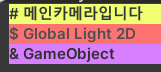

변경사항
//선언
public string objName;

//PaintObject의 if(Selection.activeObject != obj) 안
	string name = $"{ch.prefix} {obj.name}";
	if (ch.objName != "") name = $"{ch.prefix} {ch.objName}";
감사합니다