사용 Unity 버전 : 2023.3.3f1 LTS
Getting Started with the Job System
사전 패키지 설치
설치해야 하는 패키지 목록
- Mathematics : 성능이 최적화된 수학 라이브러리
- Burst : IL/.NET코드를 LLVM으로 변환하여 컴파일링하는 컴파일러
- Collections : Parallel jobs를 처리할 때 사용하는 Native Collections 라이브러리
- Entities : ECS 코어 패키지
Job 시스템을 사용하는 용도
무거운 수학 연산, 패스파인딩 등
수학 연산에 대한 Job System
Job을 사용하지 않는 테스트 코드
무거운 수학 연산을 반복 작업하여 코어에 부하를 주는 스크립트이다.
public class Testing : MonoBehaviour
{
    private void Update()
    {
        float startTime = Time.realtimeSinceStartup;

        ReallyToughTask();

        Debug.Log((Time.realtimeSinceStartup - startTime) * 1000f + "ms");
    }

    private void ReallyToughTask()
    {
        float value = 0f;

        for (int i = 0; i < 50000; i++)
        {
            value = math.exp10(math.sqrt(value));
        }
    }
}- 테스트 결과
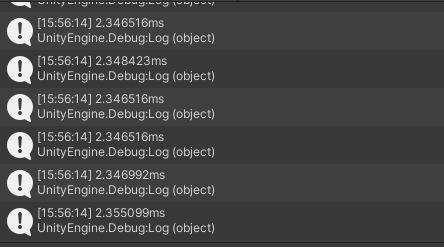
Job의 선언 및 사용 방법
// struct는 ref개념이 아닌 copy개념. 따라서 새로운 Job을 생성할 때 Job의 복사본이 생성된다.
// 모든 정보와 행동이 담긴 job struct를 만든다
public struct ReallyToughJob : IJob
{
    // Execute()를 필수로 구현, 연산에 필요한 매개변수도 선언 가능
    public void Execute()
    {
        float value = 0f;

        for (int i = 0; i < 50000; i++)
        {
            value = math.exp10(math.sqrt(value));
        }
    }
}

public class Testing : MonoBehaviour
{
    [SerializeField] private bool useJobs;

    private void Update()
    {
        float startTime = Time.realtimeSinceStartup;

        // JobHandle을 반환하는 Job 함수 사용
        JobHandle jobHandle = ReallyToughTaskWithJob();

        // Job System에 해당 job을 완료하라고 전달
        // 메인 쓰레드를 해당 job이 완료할 때 까지 중지시키고, job이 완료되면 다시 메인 쓰레드를 작동시킨다
        jobHandle.Complete();

        Debug.Log((Time.realtimeSinceStartup - startTime) * 1000f + "ms");
    }

    private JobHandle ReallyToughTaskWithJob()
    {
        // 새로운 job 생성
        ReallyToughJob job = new ReallyToughJob();

        // Job System에게 가능하면 비어있는 스레드에 해당 job을 작업하게 지시
        // Job 상태를 트래킹하는 JobHandle 반환
        return job.Schedule();
    }
}- 해당 스크립트의 실행 결과는 Job을 사용하지 않을 때와 거의 비슷하다. 이는 하나의 하나의 Job만을 사용하여 이전과 동일하게 하나의 스레드만을 사용하고 있는 상황이기 때문이다.
Job을 이용한 멀티스레딩
개발자가 선언할 수 있는 최대 스레드 양은 꽤 널널하지만, 유니티가 최대로 생성할 수 있는 스레드는 PC가 제공하는 최대 스레드의 양과 동일하다.
사용 방식은 다음과 같다.
NativeList<JobHandle> jobHandleList를 선언한 후JobHandle들을 리스트에 추가한다.- 모든 job들을
JobHandle.CompleteAll(jobHandleList)로 완료 요청한다. - 사용한 job들을
jobHandleList.Dispose();해준다.
// struct는 ref개념이 아닌 copy개념. 따라서 새로운 Job을 생성할 때 Job의 복사본이 생성된다.
// 모든 정보와 행동이 담긴 job struct를 만든다
public struct ReallyToughJob : IJob
{
    // Execute()를 필수로 구현, 연산에 필요한 매개변수도 선언 가능
    public void Execute()
    {
        float value = 0f;

        for (int i = 0; i < 50000; i++)
        {
            value = math.exp10(math.sqrt(value));
        }
    }
}

public class Testing : MonoBehaviour
{
    [SerializeField] private bool useJobs;

    private void Update()
    {
        float startTime = Time.realtimeSinceStartup;

        if (useJobs)
        {
            // 잡 시스템 리스트 생성
            NativeList<JobHandle> jobHandleList = new NativeList<JobHandle>(Allocator.Temp);

            for (int i = 0; i < 10; i++)
            {
                // JobHandle을 반환하는 Job 함수 사용
                JobHandle jobHandle = ReallyToughTaskWithJob();

                // 리스트에 job들을 추가
                jobHandleList.Add(jobHandle);
            }

            // 리스트에 추가된 모든 job들을 종료시키는 스태틱 함수 사용
            JobHandle.CompleteAll(jobHandleList.AsArray());

            // 사용한 job들을 dispose해주기
            jobHandleList.Dispose();
        }
        else
        {
            for (int i = 0; i < 10; i++)
            {
                ReallyToughTask();
            }

        }

        Debug.Log((Time.realtimeSinceStartup - startTime) * 1000f + "ms");
    }

    private void ReallyToughTask()
    {
        float value = 0f;

        for (int i = 0; i < 50000; i++)
        {
            value = math.exp10(math.sqrt(value));
        }
    }

    private JobHandle ReallyToughTaskWithJob()
    {
        // 새로운 job 생성
        ReallyToughJob job = new ReallyToughJob();

        // Job System에게 가능하면 비어있는 스레드에 해당 job을 작업하게 지시
        // Job 상태를 트래킹하는 JobHandle 반환
        return job.Schedule();
    }
}- 사용 결과
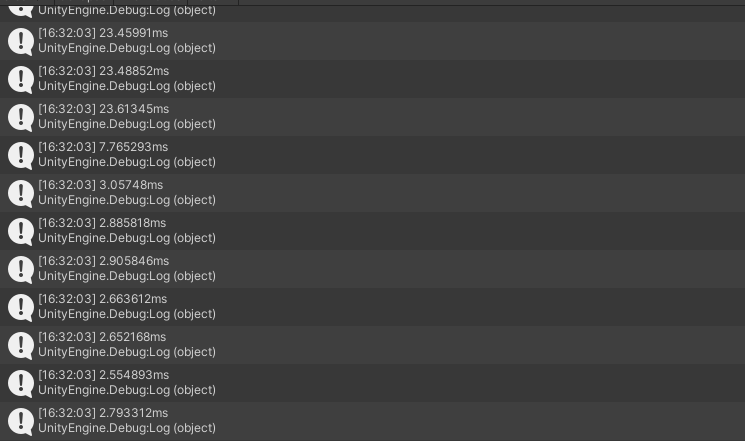
Burst 컴파일러를 이용한 추가적인 성능 향상
사용 방법은 간단하다.
using Unity.Burst를 선언한 후Job struct에[BurstCompile]애트리뷰트를 추가한다.- 유니티 에디터 메뉴바에서
Jobs - Burst - Enable Compilation을 체크한다.
// struct는 ref개념이 아닌 copy개념. 따라서 새로운 Job을 생성할 때 Job의 복사본이 생성된다.
// 모든 정보와 행동이 담긴 job struct를 만든다
[BurstCompile]
public struct ReallyToughJob : IJob
{
    // Execute()를 필수로 구현, 연산에 필요한 매개변수도 선언 가능
    public void Execute()
    {
        float value = 0f;

        for (int i = 0; i < 50000; i++)
        {
            value = math.exp10(math.sqrt(value));
        }
    }
}
트랜스폼 값을 계산하는 Job System
유니티에서 Transform등 대부분 컴포넌트는 오직 메인 스레드에서만 접근이 가능하다.
job system에서 값을 메인 스레드로 전달하여 컴포넌트의 값을 변화시키는 스크립트를 작성할 수 있다.
Job을 사용하지 않는 테스트 코드
public class Testing : MonoBehaviour
{
    [SerializeField] private Transform pfZombie;

    private List<Zombie> _zombieList;

    public class Zombie
    {
        public Transform transform;
        public float moveY;
    }

    private void Start()
    {
        _zombieList = new List<Zombie>();

        for (int i = 0; i < 1000; i++)
        {
            Transform zombieTransform = Instantiate(pfZombie, new Vector3(Random.Range(-8f, 8f), Random.Range(-5f, 5f)), Quaternion.identity);

            _zombieList.Add(new Zombie
            {
                transform = zombieTransform,
                moveY = Random.Range(1f, 2f)
            });
        }
    }

    private void Update()
    {
        float startTime = Time.realtimeSinceStartup;

        foreach (Zombie zombie in _zombieList)
        {
            zombie.transform.position += new Vector3(0, zombie.moveY * Time.deltaTime);

            if (zombie.transform.position.y > 5f)
            {
                zombie.moveY = -math.abs(zombie.moveY);
            }
            if (zombie.transform.position.y < -5f)
            {
                zombie.moveY = +math.abs(zombie.moveY);
            }

            float value = 0f;
            for (int i = 0; i < 1000; i++)
            {
                value = math.exp10(math.sqrt(value));
            }
        }

        Debug.Log((Time.realtimeSinceStartup - startTime) * 1000f + "ms");
    }
}
Job의 선언 및 사용
트랜스폼과 이동값을 별개의 배열에 저장하고 이 배열들의 주소를 jobs에 제공해 수학적 계산을 수행한 후 메인 스레드에서 결과값을 컴포넌트에 적용해준다.
[BurstCompile]
public struct ReallyToughParallelJob : IJobParallelFor
{
    public NativeArray<float3> positionArray;
    public NativeArray<float> moveYArray;
    public float deltaTime;

    public void Execute(int index)
    {
        positionArray[index] += new float3(0f, moveYArray[index] * deltaTime, 0f);

        if (positionArray[index].y > 5f)
        {
            moveYArray[index] = -math.abs(moveYArray[index]);
        }
        if (positionArray[index].y < -5f)
        {
            moveYArray[index] = +math.abs(moveYArray[index]);
        }

        float value = 0f;
        for (int i = 0; i < 1000; i++)
        {
            value = math.exp10(math.sqrt(value));
        }
    }
}

public class Testing : MonoBehaviour
{
    [SerializeField] private bool useJobs;
    [SerializeField] private Transform pfZombie;

    private List<Zombie> _zombieList;

    public class Zombie
    {
        public Transform transform;
        public float moveY;
    }

    private void Start()
    {
        _zombieList = new List<Zombie>();

        for (int i = 0; i < 1000; i++)
        {
            Transform zombieTransform = Instantiate(pfZombie, new Vector3(Random.Range(-8f, 8f), Random.Range(-5f, 5f)), Quaternion.identity);

            _zombieList.Add(new Zombie
            {
                transform = zombieTransform,
                moveY = Random.Range(1f, 2f)
            });
        }
    }

    private void Update()
    {
        float startTime = Time.realtimeSinceStartup;

        if (useJobs)
        {
            NativeArray<float3> positionArray = new NativeArray<float3>(_zombieList.Count, Allocator.TempJob);
            NativeArray<float> moveYArray = new NativeArray<float>(_zombieList.Count, Allocator.TempJob);

            for (int i = 0; i < _zombieList.Count; i++)
            {
                positionArray[i] = _zombieList[i].transform.position;
                moveYArray[i] = _zombieList[i].moveY;
            }

            ReallyToughParallelJob reallyToughParallelJob = new ReallyToughParallelJob
            {
                deltaTime = Time.deltaTime,
                positionArray = positionArray,
                moveYArray = moveYArray
            };

            // innerloopBatchCount : 하나의 스레드가 처리할 인덱스의 개수
            JobHandle jobHandle = reallyToughParallelJob.Schedule(_zombieList.Count, 100);
            jobHandle.Complete();

            for (int i = 0; i < _zombieList.Count; i++)
            {
                _zombieList[i].transform.position = positionArray[i];
                _zombieList[i].moveY = moveYArray[i];
            }

            positionArray.Dispose();
            moveYArray.Dispose();
        }
        else
        {
            foreach (Zombie zombie in _zombieList)
            {
                zombie.transform.position += new Vector3(0, zombie.moveY * Time.deltaTime);

                if (zombie.transform.position.y > 5f)
                {
                    zombie.moveY = -math.abs(zombie.moveY);
                }
                if (zombie.transform.position.y < -5f)
                {
                    zombie.moveY = +math.abs(zombie.moveY);
                }

                float value = 0f;
                for (int i = 0; i < 1000; i++)
                {
                    value = math.exp10(math.sqrt(value));
                }
            }
        }

        Debug.Log((Time.realtimeSinceStartup - startTime) * 1000f + "ms");
    }
}
특수한 job 인터페이스를 이용해 트랜스폼 컴포넌트를 스레드에서 변경
IJobParallelForTransform를 이용하여 NativeArray<float3> positionArray를 선언 및 사용하지 않고 각각의 스레드에서 트랜스폼 컴포넌트의 값을 변경하게 할 수 있다.
[BurstCompile]
public struct ReallyToughParallelJobTransform : IJobParallelForTransform
{
    public NativeArray<float> moveYArray;
    [ReadOnly] public float deltaTime;

    public void Execute(int index, TransformAccess transform)
    {
        transform.position += new Vector3(0f, moveYArray[index] * deltaTime, 0f);

        if (transform.position.y > 5f)
        {
            moveYArray[index] = -math.abs(moveYArray[index]);
        }
        if (transform.position.y < -5f)
        {
            moveYArray[index] = +math.abs(moveYArray[index]);
        }

        float value = 0f;
        for (int i = 0; i < 1000; i++)
        {
            value = math.exp10(math.sqrt(value));
        }
    }
}

public class Testing : MonoBehaviour
{
    [SerializeField] private bool useJobs;
    [SerializeField] private Transform pfZombie;

    private List<Zombie> _zombieList;

    public class Zombie
    {
        public Transform transform;
        public float moveY;
    }

    private void Start()
    {
        _zombieList = new List<Zombie>();

        for (int i = 0; i < 1000; i++)
        {
            Transform zombieTransform = Instantiate(pfZombie, new Vector3(Random.Range(-8f, 8f), Random.Range(-5f, 5f)), Quaternion.identity);

            _zombieList.Add(new Zombie
            {
                transform = zombieTransform,
                moveY = Random.Range(1f, 2f)
            });
        }
    }

    private void Update()
    {
        float startTime = Time.realtimeSinceStartup;

        if (useJobs)
        {
            NativeArray<float> moveYArray = new NativeArray<float>(_zombieList.Count, Allocator.TempJob);
            TransformAccessArray transformAccessArray = new TransformAccessArray(_zombieList.Count);

            for (int i = 0; i < _zombieList.Count; i++)
            {
                moveYArray[i] = _zombieList[i].moveY;
                transformAccessArray.Add(_zombieList[i].transform);
            }

            ReallyToughParallelJobTransform reallyToughParallelJobTransform = new ReallyToughParallelJobTransform
            {
                deltaTime = Time.deltaTime,
                moveYArray = moveYArray
            };

            JobHandle jobHandle = reallyToughParallelJobTransform.Schedule(transformAccessArray);
            jobHandle.Complete();

            for (int i = 0; i < _zombieList.Count; i++)
            {
                _zombieList[i].moveY = moveYArray[i];
            }

            transformAccessArray.Dispose();
            moveYArray.Dispose();
        }
        else
        {
            foreach (Zombie zombie in _zombieList)
            {
                zombie.transform.position += new Vector3(0, zombie.moveY * Time.deltaTime);

                if (zombie.transform.position.y > 5f)
                {
                    zombie.moveY = -math.abs(zombie.moveY);
                }
                if (zombie.transform.position.y < -5f)
                {
                    zombie.moveY = +math.abs(zombie.moveY);
                }

                float value = 0f;
                for (int i = 0; i < 1000; i++)
                {
                    value = math.exp10(math.sqrt(value));
                }
            }
        }

        Debug.Log((Time.realtimeSinceStartup - startTime) * 1000f + "ms");
    }
}
Improve Game Performance with Unity's Job System and the Burst Compiler!
각각의 객체에 하나의 스레드를 할당하는 방식
SpiderJob클래스
[BurstCompile]
public struct SpiderJob : IJob
{
    private Vector2 _targetDir;                         // 목표 위치
    private float _changeDirCooldown;                   // 방향 변경 쿨타임
    private float _speed;                               // 움직이는 속도
    private float _rotSpeed;                            // 회전 속도

    private float _deltaTime;                           // 델타타임
    private uint _seed;                                 // 랜덤값 시드
    private Vector2 _screenPoint;                       // 화면 위치
    private int _screenWidth;                           // 화면 너비
    private int _screenHeight;                          // 화면 위치
    private Vector2 _position;                          // 객체 위치
    private Quaternion _rotation;                       // 객체 회전값

    private NativeArray<float> _changeDirCooldownRes;   // 방향 변경 쿨타임
    private NativeArray<Vector2> _targetDirRes;         // 목표 위치
    private NativeArray<Vector2> _posRes;               // 객체 위치
    private NativeArray<Quaternion> _rotationRes;       // 객체 회전값

    public SpiderJob(
        Vector2 targetDir,
        float changeDirCooldown,
        float speed,
        float rotSpeed,
        float deltaTime,
        uint seed,
        Vector2 screenPoint,
        int screenWidth,
        int screenHeight,
        Quaternion rotation,
        Vector2 position,
        NativeArray<float> changeDirCooldownRes,
        NativeArray<Vector2> targetDirRes,
        NativeArray<Vector2> posRes,
        NativeArray<Quaternion> rotationRes
    )
    {
        _targetDir = targetDir;
        _changeDirCooldown = changeDirCooldown;
        _speed = speed;
        _rotSpeed = rotSpeed;
        _deltaTime = deltaTime;
        _seed = seed;
        _screenPoint = screenPoint;
        _screenWidth = screenWidth;
        _screenHeight = screenHeight;
        _rotation = rotation;
        _position = position;
        _changeDirCooldownRes = changeDirCooldownRes;
        _targetDirRes = targetDirRes;
        _posRes = posRes;
        _rotationRes = rotationRes;
    }

    public void Execute()
    {
        UpdateTargetDirection();
        RotateTowardstarget();
        SetPosition();
    }

    // 방향 변경 함수
    private void UpdateTargetDirection()
    {
        HandleRandomDirectionChange();
        HandleOffScreen();

        _targetDirRes[0] = _targetDir;
    }

    // 갈 방향을 랜덤하게 변경하는 함수
    private void HandleRandomDirectionChange()
    {
        _changeDirCooldown -= _deltaTime;

        if (_changeDirCooldown <= 0)
        {
            var random = new Unity.Mathematics.Random(_seed);

            float angleChange = random.NextFloat(-90f, 90f);
            Quaternion rotation = Quaternion.AngleAxis(angleChange, Vector3.forward);
            _targetDir = rotation * _targetDir;

            _changeDirCooldown = random.NextFloat(1f, 5f);
        }

        _changeDirCooldownRes[0] = _changeDirCooldown;
    }

    // 화면 경계 도달시 방향을 뒤로 바꾸는 함수
    private void HandleOffScreen()
    {
        if ((_screenPoint.x < 0 && _targetDir.x < 0) ||
            (_screenPoint.x > _screenWidth && _targetDir.x > 0))
        {
            _targetDir = new Vector2(-_targetDir.x, _targetDir.y);
        }

        if ((_screenPoint.y < 0 && _targetDir.x < 0) ||
            (_screenPoint.y > _screenHeight && _targetDir.x > 0))
        {
            _targetDir = new Vector2(_targetDir.x, -_targetDir.y);
        }
    }

    // 오브젝트의 현재 방향을 계산하는 함수
    private void RotateTowardstarget()
    {
        Quaternion targetRotation = Quaternion.LookRotation(Vector3.forward, _targetDir);
        _rotation = Quaternion.RotateTowards(_rotation, targetRotation, _rotSpeed * _deltaTime);

        _rotationRes[0] = _rotation;
    }

    // 방향과 전진거리를 바탕으로 현재 위치를 반환하는 함수
    private void SetPosition()
    {
        Vector2 posChange = _speed * _deltaTime * (_rotation * Vector2.up);

        _position = _position + posChange;

        _posRes[0] = _position;
    }
}SpiderJobMove클래스- 오브젝트에 부착되는 컴포넌트
public class SpiderJobMove : MonoBehaviour
{
    private Camera _camera;
    private Vector2 _targetDir;
    private float _changeDirCooldown;
    private float _speed;
    private float _rotationSpeed;

    private NativeArray<float> _changeDirCooldownRes;
    private NativeArray<Vector2> _targetDirRes;
    private NativeArray<Vector2> _posRes;
    private NativeArray<Quaternion> _rotationRes;

    private JobHandle _jobHandle;

    // Start is called before the first frame update
    private void Awake()
    {
        _camera = Camera.main;
        _targetDir = Vector2.up;
        _speed = Random.Range(2f, 5f);
        _rotationSpeed = Random.Range(90f, 180f);

        _changeDirCooldownRes = new NativeArray<float>(1, Allocator.Persistent);
        _targetDirRes = new NativeArray<Vector2>(1, Allocator.Persistent);
        _posRes = new NativeArray<Vector2>(1, Allocator.Persistent);
        _rotationRes = new NativeArray<Quaternion>(1, Allocator.Persistent);
    }

    // Update is called once per frame
    private void Update()
    {
        Vector2 screenPoint = _camera.WorldToScreenPoint(transform.position);

        SpiderJob job = new SpiderJob(
            _targetDir,
            _changeDirCooldown,
            _speed,
            _rotationSpeed,
            Time.deltaTime,
            (uint)Random.Range(1, 1000),
            screenPoint,
            _camera.pixelWidth,
            _camera.pixelHeight,
            transform.rotation,
            transform.position,
            _changeDirCooldownRes,
            _targetDirRes,
            _posRes,
            _rotationRes
        );

        _jobHandle = job.Schedule();
    }

    private void LateUpdate()
    {
        _jobHandle.Complete();

        _targetDir = _targetDirRes[0];
        _changeDirCooldown = _changeDirCooldownRes[0];
        transform.rotation = _rotationRes[0];
        transform.position = _posRes[0];
    }

    private void OnDestroy()
    {
        _changeDirCooldownRes.Dispose();
        _targetDirRes.Dispose();
        _posRes.Dispose();
        _rotationRes.Dispose();
    }
}
학습한 내용을 빠르게 다시 찾기 위한 저장소