점보트론은 특별한 내용이나 정보에 특별한 주의를 환기시키키 위한 큰 상자를 나타낸다.또한 모서리가 둥근 회색 상자로 표시된다.
보통 블로그나 회사 홈페이지에 맨위 상단에 소개글이나 사진 등으로 많이 사용한다.
div class="jumbotron text-center" style="margin-bottom:0"
↑ 나는 맨위 상단과 하단에 점보트론을 사용하였다.
<!DOCTYPE html>
<html lang="en">
<head>
    <meta charset="UTF-8">
    <meta name="viewport" content="width=device-width, initial-scale=1.0">
    <title>실습: Todo List 업데이트</title>
<link rel="stylesheet" href="https://cdn.jsdelivr.net/npm/bootstrap@4.6.2/dist/css/bootstrap.min.css">
<script src="https://ajax.googleapis.com/ajax/libs/jquery/3.6.4/jquery.min.js"></script>
<script src="https://cdn.jsdelivr.net/npm/bootstrap@4.6.2/dist/js/bootstrap.bundle.min.js"></script>

</head>
<body>
    <div class="jumbotron text-center" style="margin-bottom:0">
        <h1>Todo List</h1>
        <p>Today is a lively day!!</p>
    </div>

    <div class="container" style="margin-top: 30px;">
        <div class="row">
            <div class="col-sm-12">  <!--전체 페이지를 컬럼을 12개로 기본으로 봄 -->
                <div class="input-group mb-3"> <!-- mb는 파트를 뜻함 -->
                    <div class="input-group-prepend">
                        <div class="input-group-text">오늘의 할일</div>
                    </div>
                    <input id="newTitle" type="text" class="form-control" placeholder="할일을 입력하세요" />
                <div class="input-group-append">
                    <button id="saveBtn" class="btn btn-primary">SAVE</button>
                </div>
            </div>
        </div>
    </div>
    <hr>
        <div class="row">
            <div class="col-sm-12">
                <ul id="todoListUI" class="nav nav-pills flex-column">
                    <!--자바스크립트가 처리해서 insert해주는 부분-->
                </ul>
            </div>
        </div>
    </div>

    <div class="jumbotron text-center" style="margin-bottom:0">
        <p>할일을 이행했으면 체크 박스에 체크하세요!! <br>
            할일 목록은 LocalStorage에 저장이 됩니다.
        </p>
    </div>

    <script>
        //테스트를 위해 샘플데이터 생성
        let todoList = [
            {no:01, title:'9시 전체회의', done:false}
        ];

        let noCnt = 111;
localStorage란?
=>localStorage를 사용하면, 브라우저에 key-value 값을 저장소(Storage)에 저장할 수 있다.
<사용한 함수 2개>
setItem() - 인자값(매개변수) 2개 필요 key, value로 추가하는 함수
getItem() - 인자값 1개 필요 value값 읽어오는 함수
      ```
  if(localStorage.getItem("todoListData") == null) {
            localStorage.setItem("todoListData", JSON.stringify({noCnt, todoList})); // JSON형태로 바꿔라
        } else {
            let todoListData = JSON.parse(localStorage.getItem("todoListData"));
            noCnt = todoListData.noCnt;
            todoList = todoListData.todoList;
        }

        let saveBtn =document.getElementById('saveBtn');
        saveBtn.onclick = function(e) {
            let newTitle = document.getElementById('newTitle').value;

            let newTodo = {no:noCnt++, title:newTitle, done:false };
            todoList.push(newTodo);

            //할일 입력값 지우고 포커스 이동하기
            let todoInputValue = document.getElementById('newTitle');
            todoInputValue.value = '';
            todoInputValue.focus();

            //목록을 리랜더링하자!! 즉 다시 그리기
            reRender();  // 함수호출
          }

          //handleCheck() 함수 구현
          function handleCheck(element) {
            let idx = todoList.findIndex(item => {
                return item.no == element.dataset.no;
            });
            if(idx !== -1) {
                let titleInput =
            element.parentElement.parentElement.parentElement.querySelector('input[type=text]');
            todoList[idx].title = titleInput.value;
            todoList[idx].done = !todoList[idx].done;
            reRender();
            localStorage.setItem("todoListData", JSON.stringify({noCnt, todoList}));
            }
          }


          //handleKeyup() 함수 구현 => 사용자에 대한 배려
          function handleKeyup(element){
            if(event.keyCode === 13) {     //엔터키를 눌렀을때 ~~처리해라
                let editBtn = element.nextElementSibling.firstElementChild; // 수정버튼edit을 누르는것과 동일하게 진행
                handleEditBtn(editBtn);
            }
          }


          //handleEditBtn() 함수구현 / 수정할때
          function handleEditBtn(element) {
            let idx = todoList.findIndex(item =>{
                return item.no == element.dataset.no;
            });
            if(idx !== -1){
                let rowElement = element.parentElement.parentElement;
                let titleInput = rowElement.querySelector("input[type=text]");
                let doneCheck = rowElement.querySelector("input[type=checkbox]");

                todoList[idx].title = titleInput.value;
                todoList[idx].done = doneCheck.checked;

                reRender();
                localStorage.setItem("todoListData", JSON.stringify({noCnt, todoList}));
            }
          }


          // handleDelBtn() 함수 구현
          function handleDelBtn(element) {
            let idx = todoList.findIndex(item =>{
                return item.no == element.dataset.no;
            });
            if(idx !== -1){
                todoList.splice(idx, 1);  // 인덱스 위치에서 하나만 삭제한다!!

                reRender();
                localStorage.setItem("todoListData", JSON.stringify({noCnt, todoList}));
            }
          }


          //handleBlur() 함수 구현
          function handleBlur(element) {
            let editBtn = element.nextElementSibling.firstElementChild;
            handleEditBtn(editBtn);
          }


          // reRender() 함수 구현
          function reRender() {
            let todoListUI = document.getElementById("todoListUI");
            todoListUI.innerHTML = "";   //반복하기 전에 초기화 필수
            todoList.forEach((item, idx) => {
                let rowHtmlData = `<li class = "nav-item">
                    <div class="input-group mb-4">
                        <div class="input-group-prepend">
                            <div class="input-group-text">
                                <input type="checkbox" data-no="${item.no}"
                                onchange="handleCheck(this)"
                                ${item.done? "checked":""}/>
                            </div>
                        </div>

                        <input type="text" onkeyup="handleKeyup(this)"
                        onblur="handleBlur(this)"
                        style="text-decoration:${item.done?"line-through":"none"};"
                        value="${item.title}" class="form-control" />

                        <div class="input-group-append">
                            <button data-no="${item.no}"
                            onclick="handleEditBtn(this)" class="btn btn-success">수정Edit</button>
                        </div>
                        <div class="input-group-append">
                            <button data-no="${item.no}"
                            onclick="handleDelBtn(this)" class="btn btn-danger">지우기Delete</button>

                    </div>
                    </div>

                    <li>`;
                        todoListUI.innerHTML += rowHtmlData;
            });
          }
          reRender();
    </script>
</body>
 </html>
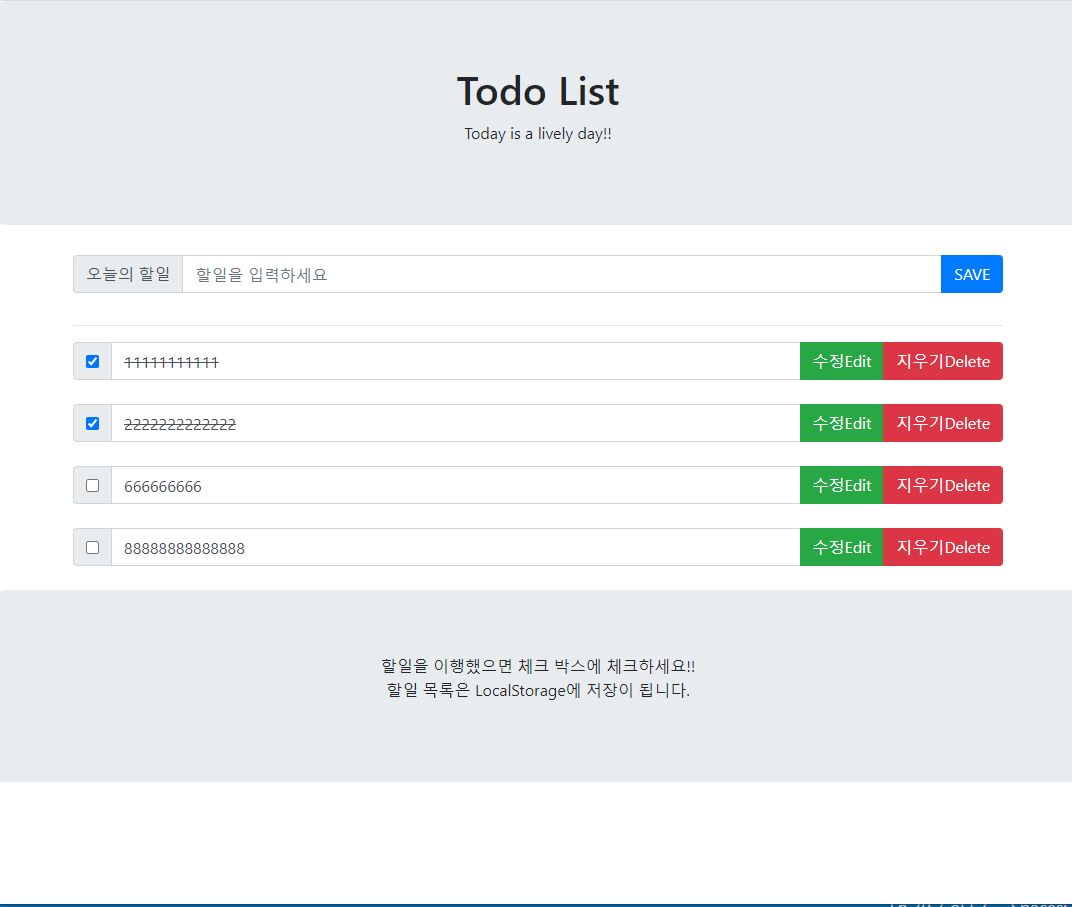
[웹 브러우저 결과]

괴발자가 될것인가, 개발자가 될것인가?