오늘 한 실습 정리
간단한 회원가입 폼 만들고 꾸며라...
부트스트랩 없이 css는 정말 자신이 없다..
우선 컴포넌트 폴더를 만들고 그안에 js파일을 만든다- 자식컴포넌트 개념
폴더이름을 Memveragecheck.js
import React, {Component} from "react";

class Memberagecheck extends Component {

    constructor(props) {
        super (props);
        this.state = { agecheck: '14세 미만은 보호자의 동의가 필요합니다.', color: false}
    }

    change = (event) => {
        const ageValue = event.target.value;
        if(ageValue>13){
            this.setState({ agecheck: '다음 단계로 진행해주세요.',color:true });
        }else{
            this.setState({ agecheck: '14세 미만은 보호자의 동의가 필요합니다.', color: false });
        }
    }
부트스트랩 없이 CSS를 페이지를 따로 만들어서 전체적으로 꾸밀예정
이벤트 발생 시,
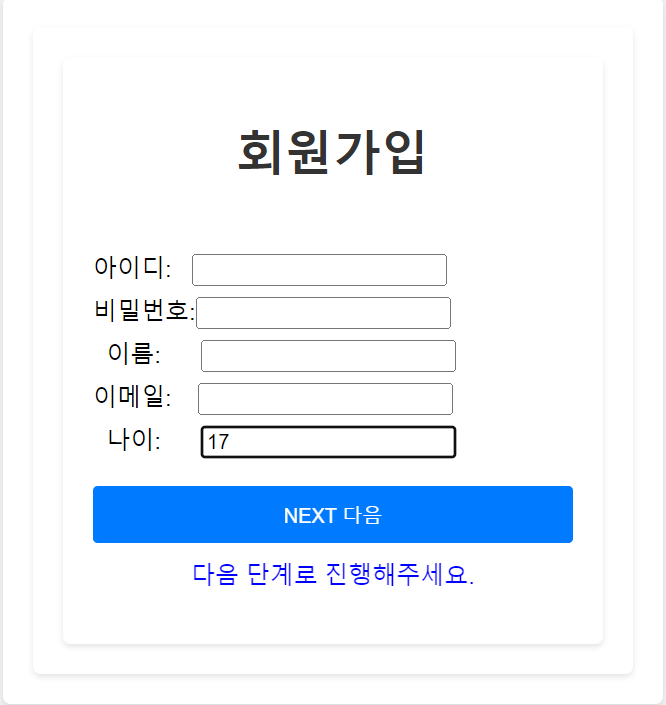
회원가입 칸에 나이가 14세 미만이면 하단에 '보호자의 동의가 필요하다' 라는
메시지를 빨간색으로 나타나게 할 예정이다. => color:red
14세 이상이면 파랑색으로 다음단계로 넘어가게 할 예정이다.=> color:true
render(){
return(
<div>
<h1>회원가입</h1>
<br></br>
<label for="id" />아이디: <input type="text" id="id"></input>
<br></br>
<label for="pwd" />비밀번호:<input type="password" id="pwd"></input>
<br></br>
<label for="name"/> 이름: <input type="text" id="name"></input>
<br></br>
<label for="name"/>이메일: <input type="text" id="email"></input>
<br></br>
<label for="age" /> 나이: <input type="text" id="age" onChange={this.change}></input>
<br></br>
<button>NEXT 다음</button>
<br></br>
<p style={{color: this.state.color ? "blue":"red" }}>
{this.state.agecheck}
</p>
</div>
);
}
}
export default Memberagecheck;CSS 페이지
body {
    font-family: Arial, sans-serif;
    background-color: #f1f1f1;
    margin: 0;
    padding: 0;
  }

  div {
    max-width: 400px;
    margin: 0 auto;
    padding: 20px;
    background-color: #fff;
    border-radius: 5px;
    box-shadow: 0 2px 4px rgba(0, 0, 0, 0.1);
  }

  h1 {
    text-align: center;
    color: #333;
  }

  label {
    display: block;
    margin-bottom: 5px;
    color: #555;
  }

  div {
    max-width: 400px;
    margin: 0 auto;
    padding: 20px;
    background-color: #fff;
    border-radius: 5px;
    box-shadow: 0 2px 4px rgba(0, 0, 0, 0.1);
  }

  button {
    width: 100%;
    padding: 10px;
    background-color: #007bff;
    color: #fff;
    border: none;
    border-radius: 3px;
    cursor: pointer;
  }

  button:hover {
    background-color: #0056b3;
  }

  p {
    text-align: center;
    color: #555;
    margin-top: 10px;
  }
부트스트랩을 끌어다 쓰면 더 예쁘게 나올수 있지만..
메인 페이지 = 부모컴포넌트 개념
import './App.css';
import Memberagecheck from './components/Memberagecheck';

function App() {
  return (
    <div className="App">
      <Memberagecheck></Memberagecheck>

    </div>
  );
}

export default App;
웹 결과값
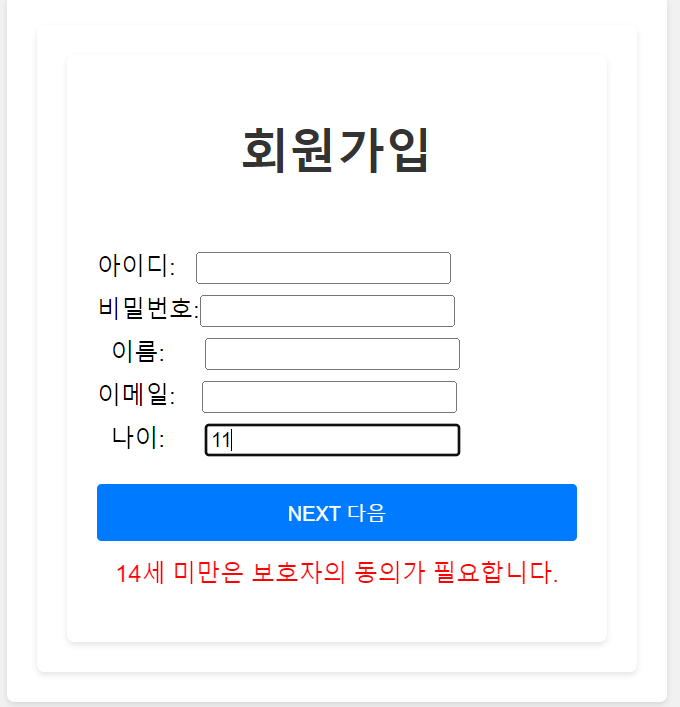
14세 이상일 때

괴발자가 될것인가, 개발자가 될것인가?