1. useReducer
- state의 개수가 늘어나면 setState의 쌍 또한 늘어나므로 state의 관리가 어려워진다. 이러한 경우에 사용하는 Hooks가 바로
useReducer이다. - useReducer는 state를 비동기적으로 변화시킨다.
const initialState = {
    winner: '',
    turn: '0',
    tableData: [['', '', ''], ['', '', ''], ['', '', '']],
}

export const SET_WINNER = 'SET_WINNER';
// action의 이름은 변수로 선언

const reducer = (state, action) => {
    // state를 어떻게 바꿀 것인지
    // action을 dispatch(실행)할 때마다 reducer 실행
    switch (action.type) {
        // action.type으로 어떤 액션인지 구분
        case 'SET_WINNER':
        return {
            ...state, // 기존 state 얕은 복사
            winner: action.winner,
            // state를 어떻게 바꿀 것인지 return에서 기술
            // state.winner = action.winner; 이렇게 직접 변경은 XXX
            // 새로운 객체를 만들어서 바뀐 값만 바꾸어주어야 함
        };
        default:
    }
};

{...}

const [state, dispatch] = useReducer(reducer, initialState);
2. 얕은 복사
- reducer를 사용할 때 중요한 개념 중 하나가 얕은 복사이다.
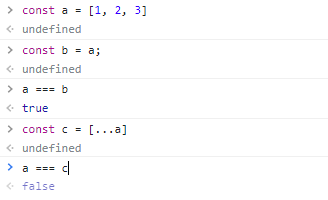
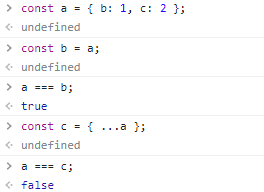
b에는 객체의 실제 값을 새로운 메모리 공간에 복사한 반면 c에는 객체 a의 객체 참조값, 즉 주소값만을 복사하였다. 이를 얕은 복사라고 한다.
3. 틱택토 게임 구현
import React, { useState, useReducer, useCallback, useEffect } from 'react';
import Table from './table';

const initialState = {
    winner: '',
    turn: 'O',
    tableData: [
        ['', '', ''],
        ['', '', ''],
        ['', '', ''],
      ],
      recentCell: [-1, -1], // 최근 눌렀던 셀 기억
}

export const SET_WINNER = 'SET_WINNER';
export const CLICK_CELL = 'CLICK_CELL';
export const CHANGE_TURN = 'CHANGE_TURN';
export const RESET_GAME = 'RESET_GAME';
// action의 이름은 변수로 선언

const reducer = (state, action) => {
    // state를 어떻게 바꿀 것인지
    // action을 dispatch(실행)할 때마다 reducer 실행
    switch (action.type) {
        // action.type으로 어떤 액션인지 구분
        case SET_WINNER:
        return {
            ...state, // 기존 state 얕은 복사
            winner: action.winner,
            // state를 어떻게 바꿀 것인지 return에서 기술
            // state.winner = action.winner; 이렇게 직접 변경은 XXX
            // 새로운 객체를 만들어서 바뀐 값만 바꾸어주어야 함
        };

        case CLICK_CELL:
            const tableData = [...state.tableData];
            tableData[action.row] = [...tableData[action.row]];
            tableData[action.row][action.cell] = state.turn;
            // immer라는 라이브러리로 가독성 해결 가능
            // 객체가 있으면 얕은 복사를 해주어야 한다.
            return {
                ...state,
                tableData,
                recentCell: [action.row, action.cell], // 최근 클릭 셀 기억
            }

        case CHANGE_TURN: {
            return {
                ...state,
                turn: state.turn === 'O' ? 'X' : 'O',
            }
        }

        case RESET_GAME: {
            return {
                ...state,
                turn: 'O',
                tableData: [
                    ['', '', ''],
                    ['', '', ''],
                    ['', '', ''],
                  ],
            };
        }
        default:
            return state;
    }
};

const TikTacToe = () => {
    // state는 부모인 TikTacToe에서 관리
    // useReducer -> state를 관리해주는 Hooks
    const [state, dispatch] = useReducer(reducer, initialState);
    const { tableData, turn, winner, recentCell } = state;

    const onClickTable = useCallback(() => {
        // 컴포넌트에 들어가는 함수들은 useCallback
        dispatch({ type: SET_WINNER, winner: '0' })
        // dispatch 내부에 들어가면 action 객체
    }, []);

    useEffect(() => {
        let win = false;
        const [row, cell] = recentCell;
        if (row < 0) {
            return;
        }
        if (tableData[row][0] === turn && tableData[row][1] === turn && tableData[row][2] === turn) {
            win = true; // 가로줄 검사
        }
        if (tableData[0][cell] === turn && tableData[1][cell] === turn && tableData[2][cell] === turn) {
            win = true; // 세로줄 검사
        }
        if (tableData[0][0] === turn && tableData[1][1] === turn && tableData[2][2] === turn) {
            win = true; // 대각선 검사
        }
        if (tableData[0][2] === turn && tableData[1][1] === turn && tableData[2][0] === turn) {
            win = true; // 대각선 검사
        }

        if (win) { // 승리 시
            dispatch({ type: SET_WINNER, winner: turn });
            dispatch({ type: RESET_GAME });
        } else {
            // 무승부 검사
            let all = true; // all이 true면 무승부라는 뜻
            tableData.forEach((row) => {
                row.forEach((cell) => {
                    if (!cell) {
                        all = false;
                        // 하나라도 안 찬 칸이 있다면 무승부가 아님
                    }
                })
            });
            if (all) {
                dispatch({ type: RESET_GAME });
            } else {
                // 무승부가 아니라면 턴을 넘김
                dispatch({ type: CHANGE_TURN });
            }
        }
    }, [tableData]);

    return (
        <>
            <Table onClick={onClickTable} tableData={state.tableData} dispatch={dispatch} />
            {state.winner && <div>{state.winner} 님의 승리</div>}

        </>
    )
};

export default TikTacToe;
4. 틱택토 최적화
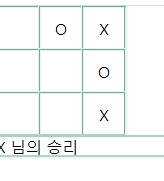
최적화를 해 주지 않으면 사용자는 한 칸만 클릭했음에도 불구하고, 모든 부분이 리렌더링된다.

이때 Tr 컴포넌트에 memo를 적용해 주면,
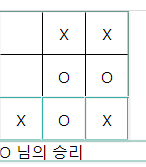
다음과 같이 가로줄에만 렌더링이 발생한다.
이때 useMemo는, memo를 사용했음에도 최적화가 원활하지 않을 때 최종병기(?) 느낌으로 컴포넌트 자체를 기억할 때 쓰면 좋다고 한다.
추가
Uncaught Error: Td(...): Nothing was returned from render. This usually means a return statement is missing. Or, to render nothing, return null.
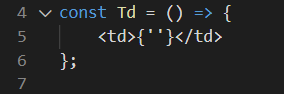
Td 컴포넌트가 중괄호 { } 로 감싸져 있으니 이러한 오류가 발생하였다. 소괄호 ( ) 로 변경하니 해결되었다!
Warning: validateDOMNesting(...): <td> cannot appear as a child of <table>.
JSX에서 <td> 태그를 사용하려면 <tbody>를 선언해야 한다.

Front-End / 기록용