이번 강의는 코드도 정말 길고 컴포넌트도 많아서 전체 소스는 생략한다 😅
1. Context API
Context API를 사용하면, 중간의 자식 element에게 props를 넘겨주지 않아도 된다.
const MineSweeper = () => {
    const [state, dispatch] = useReducer(reducer, initialState);
    const value = useMemo(() => ({
        // useMemo를 통한 캐싱 필요
        tableData: state.tableData, dispatch
    }), [state.tableData])

    return (
        <TableContext.Provider value={value}>
            {/* MineSweeper가 리렌더링 될 때마다 객체가 새로 생김 - Context API를 쓰는 자식들도 리렌더링 */}
            <Form dispatch={dispatch} />
            <div>{state.timer}</div>
            <Table />
            <div>{state.result}</div>
        </TableContext.Provider>
    )
};

이때 Provider는 Context API 내부의 컴포넌트로, 이를 통해 Context의 값을 정할 수 있다.
2. 우클릭 구현
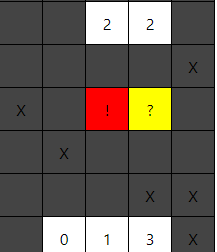
flag와 question은 우클릭으로 발생시킨다. onContextMenu 이벤트를 이용하면 된다.
td.js
    const onRightClickTd = useCallback((e) => {
        e.preventDefault();
        switch (tableData[rowIndex][cellIndex]) {
            case CODE.NORMAL:
            case CODE.MINE:
              dispatch({ type: FLAG_CELL, row: rowIndex, cell: cellIndex });
              return;
            case CODE.FLAG_MINE:
            case CODE.FLAG:
              dispatch({ type: QUESTION_CELL, row: rowIndex, cell: cellIndex });
              return;
            case CODE.QUESTION_MINE:
            case CODE.QUESTION:
              dispatch({ type: NORMALIZE_CELL, row: rowIndex, cell: cellIndex });
              return;
            default:
              return;
          }
          if (halted) {
            return; // 게임이 멈추면 return
        }
    }, [tableData[rowIndex][cellIndex]]);
3. Context API 최적화


Context API를 사용할 때도 memo와 useMemo를 통한 최적화가 중요하다. 그렇지 않으면 엄청난 성능 저하가 발생할 수 있으므로 주의!
이때, memo를 사용하려면 하위 컴포넌트에도 다 memo가 적용되어 있어야 한다.
추가
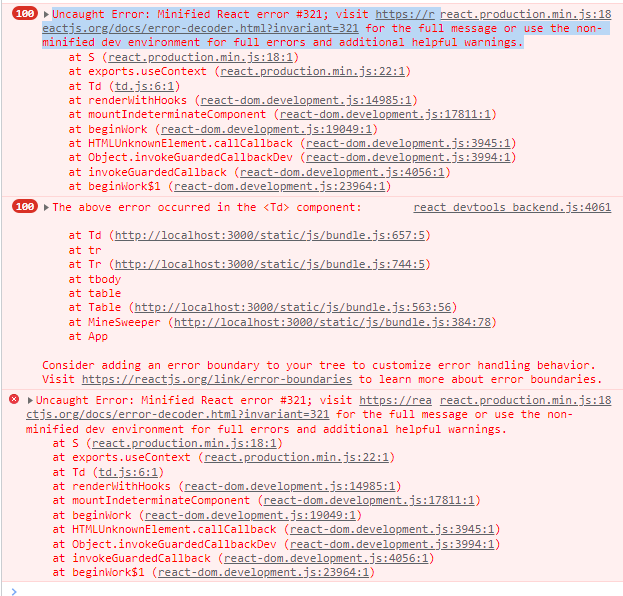
Uncaught Error: Minified React error #321; visit https://reactjs.org/docs/error-decoder.html?invariant=321 for the full message or use the non-minified dev environment for full errors and additional helpful warnings.
구현 도중, 갑자기 이런 오류가 발생했다.

구글링을 해 보니 import 경로 문제라고 하여 자동 import한 useContext를 살펴 보았는데, 생뚱맞은 경로에서 import가 되어 있었다! 🙄
경로를 다시 'react'로 고쳐주면 해결된다.
기타 오류는 비슷비슷하다... 오탈자로 인한 것이나 <tbody> 관련 오류.

Front-End / 기록용