Pydantic을 활용한 데이터 모델링 및 검증
Pydantic은 데이터 모델링과 데이터 파싱, 그리고 효율적인 에러 핸들링을 가능하게 하는 라이브러리로 널리 알려져 있습니다. 특히, 데이터 검증 및 FastAPI 애플리케이션으로 들어오는 데이터를 처리하기 위해 자주 사용됩니다.
Pydantic의 구현 방법
Pydantic을 사용하는 가장 기본적인 방법은 BaseModel을 상속받아 사용자 정의 데이터 모델을 만드는 것입니다. 이렇게 하면 각 변수 또는 요소마다 데이터 검증 규칙을 적용할 수 있으며, 이를 통해 들어오는 데이터의 유효성을 철저히 검사할 수 있습니다.
데이터 검증을 위한 요청 모델 생성
Pydantic을 사용하여 데이터 검증을 위한 요청 모델을 만드는 것은 매우 간단합니다. BaseModel 정의 시 각 필드에 대한 타입을 명시함으로써, Pydantic은 자동으로 이러한 타입 조건에 맞는 데이터만을 허용하도록 검증합니다.
- BookRequest와 Book 변환 예제
Pydantic을 사용하여 API 요청을 통해 받은 데이터를 쉽게 다룰 수 있습니다. 예를 들어, 책 정보를 받아 새로운 책을 생성하는 API 엔드포인트를 구현할 때, Pydantic의 요청 모델(BookRequest)을 사용하여 들어오는 요청 데이터의 유효성을 검증한 후, 이를 실제 책 객체(Book)로 변환할 수 있습니다.
아래는 Pydantic의 요청 모델을 사용하여 책 정보를 받고, 이를 책 객체로 변환하여 저장하는 간단한 예시입니다.
class Book:
    id: int
    title: str
    author: str
    description: str
    rating: int

    def __init__(self, id, title, author, description, rating):
        self.id = id
        self.title = title
        self.author = author
        self.description = description
        self.rating = rating

class BookRequest(BaseModel):
    # Field 로 유효성 검사 추가
    id: int
    title: str = Field(min_length=3)
    author: str
    description: str
    rating: int


@app.post("/create-book")
async def create_book(book_request: BookRequest):
    # ** : BookRequest 모델의 인스턴스에서 딕셔너리를 추출
    # dict() => model_dump() 로 변경됨
    new_book = Book(**book_request.model_dump())
    # 새 책 객체를 BOOKS 리스트에 추가
    BOOKS.append(new_book)
이 예시에서 ** 연산자는 BookRequest 모델의 인스턴스에서 추출한 딕셔너리를 Book 클래스의 생성자로 전달합니다. 이 방식을 통해, API로부터 받은 데이터를 쉽게 다루고, 유효성 검증을 통해 데이터의 정확성을 보장할 수 있습니다.
Pydantic은 데이터 중심의 애플리케이션 개발에 있어 중요한 도구 중 하나입니다. 데이터 검증과 파싱을 쉽고 효율적으로 만들어주며, 개발자가 보다 안전하고 신뢰할 수 있는 애플리케이션을 구축할 수 있도록 돕습니다.
Field 를 통해 각 필드마다 유효성 검사 해보기
from pydantic import BaseModel, Fieldpydantic 에서 Filed 도 임포트합니다. 이는 요청 객체의 필드마다 유효성 검사를 추가할 수 있도록 합니다.
그리고 basemodel 에서 title 이 3글자가 넘어야한다는 조건을 추가해봅시다.
요청 베이스 모델인데 여기서 title : str 에서 str = Filed(min_length=3) 을 추가하면 최소 길이를 지정할 수 있습니다.
class BookRequest(BaseModel):
    # Field 로 유효성 검사 추가
    id: int
    title: str = Field(min_length=3)
    author: str
    description: str
    rating: int
그리고 포스트 요청을 할 때, 요청 모델은 BookRequest 에서 정의한 베이스 모델로 받고, 요청 받은 모델을 ** 연산자를 통해 딕셔너리를 추출하여 Book 클래스의 생성자로 전달할 수 있습니다. 이 객체를 BOOKS 에 추가하면 됩니다.
@app.post("/create_book")
# 데이터 다루기 전에 유효한 지 확인하기
async def create_book(book_request: BookRequest):
    # dict() -> model_dump()
    new_book = Book(**book_request.model_dump())
    BOOKS.append(new_book)
전체코드는 이렇습니다.
from fastapi import FastAPI
# pydantic : 데이터와 기본 모델에 대한 유효성 검사할 수 있는 프레임워크
# Field : 요청 객체의 필드마다 유효성 검사 추가할 수 있음
from pydantic import BaseModel, Field

app = FastAPI()
# schema_extra() -> json_schema_extra

class Book:
    id: int
    title: str
    author: str
    description: str
    rating: int

    def __init__(self, id, title, author, description, rating):
        self.id = id
        self.title = title
        self.author = author
        self.description = description
        self.rating = rating


class BookRequest(BaseModel):
    # Field 로 유효성 검사 추가
    id: int
    title: str = Field(min_length=3)
    author: str
    description: str
    rating: int


BOOKS = [
    Book(1, 'Computer Science Pro', 'codingwithroby', 'A very nice book!', 5),
    Book(2, 'Be fast with FastAPI', 'codingwithroby', 'A awesome book!', 5),
    Book(3, 'Master endpoints', 'codingwithroby', 'A great book!', 5),
    Book(4, 'HP1', 'Author 1', 'Book Description', 2),
    Book(5, 'HP2', 'Author 2', 'Book Description', 3),
    Book(6, 'HP3', 'Author 3', 'Book Description', 1)
]


@app.get("/books")
async def read_all_books():
    return BOOKS


@app.post("/create_book")
# 데이터 다루기 전에 유효한 지 확인하기
async def create_book(book_request: BookRequest):
    # dict() -> model_dump()
    new_book = Book(**book_request.model_dump())
    BOOKS.append(new_book)
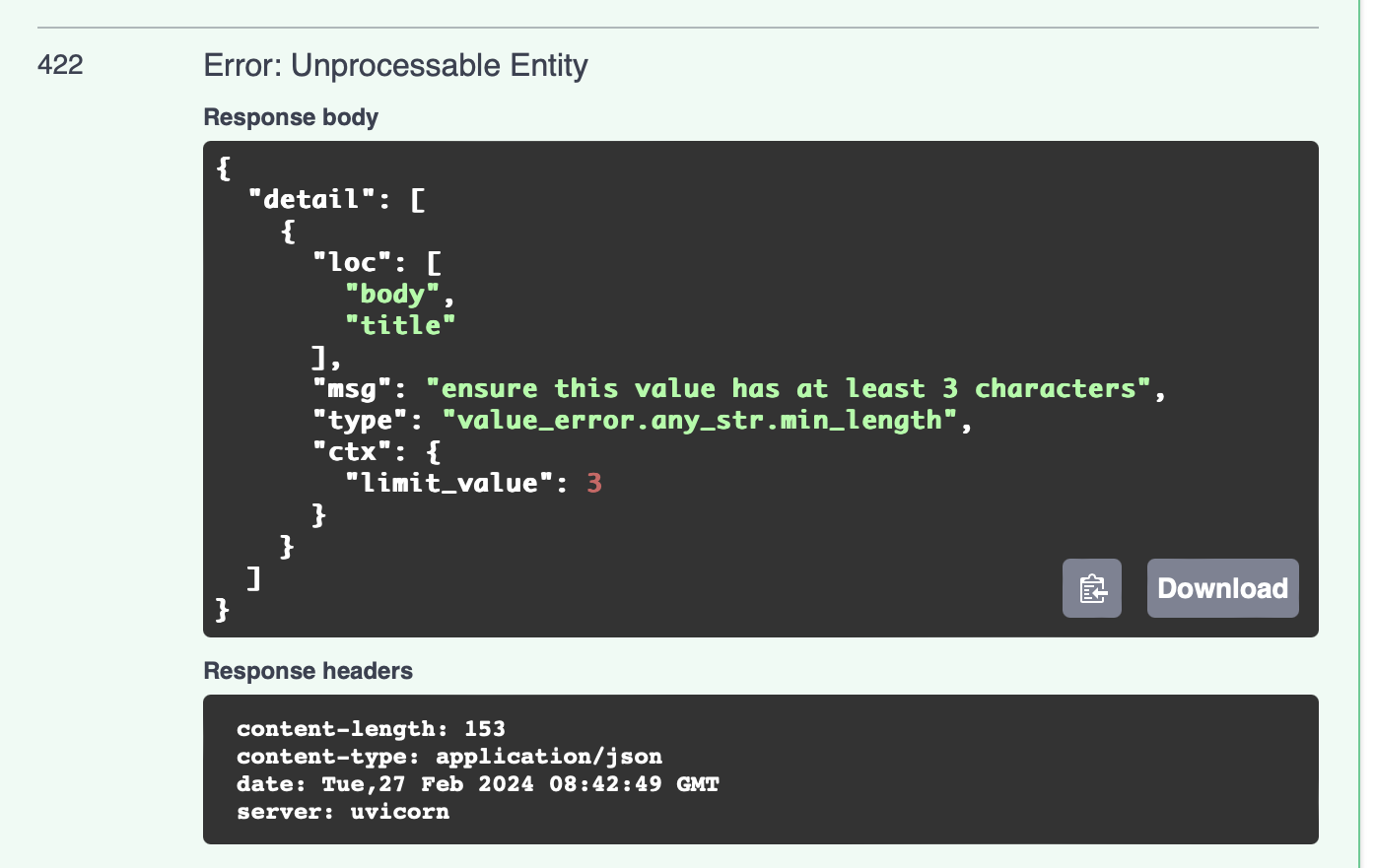
swagger 에 접속하면, 만약 title 이 공란일 때(min_length <3)
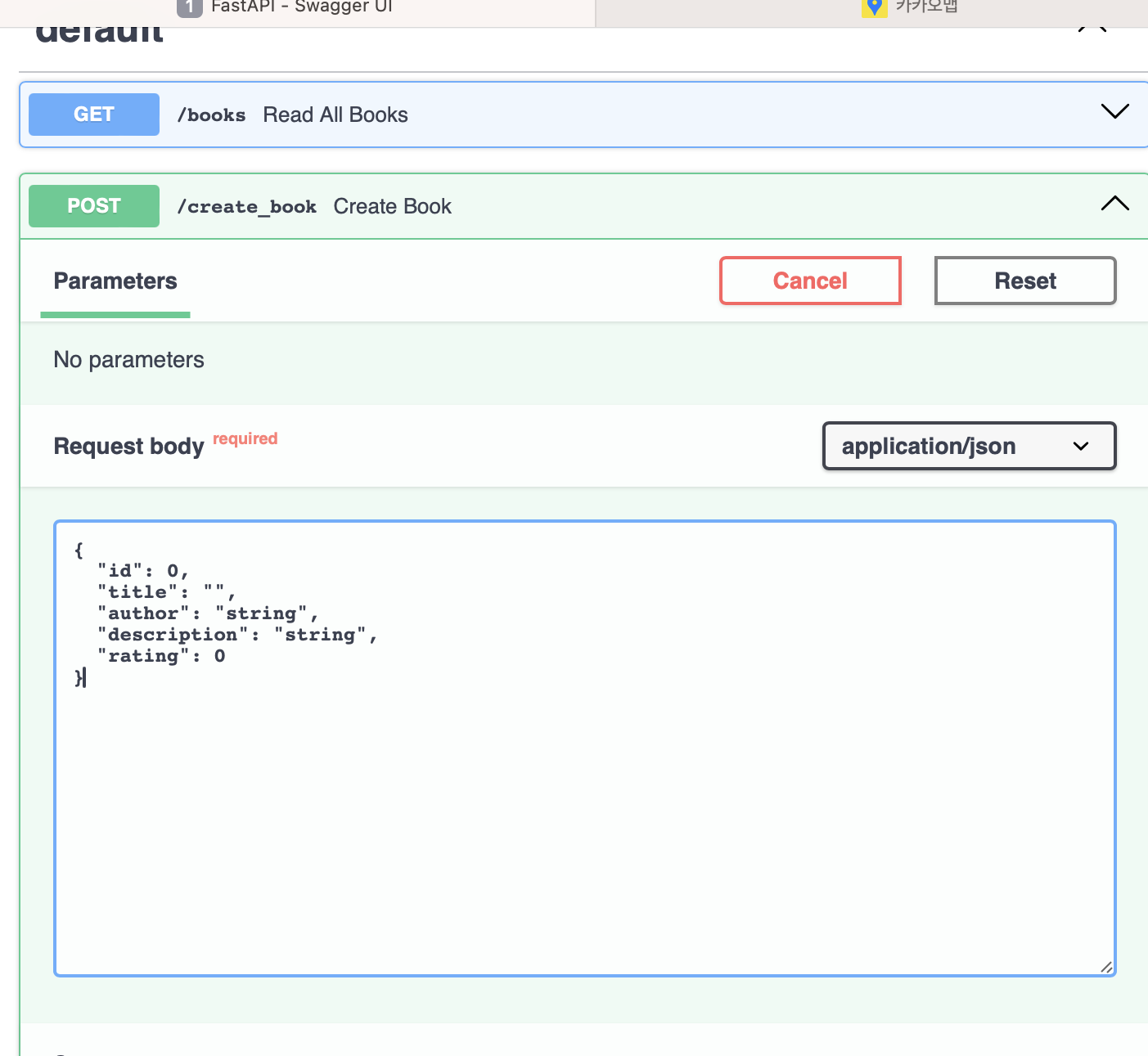
다음과 같은 메시지가 출력됨을 확인할 수 있습니다.("ensure this value has at least 3 characters"
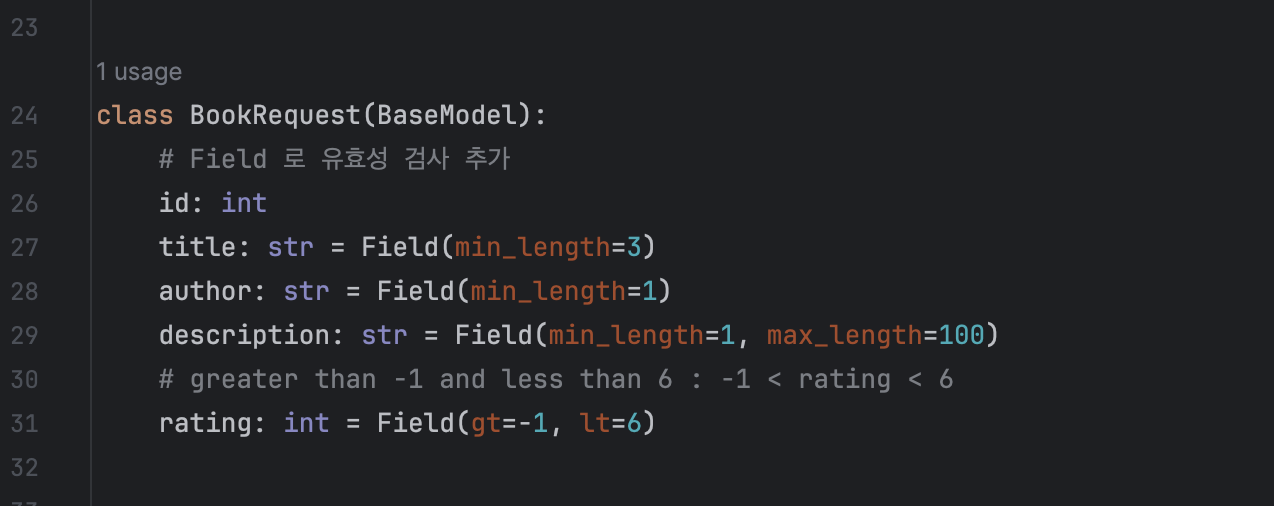
조건에는 min_length, max_length 로 글자 수에 대한 validation 을 할 수도 있고 gt, lt 로 범위를 지정할 수 있습니다. rating 은 int 값인데 이 때 범위 지정을 위해 gt (=greater than) lt(less than) 을 통해 -1보다는 크고 6보다는 작은 수로 지정할 수 있습니다.