[Servlet&JSP] Dynamic Web Project 디렉토리 구조와 역할

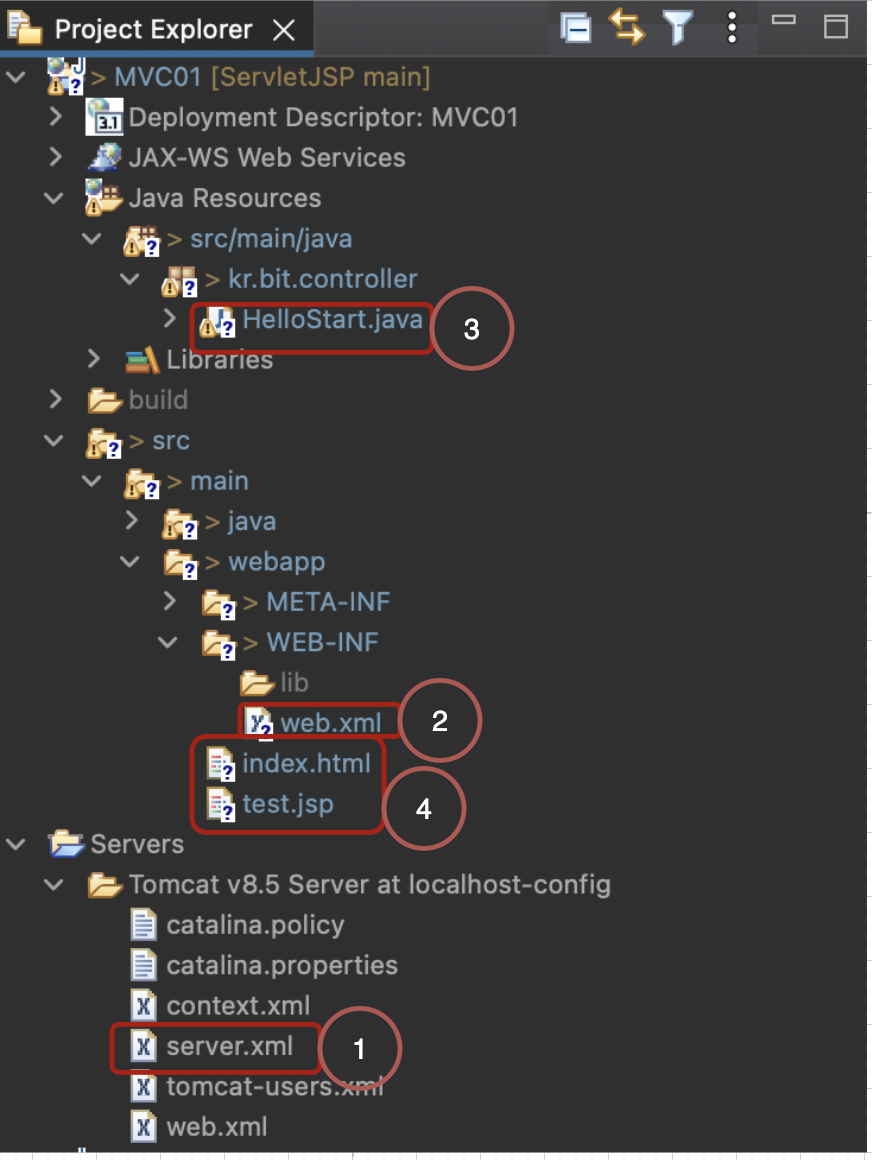
1. server.xml
- 톰캣 컨테이너에 우리가 만든 웹 어플리케이션을 context 등록한다.
- Dynamic Web Project 생성 시, Context Root(MVC01) -> path(src/main/webapp)
- Servers탭 -> Add로 웹 어플리케이션을 추가해야한다.
- 서버 구동과 함께 톰캣이 server.xml의 context를 읽는다.
<Context docBase="MVC01" path="/MVC01" reloadable="true" source="org.eclipse.jst.jee.server:MVC01"/>2. web.xml
- web.xml = 배치서술자
- 안내도 역할 : .class파일의 위치정보(어느 패키지에 위치하는지 기록)
- build 기본위치 : WEB-INF/classes/
- servlet-mapping작업 : 클라이언트의 요청url과 진짜서블릿의 위치를 mapping
- servlet의 세가지이름 : servlet-name(임의), servlet-class(진짜이름), url-pattern(클라이언트의요청)
- web.xml방식은 번거롭기 때문에, annotation 방법으로 대체한다.
<servlet>
	<servlet-name>HelloServlet</servlet-name>
	<servlet-class>kr.web.controller.HelloServlet</servlet-class>
</servlet>
<servlet-mapping>
	<servlet-name>HelloServlet</servlet-name>
	<url-pattern>/hs.do</url-pattern>
</servlet-mapping>
3. servlet
- servlet은 기본적으로 controller로써, 클라이언트의 요청을 처음으로 받는다.(MVC의 C)
- web.xml의 mapping에서 벗어나 annotaion방식으로 대체한 것을 볼 수 있다.
<servlet의 기본 구조>
@WebServlet("/h.do")
public class HelloStart extends HttpServlet {

	protected void service(HttpServletRequest request, HttpServletResponse response)
			throws ServletException, IOException {
   }

}
4. html, jsp 및 기타 파일
- WEB-INF 폴더 밑에 html, jsp, images, css, js 파일들이 위치한다.

공부하고 이해한 내용들을 직접 그림과 표를 그리면서 정리해보는 공간입니다.🤗