Ansible 이란?
Ansible은 IT 자동화 도구로, 주로 서버와 애플리케이션의 배포, 관리, 운영 자동화에 사용된다.
즉 인프라 관리를 코드 기반으로 자동화 하여 환경을 동일하게 유지할 수 있다.
Ansible 의 특징
- Agentless
chef/puppet 등은 client 대상에 agent를 설치 후 pull 방식으로 동작하지만 ansible은 agent를 설치하지 않고 push 방식으로 동작한다. - Idempotency (멱등성)
어떠한 연산이 여러번 수행되어도 결과가 동일하게 출력됨으로써 일관되게 수행할 수 있다. - YAML 언어 사용
- 오픈소스 IT 자동화 도구
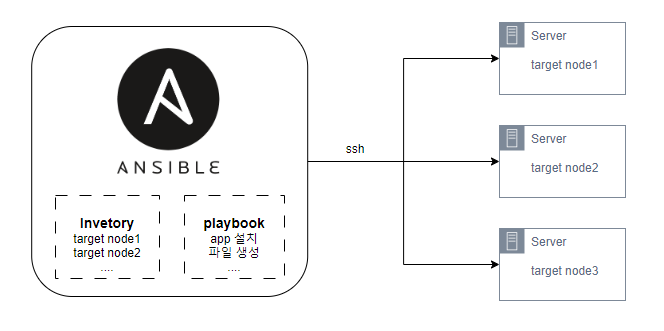
Ansible 구조
- controller 서버
Ansible 이 설치된 서버로 target node(원격지 서버) 들에게 명령을 전달한다.
- Inventory
Controller 서버가 명령을 전달할 target node(원격지 서버) 의 목록.
/etc/ansible/hosts 파일에 저장된 target node
- playbook
client 서버들에게 전달할 명령들을 모아둔 YAML 파일
- task
Ansible의 작업 단위
설치 과정
1. EPEL 리포지토리, python 설치
[root@Ansible ~]# yum install epel-release
[root@Ansible ~]# yum install -y python python-pip python-devel
2. Ansible 패키지 설치
[root@Ansible ~]# yum install ansible -y3. ssh key 생성 후 배포
controller 서버와 각 target node 들은 ssh-key 파일로 통신이 되어야 ssh 접속 시 패스워드 없이 명령 수행이 가능하다.
4. ansible 의 명령을 받을 노드 추가
[root@Ansible ~]# vi /etc/ansible/hosts

[webservers]
host1
host2

[wasservers]
172.16.1.1
172.16.1.2

[dbservers]
192.168.11.3
192.168.11.4
4. Ansible playbook 작성
playbook 생성할 경로 만들기
[root@Ansible ~]# mkdir -p /inventory/playbooks파일 복사 yaml 파일 생성
[root@Ansible ~]# vi /inventory/playbooks/Copy_script_file.yml

- name: Copy_script_file
  hosts: webservers
  tasks:
    - name: Copy script file to remote hosts
      copy:
        src: /root/Unix224542.sh
        dest: /root/Unix224542.sh
        mode: "744"
5. ping test
[root@Ansible ~]# ansible all -m ping
172.16.1.15 | SUCCESS => {
    "ansible_facts": {
        "discovered_interpreter_python": "/usr/bin/python"
    },
    "changed": false,
    "ping": "pong"
}
success 확인. 설정 완료.

sysop