2026.01.22
데이터 분석 도구: Pandas
Pandas 개요
공식문서링크: pandas documentation
NumPy가 숫자 배열을 다루는 데 특화되어 있다면, Pandas는 우리가 흔히 쓰는 엑셀 (table)형태의 데이터를 다루는 데 최적화된 라이브러리 도구이다.
Pandas 설치 및 설정
- pandas 설치
- pandas를 설치하는 가장 간단한 방법은 pip 명령어를 사용하는 것이다. 터미널이나 커맨드 라인에서 다음 명령어를 입력하면 설치된다.
pip install pandasconda 사용 시, 다음 명령어로 설치 가능
conda install pandas환경 설정
- 파이썬 스크립트나 주피터노트북에서 pandas 사용하는 방법:
여기서 pd는 pandas의 별칭으로 자주 사용되며, 코드의 가독성을 높여준다.
import pandas as pd- 버전 확인
print(pd.__version__)다른 라이브러리와 비교 (NumPy, SQL, Excel)
- pandas와 NumPy
- NumPy는 수치 계산을 위한 배열 기반의 라이브러리이고, pandas는 이를 기반으로 더 복잡한 데이터 구조를 다룬다.
- pandas는 NumPy 배열을 내부적으로 사용하여 더 효율적으로 대규모 데이터를 처리하지만, 데이터 조작이나 분석에 있어 더 높은 수준의 기능을 제공한다.
- pandas와 SQL
- SQL은 데이터베이스에서 데이터를 다루는 언어이며, pandas는 로컬 환경에서 데이터를 다룬다.
- pandas의 DataFrame은 SQL의 테이블과 유사하며, pandas에서는 SQL에서 하는 연산들(선택, 필터링, 조인 등)을 쉽게 수행할 수 있다.
- pandas와 Excel
- Excel은 GUI 기반의 스프레드시트 소프트웨어로 데이터 분석에 널리 사용되지만, 대규모 데이터 처리나 자동화에는 한계가 있다.
- pandas는 Excel에서 할 수 있는 대부분의 기능을 코드로 구현할 수 있으며, 특히 데이터의 크기가 커지면 pandas가 훨씬 효율적이다.
Pandas의 데이터 구조
pandas는 Series와 DataFrame 이라고 하는 두가지 주요 데이터 구조를 제공함
- Series: 1차원 배열로, 인덱스를 포함하며 데이터를 저장한다. (데이터에 고유한 인덱스를 부여하여 데이터에 접근할 수 있다.)
- DataFrame: 2차원 테이블 형식의 데이터 구조로 여러 개의 Series가 모여 테이블을 이루며, 각 컬럼은 동일한 인덱스를 공유한다. (행과 열 모두 인덱스를 통해 접근할 수 있다.)
(1) Series:
Series: 1차원 데이터
엑셀 시트에서 열(column)하나를 떼어낸 것과 같은 형태로, 데이터값(value) 뿐만 아니라 각 값에 이름을 붙인 인덱스(index)가 항상 쌍으로 존재한다.
구조: index + data values
NumPy의 1차원 배열과 유사하며 인덱스와 데이터를 함께 저장
데이터는 숫자, 문자열, 불리언, 또는 다른 데이터 타입을 포함할 수 있음
- index(label)을 통해 조작/처리 가능한 1차원 배열
- 엑셀의 열(column) 하나라고 생각하면 쉬워
- 데이터(value)와 각 데이터에 대응하는 인덱스(index)가 한 쌍으로 묶여있어
- 별도로 인덱스를 지정하지 않았기 때문에 0, 1, 2, 3, 4라는 기본 정수형 인덱스가 자동으로 부여돼
생성방법
pd.Series()함수 사용하여 생성
import pandas as pd

# 리스트로 Series 생성
s = pd.Series([10, 20, 30, 40], index=['a', 'b', 'c', 'd'])
print(s)
특징
- 각 데이터는 고유한 인덱스를 가지며, 이를 통해 데이터에 쉽게 접근할 수 있음
- dtype은 Series 내부의 데이터 타입을 나타냄
데이터 선택
Series의 각 값은 인덱스를 이용해 선택할 수 있음
# 인덱스를 이용한 선택
print(s['b'])  # 20
# python list 활용
stocks_ser = pd.Series(['NVDA', 'MSFT', 'AAPL', 'GOOG', 'TSLA'])
# 속성 설정:
stocks_ser.name = '미국 주식' # name 속성 (인스턴스)
#전체 데이터 출력:
print(stocks_ser) # 데이터, row index, Name, dtype
# 결과값:
# 왼쪽(0~4): 행 번호인 index
# 오른쪽(NVDA~TSLA): 실제 data
# Name: 위에서 설정한 시리즈의 이름
# dtype: 데이터의 타입. 문자열 데이터는 판다스에서 보통 object로 표시
# 특정 데이터 접근 (indexing)
print(stocks_ser[3]) # GOOG / 리스트와 마찬가지로 대괄호 [ ] 를 사용해서 특정위치의 데이터를 가지고 와.
# 자료형 확인: 이 변수가 일반 파이썬 리스트가 아니라, 판다스의 시리즈 객체임을 증명
print(type(stocks_ser))# NumPy ndarray 활용
nums_ser = pd.Series(np.random.randn(5), index=['a', 'b', 'c', 'd', 'e'])
# Series 생성 시 index label 지정 가능
print(nums_ser) # Series 전체 출력
# print(nums_ser[4]) -> ver.2.x.x (o) -> ver.3.0.0 (x)
# ver.2.x.x (index 숫자로 가능) -> ver.3.0.0 (index label이 설정된 경우 불가)
# eg)
# loc: 내눈에 보이는 이름(label)표를 보고 찾는다
#iloc: 컴퓨터가 관리하는 순서(position) 번호를 보고 찾는다.print(nums_ser['e']) # -> 결과값: 인덱스 'e'에 해당하는 난수값 출력
# loc (label-based): 라벨 이름을 사용한 접근 -> 결과는 위와 동일. 명시적으로 '라벨'을 쓰겠다고 선언하는 방식
print(nums_ser.loc['e']) #.찍고 loc[] 오면 이것은 속성 / loc(location): 인덱스라벨을 통한 참조
# 위치 번호 (0부터 시작)을 사용한 접근 -> 결과: 5번째 (인덱스4)값인 'e'의 위치 값을 출력
print(nums_ser.iloc[4]) # iloc(integer location): 인덱스를 통한 참조# python dictionary 활용 (key가 index label, value가 값이 됨)
info = {
'a': 100,
'b': 200,
'c': 300
}
info_ser = pd.Series(info)
print(info_ser)
info_ser.index = ['A', 'B', 'C']
print(info_ser)# scalar value 활용
num_ser = pd.Series(5.5)
num_ser = pd.Series(5.5, index=['ㄱ', 'ㄴ', 'ㄷ', 'ㄹ', 'ㅁ'])
print(num_ser)Series 속성
movies = ['만약에 우리', '프로젝트 Y', '신의 악단', '아바타: 불과 재', '천공의 성 라퓨타']
movies_ser = pd.Series(movies)
movies_ser
출력값:
0 만약에 우리
1 프로젝트 Y
2 신의 악단
3 아바타: 불과 재
4 천공의 성 라퓨타
dtype: str# 값으로만 이루어진 ndarray 반환
print(movies_ser.to_numpy()) # ['만약에 우리' '프로젝트 Y' '신의 악단' '아바타: 불과 재' '천공의 성 라퓨타']
print(type(movies_ser.to_numpy())) # <class 'numpy.ndarray'>
# [참고] value 속성은 2.x.x 버전에서는 to_numpy()와 같은 기능을 했으나 3.0.0 ver.에서는 array와 같은 기능을 하며 사용 지양함.
# print(movies_ser.values)
# print(type(movies_ser.values))# pandas의 확장 Array 객체로 값 반환
print(movies_ser.array)
print(type(movies_ser.array))
# <StringArray>
# ['만약에 우리', '프로젝트 Y', '신의 악단', '아바타: 불과 재', '천공의 성 라퓨타']
# Length: 5, dtype: str
# <class 'pandas.arrays.StringArray'># index를 별도 지정하지 않은 경우 기본적으로 숫자 인덱스 (RangeIndex)
print(movies_ser.index) # RangeIndex(start=0, stop=5, step=1)
# 라벨을 지정한 경우 라벨 인덱스
movies_ser.index = ['1st', '2nd', '3rd', '4th', '5th']
print(movies_ser.index) # Index(['1st', '2nd', '3rd', '4th', '5th'], dtype='str')print(movies_ser.dtype) # 자료타입 # str
print(movies_ser.shape) # 구조 (형태) # (5,)
print(movies_ser.ndim) # 차원 (깊이) # 1
print(movies_ser.size) # 크기 (요소 개수) # 5# is_unique: 시리즈가 가진 값이 모두 고유한 값인지의 여부 (True: 중복값 X / False: 중복값 O)
movies_ser.is_unique # TrueSeries 메서드
nums_ser = pd.Series([2026, 1, 22, 11, 23])

# 값 연산
print(nums_ser.sum())      # 총합 (누적 합)    -> 2083
print(nums_ser.mean())     # 평균				-> 416.6
print(nums_ser.product())  # 누적 곱 		   -> 11276716

# 데이터 확인
print(nums_ser.head(2))    # 앞에서부터 일부 데이터를 조회 (기본값=5)
print(nums_ser.tail(3))    # 뒤에서부터 일부 데이터를 조회 (기본값=5)

# Series 메타데이터 (meta data): not-null 여부 확인, 자료형 확인,...
nums_ser.info()

# Series의 데이터를 분석/설명
nums_ser.describe()

movies_ser.describe()
# 데이터의 type에 따라 describe()결과 달라질 수 있음
S&P 500 데이터 활용
pd.read_csv('./data/S_P500_Prices.csv')# read_csv(file_path): file_path 파일을 읽어와 DataFrame 형태로 반환
sp_500 = pd.read_csv('./data/S_P500_Prices.csv')
type(sp_500) # pandas.DataFrame# df.squeeze(): DataFrame 의 Series가 하나인 경우 Series 객체 반환
sp_500_ser = sp_500.squeeze()
type(sp_500_ser) # pandas.Series# sp_500_ser의 메타 데이터 확인
sp_500_ser.info()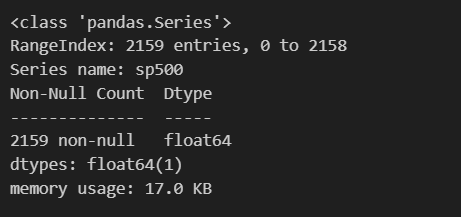
# sp_500_ser의 데이터 요약 확인
sp_500_ser.describe()
# sp_500_ser의 형태, 요소 개수, 차원수 확인
sp_500_ser.shape, sp_500_ser.size, sp_500_ser.ndim# sp_500_ser의 요소개수, 최소값, 중위값, 최대값, 평균값, 표준편차값, 분산값 각각 출력
sp_500_ser.count(), sp_500_ser.min(), sp_500_ser.median(), sp_500_ser.max(), sp_500_ser.mean(), sp_500_ser.std(), sp_500_ser.var()indexing & slicing
# [indexing] 인덱스 50의 값 가져오기
print(sp_500_ser[50])
print(sp_500_ser.iloc[50])

# [slicing] 인덱스 100~200 값 가져오기
print(sp_500_ser[100:201])
print(sp_500_ser.iloc[100:201])

# [fancy indexing] 인덱스 1000,2000의 값 동시에 가져오기
# indices = [1000, 2000]
print(sp_500_ser[[1000, 2000]])
# or
print(sp_500_ser.iloc[[1000, 2000]])

# [boolean indexing] 데이터 값이 3000 이상인 값 가져오기
print(sp_500_ser[sp_500_ser >= 3000])
값 존재 여부 판단
print(3333.689941 in sp_500_ser)   # 라벨 중에 3333.689941 이 있니?
print(3333.689941 in sp_500_ser.to_numpy()) # 갖고 있는 값 중에 3333.689941이 있니?

print(sp_500_ser.isin([3333.689941]).any())
# False
# True
# True
# isin(): 각 값에 대해 일치하는지 판단해 bool series 반환
bool_series = sp_500_ser.isin([3333.689941])
# any(): True가 하나라도 존재하면 True
bool_series.any()print(sp_500_ser.sort_values()) # 정렬된 Series 객체 반환
print(sp_500_ser) # 원본 Series 에 영향 없음sp_500_ser.sort_values(ascending=False) # 내림차순 정렬
print(sp_500_ser)sp_500_ser.sort_values(inplace=True)
# 원본을 수정하는 inplace 연산 (sp_500_ser = sp_500_ser.sort_values() 와 같은 결과)
print(sp_500_ser)(2) DataFrame
DataFrame은 행(row)과 열(column)로 이루어진 2차원 데이터 구조로, 다양한 데이터 타입을 포함할 수 있다. DataFrame은 엑셀 시트나 SQL 테이블과 유사한 구조를 가지고 있다.
- Series를 묶어낸 자료형으로 2차원 배열(=행렬, 표)
- 인덱스 라벨을 기준으로 데이터를 자동으로 정렬
생성 방법
DataFrame은 다양한 방법으로 생성할 수 있다. 대표적인 방법으로는 딕셔너리 또는 리스트를 사용하는 방법이 있다.
data = {
    'Name': ['Alice', 'Bob', 'Charlie', 'David'],
    'Age': [25, 30, 35, 40],
    'City': ['New York', 'Los Angeles', 'Chicago', 'Houston']
}

df = pd.DataFrame(data)
print(df)
특징
- 각 열(Column)은 고유한 Series로 간주된다.
- 행과 열에는 각각의 인덱스와 컬럼 라벨이 있어 데이터를 쉽게 선택할 수 있다.
데이터 선택
- DataFrame에서 특정 열을 선택하려면 열 이름을 사용하면 된다.
# 특정 열 선택
print(df['Name'])- 행을 선택하려면 loc나 iloc을 사용할 수 있다.
# 특정 행 선택 (인덱스 기준)
print(df.loc[1])  # 두 번째 행 선택
Series와 DataFrame의 차이점
- Series는 1차원 데이터 구조로, 데이터에 고유한 인덱스를 부여하여 데이터에 접근할 수 있다.
- DataFrame은 2차원 데이터 구조로, 여러 개의 Series가 모여 테이블을 이루며, 행과 열 모두 인덱스를 통해 접근할 수 있다.
DataFrame 생성
# python dictionary-list 활용: 딕셔너리의 Key가 열(column) 이름이 되고, Value(리스트)가 데이터
data = {
    'one': [1, 2, 3, 4, 5],
    'two': ['가', '나', '다', '라', '마'],
    'three': [1.23, 2.34, 3.45, 4.56, 5.67],
    'four': True   # 모든 list 요소의 length를 맞춰야 하지만, scalar value 는 예외
}
df = pd.DataFrame(data)
df
# python list-dictionary 활용
data = [
{'a': 1, 'b': 2, 'c': 3},
{'b': 5, 'c': 6}, # 'a' == NaN (Not a Number)
{'a': 7, 'b': 8, 'c': 9}
]
df = pd.DataFrame(data)
dfFYI - Numpy로 데이터를 생성하고, 이를 활용해 Pandas DataFrame을 만든 뒤 속성을 변경하는 과정
# NumPy 2차원 ndarray 활용
arr = np.random.randn(2, 3)
# NumPy의 randn은 소수점이 있는 실수형 데이터를 생성하므로, 이 데이터프레임의 모든 값의 타입은 float64가 됨

# DataFrame 생성 시 index, columns 속성 지정 가능 (행과 열 이름 지정)
df = pd.DataFrame(arr, index=['가', '나'], columns=['A', 'B', 'C'])

# 속성(Attribute) 접근 및 수정: DataFrame 속성으로 접근해 수정 가능
df.index = ['1번학생', '2번학생']
df.columns = ['귀여움', '사랑스러움', '간지']
df
data = {
'이름': ['다람쥐', '원숭이', '호랑이'],
'위치': ['독산', '서초', '안양'],
'성별': ['F', 'M', 'M']
}
teacher_df = pd.DataFrame(data)
# teacher_df = pd.DataFrame(data, index=['Squirrel', 'Monkey', 'Tiger'])
teacher_df# 전치행렬
teacher_df.TDataFrame 속성
print(teacher_df.index)    # row(행) 식별 --- RangeIndex(기본숫자), Index(label)
print(teacher_df.columns)  # column (열) 식별 --- Index(label), [RangeIndex(기본숫자, 전치가 일어난 경우...)]

print(teacher_df.T)
print(teacher_df.shape) # 구조 (형태)
print(teacher_df.size) # 요소 개수
print(teacher_df.ndim) # 차원 (깊이)
print(teacher_df.dtypes) # 요소의 자료형 (컬럼별 자료형)print(teacher_df.values) # DataFrame 이 가진 값만 추출
print(type(teacher_df.values))DataFrame 메서드
bank_client_df = pd.DataFrame({
    'Client ID': [1, 2, 3, 4],
    'Client Name': ['Ali', 'Steve', 'Nicole', 'Morris'],
    'Net worth [$]': [35000, 3000, 100000, 2000],
    'Years with bank': [4, 7, 10, 15]
})
bank_client_df
데이터 확인
print(bank_client_df.head(2)) # 상위 2개의 행을 보여줘 / 데이터가 밀리지 않고 컬럼명에 맞게 잘 들어갔는지 확인할 때 쓸수있음
print(bank_client_df.tail(1)) # 가장 마지막 1개의 행을 보여줘 / 전체 데이터가 총 몇 번 인덱스까지 있는지, 끝부분에 결함은 없는지 확인할 때 쓸수있음
bank_client_df.info() # 데이터의 골격 (기술적인 상태)확인
# RangeIndex: 전체 행의 개수 (4 entries, 0 to 3)를 보여줍니다.
# Data columns: 총 컬럼 개수와 각 컬럼의 이름을 나열합니다.
# Non-Null Count: 빈 값(결측치)이 아닌 데이터가 몇 개인지 보여줍니다. (여기서는 모두 4개이므로 빈 값이 없음을 알 수 있습니다.)
# Dtype: 데이터 타입을 보여줍니다.
# int64: 정수 (ID, 자산, 기간)
# object: 문자열 (이름)
# Memory Usage: 이 표가 메모리를 얼마나 차지하는지 보여줍니다.bank_client_df.describe() # 통계요약표 - 숫자형 데이터에 대해서만 기본적인 통계치를 계산해줌
# count 데이터 개수
# mean 평균값
# std 표준편차 (데이터가 평균에서 얼마나 떨어져 있는지)
# min 최솟값
# 25% 하위 25% 지점의 값 (1사분위수)
# 50% 중앙값 (2사분위수)
# 75% 상위 25% 지점의 값 (3사분위수)
# max 최댓값Indexing & Slicing
- iloc: 행(row), 열(column) 순으로 탐색
- loc: 행(row), 열(column) 순으로 탐색
- iloc나 loc를 쓰지 않고 대괄호를 붙여 사용하면 df[컬럼명]을 넣는 식
- iloc (integer location)
# indexing: 특정 행을 Series로 반환

print(bank_client_df.iloc[0])
print(type(bank_client_df.iloc[0]))
print(bank_client_df.iloc[0].index)
print(bank_client_df.iloc[0].name)

# slicing: 해당되는 행을 DataFrame 으로 반환
print(type(bank_client_df.iloc[:2]))
bank_client_df.iloc[:2]

# fancy indexing: 해당되는 행을 DataFrame으로 반환
print(type(bank_client_df.iloc[[0, 1]]))  #fancy indexing
bank_client_df.iloc[[0, 1]]

# fancy indexing 을 통한 조회는 결과가 1개여도 DataFrame 타입으로 반환 (차원 유지)
# 일반적인 indexing(e.g) bank_client_df.iloc[0]은 Series 타입으로 반환 (차원 제거)
print(type(bank_client_df.iloc[[0]]))
bank_client_df.iloc[[0]]

# 2차원 indexing : 특정 행, 특정 열의 값 반환
bank_client_df.iloc[0, 1]    # iloc[행 index, 열 index]

# 2차원 slicing: 해당되는 행, 해당되는 열의 데이터 DataFrame으로 반환
print(type(bank_client_df.iloc[:2, 2:]))   # 슬라이싱(:) 을 쓰면 DataFrame(2차원) 유지
bank_client_df.iloc[:2, 2:]                # 0~1번 행(2개)를 가져오고 열은 2번 열부터 끝까지 가져와

# 2차원 indexing + slicing: 해당되는 데이터를 Series로 반환
print(type(bank_client_df.iloc[:2, 1]))   # 특정 인덱스 번호를 직접 쓰면 Series(1차원) 으로 차원 축소됨
bank_client_df.iloc[:2, 1]              # 0~1번 행(2개)를 가져오되, 열은 딱 1번열(client name)하나만 지정해서 가져와

# 만약 열이 하나라도 DataFrame 형태를 유지하고 싶다면 범위 형태(1:2)를 쓰거나 리스트형태([1])을 쓰면 됨.
df_output = bank_client_df.iloc[:2, [1]]
print(type(df_output))- loc (location)
# loc 사용하기 위해 index 에 label 설정
bank_client_df.index = ['c1', 'c2', 'c3', 'c4']
bank_client_df

# loc => location -> index label
# 1. c3의 데이터 조회
# indexing: 특정 행을 Series로 반환
print(type(bank_client_df.loc['c3']))
bank_client_df.loc['c3']# 2. c2 ~ c4의 데이터를 2명씩 건너뛰며 조회
# slicing: 해당되는 행을 DataFrame으로 반환
print(type(bank_client_df.loc['c2':'c4':2]))
bank_client_df.loc['c2':'c4':2]# 3. 2에서 조회한 데이터의 Client name만 조회
# 2차원 indexing + slicing: 해당되는 데이터를 Series로 반환
print(type(bank_client_df.loc['c2':'c4':2, 'Client Name']))
bank_client_df.loc['c2':'c4':2, 'Client Name']# 4. 2에서 조회한 데이터의 Client name 컬럼부터 Net worth [$] 컬럼까지 조회
# 2차원 slicing: 해당되는 행, 해당되는 열의 데이터 DataFrame으로 반환
print(type(bank_client_df.loc['c2':'c4':2, 'Client Name':'Net worth [$]']))
bank_client_df.loc['c2':'c4':2, 'Client Name':'Net worth [$]']# 5. 2에서 조회한 데이터의 Client name과 Years with bank 컬럼만 조회
# fancy indexing: 해당되는 데이터를 DataFrame으로 반환
print(type(bank_client_df.loc['c2':'c4':2, ['Client Name', 'Years with bank']] ))
bank_client_df.loc['c2':'c4':2, ['Client Name', 'Years with bank']] # 이름이 Steve인 고객 정보 출력
bank_client_df.loc[bank_client_df['Client Name'] =='Steve']- loc나 iloc없이 대괄호 [] 접근
# 해당 컬럼에 대한 데이터를 Series로 반환
bank_client_df['Client Name']

# 컬럼명 배열로 fancy indexing 가능
bank_client_df[['Client Name', 'Net worth [$]']]
filter()
bank_client_df.filter(items=['Client Name', 'Net worth [$]'])

bank_client_df.filter(like='$', axis=1)

bank_client_df

bank_client_df.filter(like='4', axis=0)
행 추가 및 삭제