이전 글에서 설명했던 melt()와는 반대되는 피봇에 대해 알아보자
실습 데이터는 아래와 같다.
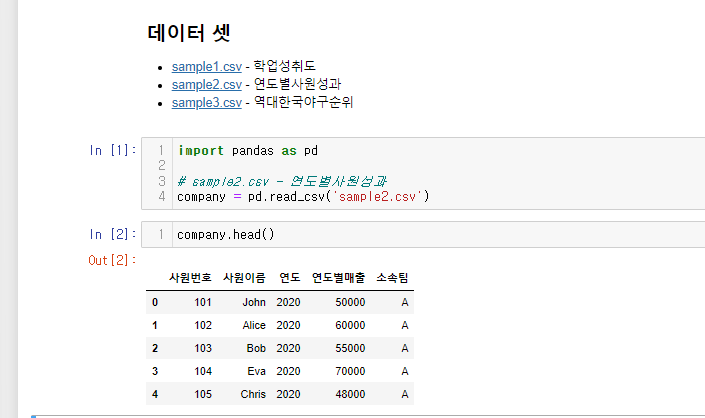
**pivot()**
long형 데이터를 내가 보고싶은 데이터만 가지고 wide하게 만들어
데이터를 보기 더 편하게 만듦
실습
연도를 기준으로 사원들의 연도별매출 피봇
company.pivot(index='연도', columns='사원이름', values='연도별매출')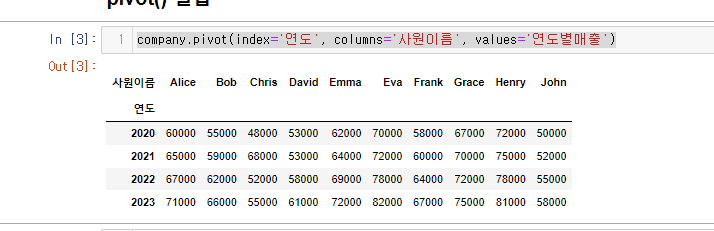
사람을 기준으로 연도별 매출 피봇
‘이 사람이 갈 수록 일을 어떻게 하는지 알아보자’
company.pivot(index='사원이름', columns='연도', values='연도별매출')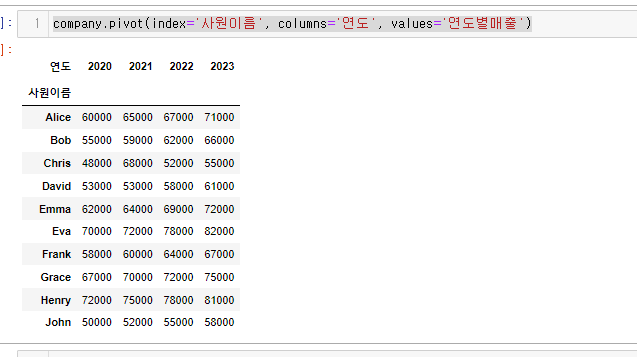
index=, values= 인자
이 두 인자는 선택값이다.
-
index=를 안적으면 원본데이터의 index를 가져온다.
- index=를 안적는 경우는
set_index처럼 먼저 인덱스를 지정했을 때!
- index=를 안적는 경우는
-
values=를 안적으면 모든 값을 가져오게 된다.
-
values=를 안적을 때 실습
```python # values를 생략하면 모든 열이 사용됨 company.pivot(index='사원이름', columns='연도') ``` 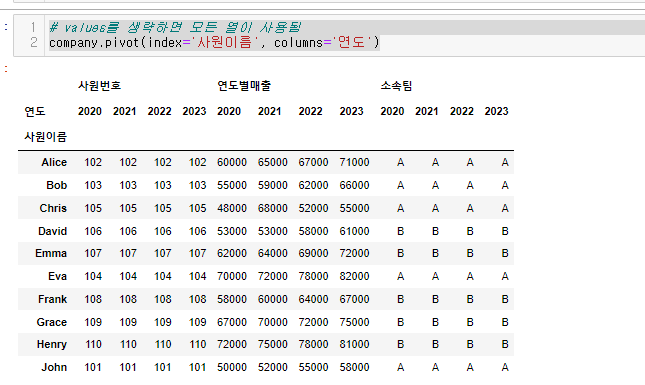 멀티 인덱싱이 됨.
-
**.pivot() <-> .melt()**
- 피폿 이후 언피봇을 해주는 melt()도 물론 사용 가능하다.
- pivot() -> 피벗, Long 데이터프레임을 Wide으로
- melt() -> 언피벗, Wide 데이터프레임을 Long으로
회사 연도를 기준으로 사원들의 매출을 볼 수 있게 피봇 후 melt() 해보자.
company_pivot = company.pivot(index='연도', columns='사원이름',values='연도별매출')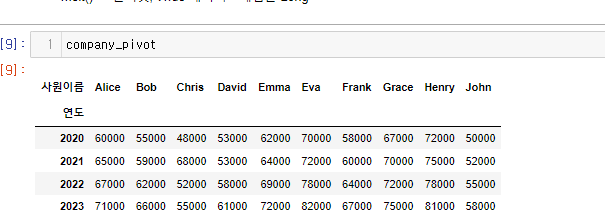
이를 melt()화 해보자
연도를 기준으로 long형태의 데이터를 만들어보려고 한다.
company_pivot.melt(id_vars='연도',value_name='연도별매출')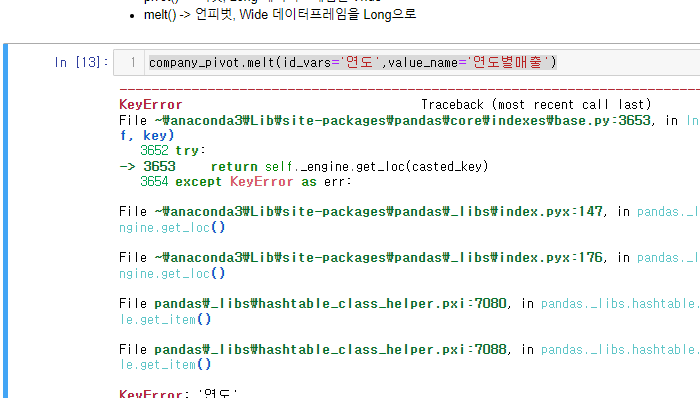
오잉!? 에러가 발생했다.
그 이유는 company_pivot 에 로우 인덱스가 되어 있기 때문이다.
reset_index()로 인덱스 제거 후 다시 진행해 보자.
company_pivot.reset_index().melt(id_vars='연도',value_name='연도별매출')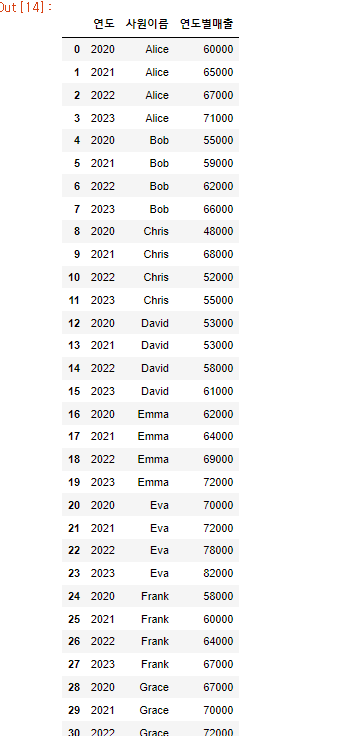
이 처럼 pivot()과 melt()는 반대되는 개념인 것을 알 수 있었다.
**pivot_table()**
피봇테이블은 피봇과 마찬가지로 우리가 보고싶은 걸 보는데,
다른점은 집계함수를 쓴다는 것이다.(aggfunc= 인자를 사용 default값은 mean이다.)
parameter
values: list-like or scalar, optional⭐- 집계할 열을 전달
index: column, Grouper, array, or list of the previous- 피벗 테이블의 인덱스로 사용할 키(열)을 전달
columns: column, Grouper, array, or list of the previous⭐- 피벗 테이블에서 그룹화할 키(열)을 전달.
aggfunc: function, list of functions, dict, default “mean”⭐- 집계 함수를 지정. 기본값은 'mean'으로 평균을 계산.
- 리스트로 여러 개 함수를 전달하며 계층적인 열이 생성.
- 딕셔너리로는 키는 집계할 열, 값은 함수/함수목록을 전달.
- margin=False인 경우, aggfunc를 사용하여 부분 집계를 계산.
fill_value: scalar, default None- 결측치의 대체값 지정.
margins: bool, default False- True면 행과 열의 범주에 걸쳐 부분 그룹 집계가 포함된 특수 모든 열과 행이 추가.
dropna: bool, default True- True면 NA 열이 있는 행은 제외된다.
margins_name: str, default ‘All’- margins가 True인 경우에 추가되는 행 또는 열의 이름을 지정합니다.
observed: bool, default False- 그룹화가 범주형인 경우에만 적용
- True : 범주형 그룹화에 대해 관찰된 값만 표시 -False : 범주형 그룹화에 대한 모든 값을 표시
- 그룹화가 범주형인 경우에만 적용
sort: bool, default True- 결과를 정렬할 지 설정
다양한 예제를 통해 이해해보자
pivot_table 예제
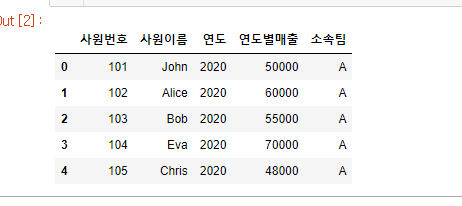
1. 사원별 누적매출 통계내기
# 사원별 누적매출 통계내기
company.pivot_table(values='연도별매출',columns='사원이름',aggfunc='sum')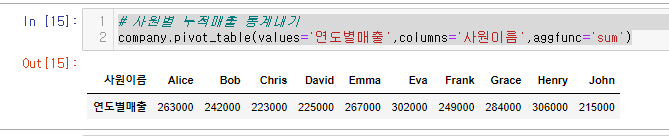
pivot때와 다르게 pivot_table은 집계한게 나오기 때문에 index를 지정해주지 않는 모습
또한 인덱스 값이 자동으로 ‘연도별매출’로 들어오게 된다.
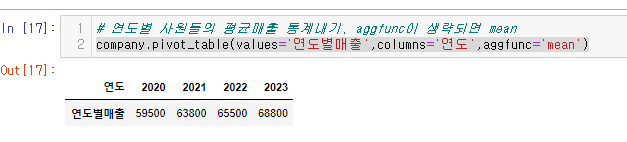
2.연도별 사원들의 평균매출 통계내기,
company.pivot_table(values='연도별매출',columns='연도',aggfunc='mean')aggfunc= 인자 default는 mean이기 때문에 생략 가능
3. 소속팀별 연도별매출 평균을 확인하기
# 소속팀별 연도별매출 평균을 확인하기
company.pivot_table(values='연도별매출',columns='소속팀')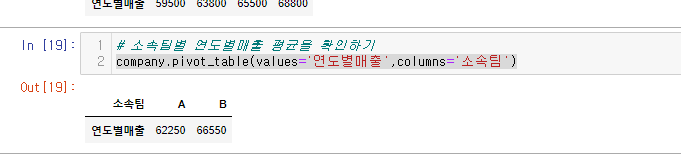
4. 소속팀별 연도별매출 평균을 연도별로 확인하기
값은 매출
컬럼은 소속팀
인덱스로 연도가 들어가야 된다. 이때 사용하는 인자가 index= 이다.
company.pivot_table(values='연도별매출',index='연도',columns='소속팀')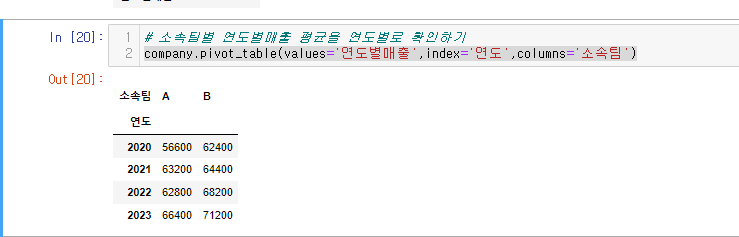
pivot_table 인자가 헷갈리면 이렇게!
"A별 BB의 CCC함수값을 DDDD인덱스로 확인하기"
A별 -> columns
BB의 -> values
CCC함수값을 -> aggfunc
DDDD인덱스로 -> index
마무리!
pivot()과 pivot_table()의 차이.
pivot()은 가지고 오고 싶은 데이터를 wide하게 만듦
pivot_table() 가지고 오고 싶은 데이터를 집계 후 wide하게 만듦
