MyBatis
MyBatis
- SQL 매핑 프레임워크
- SQL문과 저장 프로시저(Stored Procedure)등의 매핑을 지원하는 퍼시스턴스(Persistence) 프레임워크
- JDBC로 처리하는 상당부분의 코드와 파리미터 설정 및 처리를 대신해준다.
- XML과 Annotation 설정을 통해 사용할 수 있음.
MyBatis
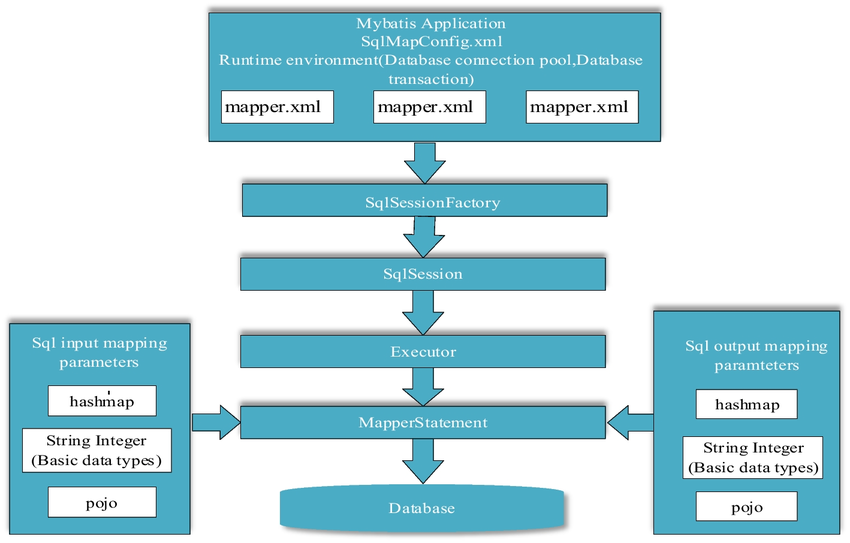
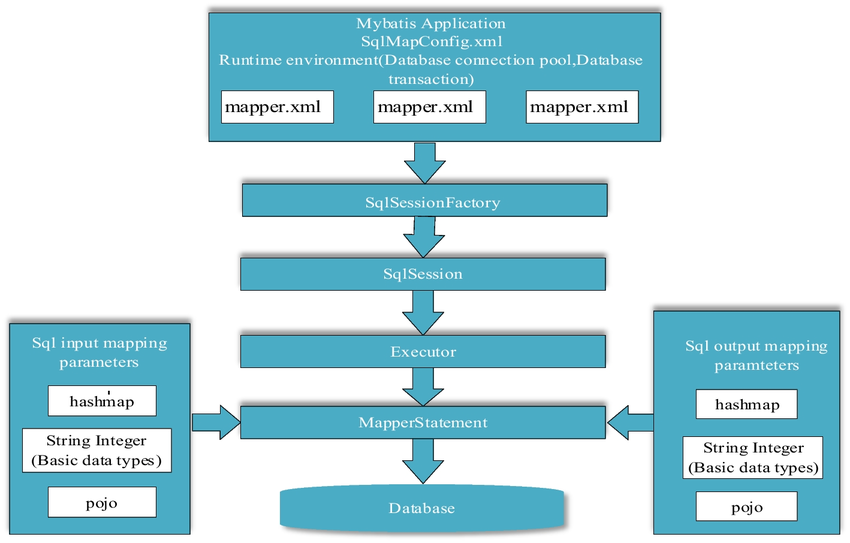
MyBatis의 구조
MYBatis사용 방법
- MyBatis 설정 파일을 만든다 (Driver, url, username,password)등 필요한 정보를 넣는다.
XML에서 MyBatis 설정 만들기
<?xml version="1.0" encoding="UTF-8" ?>
<!DOCTYPE configuration
  PUBLIC "-//mybatis.org//DTD Config 3.0//EN"
  "https://mybatis.org/dtd/mybatis-3-config.dtd">
<configuration>
  <environments default="development">
    <environment id="development">
      <transactionManager type="JDBC"/>
      <dataSource type="POOLED">
        <property name="driver" value="${driver}"/>
        <property name="url" value="${url}"/>
        <property name="username" value="${username}"/>
        <property name="password" value="${password}"/>
      </dataSource>
    </environment>
  </environments>
  <mappers>
    <mapper resource="org/mybatis/example/BlogMapper.xml"/>
  </mappers>
</configuration>- SqlSessionFactory빌드
// 설정
String resource = "org/mybatis/example/mybatis-config.xml";
InputStream inputStream =  Resources.getResourceAsStream(resource);
SqlSessionFactory sqlSessionFactory = new SqlSessionFactoryBuilder().build(inputStream);- SqlSession 만들기
try-with-resources방법을 이용하면 좋다.
try (SqlSession session = sqlSessionFactory.openSession()) {
  BlogMapper mapper = session.getMapper(BlogMapper.class);
  Blog blog = mapper.selectBlog(101);
}
4.MapperXml만들기
namespace에는 DAO 인터페이스의 풀패키징명을 적어준다.
<?xml version="1.0" encoding="UTF-8" ?>
<!DOCTYPE mapper
  PUBLIC "-//mybatis.org//DTD Mapper 3.0//EN"
  "https://mybatis.org/dtd/mybatis-3-mapper.dtd">
<mapper namespace="org.mybatis.example.BlogMapper">
  <select id="selectBlog" resultType="Blog">
    select * from Blog where id = #{id}
  </select>
</mapper>- 실제 코드에서 사용 방법
3번에서 썼듯 SqlSession객체를 만든다.
try (SqlSession session = MyBatisConfig.getFactory().openSession(true)) {
			BoardDao dao = session.getMapper(BoardDao.class);
			Board board = dao.selectOne(1);
			board.setTitle("Servlet");
			dao.updateBoard(board);
		}
