SSE란?
Server-Sent-Event의 약자로, 기존의 클라이언트가 서버에 요청해서 응답을 받아오는 것과는 반대로 서버에서 클라이언트쪽으로 보내는 것을 말한다.
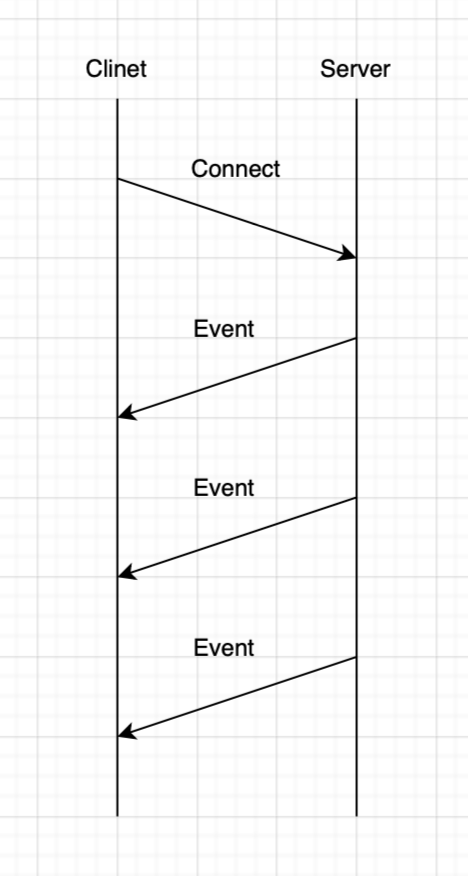
즉, 데이터를 스트리밍하는 HTTP 기반 기술로, WebSocket과 달리 서버 -> 클라이언트의 단방향 통신만 된다. 클라이언트는 EventSource API를 사용해 연결을 유지하고 실시간으로 데이터를 받아온다.
주로, 주가 실시간 업데이트, 채팅 알림, 시스템 모니터링 등 서버에서 주기적으로 변화를 알려야 하는 상황에서 자주 사용된다.
필요한 이유
기존의 HTTP 연결은 보통 한번 요청하고 응답을 받으면 연결을 끊어버리는 것이 보통이다.
하지만, 개발을 하다보면 종종 연결을 유지하고 계속 데이터를 교환해야하는 경우가 있다.
이를 위한 웹 기술은 대표적으로 4가지가 있다.
이를 위해 웹 기술은 Polling, Long Polling, WebSocket 그리고 SSE이다
Polling
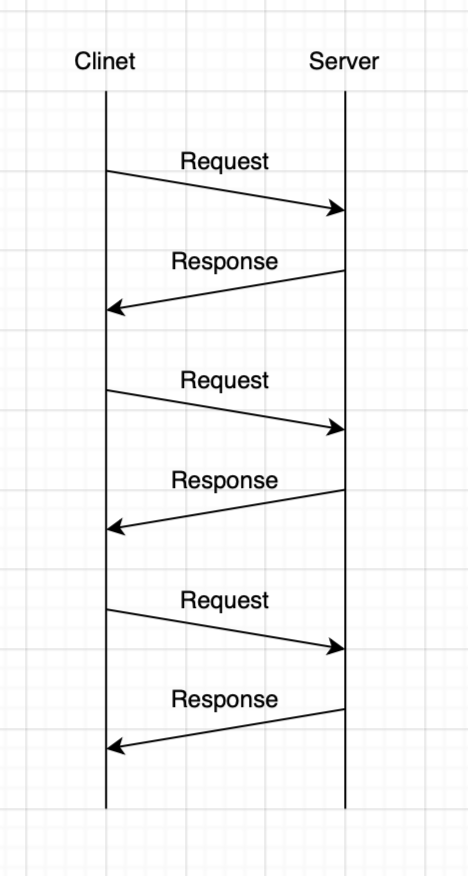
클라이언트가 주기적으로 서버에 요청해서 변경 사항을 확인하는 기법이다.
요청 간격을 짧게하면 짧게 할수록 더욱더 실시간으로 데이터 변경을 확인하고 반영할 수 있다.
다만, 클라이언트가 주기적으로 서버에 요청해서 변경을 확인하기 때문에 HTTP 오버헤드가 증가한다.
Long polling
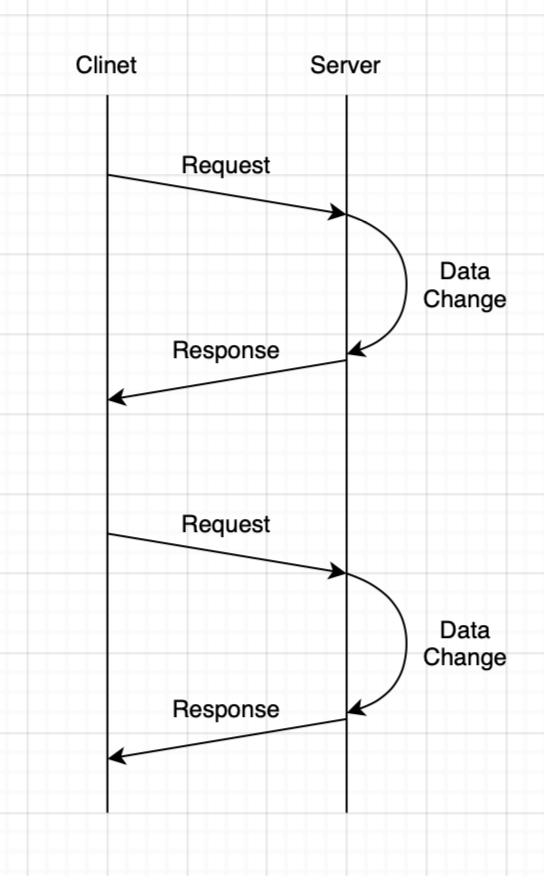
클라이언트가 요청을 했을 때 바로 응답하는 것이 아니라, 데이터의 변경이 있을때까지 기다렸다가 응답하는 기법이다.
Polling 방식에 비해 HTTP 오버헤드가 감소했지만, 여전히 매요청마다 HTTP 연결이 필요하다
SSE의 원리
HTTP 설정
HTTP의 Content-Type을 text/event-stream으로 설정함으로 연결을 끊지 않고 계속해서 알려준다는 신호를 보내준다.
- Request Header
Content-Type: text/event-stream- Response Header
Content-Type: text/event-stream
Cache-Control: no-cache
Connection: keep-alive
SSE Event 포맷
id: 42
event: chat
data: {"user":"alice","msg":"Hi!"}
retry: 3000
SSE의 이벤트 데이터는 Field와 value로 이루어지며, UTF-8로 인코딩되어 있다.
- data: 전송할 실제 메시지로 필수 값이다
- id: 연결 재개 시 누락 복구용 ID
- event: 커스텀 이벤트명
- retry: 클라이언트 자동 재연결 대기(ms)
구현
연결 타입은 Content-Type: text/event-stream 으로 연결된다.
보통 데이터는 data 나 event를 통해 교환한다.
Backend
- Controller
@RestController
class NotificationController(
    private val notificationApplication: NotificationApplication
) {
    /**
     * 클라이언트의 요청으로 알림 시스템과 연결한다.
     *
     * @param 연결될 알림 ID
     * @return 생성된 SseEmitter
     */
		@Operation(description = "SSE 연결")
		@GetMapping("/connect/{uuid}",  produces = [MediaType.TEXT_EVENT_STREAM_VALUE, MediaType.APPLICATION_JSON_VALUE])
    fun connectSseEventStream(
				@Schema(description = "UUID") @PathVariable("uuid") uuid: UUID,
				response: HttpServletResponse
    ): SseEmitter {
        return notificationService.connect(uuid)
    }
}- Service
@Service
class NotificationApplication(
    private val emitterService: EmitterService,
){
    /**
     * SseEmitter에 연결
     *
     * @param emitterId SseEmitter의 ID
     * @return 생성된 SseEmitter
     */
    fun connect(
        uuid: UUID,
    ): SseEmitter {
        val sseEmitter = emitterService.connect(uuid)
        return emitter
    }

    /**
     * SseEmitter를 통해 메세지를 전달한다.
     *
     * @param emitterId SseEmitter의 ID
     */
    fun sendNotification(
        uuid: UUID,
    ) {
        emitterService.notify(uuid)
    }

    /**
     * SseEmitter를 종료한다.
     *
     * @param emitterId SseEmitter의 ID
     */
    fun completeNotification(
        uuid: UUID,
    ) {
        emitterService.onCompleted(uuid)
    }
}
@Service
class NotificationEmitterService(
private val emitterRepository: EmitterRepository,
){
/**
* SseEmitter 연결하고 Repositry에 저장한다.
*
* @param emitterId SseEmitter의 ID
* @return 생성된 SseEmitter
*/
fun connect(emitterId: String): SseEmitter {
val sseEmitter = SseEmitter(sseTimeout)
channelStore.put(emitterId, sseEmitter)
sseEmitter.onCompletion {
log.debug("onCompletion callback")
emitterService.remove(uuid)
}
sseEmitter.onTimeout {
log.debug("onTimeout callback")
sseEmitter.complete()
sseEmitter.remove(userId)
}
sseEmitter.onError { e ->
log.debug { "onError callback ${e.message}" }
sseEmitter.complete()
sseEmitter.remove(userId)
}
return sseEmitter
}
/**
* SseEmitter를 통해 클라이언트에게 메세지 전송
*
* @param emitterId SseEmitter의 ID
* @param message SseEmitter로 보낼 메세지
*/
fun notify(
emitterId: UUID,
message: String
) {
sseEmitter.get(emitterId)?.let {
try {
it.event()
.id(emitterId)
.name(message)
.data(message, MediaType.APPLICATION_JSON)
} catch (e: IOException) {
it.completeWithError(e)
emitters.remove(userId)
}
}
}
/**
* SseEmitter를 종료
*
* @param emitterId SseEmitter의 ID
*/
fun completeNotification(
emitterId: UUID,
) {
sseEmitter.get(emitterId)?.let {
it.complete()
}
}
}- Repository
@Component
class EmitterRepository{
  	private val emitters = ConcurrentHashMap<String, SseEmitter>()

  	fun putSseEmitter(key: String, sseEmitter: SseEmitter) {
      	emitters[key] = emitter
    }

    fun getSseEmitter(key: String): sseEmitter: SseEmitter {
      	emitters[key] = emitter
    }
}
Front
const evtSource = new EventSource(URL, {
  withCredentials: true,
});evtSource.addEventListener("chat", (event) => {
const data = JSON.parse(event.data);
console.log(data)
});