
- 저는 현재 플러터와 스프링을 이용하여 프로젝트를 진행중입니다!
- 플러터 팀원 1명과 진행 중이며 저는 스프링을 담당하여 진행하고 있습니다.
- 여러 회의를 거쳐 로그인은 소셜 로그인(구글, 카카오, 네이버)로 구현하려고 합니다.
- 그러면 OAuth를 이용하여 로그인 기능을 구현해보도록 하겠습니다!
저는 이 곳에서 학습을 위한 목적으로 우선 구현을 사용자 인증 정보를 세션에 저장하는 방식을 사용하고 있습니다. 이 방식은 서버에서 클라이언트의 상태를 유지해야 하므로, 서버의 부하 증가 등 여러 문제를 야기할 수 있기 때문에 추후 토큰 기반의 인증 방식을 사용할 것을 권장드립니다!
구글 로그인 연동
- 구글 로그인을 연동하기 위해서는 구글 클라우드에 프로젝트를 생성하고 인증 정보를 발급받아야 합니다!
- 방법은 아래와 같습니다.
구글 서비스 인증 정보 발급
1. 구글 클라우드 홈페이지에 접속합니다.
https://console.cloud.google.com
2. 프로젝트 선택 → 새 프로젝트 → 원하는 이름으로 프로젝트 생성해줍니다.
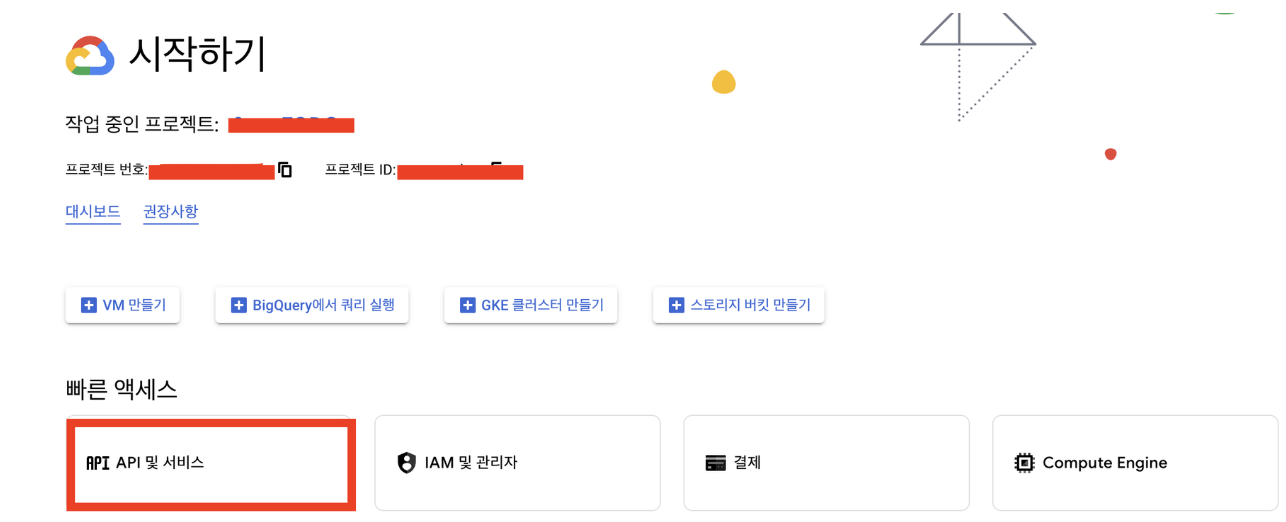
3. API 및 서비스로 접속해줍니다.
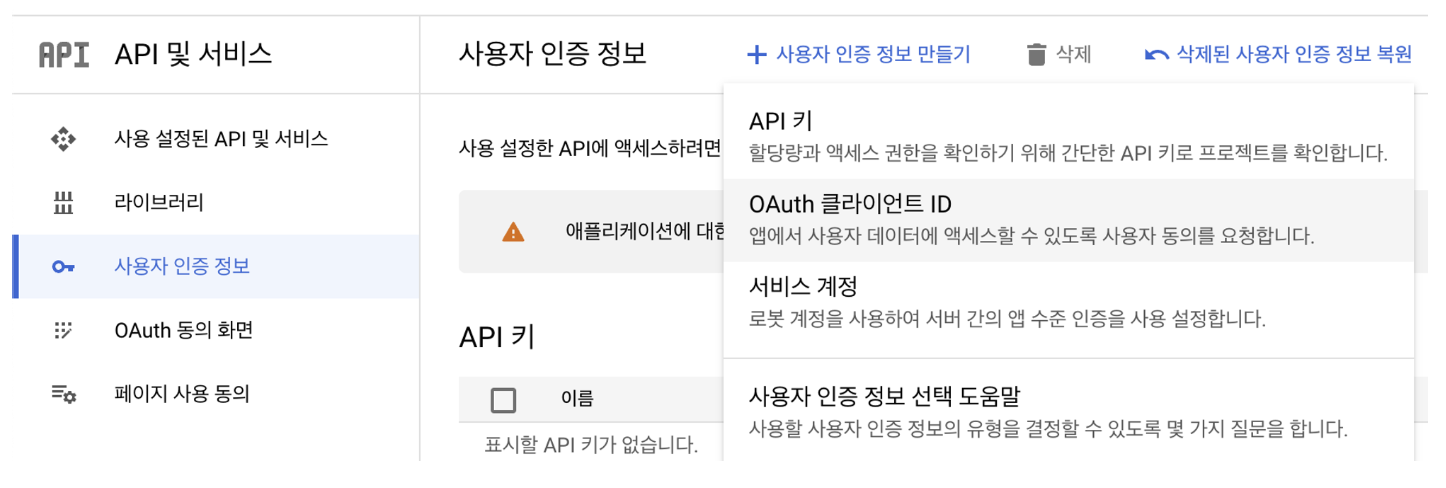
4. 좌측 사이드 바의 사용자 인증 정보 → 사용자 인증 정보 만들기 → OAuth 클라이언트 아이디를 선택합니다.
5. OAuth 동의 화면 구성
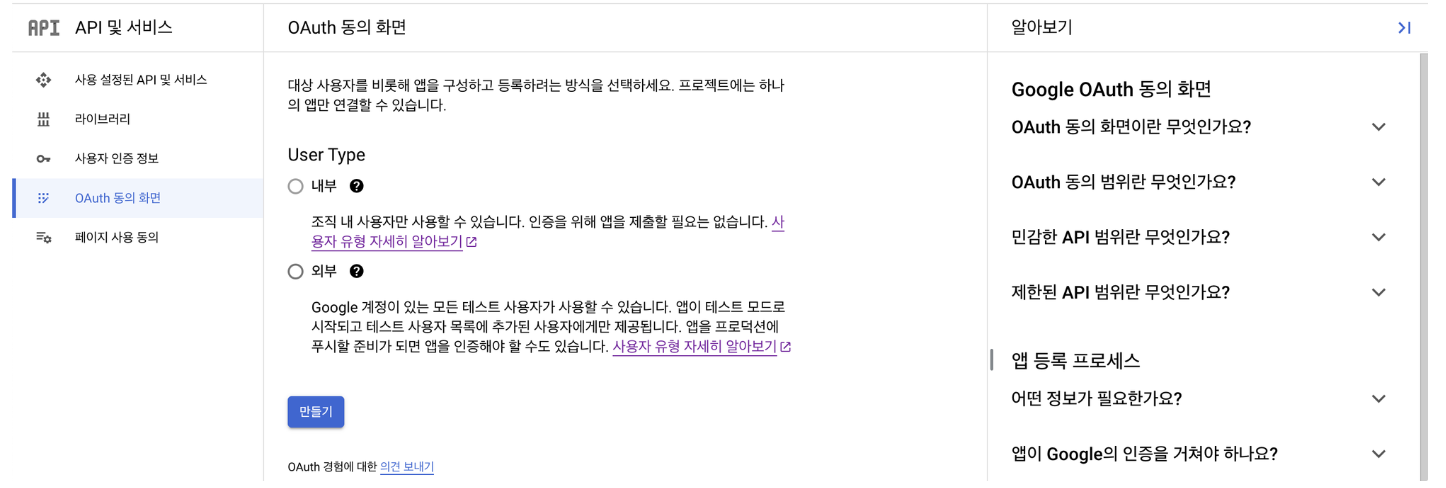
- 내부 : 구글 워크 스페이스 사용자만 앱 사용 가능
- 외부 : 구글 계정을 가진 모든 사용자가 앱 사용 가능
- 저는 외부로 설정했습니다!
6. 앱 정보 등록
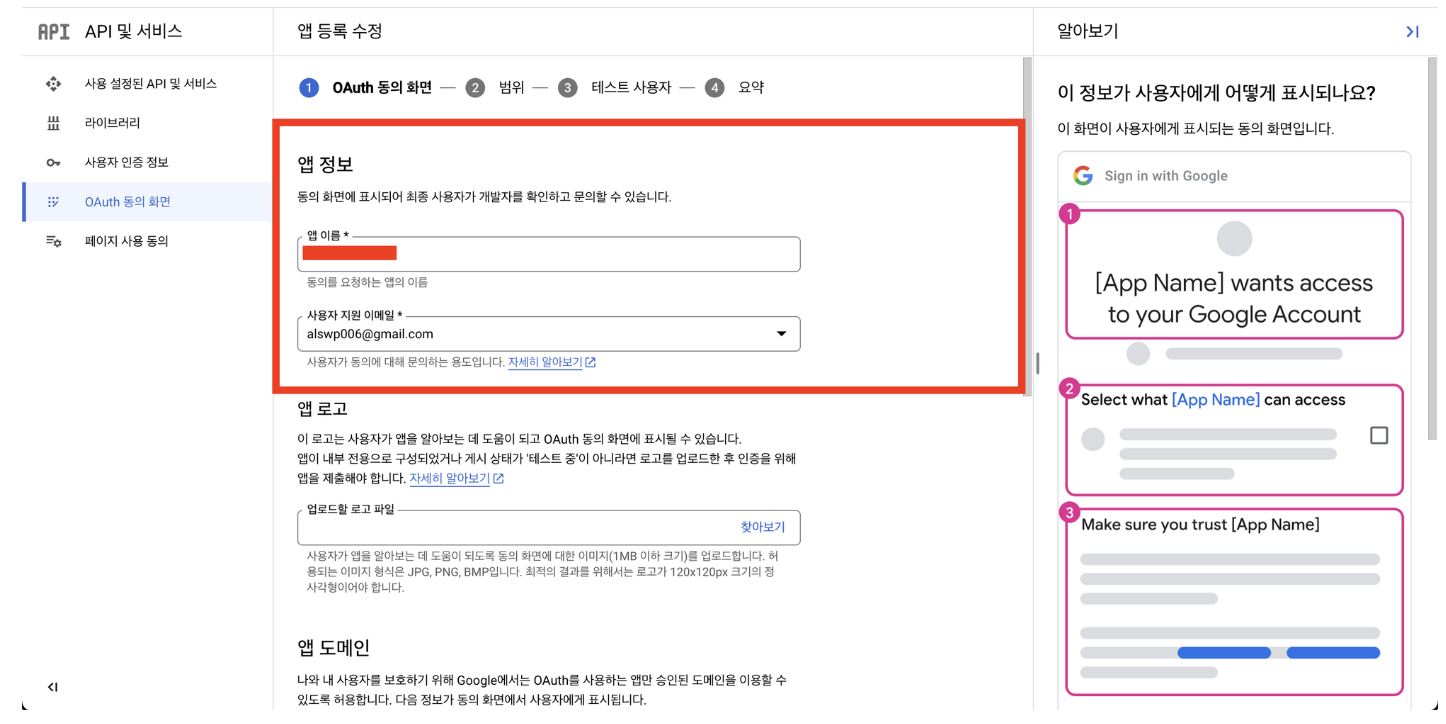
- 저는 여기서 앱 이름, 사용자 지원 이메일, 개발자 연락처 정보만 등록하였습니다!
7. 범위 등록
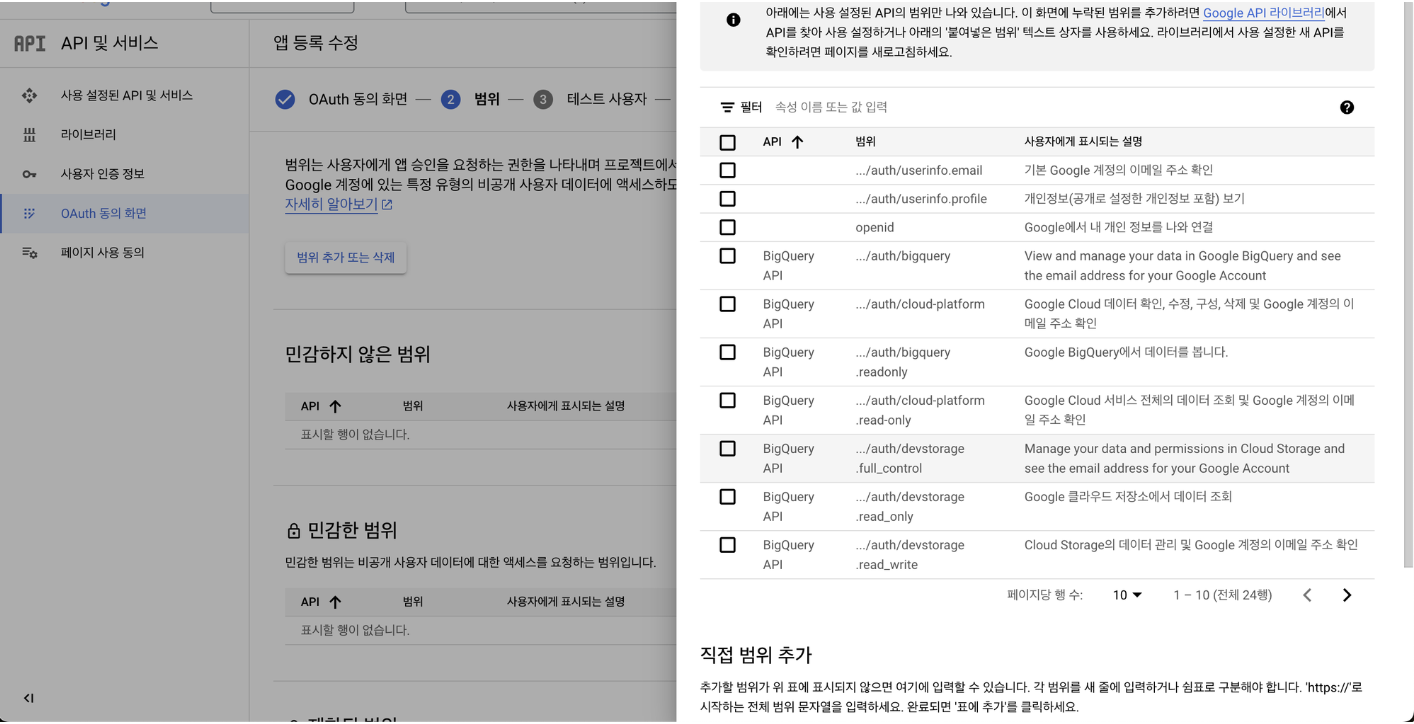
- 범위를 등록해줍니다. 저는 email, protile, openid를 선택해주었습니다.
8. 테스트 사용자 - 저장 후 계속 → 요약 - 대시보드로 돌아가기
9. 다시 사용자 인증 정보 → 사용자 인증 정보 만들기 → OAuth 클라이언트 ID를 선택해줍니다.
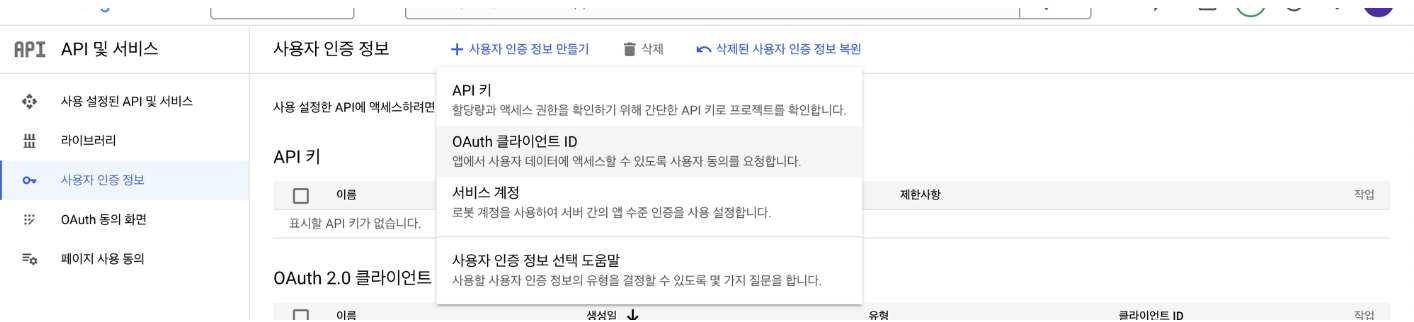
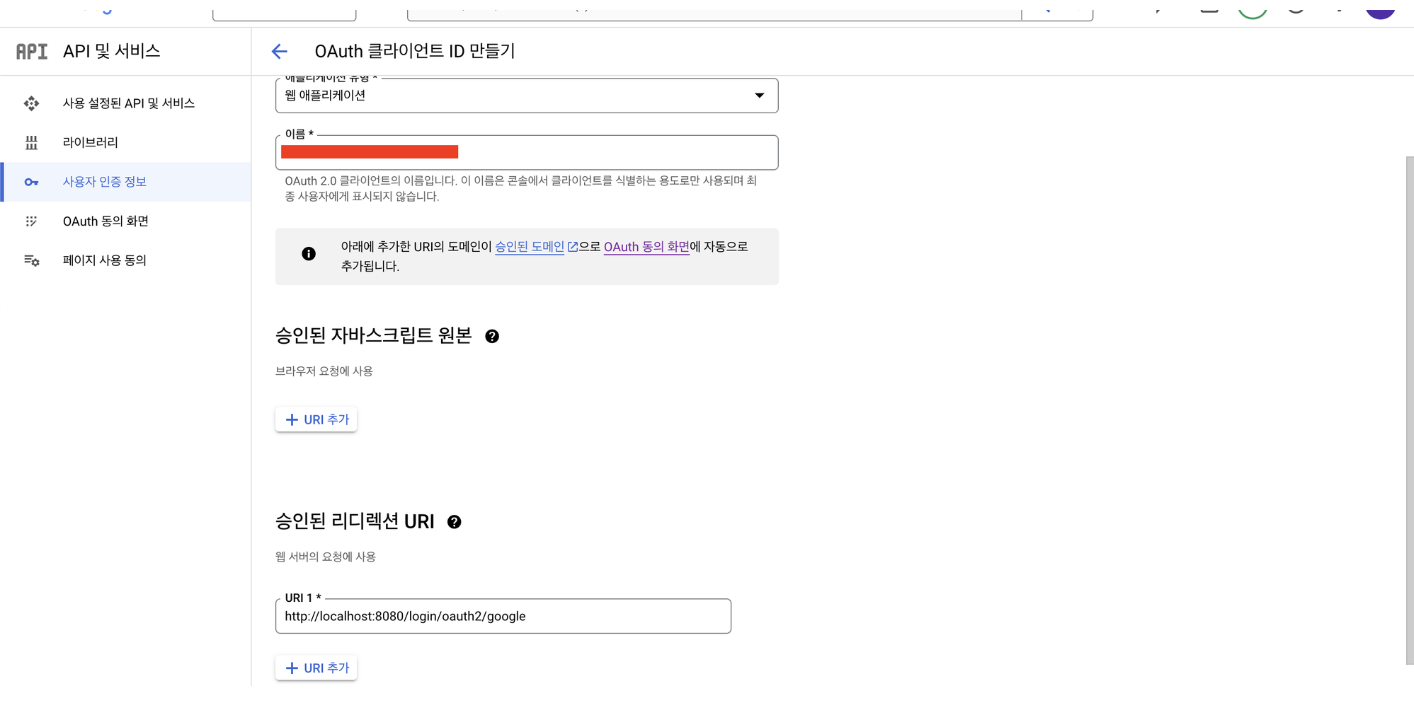
10. 애플리케이션 유형, 이름, 승인된 리디렉션 URI를 설정해줍니다.
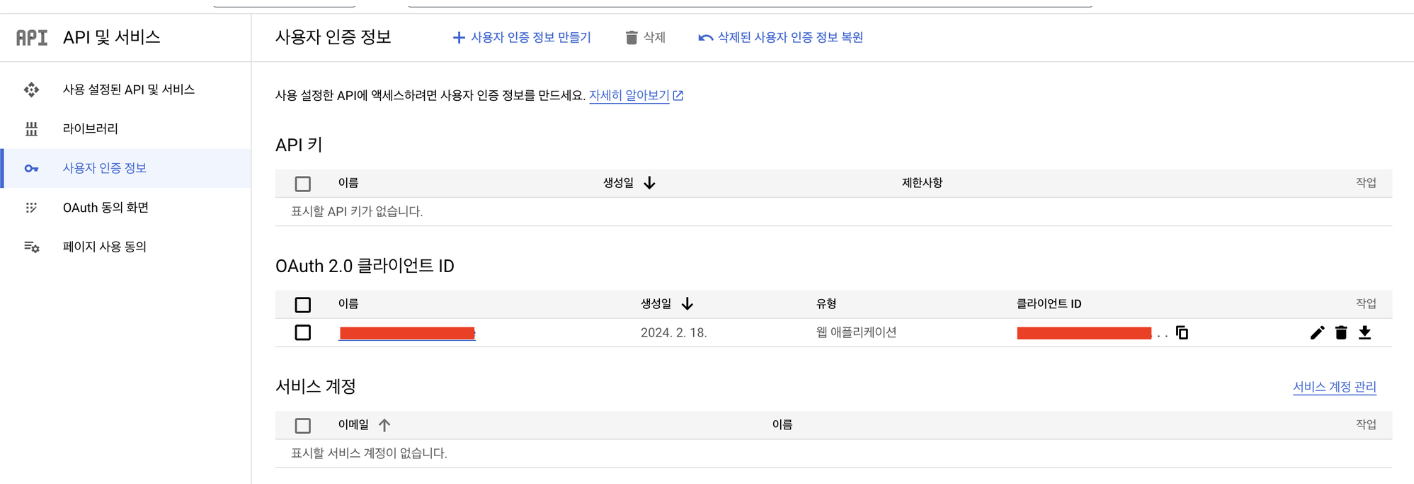
11. 완료되면 사용자 인증 정보 - OAuth 2.0 클라이언트 ID 탭에 아이디가 생성된 것을 확인할 수 있습니다.
프로젝트 설정
1. resource - application-oauth.properties 생성

- 이 파일에는 구글 로그인을 위한 클라이언트 ID와 클라이언트 보안 비밀번호가 들어갈 예정이니 보안을 위해 git에는 추가하지 않도록 합니다!
- 또한 이 파일을 .gitignore에 등록해주어 합니다! 저는 아래와 같이 등록해주었습니다!

2. application-oauth.properties에 코드 추가
spring.security.oauth2.client.registration.google.client-id=(클라이언트 ID)
spring.security.oauth2.client.registration.google.client-secret=(클라이언트 보안 비밀번호)
spring.security.oauth2.client.registration.google.scope=profile,email- 현재 저의 scope 기본 값은 openid,profile,email입니다. 위에서 scope를 따로 명시한 이유는 openid라는 scope가 있으면 Open Id Provider로 인식하기 때문입니다.
- 하지만 이렇게 되면 OpenId Provider인 서비스(구글)와 그렇지 않은 서비스(네이버, 카카오 등)를 나눠서 각각 OAuth2Service를 만들어야 합니다. 이런 상황을 피하기 위해 scope를 profile, email로 명시해줍니다!
3. application.properties에 oauth profile 등록
spring.profiles.include=oauth4. build.gradle에 의존성 추가
implementation 'org.springframework.boot:spring-boot-starter-security'
implementation 'org.springframework.boot:spring-boot-starter-oauth2-client'
5. SecurityConfig 클래스 구현
@RequiredArgsConstructor
@EnableWebSecurity
@Configuration
public class SecurityConfig {

    private final CustomOAuth2UserService customOAuth2UserService;

    @Bean
    public SecurityFilterChain filterChain(HttpSecurity http) throws Exception {
        http
                .csrf(AbstractHttpConfigurer::disable) // CSRF(Cross-Site Request Forgery) 보호를 비활성화
                .authorizeHttpRequests(authorizeRequests -> authorizeRequests
                        .requestMatchers("/", "/css/**", "/images/**", "/js/**", "/profile").permitAll() // 해당 URL 패턴들은 모든 사용자가 접근 가능
                        .requestMatchers("/api/v1/**").hasRole(Role.USER.name()) // "/api/v1/**" 패턴의 URL은 USER 권한을 가진 사용자만 접근 가능
                        .anyRequest().authenticated() // 나머지 모든 요청은 인증된 사용자만 접근 가능
                )// 요청 URL에 따른 권한을 설정
                .logout(logout -> logout.logoutSuccessUrl("/")) //로그아웃 시 리다이렉트될 URL을 설정
                .oauth2Login(oauth2Login -> oauth2Login
                        .defaultSuccessUrl("/sweetodo/todo/todoMain")// OAuth 2 로그인 설정 진입점
                        .userInfoEndpoint(userInfoEndpoint -> userInfoEndpoint
                                .userService(customOAuth2UserService) // OAuth 2 로그인 성공 이후 사용자 정보를 가져올 때의 설정
                        )
                );
        return http.build();
    }
}- 어노테이션을 통해 Spring Security를 활성화, 설정 클래스임을 명시해주고 lombok의 @RequiredArgsConstructor를 이용해 생성자를 생성해줍니다. lombok을 사용하지 않는다면 생성자를 생성하여 인자로 customOAuth2UserService를 받아주면 될 것 같습니다!
6. @Login 어노테이션과 LoginUserArgumentResolver 클래스 구현
@Target(ElementType.PARAMETER)
@Retention(RetentionPolicy.RUNTIME)
public @interface LoginUser {
}
@RequiredArgsConstructor
@Component
public class LoginUserArgumentResolver implements HandlerMethodArgumentResolver {
private final HttpSession httpSession;
//파라미터에 @Login 어노테이션이 붙어 있고, 파라미터 클래스 타입이 UserDTO.class인 경우 true를 반환한다.
@Override
public boolean supportsParameter(MethodParameter parameter) {
boolean isLoginUserAnnotation = parameter.getParameterAnnotation(LoginUser.class) != null;
boolean isUserClass = UserDTO.class.equals(parameter.getParameterType());
return isLoginUserAnnotation && isUserClass;
}
//파라미터에 전달할 객체를 생성한다.
//여기선 세션에서 객체를 가져온다.
@Override
public Object resolveArgument(MethodParameter parameter, ModelAndViewContainer mavContainer,
NativeWebRequest webRequest, WebDataBinderFactory binderFactory) throws Exception {
HttpServletRequest request = (HttpServletRequest) webRequest.getNativeRequest();
// 이미 세션이 있다면 그 세션을 돌려주고, 세션이 없으면 null을 돌려준다.
HttpSession session = request.getSession(false);
if (session == null) {
return null;
}
return session.getAttribute("user");
}
}- 세션에 저장된 사용자 정보를 쉽게 가져오기 위한 @Login 어노테이션과 HandlerMethodArgumentResolver 인터페이스를 구현하는 LoginUserArgumentResolver를 구현해줍니다.
- LoginUserArgumentResolver 클래스는 컨트롤러 메서드에서 특정 조건에 맞는 파라미터가 있을 경우 원하는 값을 바인딩해주는 역할을 합니다.
- 위 LoginUser에 대한 어노테이션은 다음 글👈에 설명이 있습니다!
- HandlerMethodArgumentResolver 인터페이스를 구현한 LoginUserArgumentResolver 클래스의 메소드들은 Spring MVC 프레임워크 내부에서 사용됩니다.
7. OAuthAttributes와 UserDTO, UserEntity,UserRepository 클래스 구현
- UserEntity
@Getter @Entity public class UserEntity { @Id @GeneratedValue(strategy = GenerationType.IDENTITY) private Long id; @Column(nullable = false) private String name; @Column(nullable = false) private String email; @Column private String picture; @Column private String provider; //공급자 (google, facebook ...) @Column private String providerId; //공급 아이디 @Enumerated(EnumType.STRING) @Column(nullable = false) private UserRole userRole; @Builder public UserEntity(String name, String email, String picture, UserRole userRole, String provider, String providerId) { this.name = name; this.email = email; this.picture = picture; this.userRole = userRole; this.provider = provider; this.providerId = providerId; } public UserEntity() { } public UserEntity update(String name, String picture) { this.name = name; this.picture = picture; return this; } public String getRoleKey() { return this.userRole.getKey(); } }- 사용자 정보를 데이터베이스에 저장하기 위한 엔티티 클래스입니다.
- 저는 이름, 이메일, 프로필 사진, 공급자 정보, 공급자 ID, 그리고 권한 정보를 저장하도록 데이터베이스 테이블을 만들었습니다.
- 사용자 이름과 사진을 업데이트하는 update() 메소드와 권한 정보를 문자열로 반환하는 getRoleKey() 메소드도 제공합니다.
- UserDTO
@Getter public class UserDTO implements Serializable { private String name; private String email; private String picture; private String provider; private String providerId; public UserDTO(UserEntity userEntity) { this.name = userEntity.getName(); this.email = userEntity.getEmail(); this.picture = userEntity.getPicture(); this.provider = userEntity.getProvider(); this.providerId = userEntity.getProviderId(); } }- User정보의 DTO 클래스입니다. 세션에 사용자 정보를 저장하기 위한 클래스입니다.
- OAuthAttributes
@Getter public class OAuthAttributes { private Map<String, Object> attributes; private String nameAttributeKey; private String name; private String email; private String picture; private String provider; private String providerId; @Builder public OAuthAttributes(Map<String, Object> attributes, String nameAttributeKey, String name, String email, String picture, String provider, String providerId) { this.attributes = attributes; this.nameAttributeKey = nameAttributeKey; this.name = name; this.email = email; this.picture = picture; this.provider = provider; this.providerId = providerId; } public static OAuthAttributes of(String registrationId, String userNameAttributeName, Map<String, Object> attributes) { return ofGoogle(registrationId, userNameAttributeName, attributes); } private static OAuthAttributes ofGoogle(String registrationId, String userNameAttributeName, Map<String, Object> attributes) { return OAuthAttributes.builder() .name((String) attributes.get("name")) .email((String) attributes.get("email")) .picture((String) attributes.get("picture")) .attributes(attributes) .provider(registrationId) .providerId((String) attributes.get("sub")) .nameAttributeKey(userNameAttributeName) .build(); } public UserEntity toEntity() { return UserEntity.builder() .name(name) .email(email) .picture(picture) .userRole(UserRole.GUEST) .provider(provider) .providerId(providerId) .build(); } }- OAuth2에서 반환하는 사용자 정보를 담는 클래스입니다.
- 구글 로그인을 한 사용자의 정보를 담는 기능과 Entity로 반환하는 메소드를 갖습니다.
- UserRepository
public interface UserRepository extends JpaRepository<UserEntity, Long> { Optional<UserEntity> findByEmail(String email); }- User 엔티티에 대한 CRUD 연산을 수행하는 레포지토리 인터페이스입니다.
- findByEmail 메소드는 추후 이메일을 기준으로 사용자를 찾아 업데이트하거나, 사용자를 새로 생성할 때 사용됩니다.
8. CustomOAuth2UserService, WebConfig 구현
- CustomOAuth2UserService
    @RequiredArgsConstructor
    @Service
    @Transactional
    public class CustomOAuth2UserService implements OAuth2UserService<OAuth2UserRequest, OAuth2User> {

        private final UserRepository userRepository;
        private final HttpSession httpSession;

        @Override
        public OAuth2User loadUser(OAuth2UserRequest userRequest) throws OAuth2AuthenticationException {

            OAuth2UserService<OAuth2UserRequest, OAuth2User> delegate = new DefaultOAuth2UserService();
            OAuth2User oAuth2User = delegate.loadUser(userRequest);

            // 현재 로그인 진행 중인 서비스를 구분하는 코드 (네이버 로그인인지 구글 로그인인지 구분)
            String registrationId = userRequest.getClientRegistration().getRegistrationId();

            // OAuth2 로그인 진행 시 키가 되는 필드 값 (Primary Key와 같은 의미)을 의미
            // 구글의 기본 코드는 "sub", 후에 네이버 로그인과 구글 로그인을 동시 지원할 때 사용
            String userNameAttributeName = userRequest.getClientRegistration().getProviderDetails()
                    .getUserInfoEndpoint().getUserNameAttributeName();

            // OAuth2UserService를 통해 가져온 OAuthUser의 attribute를 담을 클래스 ( 네이버 등 다른 소셜 로그인도 이 클래스 사용)
            OAuthAttributes attributes = OAuthAttributes.of(registrationId, userNameAttributeName, oAuth2User.getAttributes());

            UserEntity userEntity = saveOrUpdate(attributes);

            // UserEntity 클래스를 사용하지 않고 SessionUser클래스를 사용하는 이유는 오류 방지.
            httpSession.setAttribute("user", new UserDTO(userEntity)); // UserDTO : 세션에 사용자 정보를 저장하기 위한 Dto 클래스

            return new DefaultOAuth2User(
                    Collections.singleton(new SimpleGrantedAuthority(userEntity.getRoleKey())),
                    attributes.getAttributes(),
                    attributes.getNameAttributeKey());
        }

        // 구글 사용자 정보 업데이트 시 UserEntity 엔티티에 반영
        private UserEntity saveOrUpdate(OAuthAttributes attributes) {

            // 이메일을 기준으로 사용자를 찾아 업데이트하거나, 사용자를 새로 생성합니다.
            UserEntity userEntity = userRepository.findByEmail(attributes.getEmail())
                    .map(entity -> entity.update(attributes.getName(), attributes.getPicture()))
                    .orElse(attributes.toEntity());

            return userRepository.save(userEntity);
        }
}- WebConfig
    @RequiredArgsConstructor
    @Configuration
    public class WebConfig implements WebMvcConfigurer {
        private final LoginUserArgumentResolver loginUserArgumentResolver;

        @Override
        public void addArgumentResolvers(List<HandlerMethodArgumentResolver> argumentResolvers) {
            argumentResolvers.add(loginUserArgumentResolver);
        }
}- LoginUserArgumentResolver를 Spring MVC에 등록해주는 Confifuration 클래스를 구현해준다.
테스트해보기
1. 홈 접속
- 저는 테스트를 위해 index.html에 a 링크를 달아 페이지에 접속했습니다!
- 주소를 입력하여 바로 접속해도 되지만 나중에 여러 로그인을 구현했을 때 쉽게 테스트해보기 위해 이런 방식을 사용하였습니다!
<!DOCTYPE html>
<html lang="en">
<head>
  <meta charset="UTF-8">
  <title>Title</title>
</head>
<body>
<a href="/oauth2/authorization/google">google login</a>
</body>
</html>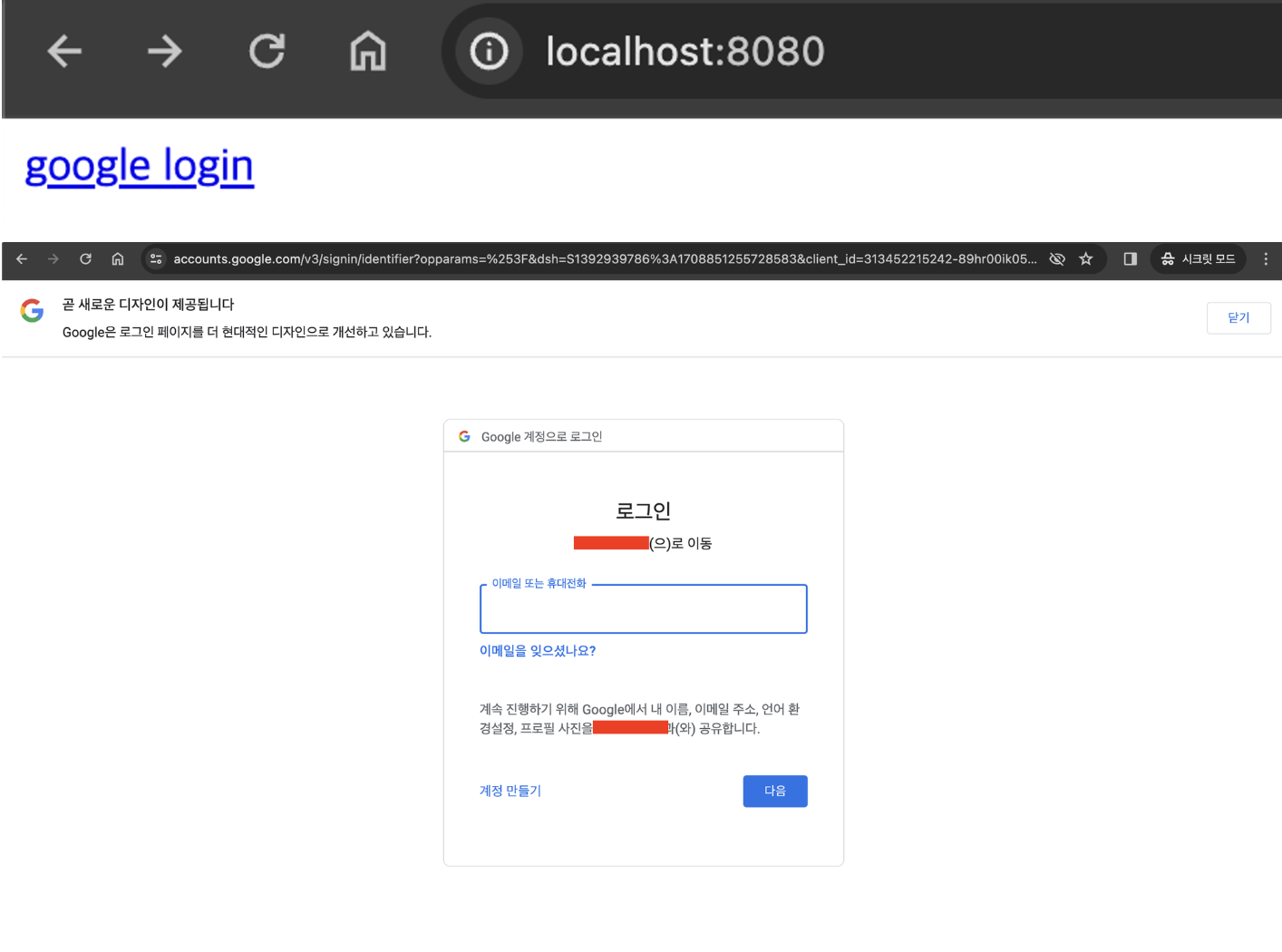
- 로그인 후 데이터베이스 확인

성공!!
- 오늘은 OAuth 2.0을 통해 구글 로그인을 구현하고 확인해보았습니다!
- 이후에는 네이버, 카카오 로그인을 차례로 구현해보겠습니다!!

블로그 이전했습니다!! 👉 https://alswp006.github.io/
안녕하세요. 글 잘봤습니다! 혹시 해당 프로젝트 코드를 볼 수 있을까요?