현재까지의 아키텍처로는 사용자가 접속할 때마다 새 세션에서 대화를 주고받는 형태로만 운영이 가능하다. 이를 실제 챗봇과 유사한 형태로 서비스를 개선하고자 한다. 구체적으로
- 사용자가 새 메시지를 보내거나 새로운 대화를 시작하고자 하면 새 세션을 시작할 수 있게 하고,
- 사이드바에서 과거 대화를 누르면 해당 세션에서 대화를 이어갈 수 있도록 할 것이다.
이를 위해 DynamoDB 테이블에 SessionName, CreatedAt, LastUpdatedAt 속성을 추가하고, 세션 추가와 로드를 위한 Lambda + API 구조를 추가할 것이다.
DynamoDB
먼저 DynamoDB 구조를 수정하여 해당 기능들이 동작할 수 있도록 한다.
기존 테이블을 삭제한 후 다시 생성하였다.
import boto3

def create_tarotchat_table():
    dynamodb = boto3.resource('dynamodb')

    table = dynamodb.create_table(
        TableName='TarotChatSessions',
        KeySchema=[
            {
                'AttributeName': 'UserId',
                'KeyType': 'HASH'  # Partition key
            },
            {
                'AttributeName': 'LastUpdatedAt',
                'KeyType': 'RANGE'  # Sort key로 LastUpdatedAt을 추가
            }
        ],
        AttributeDefinitions=[
            {
                'AttributeName': 'UserId',
                'AttributeType': 'S'
            },
            {
                'AttributeName': 'SessionId',
                'AttributeType': 'S'
            },
            {
                'AttributeName': 'LastUpdatedAt',
                'AttributeType': 'S'
            }
        ],
        GlobalSecondaryIndexes=[
            {
                'IndexName': 'UserIdLastUpdatedIndex',
                'KeySchema': [
                    {
                        'AttributeName': 'UserId',
                        'KeyType': 'HASH'
                    },
                    {
                        'AttributeName': 'LastUpdatedAt',
                        'KeyType': 'RANGE'
                    }
                ],
                'Projection': {
                    'ProjectionType': 'ALL'
                }
            }
        ],
        BillingMode='PAY_PER_REQUEST'
    )

    return table

if __name__ == '__main__':
    tarot_chat_table = create_tarotchat_table()
API Gateway
WEBSOCKET API
먼저 기존의 APIGW는 테이블 구조에 맞게 수정하였다. API에 별도의 설정을 건드리진 않았고 Lambda 코드만 수정했으므로 아래에서 다시 설명하겠다.
REST API
한편 언급한 기능들을 추가하기 위해 REST API를 추가적으로 만들었다. 백엔드와의 지속적인 연결이 불필요한 CRUD 태스크들은 WS보다 REST가 적합하다고 판단하였기 때문이다.
먼저 아래와 같이 리소스를 구축하였다:
/sessions
	GET --세션 목록 호출
    POST --새 세션 생성
	/{sessionid}
        GET --특정 세션 호출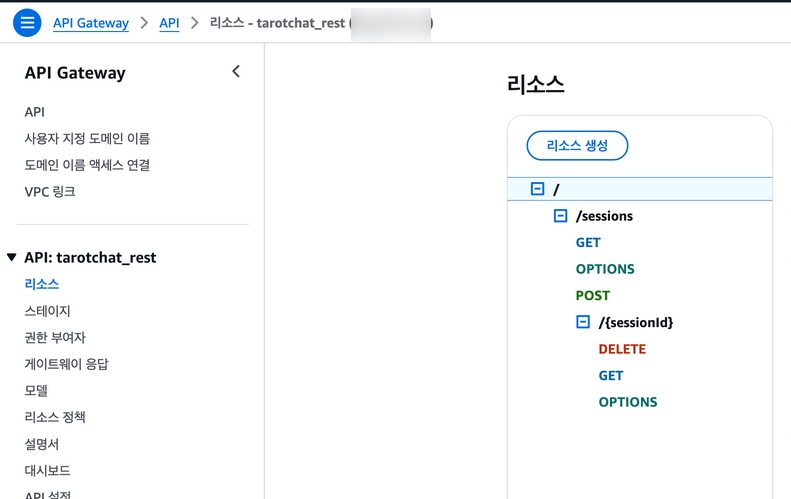
각 리소스는 후술할 Lambda 함수와 연결될 것이다.
또한 현재 아키텍처에서는 쿼리 파라미터에 PK인 userID가 존재하기 때문에 이를 파싱하여 활용하기 위해 쿼리 파라미터 지정이 필요했다.
먼저 /sessions의 GET 리소스의 메소드 요청 내 URL 쿼리 문자열 파라미터로 userId를 추가해 보자.
aws apigateway update-method
--rest-api-id 000000
--resource-id 000000
--http-method GET
--patch-operations op='add',
path='/requestParameters/method.request.querystring.userId',
value='false'
/sessions/{sessionid}의 GET 리소스의 메소드 요청에도,
aws apigateway update-method \
--rest-api-id 000000 \
--resource-id 000000 \
--http-method GET \
--patch-operations \
    '[
        {
            "op": "add",
            "path": "/requestParameters/method.request.querystring.userId",
            "value": "false"
        }
    ]'
이어서 해당 리소스의 통합 요청에서도 동일한 작업을 수행한다.
aws apigateway update-integration \
    --rest-api-id 00000000 \
    --resource-id 000000 \
    --http-method GET \
    --patch-operations \
    '[
        {
            "op": "add",
            "path": "/requestParameters/integration.request.path.sessionId",
            "value": "method.request.path.sessionId"
        },
        {
            "op": "add",
            "path": "/requestParameters/integration.request.querystring.userId",
            "value": "method.request.querystring.userId"
        }
    ]'
한편 이 API에는 처음에 CORS를 활성화하여 클라이언트에서 백엔드 접속이 가능하도록 하였으나,
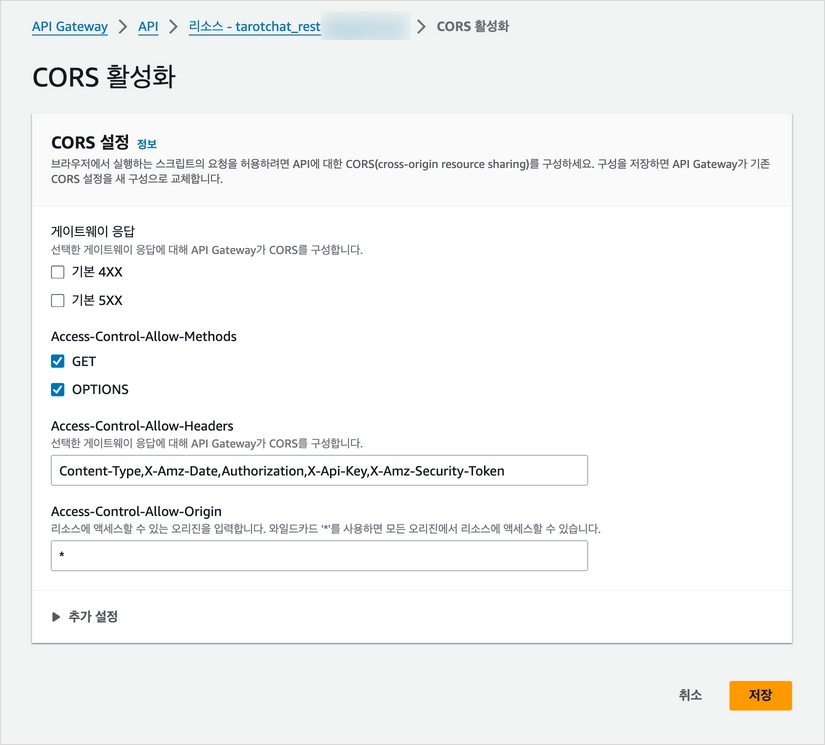
응답 규칙에 맞게 헤더를 가공하는 게 쉽지 않다는 점을 깨닫고 프록시 통합으로 접근을 변경하였다. 우선 두 가지 GET 리소스 모두에 대해 프록시 통합을 수행하였다.
tarot_chat % aws apigateway put-integration \
  --rest-api-id 000000 \
  --resource-id 000000 \
  --http-method GET \
  --type AWS_PROXY \
  --integration-http-method POST \
  --uri arn:aws:apigateway:us-east-1:lambda:path/2015-03-31/functions/arn:aws:lambda:us-east-1:ㅌXXXXXXX:function:tarotchat_getsession/invocations
IAM + APIGW
이때 처음 헤매는 과정에서 API Gateway - Lambda 간 통신이 정상적으로 이루어지는지 체크하기 위해 Cloudwatch 로깅을 활성화하였다. 해당 작업은 CLI로 수행하였다.
- API Gateway가 Cloudwtch Log에 로그를 기록하는 IAM Role을 생성한다.
aws iam create-role --role-name APIGatewayCloudWatchLogsRole --assume-role-policy-document '{
  "Version": "2012-10-17",
  "Statement": [
    {
      "Sid": "",
      "Effect": "Allow",
      "Principal": {
        "Service": "apigateway.amazonaws.com"
      },
      "Action": "sts:AssumeRole"
    }
  ]
}'- IAM 정책에 해당 역할을 연결한다.
aws iam attach-role-policy --role-name APIGatewayCloudWatchLogsRole --policy-arn arn:aws:iam::aws:policy/service-role/AmazonAPIGatewayPushToCloudWatchLogs- APi Gateway에 해당 역할을 업데이트하고
aws apigateway update-account --patch-operations op='replace',path='/cloudwatchRoleArn',value='arn:aws:iam::<00000000>:role/APIGatewayCloudWatchLogsRole'- stage logging을 활성화한다.
aws apigateway update-stage \
  --rest-api-id 00000000 \
  --stage-name product \
  --patch-operations '[
    {"op":"replace","path":"/*/*/logging/dataTrace","value":"true"},
    {"op":"replace","path":"/*/*/logging/loglevel","value":"INFO"}
  ]'
마지막으로 API를 재배포한다.
aws apigateway create-deployment \
  --rest-api-id 000000 \
  --stage-name product
Lambda
WS API 관련 함수
tarotcaht_connect
새 세션 생성 시 SessionName, CreatedAt, LastUpdatedAt 정보를 저장하도록 함수를 변경하였다.
import json
import boto3
import uuid
from datetime import datetime

dynamodb = boto3.resource('dynamodb')
table = dynamodb.Table('tarotchat_ddb')

def lambda_handler(event, context):
    connection_id = event['requestContext']['connectionId']

    try:
        # 파라미터에서 userId, sessionId 추출
        query_params = event.get('queryStringParameters', {})
        user_id = query_params.get('userId')
        session_id = query_params.get('sessionId')

        if not user_id or not session_id:
            raise ValueError("Both userId and sessionId are required")

        current_time = datetime.now().isoformat()

        # 세션 연결시 현재 connectionID 및 업데이트 시점을 최신화
        table.update_item(
            Key={
                'UserId': user_id,
                'SessionId': session_id
            },
            UpdateExpression="SET ConnectionId = :conn_id, LastUpdatedAt = :updated_at",
            ExpressionAttributeValues={
                ':conn_id': connection_id,
                ':updated_at': current_time
            }
        )

        return {
            'statusCode': 200,
            'body': json.dumps('Connected successfully')
        }
    except Exception as e:
        print(f"Error: {str(e)}")
        return {
            'statusCode': 500,
            'body': json.dumps('Connection failed')
        }
taortchat_sendmessage
메시지 전송 시 해당 세션의 LastUpdatedAt을 업데이트하도록 수정
import json
import boto3
from datetime import datetime
from langchain_aws import ChatBedrock
from langchain.memory import ConversationBufferMemory
from langchain_community.chat_message_histories.dynamodb import DynamoDBChatMessageHistory
from langchain.schema import HumanMessage, AIMessage

gateway_client = boto3.client('apigatewaymanagementapi', endpoint_url='https://xxxxxxxx.execute-api.us-east-1.amazonaws.com/production')
dynamodb = boto3.resource('dynamodb')
table = dynamodb.Table('tarotchat_ddb')

def stream_to_connection(connection_id, content):
    try:
        gateway_client.post_to_connection(
            ConnectionId=connection_id,
            Data=json.dumps({"type": "stream", "content": content}).encode('utf-8')
        )
    except Exception as e:
        print(f"Error streaming: {str(e)}")

def lambda_handler(event, context):
    connection_id = event['requestContext']['connectionId']
    body = json.loads(event['body'])
    user_message = body['message']
    user_id = body['userId']
    session_id = body['sessionId']

    try:
        # 메시지 전송 시 세션의 LastUpdated 값을 현재 시점으로 업데이트
        table.update_item(
            Key={'UserId': user_id, 'SessionId': session_id},
            UpdateExpression="set LastUpdatedAt = :t",
            ExpressionAttributeValues={':t': datetime.now().isoformat()}
        )

        chat_memory = DynamoDBChatMessageHistory(
            table_name="TarotChatSessions",
            session_id=f"{user_id}:{session_id}",
            primary_key_name="UserId",
            key={
                "UserId": user_id,
                "SessionId": session_id
            }
        )

        memory = ConversationBufferMemory(
            chat_memory=chat_memory,
            return_messages=True
        )

        model = ChatBedrock(
            model_id="anthropic.claude-3-haiku-20240307-v1:0",
            streaming=True,
            model_kwargs={
                "anthropic_version": "bedrock-2023-05-31",
                "max_tokens": 3000,
                "temperature": 0.1
            }
        )

        chat_history = memory.chat_memory.messages
        messages = []
        messages.extend(chat_history)
        messages.append(HumanMessage(content=user_message))

        response = model.invoke(messages)
        full_response = ""

        if hasattr(response, '__iter__'):
            for chunk in response:
                if isinstance(chunk, AIMessage):
                    content = chunk.content
                elif isinstance(chunk, dict) and 'content' in chunk:
                    content = chunk['content']
                else:
                    content = str(chunk)

                if content:
                    stream_to_connection(connection_id, content)
                    full_response += content
        else:
            full_response = response.content if hasattr(response, 'content') else str(response)
            stream_to_connection(connection_id, full_response)

        memory.chat_memory.add_user_message(user_message)
        memory.chat_memory.add_ai_message(full_response)

        gateway_client.post_to_connection(
            ConnectionId=connection_id,
            Data=json.dumps({"type": "end"}).encode('utf-8')
        )

        return {'statusCode': 200}
    except Exception as e:
        print(f"Error: {str(e)}")
        gateway_client.post_to_connection(
            ConnectionId=connection_id,
            Data=json.dumps({"type": "error", "message": str(e)}).encode('utf-8')
        )
        return {'statusCode': 500}
tarotchat_disconnect
세션 연결을 해제하고 다른 세션을 연결할 때 사용되는 함수를 새로 작성, 3편에서 언급한 WS API의 $Disconnect 경로와 연결하였다.
import json
import boto3
from boto3.dynamodb.conditions import Key

dynamodb = boto3.resource('dynamodb')
table = dynamodb.Table('tarotchat_ddb')

def lambda_handler(event, context):
    connection_id = event['requestContext']['connectionId']

    try:
        # Connection ID에 해당하는 사용자 정보 조회
        response = table.query(
            KeyConditionExpression=Key('ConnectionId').eq(connection_id)
        )

        if response['Items']:
            user_item = response['Items'][0]
            user_id = user_item['UserId']

            #Connection ID만 삭제
            table.delete_item(
                Key={
                    'ConnectionId': connection_id
                }
            )


            print(f"User {user_id} disconnected")
        else:
            print(f"No user found for connection id {connection_id}")

        return {
            'statusCode': 200,
            'body': json.dumps('Disconnected successfully')
        }
    except Exception as e:
        print(f"Error during disconnect: {str(e)}")
        return {
            'statusCode': 500,
            'body': json.dumps('Error during disconnect')
        }
REST API 관련 함수
tarotcaht_getsession
특정 사용자의 세션 목록을 불러오는 함수
import json
import boto3
from boto3.dynamodb.conditions import Key

dynamodb = boto3.resource('dynamodb')
table = dynamodb.Table('tarotchat_ddb')

def lambda_handler(event, context):
    try: # event header에서 user id(sub)값을 추출
        user_id = event.get('headers', {}).get('UserId')

        if not user_id:
            return {
                'statusCode': 400,
                'body': json.dumps({'error': 'UserId is required'}),
                'headers': {
                    'Content-Type': 'application/json',
                    'Access-Control-Allow-Origin': '*'
                }
            }

        # UserID를 기준으로 테이블 내림차순(LastupdatedAt 최신순)탐색. 테스트 단계에서는 최근 10개의 세션만 로드하도록 제한함
        response = table.query(
            KeyConditionExpression=Key('UserId').eq(user_id),
            ScanIndexForward=False,
            Limit=10
        )

        sessions = response['Items']

        return {
            'statusCode': 200,
            'body': json.dumps(sessions),
            'headers': {
                'Content-Type': 'application/json',
                'Access-Control-Allow-Origin': '*'
            }
        }
    except Exception as e: # 에러 예외 처리
        print(f"Error: {str(e)}")
        return {
            'statusCode': 500,
            'body': json.dumps({'error': str(e)}),
            'headers': {
                'Content-Type': 'application/json',
                'Access-Control-Allow-Origin': '*'
            }
        }
tarotchat_getsessionmsg
세션을 클릭할 경우 해당 세션 내 대화를 불러오는 함수.
import json
import boto3
from boto3.dynamodb.conditions import Key

dynamodb = boto3.resource('dynamodb')
table = dynamodb.Table('tarotchat_ddb')

def lambda_handler(event, context):
    try: # userid, sessionid를 활용하여 대화 탐색
        user_id = event['pathParameters']['userId']
        session_id = event['pathParameters']['sessionId']

        response = table.get_item(
            Key={
                'UserId': user_id,
                'SessionId': session_id
            }
        )

        # 존재하지 않는 세션일 경우 에러 처리
        if 'Item' not in response:
            return {
                'statusCode': 404,
                'body': json.dumps({'error': 'Session not found'}),
                'headers': {
                    'Content-Type': 'application/json',
                    'Access-Control-Allow-Origin': '*'
                }
            }

        session = response['Item']
        messages = session.get('messages', []) # 사용자 메시지

        return {
            'statusCode': 200,
            'body': json.dumps(messages),
            'headers': {
                'Content-Type': 'application/json',
                'Access-Control-Allow-Origin': '*'
            }
        }
    except Exception as e: # 에러 예외 처리
        print(f"Error: {str(e)}")
        return {
            'statusCode': 500,
            'body': json.dumps({'error': str(e)}),
            'headers': {
                'Content-Type': 'application/json',
                'Access-Control-Allow-Origin': '*'
            }
        }
tarotchat_newsession
요청이 있을 때 새 대화 세션을 DynamoDB에 삽입하는 함수.
이때 생성되는 세션 이름은 임시로 세션이 생성된 timestamp를 사용하였으며 추후 보완할 예정이다.
import json
import boto3
import uuid
from datetime import datetime

dynamodb = boto3.resource('dynamodb')
table = dynamodb.Table('tarotchat_ddb')

def lambda_handler(event, context):
	# userid, sessionid, 현재시각, 세션명, 업데이트시각을 포함한 item을 DDB에 put
    try:
        body = json.loads(event['body'])
        user_id = body['userId']

        session_id = str(uuid.uuid4())
        current_time = datetime.now().isoformat()

        item = {
            'UserId': user_id,
            'SessionId': session_id,
            'CreatedAt': current_time,
            'LastUpdatedAt': current_time,
            'SessionName': f"Session {current_time}" # 임시 세션 제목
        }

        table.put_item(Item=item)

        return {
            'statusCode': 200,
            'body': json.dumps({
                'sessionId': session_id,
                'message': 'New session created successfully'
            }),
            'headers': {
                'Content-Type': 'application/json',
                'Access-Control-Allow-Origin': '*'
            }
        }
    except Exception as e: #에러 예외 처리
        print(f"Error: {str(e)}")
        return {
            'statusCode': 500,
            'body': json.dumps({'error': str(e)}),
            'headers': {
                'Content-Type': 'application/json',
                'Access-Control-Allow-Origin': '*'
            }
        }