과정
Google Play 콘솔에 구독 상품 추가
사전 준비
아래를 사항을 모두 진행해야 구독 제품 생성 및 구성이 가능하다.
-
결제 프로필 작성
-
앱에 billing 종속 추가, billing client 초기화 코드 추가
private var billingClient = BillingClient.newBuilder(activity.applicationContext) .setListener(PurchasesUpdatedListener { billingResult, purchases -> purchasesUpdated(billingResult, purchases) { onPurchased(it) } } ) .enablePendingPurchases() // deprecated 되었지만, 사용해야 함. 대체할 방법이 없음. .build() private val purchasesUpdatedListener = PurchasesUpdatedListener { billingResult, purchases -> // To be implemented in a later section. } } -
콘솔에 앱 게시 (내부테스트 가능)
구독 정보 추가
수익창출/제품/정기결제 에서 구독 정보 추가
앱을 Google Play와 연결
   billingClient.startConnection(object : BillingClientStateListener {
      override fun onBillingServiceDisconnected() {
      }

      override fun onBillingSetupFinished(billingResult: BillingResult) {
        if (billingResult.responseCode == BillingClient.BillingResponseCode.OK) {

          viewModelScope.launch {
            processPurchases()
          }
        }
      }
    })
구매 가능한 제품 정보 받아오기
 suspend fun processPurchases() {
    val productList = listOf(
      QueryProductDetailsParams.Product.newBuilder()
        .setProductId(productId)
        .setProductType(BillingClient.ProductType.SUBS)
        .build()
    )
    val params = QueryProductDetailsParams.newBuilder()
    params.setProductList(productList)

    val productDetailsResult = withContext(Dispatchers.IO) {
      billingClient.queryProductDetails(params.build())
    }
  }
상품 구매하기
// 구독 상품의 플랜 받아오기
  suspend fun getProductList(onConnected: (List<SubscriptionOfferDetails>) -> Unit) {
    queryProductDetails { billingResult, productDetailsList ->
      if (billingResult.responseCode == BillingClient.BillingResponseCode.OK) {
        val subscriptionOfferDetails = productDetailsList.firstOrNull()?.subscriptionOfferDetails
        subscriptionOfferDetails?.let { onConnected(it) }
      } else {
        Timber.e("Failed to query product details with code: ${billingResult.responseCode}")
      }
    }
  }

// 사용자가 선택한 플랜 결제
  fun querySubscriptionPlans(planId: String) {
    queryProductDetails { billingResult, productDetailsList ->
      if (billingResult.responseCode == BillingClient.BillingResponseCode.OK && productDetailsList.isNotEmpty()) {
        val offerToken = productDetailsList.firstNotNullOfOrNull { details ->
          details.subscriptionOfferDetails?.firstOrNull { offer ->
            offer.basePlanId == planId
          }?.offerToken
        }

        offerToken?.let { token ->
          val productDetailsParamsList = listOf(
            BillingFlowParams.ProductDetailsParams.newBuilder().setProductDetails(productDetailsList.first()).setOfferToken(token).build()
          )

          val billingFlowParams = BillingFlowParams.newBuilder().setProductDetailsParamsList(productDetailsParamsList).build()

          activityRef.get()?.let { activity ->
            billingClient.launchBillingFlow(activity, billingFlowParams)
          }
        } ?: Timber.e("OfferToken not found for planId: $planId")
      } else {
        Timber.e("Failed to query subscription plans with code: ${billingResult.responseCode}")
      }
    }
  }
구매 완료 후 처리
  private fun purchasesUpdated(billingResult: BillingResult, purchases: List<Purchase>?, onPurchased: (Purchase) -> Unit) {
    if (billingResult.responseCode == BillingClient.BillingResponseCode.OK && purchases != null) {
      for (purchase in purchases) {
        onPurchased(purchase)
        Toast.makeText(
          activityRef.get(),
          "구독에 성공했습니다.",
          Toast.LENGTH_LONG
        ).show()
      }
    } else if (billingResult.responseCode == BillingClient.BillingResponseCode.USER_CANCELED) {
      Toast.makeText(
        activityRef.get(),
        "구매가 취소되었습니다.",
        Toast.LENGTH_LONG
      ).show()
    } else {
      Toast.makeText(
        activityRef.get(),
        "일시적인 오류로 구독에 실패했습니다. 다음에 다시 시도해주세요.",
        Toast.LENGTH_LONG
      ).show()
    }
  }
트러블 슈팅
Response Code: BILLING_UNAVAILABLE, Debug Message: Billing service unavailable on device.
- 에뮬레이터에서 시도해서 생기는 문제였음
- 테스트로 한국 구매만 가능하게 해놔서… 한국 계정으로 로그인 하면 잘 됨.
콘솔에 추가한 구독 상품이 제대로 오지 않는다.
반영 될 때까지 꽤나 기다려야 함. 좀 삽질하면서 기다리니까 어느 순간 제대로 옴!
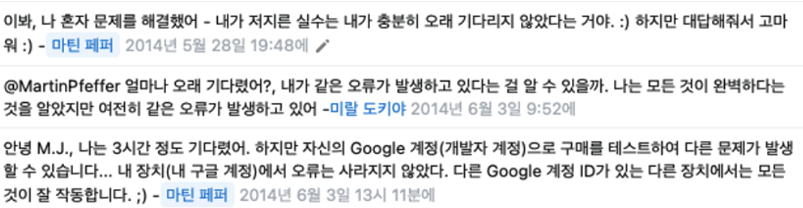
이 버전의 애플리케이션에서는 Google Play 를 통한 결제를 사용할 수 없습니다.
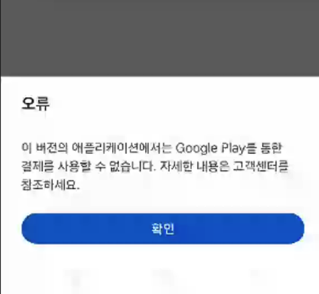
라이선스 계정으로 등록을 해야한다.
https://developer.android.com/google/play/licensing/setting-up?hl=ko#test-env
라이선스 등록을 해주니 오류가 사라졌다.
참고 링크
https://velog.io/@im_ssu/안드로이드-구글-인앱-결제-V3
https://developer.android.com/google/play/billing/integrate?hl=ko