최종프로젝트 5주차 - 툴팁 버그 수정중
오늘의 키워드 : 왜 안되는거지!!!
<오늘 작업>
- ItemToolTip의 OnShow부분 수정
- 하이어라키의 ItemTooltip에 LayoutElement추가
- SlotTooltipEventPublisher 리팩토링
- DraggableItem에 한 줄 추가
- SkillSlotController에 한 줄 추가
원래 사용하던 툴팁은 텍스트 길이에 따라 이미지가 자동으로 확장되게끔 하고 있었다. 하지만 이러한 방식의 단점은 화면 경계를 넘어갈 경우 텍스트 내용이 잘려보인다는 것이었다. 그래서 이를 해결하기 위해 두 가지 핵심 로직을 추가하고 수정하였다.
1. 가로방향 (캔버스 좌우) 판별 후 해당 슬롯 기준 반대 방향으로 툴팁 펼치기
2. 세로 방향 (캔버스 위 아래)으로 밖으로 넘어가는 양만큼 보정하여 내용이 전부 보이도록 하기
ItemToolTip.cs 수정
OnShow 메서드에 다음의 로직을 추가하였다.
        //툴팁 활성화, 레이아웃 강제 갱신
        tooltipWindow.SetActive(true);
        Canvas.ForceUpdateCanvases();

        // 현재 컨텐트 기준 너비 측정
        float contentWidth = rt.rect.width;

        //preferredWidth에 clamp 적용
        layout.preferredWidth = Mathf.Min(contentWidth, maxWidth);
        Canvas.ForceUpdateCanvases();

        //pivot.x, pos 조정
        float halfW = Screen.width * 0.5f;
        float pivotX = evt.screenPosition.x > halfW ? 1f : 0f;
        rt.pivot = new Vector2(pivotX, 0.5f);

        //화면 상단 overflow 방지 로직
        Vector2 pos = evt.screenPosition;

        //툴팁 높이
        float tooltipH = rt.rect.height;
        // pivot.y = 0.5 이므로 상단/하단 엣지 계산
        float topEdge = pos.y + tooltipH * 0.5f;
        float bottomEdge = pos.y - tooltipH * 0.5f;

        //위쪽으로 넘친 만큼 내리기
        float overflowTop = topEdge - Screen.height;
        if (overflowTop > 0f)
            pos.y -= overflowTop;

        //아래쪽으로 넘친 만큼 올리기
        float overflowBot = 0f - bottomEdge;  // bottomEdge<0 이면 음수
        if (overflowBot > 0f)
            pos.y += overflowBot;

rt.position = pos;- 텍스트 길이에 따라 이미지도 맞춰서 자동으로 확장시키되, 최대너비를 넘지 않도록
preferredWidth를 고정시켰다. - 화면 중간을 기준으로 툴팁 피봇을 1, 또는 0으로 설정하였다.
- 세로
pivot.y는 기본적으로 슬롯 중간에 위치할 수 있게 0.5로 유지하되, 툴팁의 높이를 계산해 화면 위 아래 경계를 체크한 뒤 넘친 만큼만pos.y를 보정하였다.
SlotTooltipEventPyblisher
아이템을 드래그 중일 때 다른 아이템 위에 마우스가 올려져 있는 상태라고 하더라도 툴팁이 보이지 않게 하기위해 OnPointerEnter를 추가해주었다.
    public void OnPointerEnter(PointerEventData eventData)
    {
        // 드래그 중일 땐 무시
        if (DraggableItem.IsDragging) return;

        PublishShowIfValid(eventData.pointerEnter);
    }

    public void OnPointerExit(PointerEventData eventData)
    {
        EventBus.Publish(new TooltipHideEvent());
    }

    // 추가된 부분
    // 아이템을 슬롯에 드롭하는 순간 호출
    public void OnDrop(PointerEventData eventData)
    {
        // 드래그 중인 아이템인지 확인
        var di = eventData.pointerDrag?.GetComponent<DraggableItem>();
        if (di == null || !di.dragEnabled) return;

        // 기존 툴팁 숨기고
        EventBus.Publish(new TooltipHideEvent());

        // 드롭 직후 이 슬롯에 툴팁 띄우기
        PublishShowIfValid(gameObject);
    }

    // OnPointerEnter와 OnDrop에서 공통으로 쓰는 로직
    private void PublishShowIfValid(GameObject go)
    {
        if (go == null) return;

        // 룬 슬롯 위라면 무시
        if (go.GetComponentInParent<RuneSlotController>() != null)
            return;

        //자신인지 확인
        if (go.GetComponentInParent<SlotTooltipEventPublisher>() != this)
            return;

        // 실제 아이템 데이터 추출
        ItemData data = null;
        AchievementData achievData = null;
        List<RuneData> runes = new List<RuneData>();

        if (skillSlot != null && skillSlot.skillDragItem != null)
        {
            data = skillSlot.CurrentSkill;
            runes = new List<RuneData>(
                skillSlot.skillDragItem
                         .GetComponent<SkillItemController>()
                         .attachedRunes
            );
        }
        else if (invSlot != null)
        {
            var childDi = GetComponentInChildren<DraggableItem>();
            if (childDi != null)
            {
                data = childDi.itemData;
                var sic = childDi.GetComponent<SkillItemController>();
                if (sic != null)
                    runes = new List<RuneData>(sic.attachedRunes);
            }
        }
        else if (potionSlot != null)
        {
            var childDi = GetComponentInChildren<DraggableItem>();
            if (childDi != null && childDi.itemData is PotionData pData)
            {
                data = pData;
            }
        }
        else if (collectorSlot != null)
        {
            achievData = collectorSlot.achievementData;
            data = collectorSlot.itemData;
        }

        Vector2 slotPos = rt.position;

        // 데이터 없으면 스킵
        if (data == null && achievData == null) return;

        EventBus.Publish(new TooltipShowEvent
        {
            data = data,
            achievData = achievData,
            screenPosition = slotPos,
            attachedRunes = runes,
        });
}- 공통으로 사용되는 로직을 따로 분리해 관리할 수 있도록 리팩토링하였다.
결과 이미지는 다음과 같다.
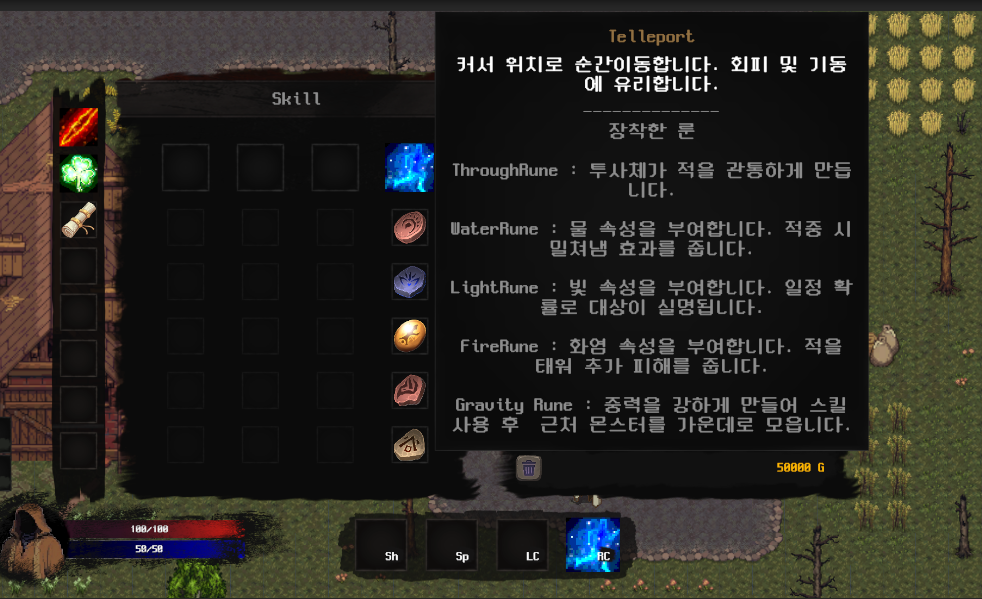
네번째 스킬칸에 있는 스킬에 마우스를 올린 상태이다. 설명이 긴 룬을 다섯개나 채용했는데도 글이 잘리지 않고 전부 보인다. 그리고 화면상 왼쪽에 있는 슬롯에 마우스를 올렸으므로 오른쪽으로 툴팁이 펼쳐진 것을 볼 수 있다.
툴팁 수정에 따른 각종 버그 수정
- 스킬북 합성 시 다른 아이템을 드래그 시작하기 전까지 툴팁이 나오지 않는 현상
- 확인해보니 같은 스킬북끼리 합성이 되었을 때 아직 드래그 중이라고 여겨지기 때문에 툴팁이 뜨지 않는 거였다. 그래서
SkillSlotController에서dragged.OnEndDrag(eventData);를 추가해 드래그하고 있던 아이템의 드래그 상태를 강제로 끝내 해결하였다.
- 간헐적으로 아이템을 드래그하기 시작할때 툴팁이 바로 사라지지 않고 잔류하는 현상
DraggableItem의OnBeginDrag마지막에EventBus.Publish(new TooltipHideEvent());를 추가해 툴팁을 닫는 이벤트를 발행해줌으로써 해결하였다.
마무리하며
튜터님의 도움이 컸다. 툴팁을 어떻게 띄울지 고민이 됐었는데 튜터님이 오른쪽 왼쪽 기준으로 띄우는 곳을 다르게 하면 어떻겠냐는 의견을 주셨고 우리게임이 마침 인벤토리가 오른쪽 왼쪽으로 명확하게 나뉘기 때문에 적용하기에 좋았다. 그리고 지금 추가적으로 적는거지만 저 날 당일에는 버그를 수정하지 못했었다. 스킬북 합성 시 다른 아이템을 드래그 시작하기 전까지 툴팁이 나오지 않는 현상을 수정한다고 몇시간은 쓴 것 같은데 그냥 저 한 줄의 위치만 옮겨주는 되는거였다.... 알아내서 해결했으니... 다행인걸로?