[강의] 게임 개발이 처음이어도 쉽게 배우는 모바일 게임 개발 1주차 [떨어지는 물방울 받기]
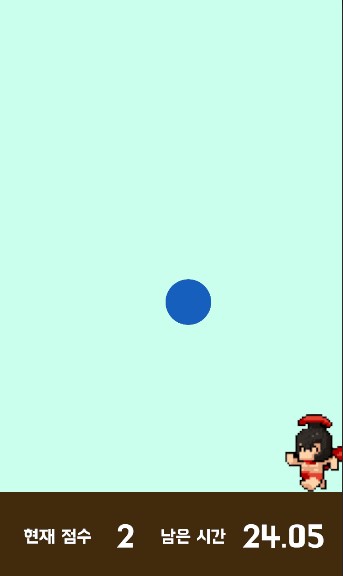
오늘은 위의 그림과 같은 게임을 만들어보는 강의를 시청했다.
캐릭터 Rtan 움직이기
public class Rtan : MonoBehaviour // 캐릭터 script
{
    SpriteRenderer renderer; // Inspector창의 SpriteRenderer에 접근하기 위한 renderer 생성

    int direction = 1; // 캐릭터 이동방향
    public float velocity = 0.05f; // 캐릭터 이동 속도

    void Start()
    {
        Application.targetFrameRate = 60; // 프레임 설정
        renderer = GetComponent<SpriteRenderer>(); // SpriteRenderer 컴포넌트 받아오기
    }

    {
        float posX = transform.position.x;

        if (Input.GetMouseButtonDown(0))
        {
            direction *= -1;
            renderer.flipX = !renderer.flipX;
        } // 마우스를 클릭하면 플레이어가 방향을 바꿈

        if (posX > 2.6f)
        {
            renderer.flipX = true;
            direction = -1;
        }

        if (posX < -2.6f)
        {
            renderer.flipX = false;
            direction = 1;
        } // 플레이어가 화면 끝에 닿으면 방향을 바꿈. spriterenderer의 flip을 이용

        transform.position += Vector3.right * direction * velocity;
    }
}
빗방울 Prefab 제작
public class Rain : MonoBehaviour
{
    SpriteRenderer renderer;

    float size;
    int score;

    void Start()
    {
        renderer = GetComponent<SpriteRenderer>();

        float x = Random.Range(-2.4f, 2.4f);
        float y = Random.Range(3.0f, 5.0f);

        transform.position = new Vector3(x, y, 0);

        int type = Random.Range(1, 5); // 빗방울 Type 생성

        if (type == 1)
        {
            size = 1.2f;
            score = 1;
            renderer.color = new Color(0, 116/255f, 1f, 210/255f);
        }
        else if (type == 2)
        {
            size = 1.0f;
            score = 2;
            renderer.color = new Color(26 / 255f, 111 / 255f, 217 / 255f, 235 / 255f);
        }
        else if (type == 3)
        {
            size = 0.8f;
            score = 3;
            renderer.color = new Color(19 / 255f, 95 / 255f, 188 / 255f, 1f);
        }
        else if (type == 4)
        {
            size = 0.8f;
            score = -5;
            renderer.color = new Color(1f, 0, 0, 230 / 255f);
        }
		// tpye별로 사이즈와 스코어, 색상을 정함
        transform.localScale = new Vector3(size, size, 0);
    }

    private void OnTriggerEnter2D(Collider2D collision)
    {
        if (collision.gameObject.CompareTag("Ground")) // 인식한 collider의 게임오브젝트의 태그를 비교
        {
            Destroy(gameObject);
        }
        if (collision.gameObject.CompareTag("Player"))
        {
            GameManager.Instance.AddScore(score);
            Destroy(gameObject);
        }
    }
    /* inspector - collider에서 is Trigger로 충돌을 제어할 수 있다.
    * isTrigger가 false일 때는 물리적 Collision이 발생
    * isTrigger가 true라면 물리적 충돌 없이 collider를 인식
    * 위 코드에서 빗방울을 Trigger로 제어한 이유는
    * 빗방울 생성 빈도를 높였을때 빗방울끼리 충돌하여 화면 밖으로 나가는 경욱가 발생하기 때문이다.
    */
}
GameManager - 빗방울 반복생성, 점수 구현, 시간반영, 게임 끝내기
using System.Collections;
using System.Collections.Generic;
using UnityEngine;
using UnityEngine.UI;

public class GameManager : MonoBehaviour
{
    public static GameManager Instance; // 싱글톤화 : 유일한 객체로 만들고 여러 스크립트에서 접근 가능하게 만들어줌
    public GameObject rain;
    public GameObject endPanel;
    public Text totalScoreTxt;
    public Text timeTxt;

    int totalScore;
    float totalTime = 30.0f;

    private void Awake()
    {
        Instance = this;
        Time.timeScale = 1.0f;
    }

    // Start is called before the first frame update
    void Start()
    {
        InvokeRepeating("MakeRain", 0f, 1f); // 빗방울 생성 Method를 반복
    }

    // Update is called once per frame
    void Update()
    {
        if (totalTime > 0f)
        {
            totalTime -= Time.deltaTime; // deltaTime : 마지막 프레임이 완료된 후 경화한 시간. 프레임 차이가 있어도 같은 시간이 경과됨
        }
        else
        {
            totalTime = 0f;
            endPanel.SetActive(true); // 화면에 게임 종료 패널을 띄움
            Time.timeScale = 0f; // 시간을 멈춤
        }
            timeTxt.text = totalTime.ToString("N2"); // 소수점 둘째자리까지 시간을 String으로 변환하여 시간 표시
    }

    void MakeRain()
    {
        Instantiate(rain); // 오브젝트 생성 함수
    }

    public void AddScore(int score)
    {
        totalScore += score;
        totalScoreTxt.text = totalScore.ToString();
    }
}
using UnityEngine;
using UnityEngine.SceneManagement;
public class RetryBtn : MonoBehaviour // MainScene을 새로 불러옴
{
public void Retry()
{
SceneManager.LoadScene("MainScene");
}
}
게임 개발 기록