게임 개발이 처음이어도 쉽게 배우는 모바일 게임 개발 2주차 [풍선을 지켜라]
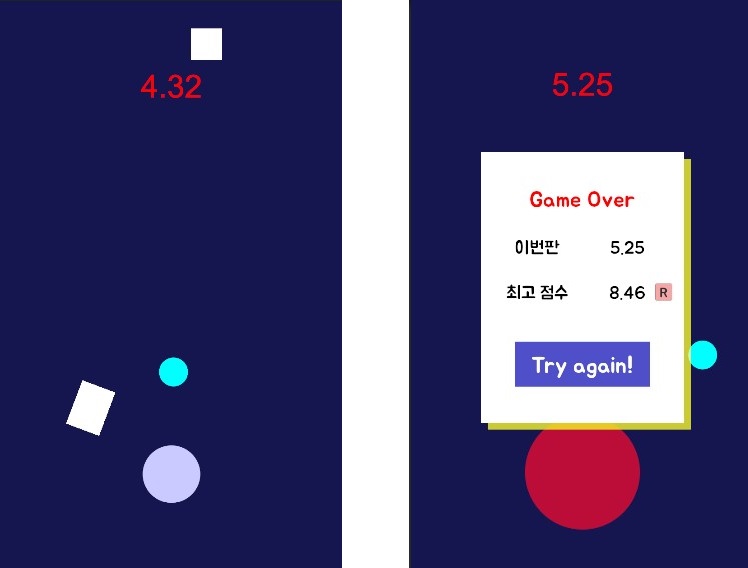
[풍선을 지켜라]는 '떨어지는 오브젝트'로부터 '마우스를 따라 움직이는 쉴드 오브젝트'를 이용하여 하단의 '풍선 오브젝트'를 지키는 간단한 게임이다.
- GameObject - Shield : 마우스를 따라 움직임. Circle Collider 2D
public class Shield : MonoBehaviour
{
    void Update()
    {
        Vector2 mousePos = Camera.main.ScreenToWorldPoint(Input.mousePosition);
        transform.position = mousePos;
    }
}- GameObject - Square: 떨어지는 낙하물. 생성 위치와 크기, 모양이 랜덤. Rigidbody 2d, Box Collider 2D -> Prefabs
public class Square : MonoBehaviour
{
    // Start is called before the first frame update
    void Start()
    {
        float x = Random.Range(-3.0f, 3.0f);
        float y = Random.Range(3.0f, 5.0f);
        transform.position = new Vector2(x, y); // 랜덤한 위치에 생성

        float size_x = Random.Range(0.5f, 1.5f);
        float size_y = Random.Range(0.5f, 1.5f);
        transform.localScale = new Vector2(size_x, size_y);
        // 다양한 크기와 모양을 가짐
    }

    // Update is called once per frame
    void Update()
    {
        if (transform.position.y < -6.0f)
        {
            Destroy(gameObject);
        } // Square가 화면 아래로 나가면 사라짐
    }

    private void OnCollisionEnter2D(Collision2D collision) // Balloon에 Player태그 설정
    {
        if (collision.gameObject.CompareTag("Player"))
        {
            GameManager.Instance.GameOver();
        }
    } // Square가 Balloon에 닿으면 GameManager의 GameOver() Method를 호출.
}- GameManager : prefabs-Square 생성 Method, GameOver Method, TimeStop Method
- GameOver(): 게임을 종료시키고 최고점수를 저장함
public class GameManager : MonoBehaviour
{
    public static GameManager Instance;
    public GameObject square;
    public GameObject endPanel;
    public Text timeTxt;
    public Text nowScoreTxt;
    public Text bestScoreTxt;

    public Animator anim;

    bool isPlay = true;
    float time = 0.0f;
    string key = "bestScore";

    private void Awake()
    {
        if (Instance == null)
        {
            Instance = this;
        }
    }

    // Start is called before the first frame update
    void Start()
    {
        Time.timeScale = 1.0f;
        InvokeRepeating("MakeSquare", 0f, 1f);
    }

    // Update is called once per frame
    void Update()
    {
        if (isPlay)
        {
        time += Time.deltaTime;
        timeTxt.text = time.ToString("N2");
        }
    }

    void MakeSquare()
    {
        Instantiate(square);
    }

    public void GameOver()
    {
        isPlay = false;
        anim.SetBool("isDie", true);
        Invoke("TimeStop", 0.5f);
        nowScoreTxt.text = time.ToString("N2");

        if (PlayerPrefs.HasKey(key))
        {
            float best = PlayerPrefs.GetFloat(key);
            if (best < time)
            {
                PlayerPrefs.SetFloat(key, time);
                bestScoreTxt.text = time.ToString("N2");
            }
            else
            {
                bestScoreTxt.text = best.ToString("N2");
            }
        }
        else
        {
            PlayerPrefs.SetFloat(key, time);
            bestScoreTxt.text = time.ToString("N2");
        }

        endPanel.SetActive(true);
    }

    void TimeStop()
    {
        Time.timeScale = 0.0f;
    }
}- RetryBtn: 게임 종료 UI패널에서 Try again 버튼을 누르면 MainScene을 로드
public class RetryBtn : MonoBehaviour
{
public void Retry()
{
SceneManager.LoadScene("MainScene");
}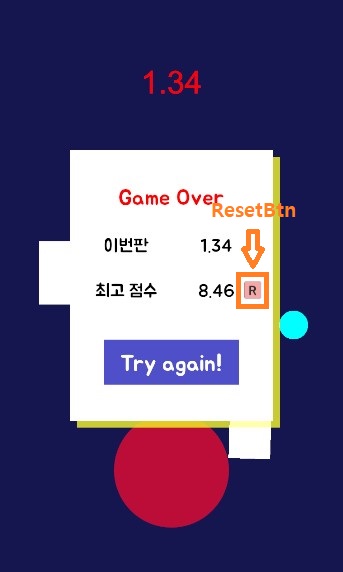
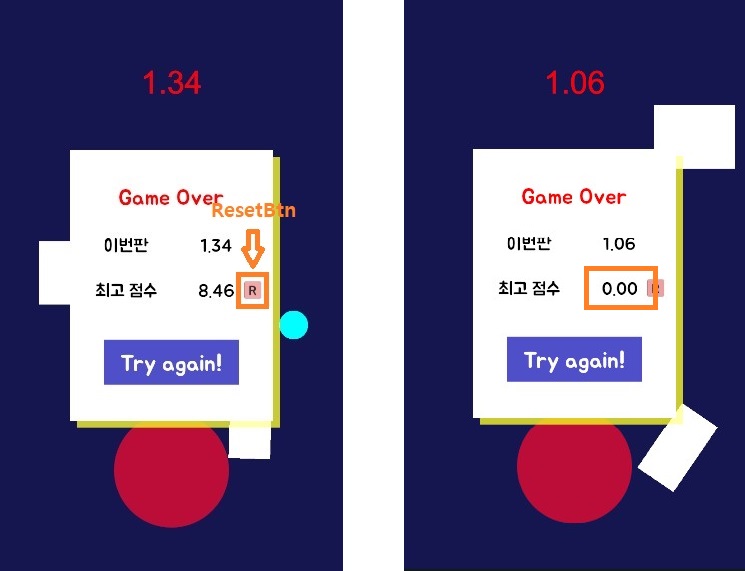
}- ResetScoreBtn : 점수 저장이 제대로 되고 있는지 쉽게 확인하기 위해(점수가 갱신되는지 확인하려면 계속 최고점수를 넘겨야해서) 최고점수 리셋버튼을 만들어봤다. 버튼에 script 적용하는 연습도 할 수 있었다.
public class ResetScoreBtn : MonoBehaviour
{
    public Text bestScoreTxt;
    public void ResetScore()
    {
        PlayerPrefs.DeleteAll();
        bestScoreTxt.text = "0.00";
    }
}

게임 개발 기록