AnimationCurve
몬스터가 죽고 재화(골드)를 드랍하는데, 그 값을 랜덤하게 뽑으려고 한다. 이때, 작은 값이 뽑힐 확률이 더 높게 설정하고 싶어서 Random.Value의 값을 AnimationCurve를 이용해 가중치를 설정하여 작은 값이 더 잘 나오게 하였다.
-
AnimationCurve 적용 방법
- AnimationCurve를 public으로 선언하여 Inspector창에서 Curve를 설정할 수 있도록 한다.
- CurveWeightedRandom(AnimationCurve curve) 메서드를 이용해 Random.value로 뽑은 랜덤 값으로 curve상의 한 점을 얻는다.
- Curve의 기울기가 완만한 부분 값이 더 자주 나온다.
- 아래의 [Image 1]과 같이 커브를 설정하면 0 ~ 0.25의 값이 나올 확률이 50%다.
-
실제 작성한 script (0~1 사이의 값을 Curve를 이용하여 랜덤하게 뽑은 뒤 최대로 나올 수 있는 값에 곱해줘서 (낮은 값이 더 자주 나오게 가중치가 설정된) 랜덤한 골드를 얻을 수 있게 함)
public AnimationCurve curveRandom;
[SerializeField] private int dropGold;
public void SetDropGold(int maxGold)
{
dropGold = Mathf.RoundToInt(maxGold * CurveWeightedRandom(curveRandom));
}
private float CurveWeightedRandom(AnimationCurve curve)
{
return curve.Evaluate(Random.value);
} 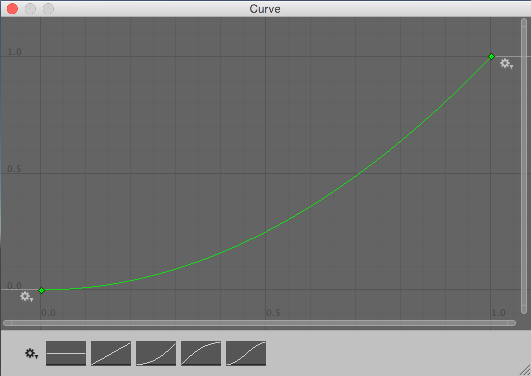 [Image 1] 설정한 Curve
출처 : Unity Documentation, https://docs.unity3d.com/kr/2022.3/Manual/class-Random.html
- 작동 방식
- Random.value가 Curve 그래프 상의 x값
- return값은 x값에 대한 Curve상의 y값
- 위의 [Image 1]을 보면 x가 0 ~ 0.5일 때 y는 0 ~ 0.25로 Random.value의 50%가 0 ~ 0.25의 값을 return함
- 기울기가 완만한 구간의 y값이 더 자주 return된다는 것을 알 수 있음
- Curve를 커스텀하여 연속적인 가중치를 설정할 수 있음
Player, Monster 체력 재생
- 1초마다 Stat의 Regeneration 값만큼 재생
- 데미지를 입으면 재생 중지
- 마지막으로 데미지를 입은 후 5초가 지나면 다시 체력 재생
private IEnumerator hpRegen;
private float lastDamagedTime;
private bool isAttacked = false;

private void Start()
{
    hpRegen = RegenerateHp();
    StartCoroutine(hpRegen);
}

private void Update()
{
    if (isAttacked)
    {
        if (Time.time - lastDamagedTime > 5f)
        {
            isAttacked = false;
            if (hpRegen != null)
                StartCoroutine(hpRegen);
        }
    }
    _hpBar.UpdateCurrentHP(status.HP.CurrentValue);
}

// Skill이나 Projectile 오브젝트에서 충돌 시 호출할 메서드
public void TakeDamage(float damage)
{
    isAttacked = true;
    lastDamagedTime = Time.time;
    status.HP.CurrentValue -= damage;

    if (hpRegen != null)
        StopCoroutine(hpRegen);
}

IEnumerator RegenerateHp()
{
    while (true)
    {
        if (status.HP.CurrentValue < status.HP.GetValue())
            status.HP.CurrentValue = Mathf.Min(status.HP.CurrentValue + status.HPRegeneration.CurrentValue,
            						 status.HP.GetValue());
        yield return regenInterval;
    }
}
WaitForSeconds regenInterval = new WaitForSeconds(1f);
게임 개발 기록