
아래의 그림과 같이 이미지와 이미지 위의 아이콘, 이미지 아래에 문구들이 있는 카드 레이아웃을 만들어 보았다.
단순히 따라 만드는 게 아니라,
만들면서 헷갈렸던 부분들을 정리해보려고 한다.
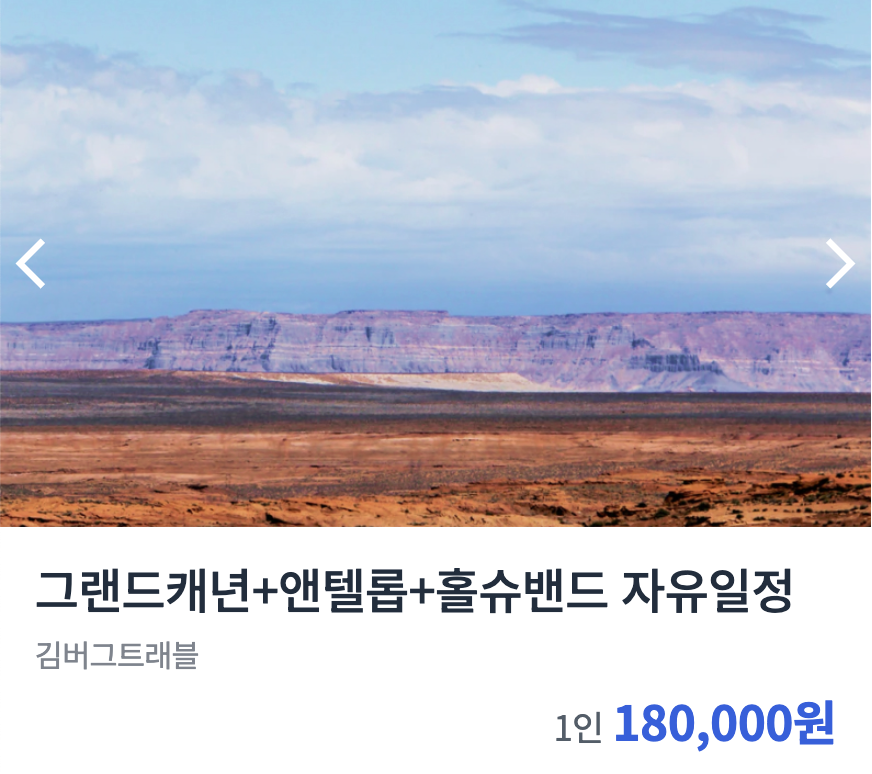
만들면서 궁금했던 점들
1. .card-content span 은 정확히 무엇을 선택하는 걸까?
HTML 구조를 보면:
<div class="card-content">
  <h1>...</h1>
  <span>김버그트래블</span>   <!-- 직계 자식 -->
  <strong>
    <span>1인</span>         <!-- strong 안에 있음 -->
  </strong>
</div>
.card-content span 이
김버그트래블에만 적용되는 건지, 아니면 1인에도 같이 적용되는 건지 헷갈렸다.
만약, 김버그트래블에만 적용시키고 싶다면
.card-content > span → 직계 자식 선택자인 > 을 넣어야 한다.
즉,
.card-content > span→ 김버그트래블만 선택.card-content span→ 안에 있는 모든 span (김버그트래블 + 1인) 선택
2. 이미지 위 화살표를 ‘정가운데’ 배치하려면 매번 width/height 계산해야 하나?
절대 X
계산하지 않고 중앙 정렬 공식을 쓰면 된다.
해결 방법
.card-carousel {
  position: relative;
}

.card-carousel button {
  position: absolute;
  top: 50%;
  transform: translateY(-50%);
}- 버튼의 기준점을 만들기 위해 부모에
position: relative - 버튼은
position: absolute top: 50%로 부모의 중간 지점에 올리고transform: translateY(-50%)로 “내 높이의 절반만큼 위로” 당겨서 진짜 중앙 맞추기
★★ transform까지 필요한 이유
top: 50% 는 버튼의 윗변을 부모의 50% 지점에서 맞추는 거라서
버튼이 정확히 중앙이 아니라 아래로 반쯤 내려가 보이게 된다.
3. 레이아웃을 숫자로 억지로 맞추지 말고 효율적으로 하는 방법은?
처음 했을 때 픽셀로 레이아웃을 배치하였다.
필셀 좌표로 배치하면 요소 크기나 폰트가 조금만 변해도 레이아웃이 깨지기 쉽기 때문에,
기준점을 만들고(relative), 정렬(text-align), 부모 기준 비율(100%)을 활용하는 방식이 더 안정적이다.
해결 방법
.card-carousel img {
  width: 100%;
  height: auto;
}

.card-content strong {
  display: block;
  text-align: right;
}- 크기는 부모 기준으로 맞추면 된다.
height: auto;: width값에 맞춰 자동으로 조정된다.
- 오른쪽 끝에 가격 배치는 정렬로 맞추면 된다.
코드
html 코드
<!DOCTYPE html>
<html lang="ko">
    <head>
        <meta charset="UTF-8" />
        <meta name="viewport" content="width=device-width, initial-scale=1.0" />
        <title>Position 2</title>
        <link href="https://fonts.googleapis.com/css?family=Noto+Sans+KR:400,500,700&display=swap" rel="stylesheet" />
        <link rel="stylesheet" href="./style.css" />
    </head>
    <body>
        <div class="card">
            <div class="card-carousel">
                <img src="./assets/img-card.jpg" alt="그랜드캐년" />
                <button type="button" aria-label="이전" id="prev"></button>
                <button type="button" aria-label="다음" id="next"></button>
            </div>
            <div class="card-content">
                <h1>
                    그랜드캐년+앤텔롭+홀슈밴드 자유일정
                </h1>
                <span>
                    김버그트래블
                </span>

                <strong>
                    <span>
                        1인
                    </span>
                    180,000원
                </strong>
            </div>
        </div>
    </body>
</html>
css 코드
* {
    box-sizing: border-box;
    margin: 0;
}

body {
    font-family: "Noto Sans KR", sans-serif;
    letter-spacing: -0.02em;
}

h1 {
    font-size: 22px;
    font-weight: 500;
    color: #1f2d3d;
    line-height: 1.4545454545;
}

span {
    font-size: 14px;
    font-weight: 400;
    color: #7d858f;
    line-height: 1.5;
}

strong {
    font-size: 22px;
    color: #2860e1;
    line-height: 1.0909090909;
}

strong span {
    font-size: 16px;
    font-weight: 400;
    color: #525d69;
    line-height: 1.5;
}

button {
    display: block;
    width: 28px;
    height: 28px;
    border: none;
    background-size: contain;
    background-repeat: no-repeat;
    background-position: center center;
    background-color: transparent;
}

#prev {
    background-image: url(./assets/icon-backward.svg);
}

#next {
    background-image: url(./assets/icon-forward.svg);
}

.card {
	width: 400px;
}

.card-carousel {
	position: relative;
}

.card-carousel img {
	display: block;
	width: 100%;
	height: auto;
}

#prev,
#next {
	position: absolute;
	top: 50%;
	transform: translateY(-50%);
}

#prev {
	left: 0;
}

#next {
	right: 0;
}

.card-content {
	padding: 12px 16px;
}

.card-content h1 {
	margin-bottom: 2px;
}

.card-content strong {
	display: block;
	margin-top: 8px;
	text-align: right;
}
이번 실습에서 배운 것
✔ > 는 직계 자식 선택자다.
✔ 중앙 정렬은 50% + translate 공식으로 해결할 수 있다.
✔ 레이아웃을 숫자로 찍기보다 '정렬과 흐름'으로 잡는 게 훨씬 안정적이다.
느려도 천천히 꾸준히 !