누적 학습 시간 : 188시간 34분
📅 2026-04-28
언리얼에서 C++로 액터클래스 생성
클래스 생성

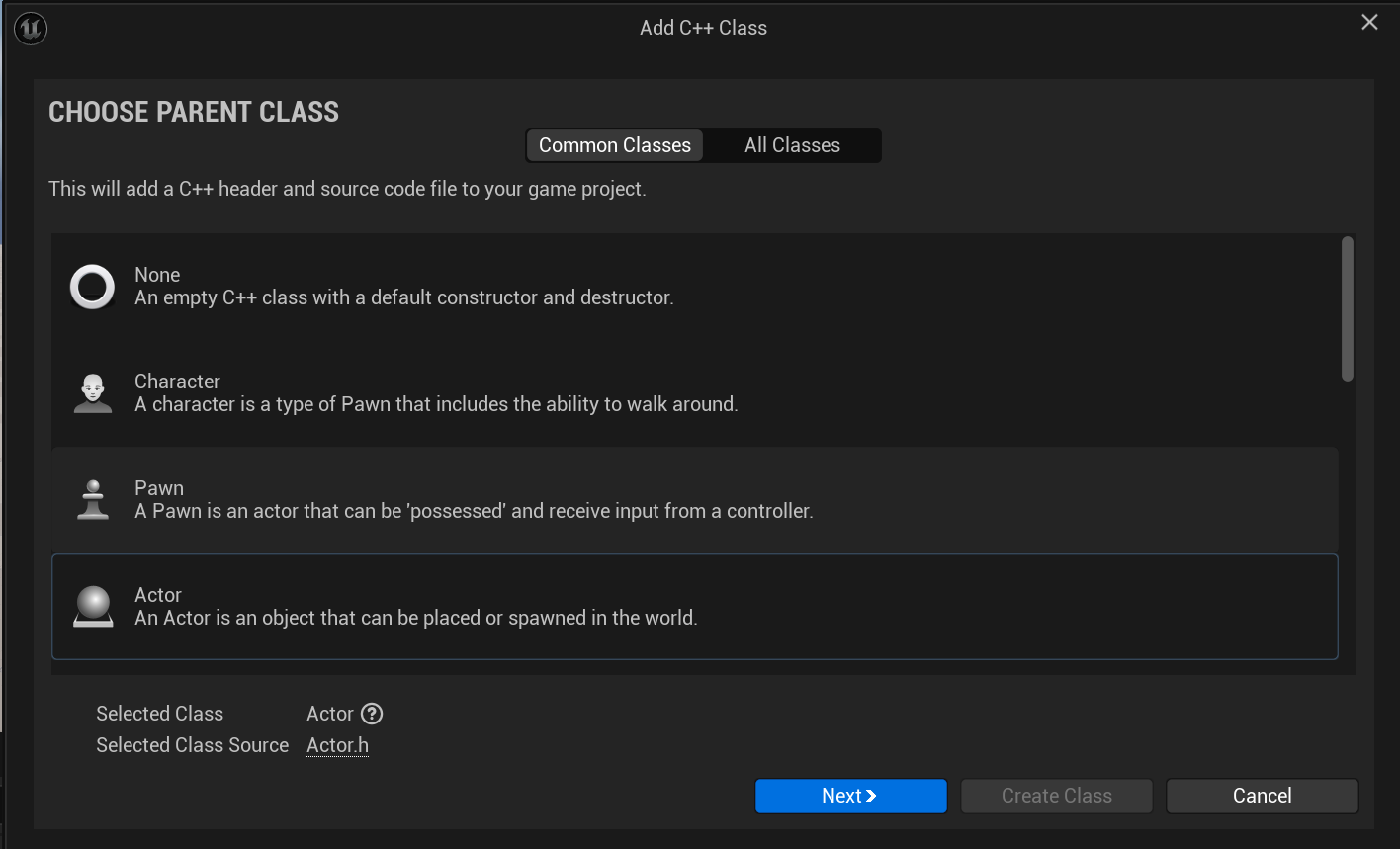
에디터 > 상단 Tools > New C++ Class > Actor > MyActor로 생성
콘텐츠 브라우저에서 BP 생성
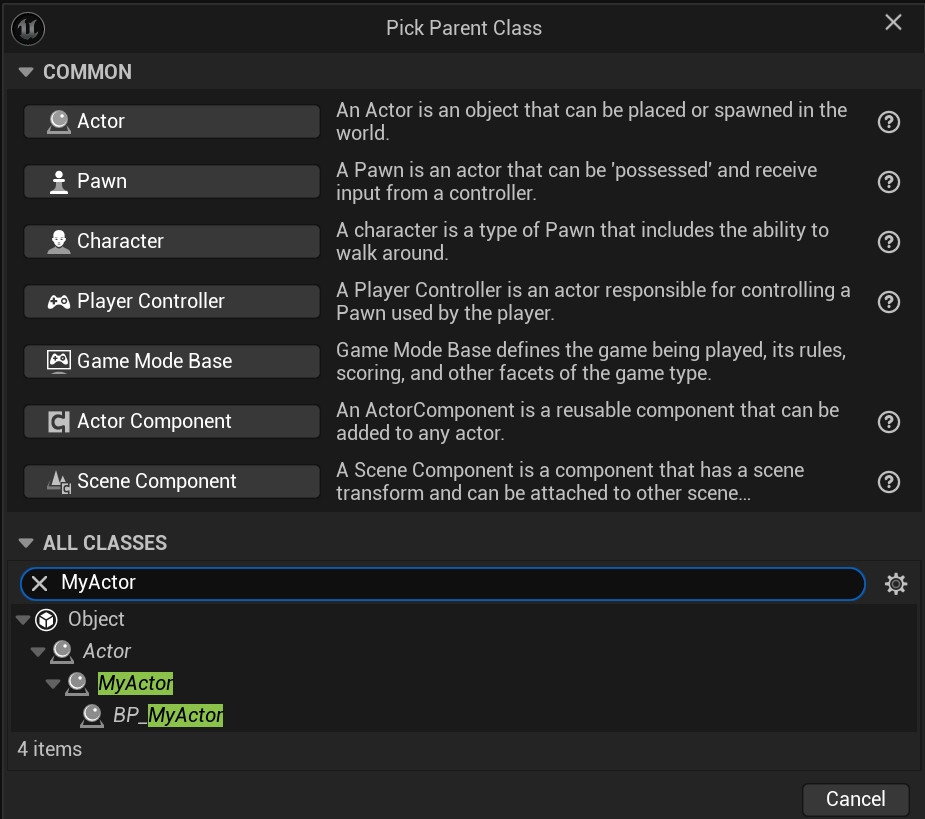
콘텐츠 브라우저 > 우클릭 > ALL CLASSES > MyActor 검색
Location이동 및 Rotation 구현
MyActor.h
#pragma once

#include "CoreMinimal.h"
#include "GameFramework/Actor.h"
#include "MyActor.generated.h"

UCLASS()
class PROJECT1TOGETHER_API AMyActor : public AActor
{
	GENERATED_BODY()

public:
	// Sets default values for this actor's properties
	AMyActor();

	FVector PrevLocation;
	FVector CurrentLocation;
	float TotalDistance;
	int MoveCount;

protected:
	// Called when the game starts or when spawned
	virtual void BeginPlay() override;

public:
	// Called every frame
	virtual void Tick(float DeltaTime) override;


	void Move();
	void Turn();
	void TriggerEvent();
};
MyActor.cpp
#include "MyActor.h"

// Sets default values
AMyActor::AMyActor()
{
	// Set this actor to call Tick() every frame.  You can turn this off to improve performance if you don't need it.
	PrimaryActorTick.bCanEverTick = true;
}

// Called when the game starts or when spawned
void AMyActor::BeginPlay()
{
	Super::BeginPlay();

}

// Called every frame
void AMyActor::Tick(float DeltaTime)
{
	Super::Tick(DeltaTime);

}

void AMyActor::Move()
{
	FVector Target;

	// -50 ~ 50 randomeFloat
	Target.X = FMath::FRandRange(-50.0, 50.0);
	Target.Y = FMath::FRandRange(-50.0, 50.0);
	Target.Z = 0;

	AddActorWorldOffset(Target);

}

void AMyActor::Turn()
{
	FRotator DeltaRotation;

	DeltaRotation.Yaw = FMath::FRandRange(-180.0, 180.0);
	DeltaRotation.Pitch = 0;
	DeltaRotation.Roll = 0;

	AddActorWorldRotation(DeltaRotation);
}
과제 1
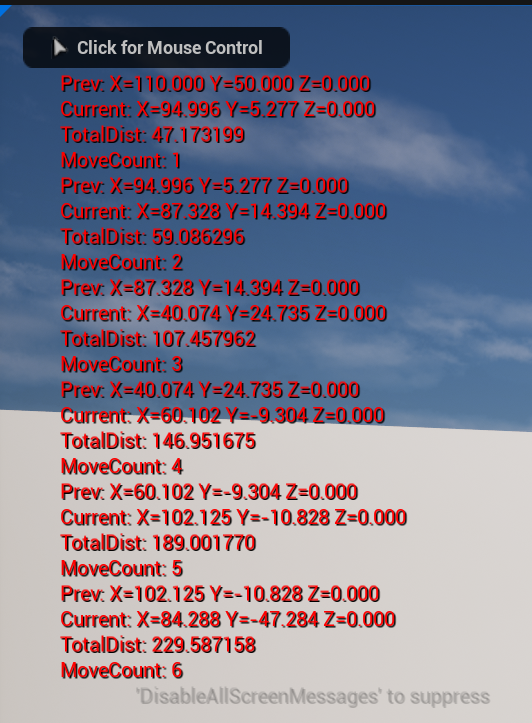
- 이동할 때마다 좌표, MoveCount 출력
- 50% 확률 이동
- 10회 이동 후 최종결과 리포트
MyActor.h
// Fill out your copyright notice in the Description page of Project Settings.

#pragma once

#include "CoreMinimal.h"
#include "GameFramework/Actor.h"
#include "MyActor.generated.h"

UCLASS()
class PROJECT1TOGETHER_API AMyActor : public AActor
{
	GENERATED_BODY()

public:
	// Sets default values for this actor's properties
	AMyActor();

	FVector PrevLocation;
	FVector CurrentLocation;
	float TotalDistance;
	int MoveCount;

protected:
	// Called when the game starts or when spawned
	virtual void BeginPlay() override;

public:
	// Called every frame
	virtual void Tick(float DeltaTime) override;


	void Move();
	void Turn();
	void TriggerEvent(int key);
};
MyActor.cpp
// Fill out your copyright notice in the Description page of Project Settings.


#include "MyActor.h"

// Sets default values
AMyActor::AMyActor()
{
	// Set this actor to call Tick() every frame.  You can turn this off to improve performance if you don't need it.
	PrimaryActorTick.bCanEverTick = true;
	TotalDistance = 0.0f;
	MoveCount = 0;
}

// Called when the game starts or when spawned
void AMyActor::BeginPlay()
{
	Super::BeginPlay();
	PrevLocation = GetActorLocation();

	for (int32 i = 0; i < 10; i++)
	{
		bool CanMove = FMath::RandBool();
		if (CanMove)
		{
			TriggerEvent(i);
		}
	}
}

// Called every frame
void AMyActor::Tick(float DeltaTime)
{
	Super::Tick(DeltaTime);

}

void AMyActor::Move()
{
	FVector Target;

	// -50 ~ 50 randomeFloat
	Target.X = FMath::FRandRange(-50.0, 50.0);
	Target.Y = FMath::FRandRange(-50.0, 50.0);
	Target.Z = 0;

	AddActorWorldOffset(Target);

}

void AMyActor::Turn()
{
	FRotator DeltaRotation;

	DeltaRotation.Yaw = FMath::FRandRange(-180.0, 180.0);
	DeltaRotation.Pitch = 0;
	DeltaRotation.Roll = 0;

	AddActorWorldRotation(DeltaRotation);
}

void AMyActor::TriggerEvent(int key)
{
	int32 BaseCountKey = MoveCount * 10 + key ;
	MoveCount++;
	Move();
	Turn();
	CurrentLocation = GetActorLocation();
	TotalDistance += FVector::Dist(PrevLocation,CurrentLocation);


	if (GEngine)
	{
		GEngine -> AddOnScreenDebugMessage(BaseCountKey + 1, 5, FColor::Red, FString::Printf(TEXT("Prev: %ls"),*PrevLocation.ToString()));
		GEngine -> AddOnScreenDebugMessage(BaseCountKey + 2, 5, FColor::Red, FString::Printf(TEXT("Current: %ls"),*CurrentLocation.ToString()));
		GEngine -> AddOnScreenDebugMessage(BaseCountKey + 3, 5, FColor::Red, FString::Printf(TEXT("TotalDist: %f"),TotalDistance));
		GEngine -> AddOnScreenDebugMessage(BaseCountKey + 4, 5, FColor::Red, FString::Printf(TEXT("MoveCount: %d"),MoveCount));
	}


	UE_LOG(LogTemp, Warning, TEXT("Init: %s"), *PrevLocation.ToString());
	UE_LOG(LogTemp, Warning, TEXT("Current: %s"), *CurrentLocation.ToString());
	UE_LOG(LogTemp, Warning, TEXT("Acc: %f"), TotalDistance);
	UE_LOG(LogTemp, Warning, TEXT("MoveCount: %d"), MoveCount);

	PrevLocation = CurrentLocation;
}
결과
에디터 종료 후 액터 재생성 오류
언리얼 에디터 + Rider로 신나게 작업하다가 에디터, Rider 닫고 재시작을 했더니
레벨에서 액터가 사라지고 BP_MyActor를 드래그앤드랍으로 배치시 실패 오류 로그가 발생한다.
튜터님께 질문드린결과 실무에서도 C++ 프로젝트 열때 Rider에서 여는게 일반적이라고 알려주셨다.
에디터에서 열 경우 에디터 하단 Contents Browser에 C++ Classes 폴더가 없는데 이는 C++ 컴파일이 되지 않아서 인식해지 못해서 발생한다고 생각했다.

그래서 튜터님 말씀대로 언리얼과 Rider를 종료하고
Rider로 프로젝트를 연 뒤 우측 상단 프로젝트명 옆 실행 버튼이 활성화될 때 까지 기다렸다가 누르면 빌드가 시작되면서 언리얼에디터가 열리는데
이때 문제가 해결된 것을 볼 수 있다. 이때부터는 에디터부터 열어도 오류가 발생하지 않는다.

이것 저것 다해보는 삶