1. 앱 입문 주차 과제
1) UIButton 타이틀 색상 설정하기
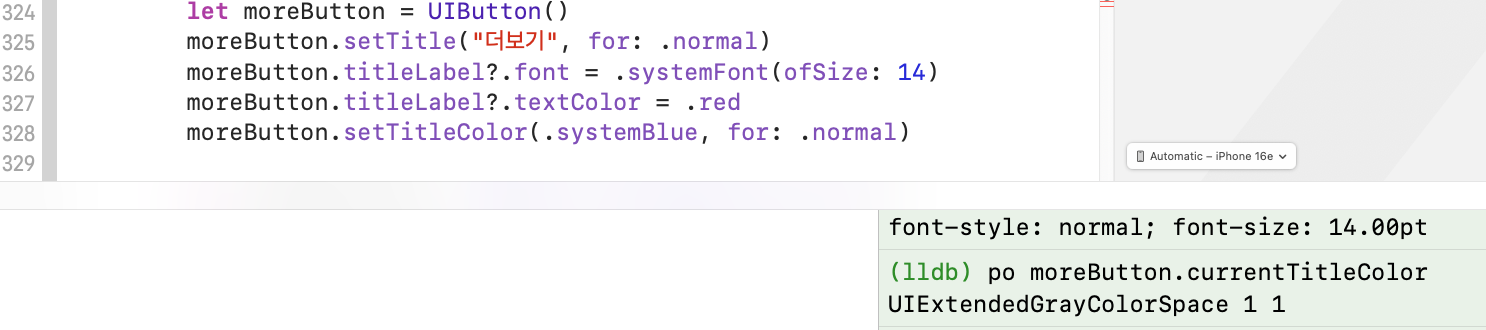
UIButton의 타이틀 색상을 설정하는데 button.titleLabel?.textColor를 사용했더니 되지 않는다.
button.setTitleColor를 사용하면 변경이 되는데, 왜 그런걸까?
인터넷을 찾아다녀보았지만.. setTitleColor를 사용하라는 말뿐, 명확한 해답은 찾지 못했다.
Do not use the label object to set the text color or the shadow color. Instead, use the
setTitleColor(_:for:)andsetTitleShadowColor(_:for:)methods of this class to make those changes.
titleLabel - Swift Documentation
심지어 공식 문서에서도 저걸 쓰라는 말만 있다...
브레이크 포인트를 찍어서 돌려보았는데,
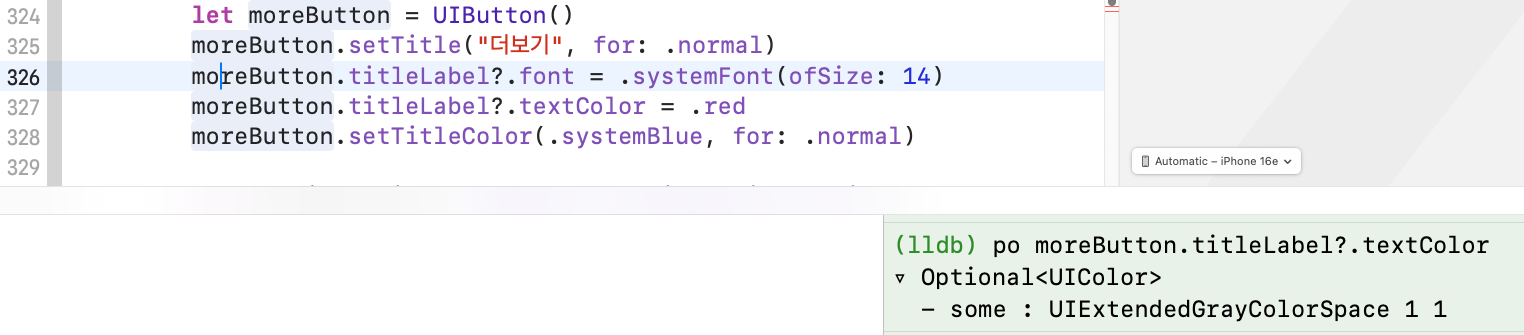
326번 라인(moreButton.titleLabel?.font)에서 titleLabel?.textColor를 찍으면 UIExtendedGrayColorSpace 1 1이라는 색상이 출력된다.
textColor가 존재하는데 왜 그걸 변경하면 적용이 되지 않는 것일까?

심지어 327번 라인(moreButton.titleLabel?.textColor = .red)를 하면 디버거에서 에러가 발생한다.
(프로그램 실행에는 문제가 없었다.)
(+ 근데 이거 튜터님이 돌리실 땐 에러가 발생하지 않았다. 뭐지?)
튜터님께도 여쭤보고 하여 나름의 두 가지 결론을 낼 수 있었다.
1️⃣ 타이틀 색상의 state 설정이 없음
UIButton은 state를 가지고 있다.
단순히 titleLabel.textColor를 변경시키면 버튼은 해당 색상이 어떤 상태일 때에 사용되어야하는지를 모르기 때문에 적용이 되지 않았던 것이 아닐까?
하지만! 위에서 돌렸던 코드에서는 moreButton.setTitle("더보기", for: .normal)로, normal 상태에서의 타이틀을 이미 설정해주었다.
그렇다면 titleLabel은 당연히 normal상태일 때를 디폴트로 가져가야하는 것이 아닌가?라는 의문이 있었다.
2️⃣ view.tintColor와의 충돌
튜터님께서 말씀해주신 부분이다.
titleLabel.textColor로 색상을 설정해버리면, view.tintColor가 더 상위에 있기 때문에 titleLabel.textColor가 아니라 tintColor 색상으로 보인다는 것이다.
button.titleLabel.textColor = .redtitleLabel의 색상을 red로 설정했지만
view.tintColor = .systemBluetintColor가 systemBlue라면 버튼의 타이틀 색상은 systemBlue로 보인다. tintColor가 변경된다면 변경된 색상으로 바뀔 것이다.
결국 titleLabel.textColor를 설정하는 것은 아무 의미가 없는 것이다.
button.setTitleColor(.red, for: .normal)반면, setTitleColor를 사용한다면 tintColor와 관계없이 버튼의 타이틀 색상은 red를 유지한다.
추가적으로, 요즘에는 UIButton.configuration으로 버튼을 설정한다고 알려주셨다.
코드에는 configuration으로 구현하는 방향으로 진행하고자 한다...
그래도 의문 해결!
2) ViewController 속성 선언 관련
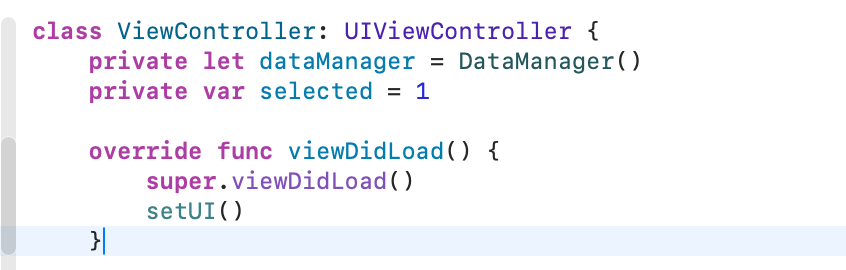
기존 코드에서는 ViewController에 속성을 선언하지 않고 함수로 컨텐츠들을 만들었다.
setUI만 호출하면 한번에 그려지는데... '더보기' 버튼 동작에서 이 구조에 문제가 있다는 것을 깨달았다.
더보기 버튼을 누르면 summary 스택의 텍스트가 바뀌어야하는데, 현재 구조에서는 텍스트가 바뀌면 UI 전체를 다 다시 그려야 한다.
레이블 하나 텍스트만 바꾸는데 그게 맞나...
그래서 VC 안에 속성을 선언하는 구조로 다시 변경하였다..🤯
3) UIButton Configuration
iOS15부터 UIButton을 Configuration을 통해 설정할 수 있게 되었다.
configurationUpdateHandler를 통해 버튼 상태(state)에 따라 configuration을 설정해줄 수 있어 적용해보았다.
func setMoreButton() {
	moreButton.configurationUpdateHandler = { button in

    	var configuration = UIButton.Configuration.plain()

        switch button.state {
        case .normal: // 선택하지 않았을 경우
        	configuration.title = "더보기"
        case .selected: // 선택했을 경우
        	configuration.title = "접기"
            configuration.baseBackgroundColor = .clear
        default: break
        }

        configuration.attributedTitle?.font = .systemFont(ofSizze: 14)
        configuration.attributedTitle?.foregroundColor = .systemBlue

        button.configuration = configuration
    }
}
🧐 폰트와 글자 색상은 동일한데 configuration.title만 변경하면 안될까?
실험해보았다.
func setMoreButton() {
	var configuration = UIButton.Configuration.plain()
    configuration.title = "더보기" // 초기 세팅
    configuration.attributedTitle?.font = .systemFont(ofSize: 14)
    configuration.attributedTitle?.foregroundColor = .systemBlue
    configuration.baseBAckgroundColor = .clear

    moreButton.configuration = configuration

    moreButton.configurationUpdateHandler = { button in
    	switch button.state {
    	case .normal:
    	button.configuration?.title = "더보기"
    	case .selected:
    	button.configuration?.title = "접기"
    	default: break
    	}
	}
}
결론적으로 위 방식은 원하는대로 적용이 되지 않았다.
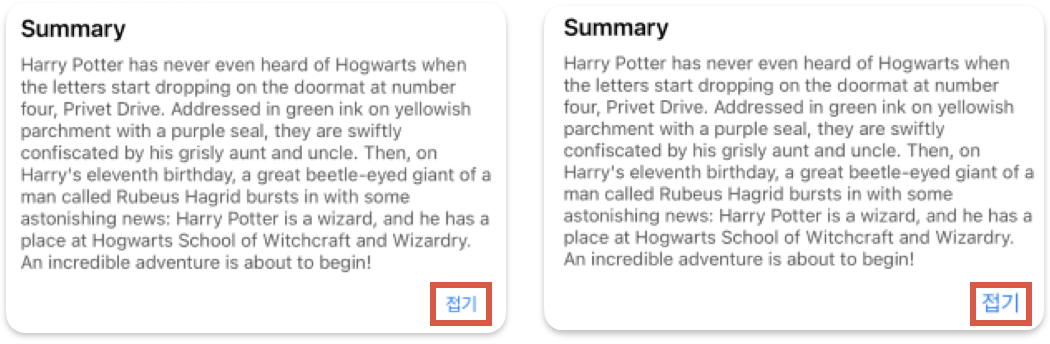
왼쪽은 기존 코드, 오른쪽이 실험한 코드로 작동했을 때의 모습이다.
summary 버튼의 폰트 사이즈는 본문과 같은 크기여야하는데, 오른쪽은 글자가 조금 더 커진 모습을 볼 수 있다.
configuration.title을 새롭게 할당하기 때문에 기존에 적용해두었던 font나 foregroundColor는 재사용되지 않고 이들 또한 새로이 할당해줘야 하는게 아닌가 싶다.