개요
본 문서에서는 Apollo GraphQL Gateway 를 이용한 GraphQL Federation 을 구현하는 방법을 서술한다. (모든 예제 코드는 여기에 기재되어 있으니 참조할 것)
Apollo에서는Federation이라는 기능을 제공한다.Federation이란, 여러GraphQL API를 결합하는Supergraph를 생성하기 위한 개방형 아키텍처를 말함.
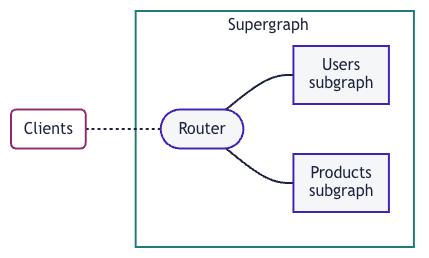
- 개별
GraphQL API를subgraph라고 하며, 이를 라우터를 이용해 통합한 스키마를 클라이언트에 제공할 수 있음. 이에 따라 클라이언트는 각각의 서버별 구성을 할 필요가 사라짐.
구현
Apollo 에서는 GraphOS 라는 것을 제공하는데, 이는 Cloud 상에서 Ferderation에 필요한 요소 (Supergraph, Subgraph) 등을 관리하는 기능이 탑재되어 있음.
그러나 우리는 직접 SuperGraph Schema를 생성할 것이며 후술할 Rover CLI 를 이용할 예정이므로 GraphOS 는 관심이 있는 경우 좀 더 찾아보도록 한다.
A. Federation 기능을 지원하며, Subgraph를 제공해줄 GraphQL Server 를 구현한다.
A-1. 라이브러리 및 서버 구현 스펙 선택
-
Federation을 위한Gateway를 구현하기에 앞서, 해당Gateway에Subgraph를 제공해줄 서버가 필요하다. 즉, 실질적인 API를 제공하는 서버를 구현해야 한다. -
이때
Subgraph를 제공하면서Apollo Gateway와 호환되는 라이브러리를 선택해야 하는데, 해당 정보는 Federation-compatible subgraph implementations 의 내용을 참조하면 되며, 다양한 언어를 지원한다. 필자는 그중에서도Java / Kotlin탭의ExpediaGroup/graphql-kotlin라이브러리를 선택하였으며,Spring Boot와 함께 사용할 것이다. (Kotlin 이 주력 언어)


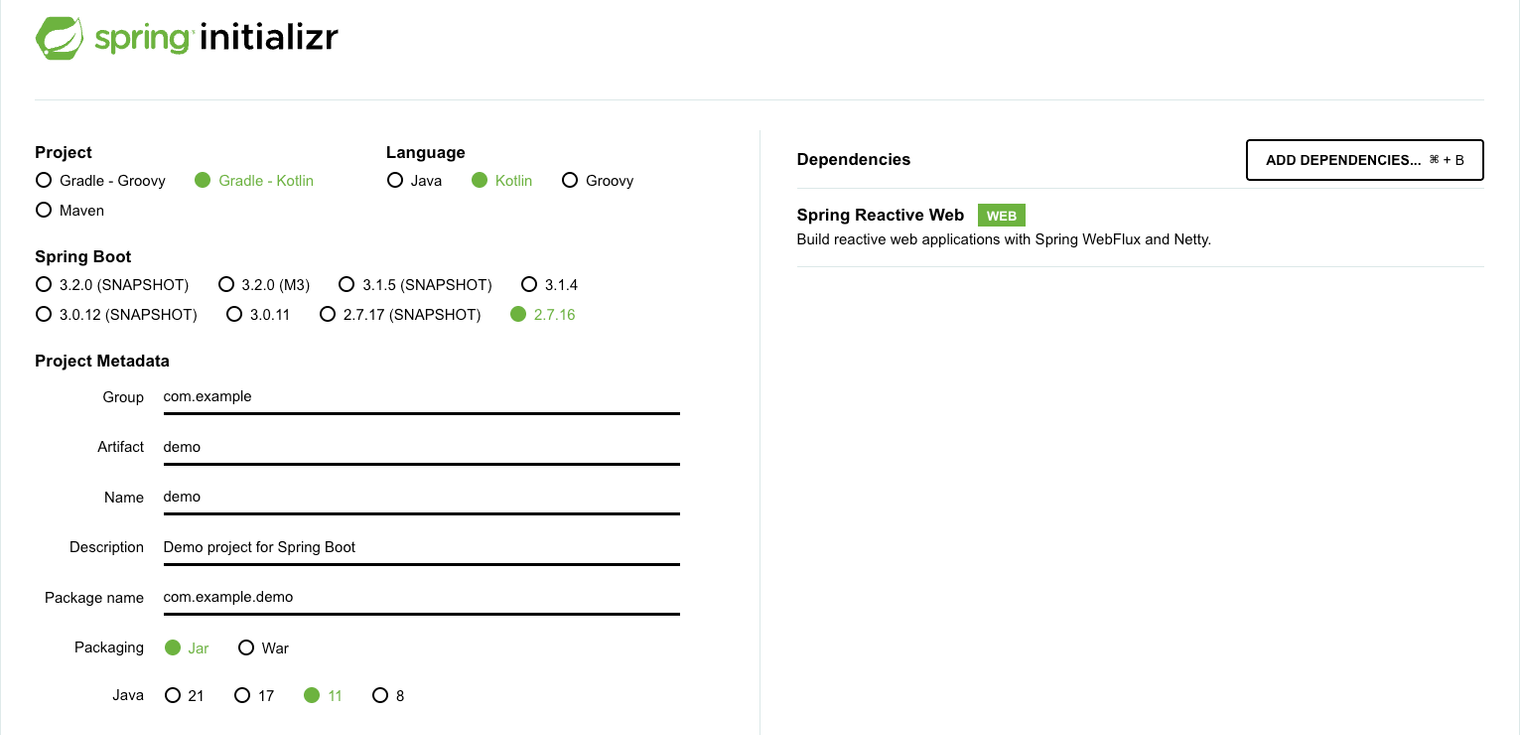
참고로, 필자가 선택한 ExpediaGroup/graphql-kotlin 라이브러리, 정확하게는 ExpediaGroup/graph-kotlin-spring-server는 WebFlux 를 사용해야 한다. (자세한 내용은 GraphQLServer | GraphQL Kotlin , Spring Server Overview | GraphQL Kotlin 참조)
A-2. SubGraph를 제공할 GraphQL Server 에 Federation 설정 및 구현을 진행한다.
import org.jetbrains.kotlin.gradle.tasks.KotlinCompile

plugins {
	id("org.springframework.boot") version "2.7.16"
	id("io.spring.dependency-management") version "1.0.15.RELEASE"
	kotlin("jvm") version "1.6.21"
	kotlin("plugin.spring") version "1.6.21"
}

group = "com.example"
version = "0.0.1-SNAPSHOT"

java {
	sourceCompatibility = JavaVersion.VERSION_11
}

repositories {
	mavenCentral()
}

dependencies {
	implementation("org.springframework.boot:spring-boot-starter-webflux")
	implementation("com.fasterxml.jackson.module:jackson-module-kotlin")
	implementation("io.projectreactor.kotlin:reactor-kotlin-extensions")
	implementation("org.jetbrains.kotlin:kotlin-reflect")
	implementation("org.jetbrains.kotlinx:kotlinx-coroutines-reactor")
	testImplementation("org.springframework.boot:spring-boot-starter-test")
	testImplementation("io.projectreactor:reactor-test")

    // 추가된 부분
	// https://mvnrepository.com/artifact/com.expediagroup/graphql-kotlin-spring-server
	implementation("com.expediagroup:graphql-kotlin-spring-server:7.0.0-alpha.0")
}

tasks.withType<KotlinCompile> {
	kotlinOptions {
		freeCompilerArgs += "-Xjsr305=strict"
		jvmTarget = "11"
	}
}

tasks.withType<Test> {
	useJUnitPlatform()
}- 위 코드블럭은
SubGraph를 제공할GraphQL API서버로 사용할Spring Boot Application의build.gradle.kts이다. - Spring Initializr 로 프로젝트를 생성한 이후,
ExpediaGroup의graphql-kotlin-spring-server의존은 따로 추가해주어야 한다.
package com.example.subgraphservice.config.graphql

import graphql.GraphQLError
import graphql.execution.DataFetcherExceptionHandler
import graphql.execution.DataFetcherExceptionHandlerParameters
import graphql.execution.DataFetcherExceptionHandlerResult
import graphql.language.SourceLocation

class CustomDataFetcherExceptionHandler : DataFetcherExceptionHandler {

    override fun onException(handlerParameters: DataFetcherExceptionHandlerParameters): DataFetcherExceptionHandlerResult {
        handlerParameters.exception.printStackTrace()
        val errors = when (val exception = handlerParameters.exception) {
            else -> {
                exception.printStackTrace()
                listOf(customGraphQLError(message = exception.localizedMessage ?: "your error message"))
            }
        }

        return DataFetcherExceptionHandlerResult.newResult()
            .errors(errors)
            .build()
    }

    private fun customGraphQLError(message: String): GraphQLError {
        return object : GraphQLError {
            override fun getMessage() = message

            override fun getLocations() = mutableListOf<SourceLocation>()

            override fun getErrorType() = null

            override fun getExtensions() = mapOf<String, Any>()
        }
    }
}
package com.example.subgraphservice.config.graphql
import com.expediagroup.graphql.generator.federation.FederatedSchemaGeneratorHooks
import com.expediagroup.graphql.generator.federation.execution.FederatedTypeResolver
class CustomFederationSchemaGeneratorHooks(resolvers: List<FederatedTypeResolver>) :
FederatedSchemaGeneratorHooks(resolvers) {
}package com.example.subgraphservice.config.graphql
import com.expediagroup.graphql.generator.annotations.GraphQLDescription
import com.expediagroup.graphql.generator.federation.FederatedSchemaGeneratorHooks
import com.expediagroup.graphql.generator.federation.execution.FederatedTypeResolver
import com.expediagroup.graphql.server.Schema
import graphql.GraphQL
import graphql.execution.AsyncExecutionStrategy
import graphql.execution.AsyncSerialExecutionStrategy
import graphql.execution.DataFetcherExceptionHandler
import graphql.schema.GraphQLSchema
import org.springframework.context.annotation.Bean
import org.springframework.context.annotation.Configuration
import java.util.*
@Configuration
class GraphQLConfiguration {
@GraphQLDescription("Sample GraphQL Schema")
@Bean
fun graphQLSchema(): Schema {
return object : Schema {}
}
/**
*
* ```graphql
* query {
* _service {
* sdl
* }
* }
* ```
*
* 참고 : Federation 설정이 진행되면 위 쿼리를 이용해서 SuperGraph 에 SubGraph를 제공할 수 있게 됨.
*
* @see com.expediagroup.graphql.generator.SchemaGenerator
* @see com.expediagroup.graphql.generator.SchemaGeneratorConfig
* @see com.expediagroup.graphql.generator.hooks.SchemaGeneratorHooks
* @see com.expediagroup.graphql.generator.hooks.NoopSchemaGeneratorHooks
* @see com.expediagroup.graphql.server.spring.NonFederatedSchemaAutoConfiguration
*
* @see com.expediagroup.graphql.generator.federation.FederatedSchemaGenerator
* @see com.expediagroup.graphql.generator.federation.FederatedSchemaGeneratorConfig
* @see com.expediagroup.graphql.generator.federation.FederatedSchemaGeneratorHooks
* @see com.expediagroup.graphql.generator.federation.FederatedSchemaGeneratorHooks.willBuildSchema // 이 함수에서 Federation 관련 설정이 진행됨.
* @see com.expediagroup.graphql.generator.federation.types.SERVICE_OBJECT_TYPE // 상단에 명시된 쿼리 참조.
*/
@Bean
fun federatedSchemaGeneratorHooks(resolvers: Optional<List<FederatedTypeResolver>>): SchemaGeneratorHooks {
return CustomFederationSchemaGeneratorHooks(resolvers.orElse(emptyList()))
}
@Bean
fun graphQL(schema: GraphQLSchema?): GraphQL {
val dataFetcherExceptionHandler = object : DataFetcherExceptionHandler {} // 기본 구현체 사용
return GraphQL.newGraphQL(schema)
.queryExecutionStrategy(AsyncExecutionStrategy(dataFetcherExceptionHandler))
.mutationExecutionStrategy(AsyncSerialExecutionStrategy(dataFetcherExceptionHandler))
.build()
}
}package com.example.subgraphservice.domain.book.api
import com.expediagroup.graphql.generator.annotations.GraphQLDescription
import com.expediagroup.graphql.server.operations.Query
import org.springframework.stereotype.Component
@Component
class BookGraphQLQuery : Query {
@GraphQLDescription("제목으로 책을 조회한다.")
fun getBook(title: String): Book {
return Book(title)
}
}
data class Book(
val title: String,
)- 구현 및 동작은 각 라이브러리마다 상이할 것이므로, 라이브러리 관련 구현에 대해서는 직접 그 구현을 살펴보길 바란다. 다만, 필자가 사용한 라이브러리에 대해서는 위 코드 블럭에 주석을 추가해두었다.
- 추가.
SchemaGeneratorHooks는 하나만 등록이 가능하며,FederatedSchemaGeneratorHooks을Spring Bean으로 등록하면 자동으로Federation설정이 진행된다.
- 추가.
GraphQL API를 제공하기 위해서는 필수적으로Schema와Query가 제공되어야 함에 유의할 것.
# application.yaml

logging:
  level:
    root: debug

graphql:
  packages:
    - "com.example.subgraphservice"
  playground:
    enabled: true
여기까지 했다면 Subgraph 를 제공하는 GraphQL API 구현은 끝났다.
서버를 실행시킨 뒤 Postman 혹은 그 외 기타 툴을 이용해서 정상으로 동작하며 API 또한 잘 제공하고 있는지 확인하면 된다. (아래 사진은 Postman 에서 확인한 것)
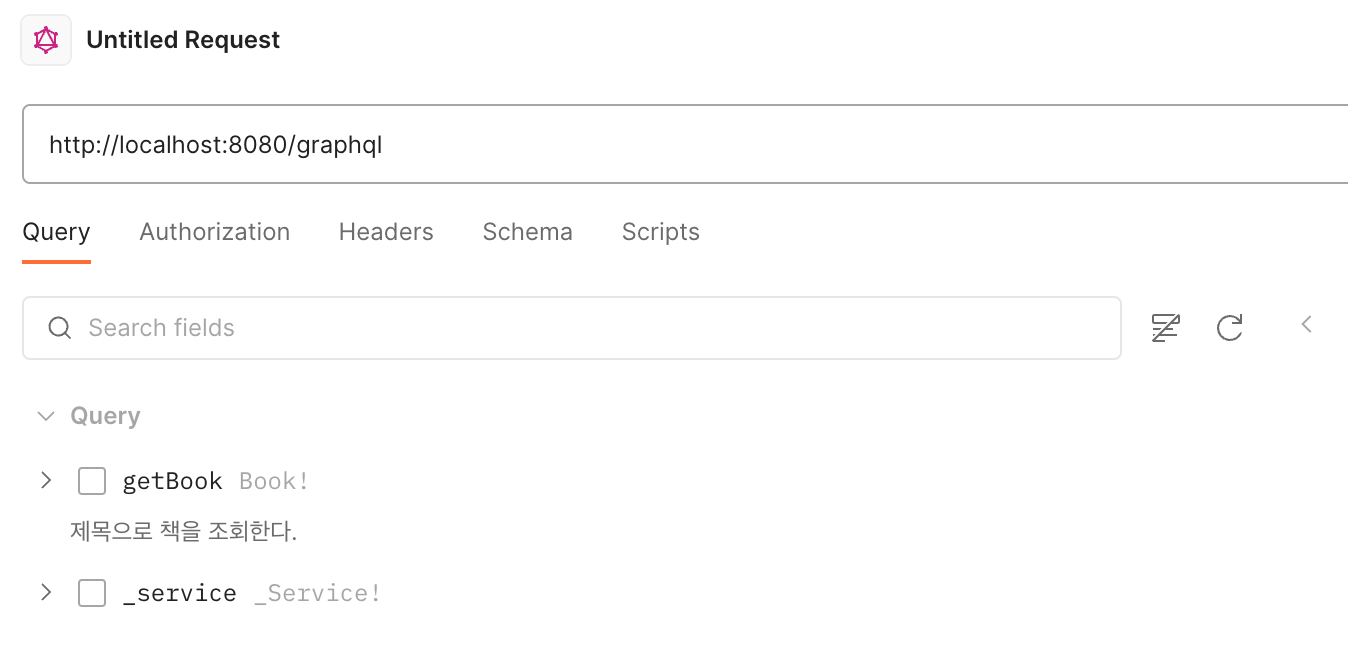
참고 : Federation 설정을 하지않으면 위와 같이 _service 라는 쿼리가 존재하지 않음.
B. Federation 기능을 지원하며, Supergraph의 역할을 해줄 Gateway Server 를 구현한다.
B-1. Node.js gateway setup 진행
- Get started with Apollo Server, Implementing a gateway with Apollo Server 을 참고하여 진행하도록 한다. 이 과정은 매우 간단하므로 설명을 생략한다.
(Get started with Apollo Server에서 제시하는 안내에 따라 Node.js 프로젝트 생성 후, Implementing a gateway with Apollo Server에서 제시하는 npm install @apollo/gateway @apollo/server graphql 명령어 실행 및 아래 코드 블럭을 index.ts 파일에 입력하면 끝이다)
import { ApolloServer } from '@apollo/server';
import { startStandaloneServer } from '@apollo/server/standalone';
import { ApolloGateway } from '@apollo/gateway';
import { readFileSync } from 'fs';

const supergraphSdl = readFileSync('./supergraph.graphql').toString();

// Initialize an ApolloGateway instance and pass it
// the supergraph schema as a string

const gateway = new ApolloGateway({
  supergraphSdl,
});


// Pass the ApolloGateway to the ApolloServer constructor

const server = new ApolloServer({
  gateway,
});


// Note the top-level `await`!
const { url } = await startStandaloneServer(server);
console.log(`🚀  Server ready at ${url}`);
결과물은 위와 같은 index 파일을 가진 Node.js app이 될텐데, root 디렉터리에 supergraph.graphql 파일을 생성해주어야 하는 것에 주의한다.
B-2. Rover CLI를 이용한 Supergraph Schema 통합 진행
GraphQL Supergraph 통합 방법은 2가지가 있다.
GraphOS를 이용하여 자동으로 통합Rover CLI를 이용하여 수동으로 통합
(다만 1번 항목의 경우 Apollo 가 제공하는 클라우드 서비스를 이용해야 하므로 관심이 있다면 Schema composition 를 참조하도록 한다)
아래는 Rover CLI 명령어이다. 이를 실행하면 supergraph-config.yaml 파일의 정보를 바탕으로 subgraph 를 supergraph 로 통합해준다. 설치되어 있지 않다면 Installing Rover 를 참고하여 설치하도록 한다.
rover supergraph compose --config ./supergraph.yaml여기서, ./supergraph-config.yaml 에는 Subgraph 를 제공하는 GraphQL API서버들에 대한 라우팅 정보등이 들어간다. (자세한 내용은 Rover supergraph commands 를 참고하도록 하며, 아래는 예제이다)
# supergraph.yaml

federation_version: =2.3.2
subgraphs:

#  # Local .graphql file
#  films:
#    routing_url: https://films.example.com
#    schema:
#      file: ./films.graphql

  # Subgraph introspection
  book:
    routing_url: http://localhost:8080/graphql  # <- can be omitted if the same as introspection URL
    schema:
      subgraph_url: http://localhost:8080/graphql
#      introspection_headers:  # Optional headers to include in introspection request
#        Authorization: Bearer ${env.PEOPLE_AUTH_TOKEN}

#  # Apollo Studio graph ref
#  actors:
#    routing_url: http://localhost:4005  # <- can be omitted if matches existing URL in Studio
#    schema:
#      graphref: mygraph@current
#      subgraph: actors
다만, 이 rover supergraph compose 명령어의 경우 stdout 으로 출력하기만 할 뿐이므로 아래와 같이 --output your-schema.graphql 처럼 Output format 옵션이 필요하다.
# Creates your-schema.graphql or overwrites if it already exists
rover supergraph compose --config ./supergraph.yaml --output your-schema.graphql
위 명령어를 사용하면 your-schema.graphql 파일의 내용이 원래는 공백이었겠지만 아래와 같이 변할 것이다.
schema
  @link(url: "https://specs.apollo.dev/link/v1.0")
  @link(url: "https://specs.apollo.dev/join/v0.3", for: EXECUTION)
{
  query: Query
}

directive @join__enumValue(graph: join__Graph!) repeatable on ENUM_VALUE

directive @join__field(graph: join__Graph, requires: join__FieldSet, provides: join__FieldSet, type: String, external: Boolean, override: String, usedOverridden: Boolean) repeatable on FIELD_DEFINITION | INPUT_FIELD_DEFINITION

directive @join__graph(name: String!, url: String!) on ENUM_VALUE

directive @join__implements(graph: join__Graph!, interface: String!) repeatable on OBJECT | INTERFACE

directive @join__type(graph: join__Graph!, key: join__FieldSet, extension: Boolean! = false, resolvable: Boolean! = true, isInterfaceObject: Boolean! = false) repeatable on OBJECT | INTERFACE | UNION | ENUM | INPUT_OBJECT | SCALAR

directive @join__unionMember(graph: join__Graph!, member: String!) repeatable on UNION

directive @link(url: String, as: String, for: link__Purpose, import: [link__Import]) repeatable on SCHEMA

type Book
  @join__type(graph: BOOK)
{
  title: String!
}

scalar join__FieldSet

enum join__Graph {
  BOOK @join__graph(name: "book", url: "http://localhost:8080/graphql")
}

scalar link__Import

enum link__Purpose {
  """
  `SECURITY` features provide metadata necessary to securely resolve fields.
  """
  SECURITY

  """
  `EXECUTION` features provide metadata necessary for operation execution.
  """
  EXECUTION
}

type Query
  @join__type(graph: BOOK)
{
  """제목으로 책을 조회한다."""
  getBook(title: String!): Book!
}
여기서 눈여겨 볼 부분은 아래 부분이다.
enum join__Graph {
  BOOK @join__graph(name: "book", url: "http://localhost:8080/graphql")
}
우리가 Subgraph 를 제공하기 위해 만들었던 GraphQL API Server 가 @join__graph 로 연결되어 있다. 이 부분에 대한 설명은 join v0.3 를 참고하도록 한다.
이를 간략하게 말하자면, Supergraph Gateway 에게 Subgraph 에 대한 라우팅 정보를 알려주는 메타 데이터라고 생각하면 된다.
Declare subgraph metadata on joinGraph enum values.Each supergraph schema contains a list of its included subgraphs. The joinGraph enum represents this list with an enum value for each subgraph. Each enum value is annotated with a @join__graph directive telling the router what endpoint can be used to reach the subgraph, and giving the subgraph a human‐readable name that can be used for purposes such as query plan visualization and server logs.
The @joingraph directive must be applied to each enum value on joinGraph, and nowhere else. Each application of @join__graph must have a distinct value for the name argument; this name is an arbitrary non‐empty string that can be used as a human‐readable identifier which may be used for purposes such as query plan visualization and server logs. The url argument is an endpoint that can resolve GraphQL queries for the subgraph.
이후 Supergraph Gateway 와 Subgraph GraphQL API Server 를 모두 실행시킨 다음, Supergraph Gateway 의 엔드포인트로 GraphQL Schema 를 조회하여 확인.
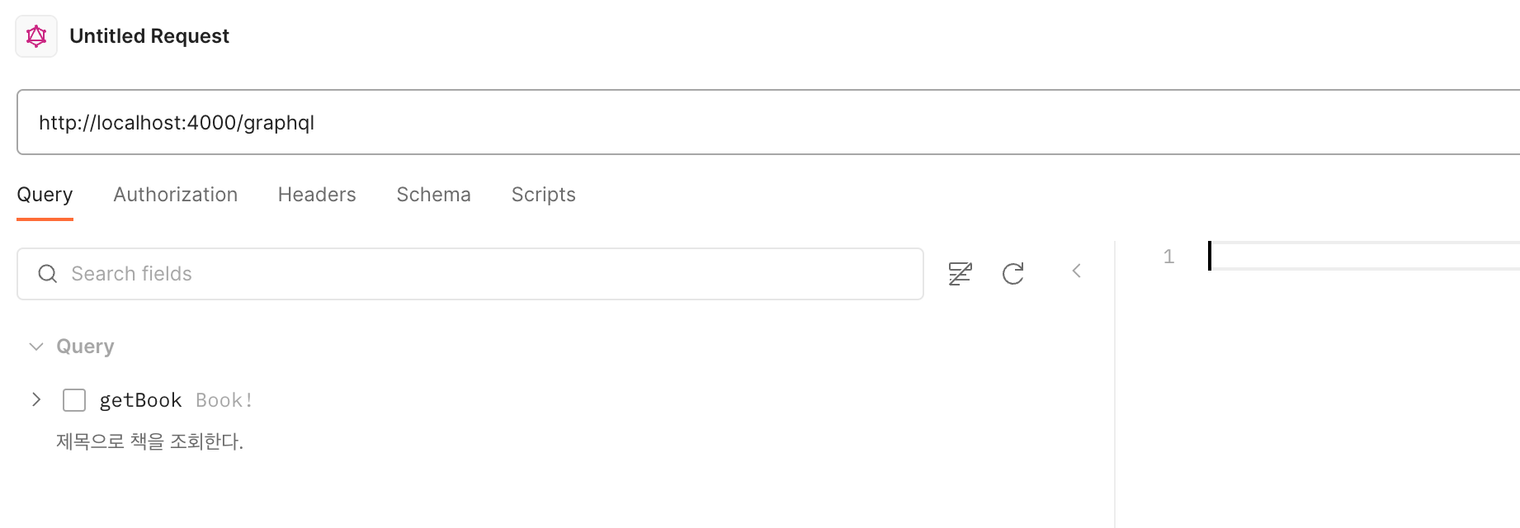
확인 결과, 위 사진처럼 Subgraph GraphQL API Server 에 만들어 두었던 Query 가 정상적으로 노출됨을 볼 수 있음. 물론 동작 또한 정상임.
이로써 Supergraph Gateway + Subgraph GraphQL API Server 환경의 Federation 설정 및 구현이 끝났다.
참고 자료
Apollo
- Get started with Apollo Server
- Implementing a gateway with Apollo Server
- Schema composition
- The Rover CLI
- Rover supergraph commands
- Federation-compatible subgraph implementations
- API Reference: @apollo/gateway
- API Reference: ApolloServer
- API Reference: startStandaloneServer
- API Reference: expressMiddleware
- Apollo Federation: MAS for GraphQL
- join v0.1 - for defining supergraphs which join multiple subgraphs
- Apollo Library of Technical Specifications
- Learn GraphQL: What is Federated Architecture?
- The router
- The Apollo Router
- join v0.3 - for defining supergraphs which join multiple subgraphs
- link v1.0 - for linking schemas together