오늘의 구현을 통해서 현재 진행 중인 체스 보드의 FEN 형식 표기를 완전하게 출력할 수 있게 되었다. FEN 형식(포사이스-에드워드 표기법,Forsyth-Edwards Notation)은 진행되고 있는 체스 보드의 형태와 룰 적용 가능 여부(캐슬링, 앙파상,무승부 규칙 등)을 한 줄의 문자열로 합쳐서 표현하는 표기법이다. PGN(Portable Game Notation)의 경우 현재 포지션에 도달하기까지 모든 기보를 저장하고 있어서 이를 시뮬레이션하여 체스 보드를 구현해야 하지만, FEN은 그대로 체스 보드로 렌더링할 수 있다는 장점이 있다.
FEN: https://www.chess.com/ko/terms/fen-chess-ko
PGN: https://www.chess.com/ko/terms/chess-pgn-ko
앙파상, 캐슬링 구현 및 FEN string 상태관리
앙파상과 캐슬링이 어떤 특수 규칙인지까지 적지는 않겠다. 구현하기 위해서 알아야 하는 것은 이 두 특수규칙이 가지는 공통점인데, 일반적인 행마 규칙과 다른 예외적인 행마 규칙이라는 점이다. 따라서 착수 자체에 영향을 준다. 현재 구현된 프로세스상 기물 클릭 => moveablePoint 렌더링에서 moveablePoint로 각 특수 규칙의 적용 가능 여부를 판단하여 특수 규칙 적용 가능한 때에는 moveablePoint를 추가로 렌더링해주고, 이렇게 렌더링된 moveablePoint를 클릭해서 착수했을 때에는 이를 감지하여 특수 규칙이 적용된 행마가 작동되도록 구현하였다.
//utils/pieceMove.ts
...
export const pieceMoveState = selector<void>({
  key: "pieceMoveState",
  get: () => {},
  set: (({ get, set }) => {
    const positionArr = get(positionArrState);
    const movingStart = get(movingStartState);
    const movingPiece = get(movingPieceState);
    const destination = get(destinationState);
    const enpassant = get(enPassantState);

    let result: string[][] = new Array(8).fill("").map(() => new Array(8).fill(""))
    for (let i = 0; i < 8; i++) for (let j = 0; j < 8; j++) result[i][j] = positionArr[i][j];

    const [startRow, startCol]: [number, number] = getNumberIndex(movingStart);
    const [destiRow, destiCol]: [number, number] = getNumberIndex(destination);

    //set halfMoveState
    if(movingPiece === "P" || movingPiece === "p"){
      set(halfMoveState, 0);
    }else{
      set(halfMoveState, get(halfMoveState) + 1);
    }

    //set fullMoveState
    if(get(turnState) === "b") set(fullMoveState, get(fullMoveState) + 1);

    //set enpassantState
    if(movingPiece === "P" && movingStart[1] === '2' && destination[1] === '4'){
      set(enPassantState,`${movingStart[0]}3`)
    }else if(movingPiece === "p" && movingStart[1] === '7' && destination[1] === '5'){
      set(enPassantState,`${movingStart[0]}6`)
    }else{
      set(enPassantState,"-");
    }

    //handle castling
    if(movingPiece === "K" && Math.abs(getNumberIndex(movingStart)[1] - getNumberIndex(destination)[1]) > 1){
      if(getNumberIndex(destination)[1] === 6){//kingside castle
        result[7][7] = "";
        result[7][5] = "R";
      }else if(getNumberIndex(destination)[1] === 2){//queenside castle
        result[7][0] = "";
        result[7][3] = "R";
      }
    }
    if(movingPiece === "k" && Math.abs(getNumberIndex(movingStart)[1] - getNumberIndex(destination)[1]) > 1){
      if(getNumberIndex(destination)[1] === 6){//kingside castle
        result[0][7] = "";
        result[0][5] = "r";
      }else if(getNumberIndex(destination)[1] === 2){//queenside castle
        result[0][0] = "";
        result[0][3] = "r";
      }
    }

    //capture piece
    const target = positionArr[destiRow][destiCol];
    if(target !== ""){
      if(target === target.toUpperCase()){
        const whiteCapturedPieces = get(whiteCapturedPiecesState);
        set(whiteCapturedPiecesState, capturedPiecesSort([...whiteCapturedPieces, target]))
      }else{
        const blackCapturedPieces = get(blackCapturedPiecesState);
        set(blackCapturedPiecesState, capturedPiecesSort([...blackCapturedPieces, target]))
      }
      set(halfMoveState, 0);
      set(capturedState, true);
    }else{
      set(capturedState, false);
    }

    //handle enpassant(capture)
    if(destination === enpassant){
      const enpassantIndex = getNumberIndex(enpassant);
      const whiteCapturedPieces = get(whiteCapturedPiecesState);
      if(movingPiece === "P"){
        result[enpassantIndex[0] + 1][enpassantIndex[1]] = "";
        set(whiteCapturedPiecesState, capturedPiecesSort([...whiteCapturedPieces, "p"]))
        set(capturedState, true);
      }else if(movingPiece === "p"){
        result[enpassantIndex[0] - 1][enpassantIndex[1]] = "";
        set(whiteCapturedPiecesState, capturedPiecesSort([...whiteCapturedPieces, "P"]))
        set(capturedState, true);
      }
    }

    result[startRow][startCol] = "";
    result[destiRow][destiCol] = movingPiece;

    const resultString = getPositionString(result);
    //console.log(`move ${movingPiece} from ${movingStart}(${startRow}/${startCol}) to ${destination}(${destiRow}/${destiCol}), result is ${resultString}.`)
    set(positionState, resultString);

    let castle: string|string[] = get(castleState);
    if(!(castle === "-")){
      castle = castle.split('');
      if(movingPiece === "r"){
        if(movingStart === "a8"){
          castle = castle.filter((x) => x !== "q");
        }else if(movingStart === "h8"){
          castle = castle.filter((x) => x !== "k");
        }
      }else if(movingPiece === "R"){
        if(movingStart === "a1"){
          castle = castle.filter((x) => x !== "Q");
        }else if(movingStart === "h1"){
          castle = castle.filter((x) => x !== "K");
        }
      }else if(movingPiece === "k"){
        castle = castle.filter((x) => x !== "q" && x !== "k");
      }else if(movingPiece === "K"){
        castle = castle.filter((x) => x !== "Q" && x !== "K");
      }
      if(castle.length === 0){
        set(castleState, "-");
      }else{
        set(castleState, castle.join(''));
      }
    }
  })
})
...
착수 시에 이동하려는 위치에 기물이 이미 위치해있는지를 확인하여 captureState를 제어하며, capture 이벤트가 발생할 경우 이를 각 플레이어의 capturedPiecesArr에 추가해준다. 깔끔한 렌더링을 위해 아래 함수를 통해 이 배열을 정렬해주면서 갱신해준다. Array.prototype.sort()함수와 object mapping을 활용하였다.
export const capturedPiecesSort = (capturedPieces:string[]):string[] => {
  const sortValue : {
    [key:string] : number
  } = {
    "Q": 0,
    "R": 1,
    "B": 2,
    "N": 3,
    "P": 4,
    "q": 5,
    "r": 6,
    "b": 7,
    "n": 8,
    "p": 9
  }
  return(capturedPieces.sort((a, b) => {
    return sortValue[a] - sortValue[b];
  }))
}
체스판 회전 구현
이후에 실시간 대전 등의 컨텐츠를 추가하기 위해서는 플레이하고 있는 체스 게임의 색상(흑, 백)에 맞춰서 보드를 돌려놓은 시점으로 게임을 진행하는 것이 사용자 관점에서 편리하다. 레퍼런스로 삼고 있는 체스닷컴이나 리체스에서도 이미 그렇게 구현되어 있으며, 원한다면 게임 플레이 내에서도 보드를 돌려서 플레이할 수 있도록 한다.
체스보드는 map을 통한 2차원 배열 렌더링으로 구현하였기 때문에, 각각 map에서 렌더링된 component들을 묶는 Wrap div에 flex property를 부여한 뒤, flex-direction:reverse property를 활용하여 rotate state의 true 여부에 따라 css로 반대 방향 렌더링이 되도록 구현하였다. 기능적인 부분에 하나도 손을 대지 않고 화면 상의 렌더링 순서만 바꾸었기 때문에 가장 좋은 방법으로 구현해낸 것 같다.
//ChessBoard/style.ts
import styled from "styled-components";
import { responsive } from "../../styles/macros";

interface SquareProps {
  isDark : boolean,
}
interface BoardProps {
  rotate: boolean,
}

export const BoardWrap = styled.div`
  user-select: none;
  ${responsive('small')}{
    width: 100%;
  }
  background-color: gray;
`

export const BoardBlock = styled.div`
  display: block;
`

export const Board = styled.div<BoardProps>`
  display:flex;
  flex-direction:${props => props.rotate ? `column-reverse` : `column`};
  box-sizing: content-box;
  width: 36rem;
  height: 36rem;
  ${responsive('small')}{
    width: 100vw;
    height: 100%;
  }
`

export const Row = styled.div`
  display: block;
  width: 100%;
  height: 12.5%;
`
export const Square = styled.div<SquareProps>`
  float: left;
  position: relative;
  width: 12.5%;
  height: 100%;
  padding-bottom: 12.5%;
  height: 0;
  ${props=>props.isDark ?
    `background-color: var(--color-wdk);`
    :
    `background-color: var(--color-wsh);`
  }
`

export const DotWrap = styled.div`
  position: absolute;
  z-index: 5;
  width: 100%;
  height: 100%;
  align-items: center;
  display: flex;
  flex-direction: column;
  justify-content: center;
  cursor: pointer;
`

export const MoveableDot = styled.div`
  width: 30%;
  height: 30%;
  border-radius: 50%;
  background-color: rgba(0,0,0,0.5);
`
추가로 player card라는 component로 현재 게임을 플레이하고 있는 플레이어들의 state들을 각각 보여주는 상태창을 만들었고, 해당 부분도 보드의 상하에 플레이하고 있는 기물 색상에 맞는 방향에 위치하도록 rotate state를 styled-component의 props로 전달하여 제어하도록 하였다.
//Game/index.tsx
...
<PlayerAndBoard
  rotate={rotate}
>
  <PlayerCardWrap>
    <PlayerCard
      ID="BlackPlayer"
      rating={2200}
      title="GM"
      color="b"
      capturedPieces={whiteCapturedPieces}
      pieceScore={- pieceScore[2]}
      state="normal"
    />
  </PlayerCardWrap>
  <ChessBoardWrap>
    <ChessBoard />
  </ChessBoardWrap>
  <PlayerCardWrap>
    <PlayerCard
      ID="WhitePlayer"
      rating={1800}
      title="IM"
      color="w"
      capturedPieces={blackCapturedPieces}
      pieceScore={pieceScore[2]}
      state="normal"
    />
  </PlayerCardWrap>
</PlayerAndBoard>
...
//Game/style.ts
...
interface PlayerAndBoardProps {
rotate: boolean
}
export const PlayerAndBoard = styled.div<PlayerAndBoardProps>`
display: flex;
flex-direction: ${props => props.rotate ? `column-reverse` : `column`};
${responsive('large')}{
justify-content: space-between;
height: 47rem;
}
border-radius: 0.5rem;
`
...이제 rotate state의 값인 boolean 값을 반전시키면 PlayerCard와 함께 ChessBoard가 회전한다. onClick 이벤트를 onClick={setRotate(prev=>!prev)}과 같이 가지고 있는 rotate Button을 구현하였다.
페이지 디자인
페이지가 그럴싸해 보이도록 디자인을 좀 손 봤다. 굳이 지금 시점에 디자인을 확정한 이유는 딱히 없다. 그냥 기능 구현을 계속해서 하다보니 머리를 너무 많이 쓰는 것 같아서 두통이 몰려왔다. 그래서 크게 머리 쓰지 않고 작업할 수 있는 디자인 작업을 하였다. 기본적인 컨셉은 우드톤의 미니게임이다. font는 Roboto를 import하여 global font family로 설정해주었으며, 색상은 pinterest에서 wood palette 등을 검색해서 대충 색이 조화로워 보이는 색상표를 가지고 와서 포인트 색으로 활용해주었다. 전체적인 레이아웃 구성은 체스닷컴을 참고했는데, 너무 따라한 것 같은 느낌이 나지 않도록 정말 레이아웃만 참고하고 다른 모든 부분은 즉석에서 제작하였다.
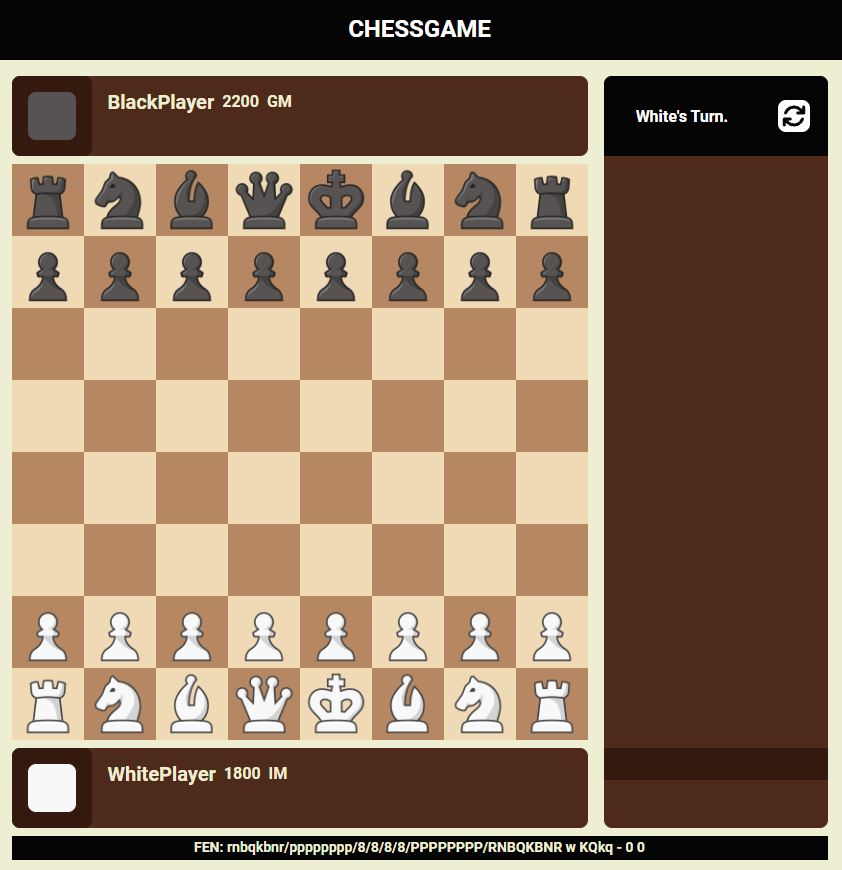
- 반응형 미디어 쿼리를 통해 폰트 크기를 조절해주고 component들의 렌더링 레이아웃을 제어해주었다. 위는 큰 화면을 타겟으로 구성한 레이아웃이고, 아래는 모바일 화면을 타겟으로 구성한 레이아웃이다.
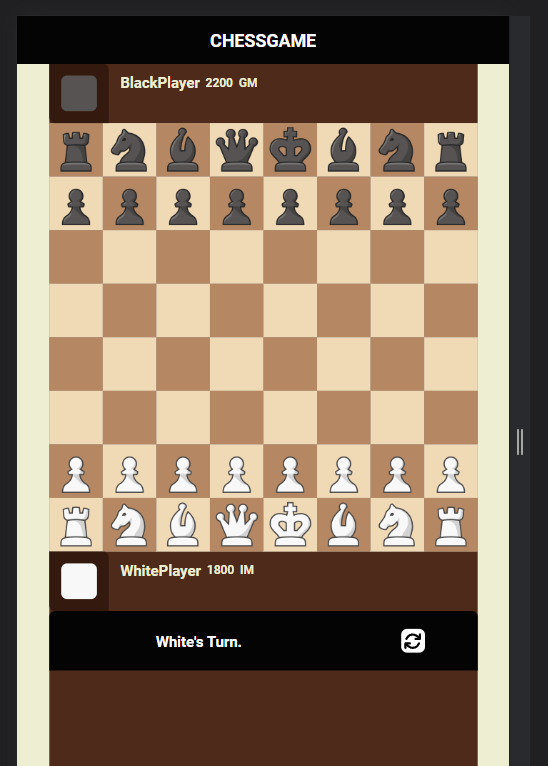
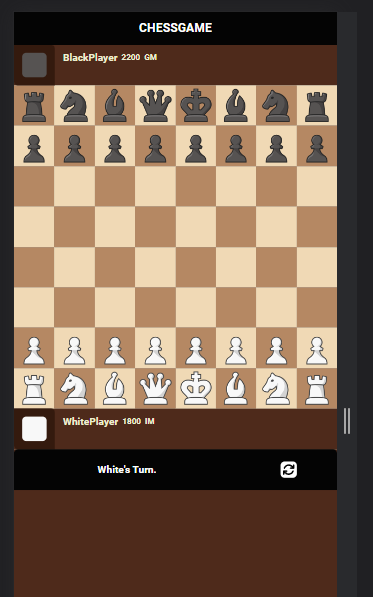
오늘은 꽤 많은 시간을 투자했다. 특히 페이지 디자인 부분에서 디자인 기획이 없는 상태로 체스닷컴과 리체스를 레퍼런스로 하여 나름대로 디자인을 해봤는데, 꽤 예쁘게 만들어진 것 같다. 앞으로 프로모션, 무승부만 구현하면 현대 체스 규칙을 모두 준수하는 정상적인 체스 플레이가 가능해진다. 이 정도로 끝낼 프로젝트였는데 생각보다 마음에 들게 구현되고 있어서 웹 소켓을 열어 실시간 대전을 할 수 있도록 만들고 싶다는 욕심이 점점 커지고 있다. 그럼 서버도 열어야 하고 통신 방식도 생각해야하고... 할 게 많아 보인다.
현재 구현 상황
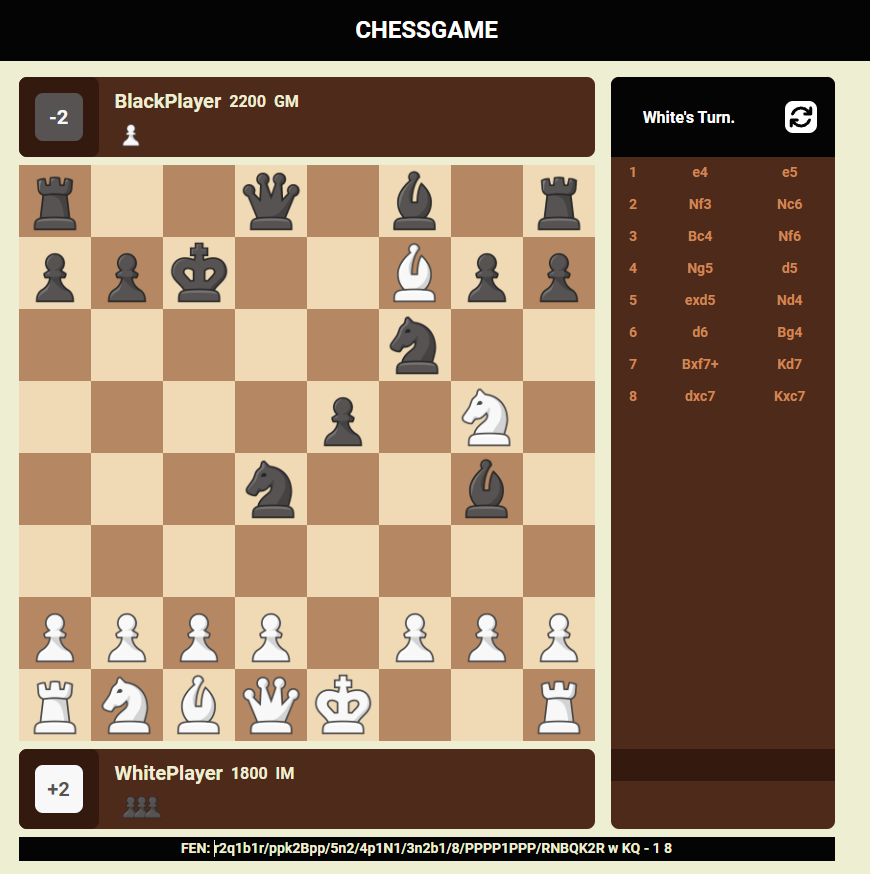
게임이 어느정도 진행된 상태에서의 화면이다. 잡아낸 상대 기물을 각각의 PlayerCard에 렌더링해주고, 기물 점수도 계산해서 렌더링해주었다. MovePiece 함수 내에서 captureState를 제어하고, notationState selector를 활용하여 착수 때마다 notation state에 새로운 기보를 추가하고 이를 구독해 렌더링하는 방식으로 우측의 notation을 구현하였다. notation이 기록되는 위치 아래의 어두운 row에는 notation history를 따라서 이전의 보드 상황을 재현할 수 있도록 만들어주는 버튼을 구현할 예정이고, 그 아래에는 기권, 무승부, 무르기 요청 버튼 등을 추가할 예정이다.
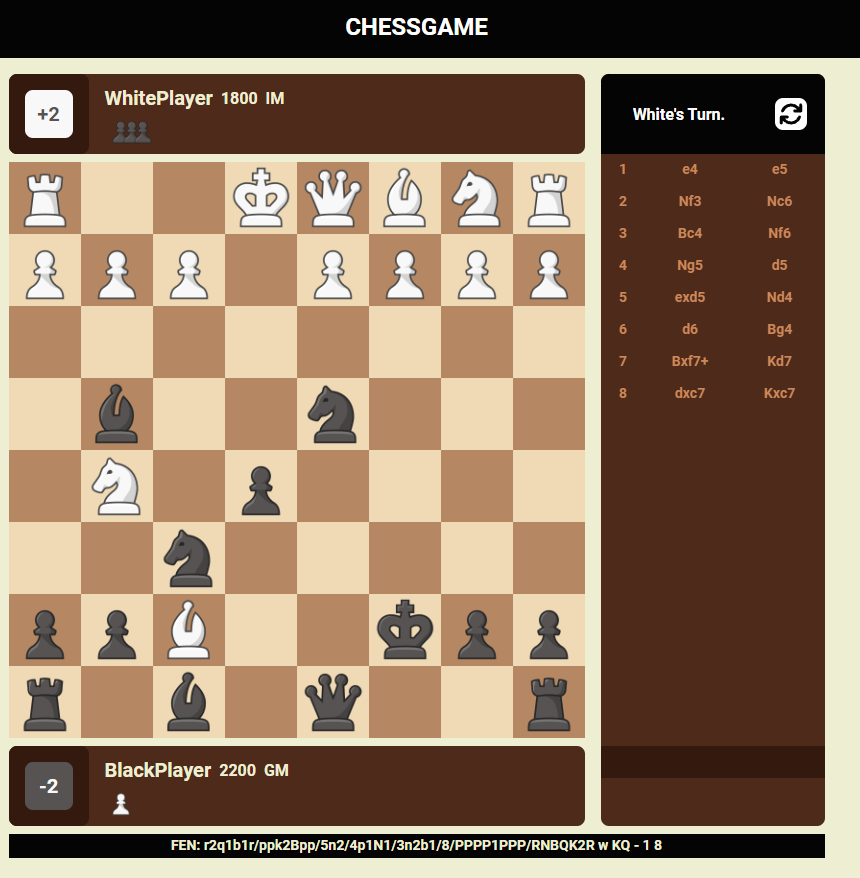
우측 상단의 rotate 버튼을 누르면 위에서 언급했던 것처럼 rotate state를 반전시키며, 이를 구독하고 있는 css 구문들이 자동으로 갱신되어 ChessBoard와 PlayerCard의 위치가 회전되도록 구현하였다.
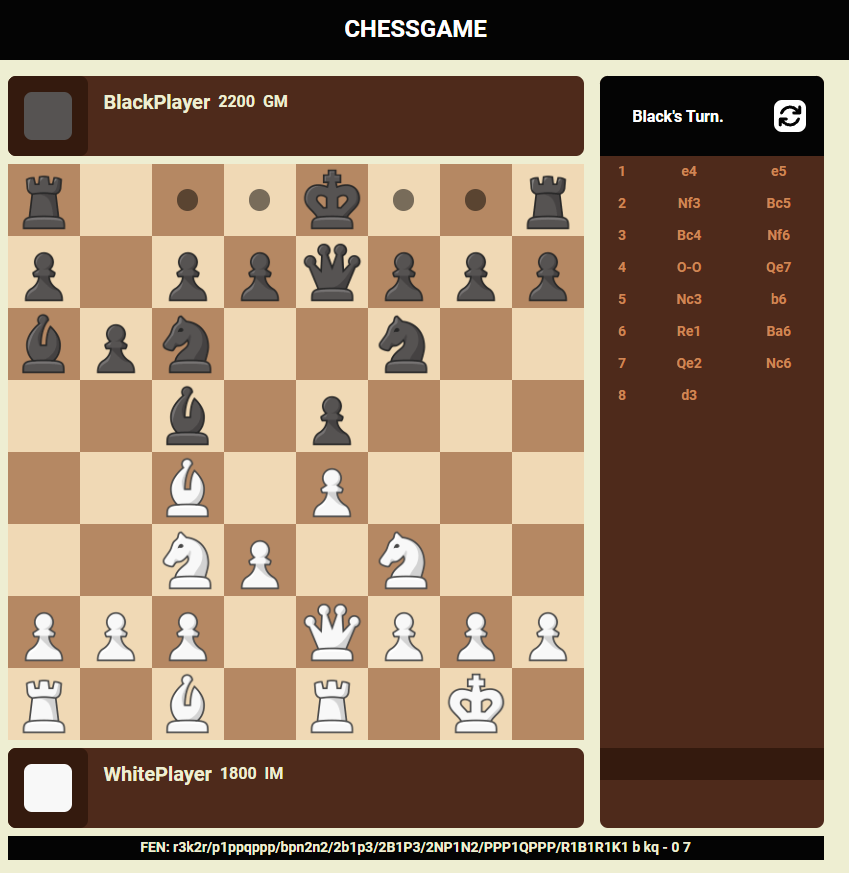
캐슬링이 잘 작동하는 것을 확인할 수 있다. 4.O-O를 통해 백의 킹 사이드 캐슬링이 실행된 것도 확인할 수 있다.
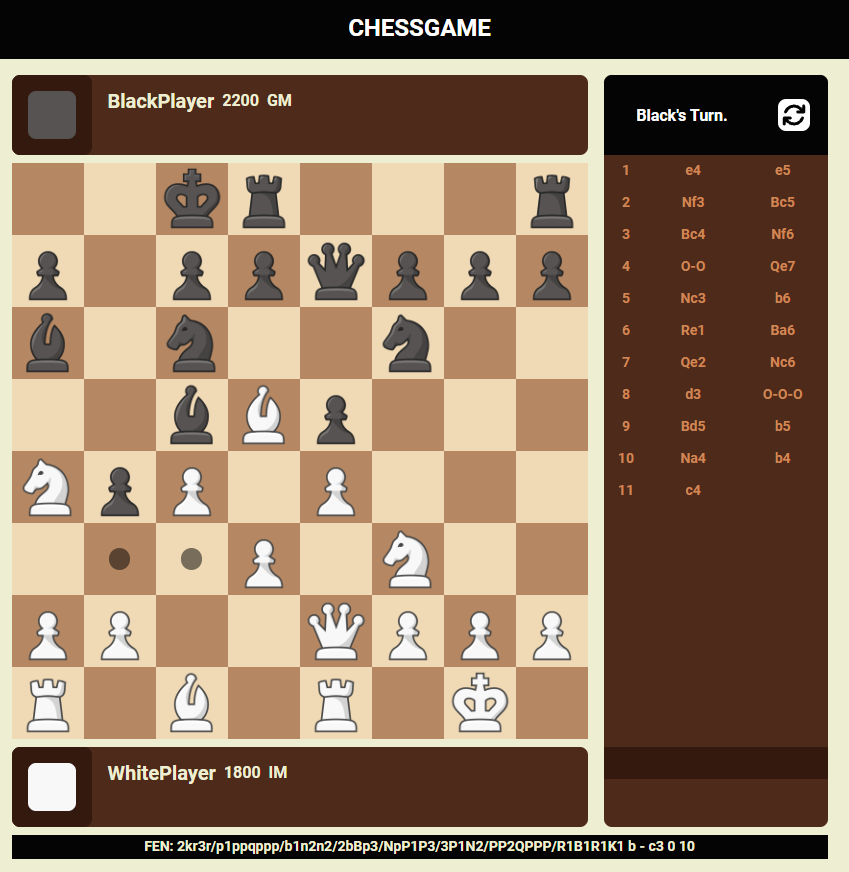
앙파상이 가능한 상태에서의 moveablePoint 렌더링 화면이다.
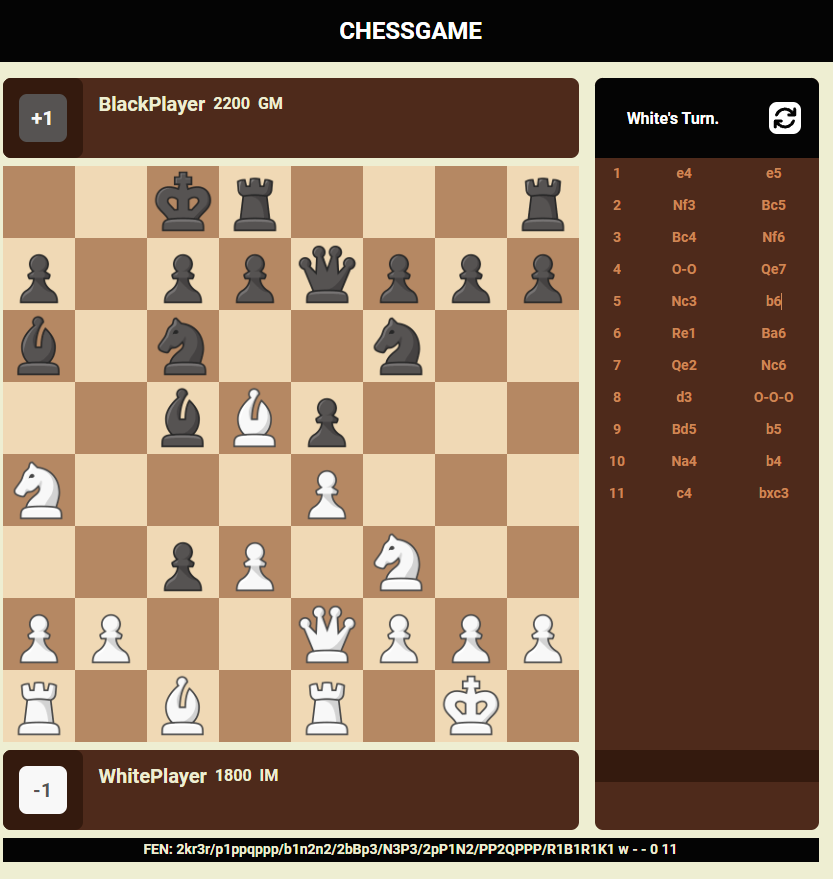
앙파상 이후의 화면이다.
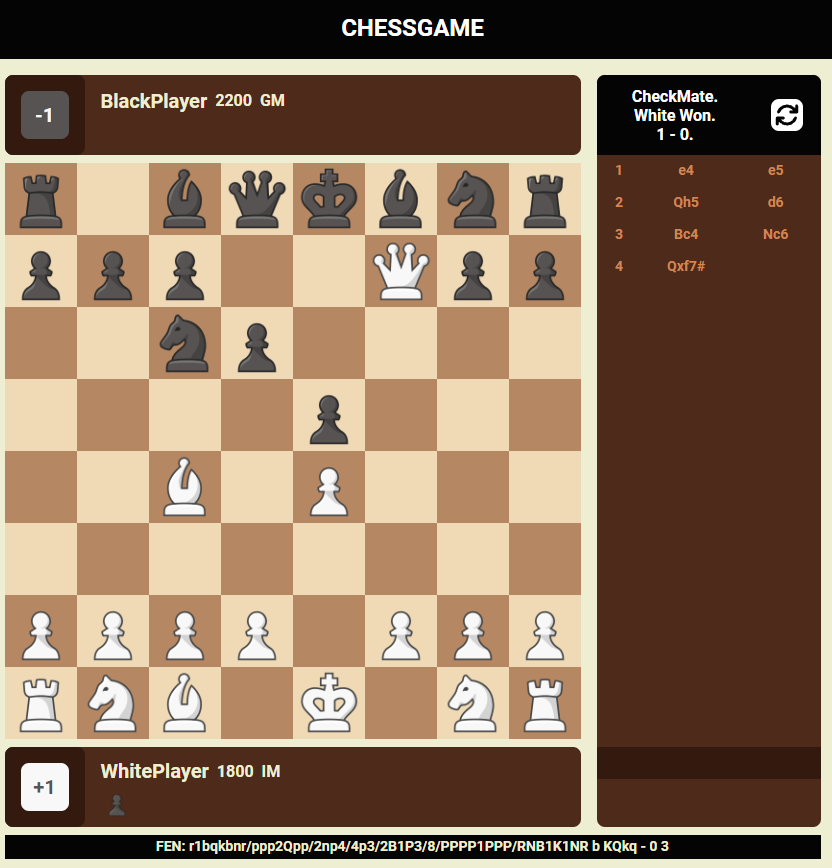
스콜라메이트