Python Built-in Types
str.split
str.split(sep=None, maxsplit=-1)- Return a list of the words in the string, using sep as the delimiter string.
maxsplit=-1- If maxsplit is given, at most maxsplit splits are done (thus, the list will have at most maxsplit+1 elements).
- If maxsplit is not specified or -1, then there is no limit on the number of splits (all possible splits are made).
sep=None- If sep is given, consecutive delimiters are not grouped together and are deemed to delimit empty strings (for example, '1,,2'.split(',') returns
['1', '', '2']). - The sep argument may consist of multiple characters (for example, '1<>2<>3'.split('<>') returns
['1', '2', '3']). Splitting an empty string with a specified separator returns['']. - If sep is not specified or is None, a different splitting algorithm is applied: runs of consecutive whitespace are regarded as a single separator, and the result will contain no empty strings at the start or end if the string has leading or trailing whitespace. Consequently, splitting an empty string or a string consisting of just whitespace with a None separator returns
[]. For example, ' 1 2 3 '.split() returns['1', '2', '3'], and ' 1 2 3 '.split(None, 1) returns['1', '2 3 '].
- If sep is given, consecutive delimiters are not grouped together and are deemed to delimit empty strings (for example, '1,,2'.split(',') returns
요구사항 분석의 중요성
- 맞는지 틀리는지/나은지 아닌지/최적화 이슈 등보다 더욱 중요한 건 '요구사항을 준수하는 것'
- 예시: 순번은 01 부터 시작해서 20 까지이며, 마지막 성명까지 순서대로 1씩 증가해야 합니다.
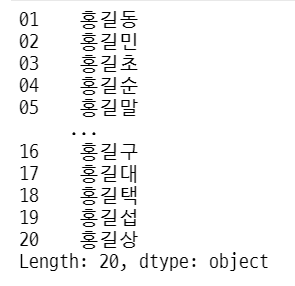
- 이걸 아래와 같이 구현하면 곤란
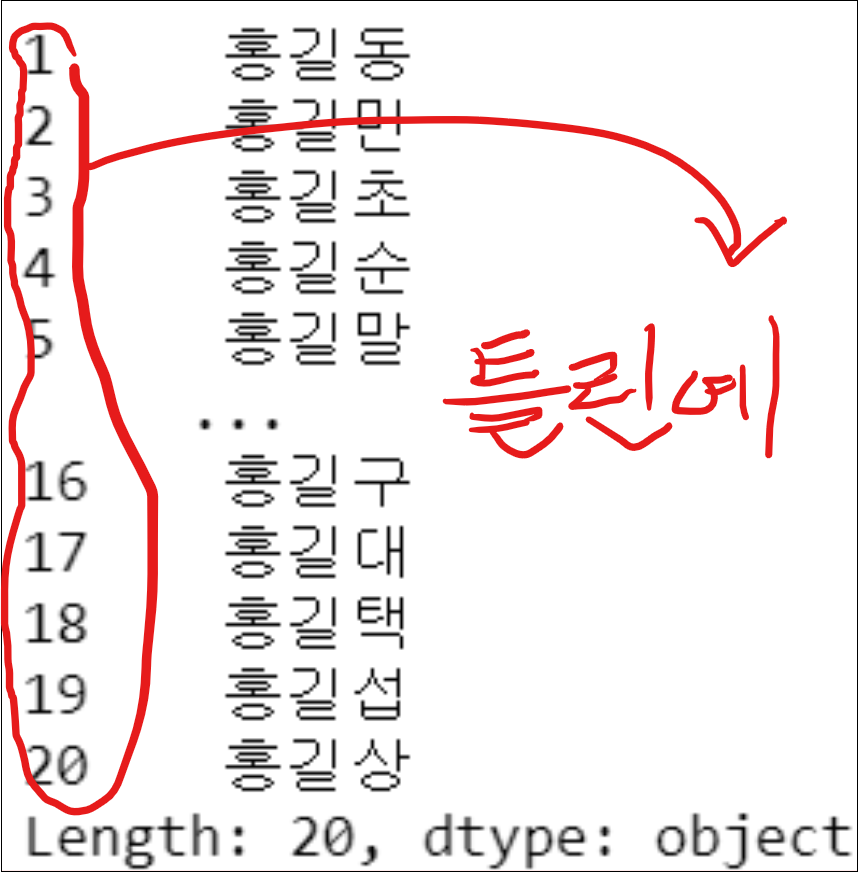
- 요구사항과 다르기 때문!
- 예시: 순번은 01 부터 시작해서 20 까지이며, 마지막 성명까지 순서대로 1씩 증가해야 합니다.
키워드
#키워드 확인 소스
import keyword
print(keyword.kwlist,"\n",'='*50)
print('키워드 갯수 : ', len(keyword.kwlist))
['False', 'None', 'True', 'and', 'as',
'assert', 'async', 'await', 'break', 'class',
'continue', 'def', 'del', 'elif', 'else',
'except', 'finally', 'for', 'from', 'global',
'if', 'import', 'in', 'is', 'lambda',
'nonlocal', 'not', 'or', 'pass', 'raise',
'return', 'try', 'while', 'with', 'yield']
==================================================
키워드 갯수 : 35pd.Series 응용
Class = '홍길동&홍길민&홍길초&홍길순&홍길말&홍길서&홍길명&홍길태&홍길남&홍길훈&홍길평&홍길산&홍길숙&홍길례&홍길만&홍길구&홍길대&홍길택&홍길섭&홍길상'
#위의 문자열 변수명을 class의 소문자로 쓰면 에러 발생합니다.
#상단의 키워드 확인 소스 참조
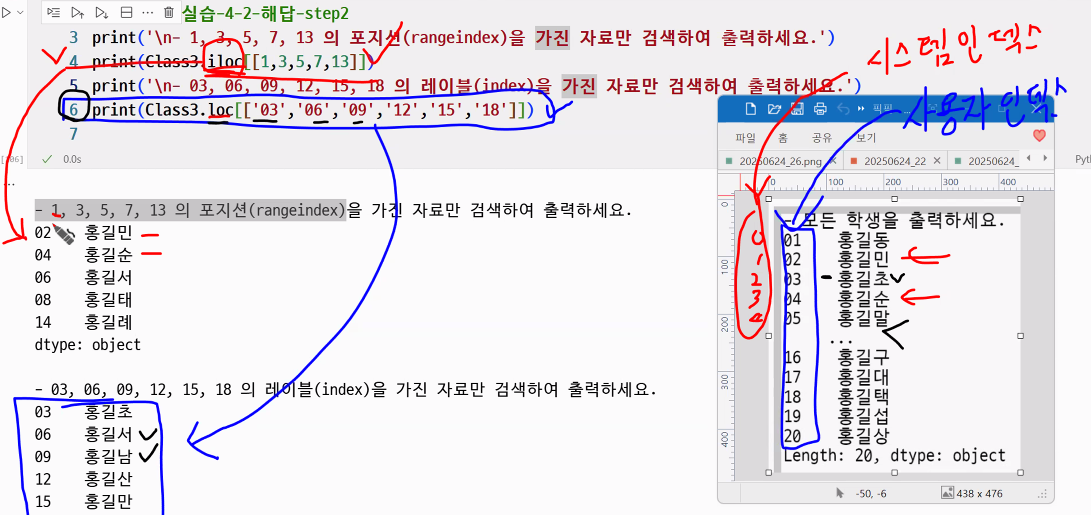
s = pd.Series(Class.split('&'), index=[f'{i:02d}' for i in range(1, len(list(Class.split('&')))+1)])
print(s){i:02d}에서 각 부분의 의미::(콜론): 포맷 코드의 시작을 나타냄0: 자리수가 부족할 때 왼쪽을 0으로 채움2: 전체 자릿수를 2자리로 맞춤d: 정수(decimal) 타입임을 의미
- 즉, i가 1이면 "01", 9면 "09", 10이면 "10"처럼 항상 두 자리의 문자열로 만듦
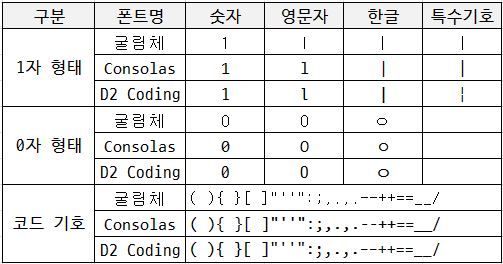
D2Coding
D2 설치했는데 Jetbrain Mono 쓸 수 있는 분들은 Jetbrain도 좋아요.
- D2 Coding 글꼴은 나눔바른고딕을 바탕으로 개발자의 코딩을 위해 가독성 및 유사 문자간 변별력 뿐만 아니라 디자인적으로 한글과의 조화를 고려해 최적화시킨 글꼴입니다. D2 Coding 글꼴은 코딩시 유사한 형태의 영문/숫자 뿐만 아니라 한글/특수문자 등에 대한 변별력과 가독성을 강화하였습니다. 또한 고정폭 글꼴로 제작이 되어 어떤 개발환경에서도 자간과 행간을 유지하도록 디자인되어 있습니다.
변수명 앞 *와 ** 의미
1. * (언패킹, positional arguments)
-
의미: 리스트, 튜플 등 시퀀스 타입의 값을 함수의 위치 인자(positional arguments)로 하나씩 풀어서 전달합니다.
-
예시:
def func(a, b, c): print(a, b, c) values = [1, 2, 3] func(*values) # func(1, 2, 3)과 동일 -
설명:
*inputList는[100, True, 'jaehyun']을 각각의 인자(100, True, 'jaehyun')로 풀어서 함수에 전달합니다.
2. ** (언패킹, keyword arguments)
-
의미: 딕셔너리의 key-value 쌍을 함수의 키워드 인자(keyword arguments)로 하나씩 풀어서 전달합니다.
-
예시:
def func(score, name, age): print(score, name, age) info = {'score': 100, 'name': 'Joey', 'age': 10} func(**info) # func(score=100, name='Joey', age=10)과 동일 -
설명:
**inputDic는{'score':100, 'name':'jaehyun', 'age':10}을 각각의 키워드 인자(score=100, name='jaehyun', age=10)로 풀어서 함수에 전달합니다.
3. 함수 정의에서의 *args, **kwargs
*args: 위치 인자를 튜플로 받음**kwargs: 키워드 인자를 딕셔너리로 받음
정리
*: 리스트/튜플 등 시퀀스 → 여러 개의 위치 인자로 언패킹**: 딕셔너리 → 여러 개의 키워드 인자로 언패킹
이 기능 덕분에 함수에 유연하게 여러 인자를 전달할 수 있습니다!
추가 예시
def test(a, b, c):
    print(a, b, c)

lst = [1, 2, 3]
dct = {'a': 10, 'b': 20, 'c': 30}

test(*lst)    # 1 2 3
test(**dct)   # 10 20 30
텍스트 파일 입출력
- io 모듈에서 제공하는 open() 함수 이용
- 형식:
open(file, mode, encoding)
- 형식:
- open 함수의 주요 파라미터 의미
- file: 파일의 경로와 파일명 지정
- mode: 읽기, 쓰기, 쓰기+추가 모드 등을 정해진 문자로 지정
r: 읽기용 파일 객체를 열기(기본값)x: 쓰기용 파일 객체를 열기a: 기존 파일의 맨 마지막에 추가용 파일 객체를 열기- 이외에도 w(쓰기용 파일을 새로 만들어서 열기 → 기존 파일이 있으면 error), b(이진 파일 형식으로 읽기/쓰기 파일 객체를 열기) 등이 있음
- encoding: 인코딩 또는 디코딩에 사용되는 인코딩의 이름을 지정하는 속성
encoding='utf8'
# (1) 현재 작업 디렉터리
import os
print("\n현재 경로:", os.getcwd())

# (2) 예외 처리
try:
    # (3) 파일 읽기
    ftest1 = open('data/ftest.txt', mode ='r', encoding='utf8')
    print(ftest1.read()) # 파일 전체 읽기

    # (4) 파일 쓰기
    ftest2 = open('data/ftest2.txt', mode ='w', encoding='utf8')
    ftest2.write("my first test~~~") # 파일 쓰기

    # (5) 파일 쓰기 + 내용 추가
    ftest3 = open('data/ftest2.txt', mode ='a', encoding='utf8')
    ftest3.write("\nmy second text ~~~") # 파일 쓰기(추가)

except Exception as e:
    print("Error 발생:", e)

finally:
    ftest1.close() # 파일 객체 닫기
    ftest2.close()
ftest3.close()- try ~ except ~ finally ~
- 외부 파일(ftext 등)의 존재 여부에 따라 에러가 발생하는 경우를 대비하기 위함
- 외부 파일 핸들링 시 안정성을 위해 해당 구문을 사용하는 것이 좋음

2 B R 0 2 B