저번에 만든 자기소개 페이지의 스타일을 인라인방식이 아닌,
외부 css문서를 가져와서 연결하는 링크 방식으로 변경.
연결
<link href="css파일경로" rel="stylesheet">다양한 css selector
.profile { font-size : 20px }  /*클래스*/
#special { font-size : 30px } /*아이디*/
p { font-size : 16px } /*태그*/
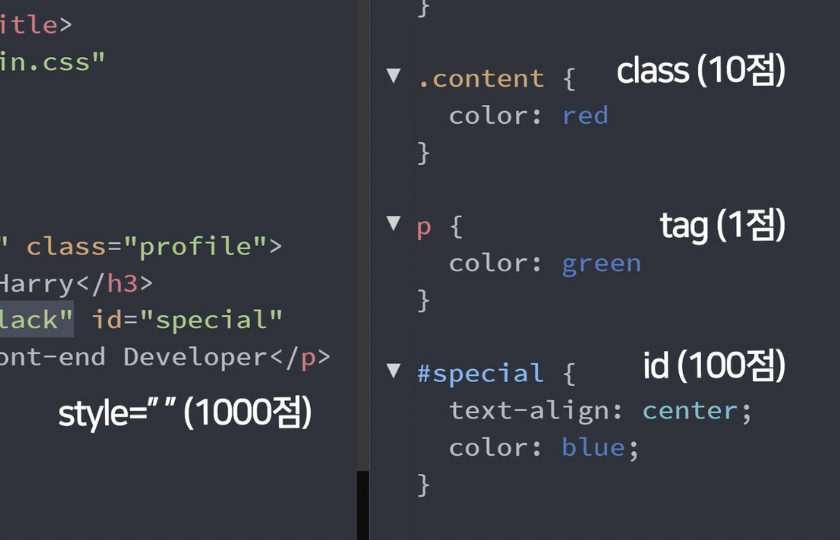
셀렉터의 우선순위
위의 다양한 셀렉터가 겹치게 된다면, 적용되는 우선순위가 있다.
style="" >>>>>>>>>> #id >> .class > p
정리 코드 (html)
	<img src="profile.png" class="profile">
    <h1 class="name">Lee Been</h1>
    <p class="job">Front-end Developer</p>
    <p class="anounce">안녕하세요, 이빈입니다. 웹개발 공부 중입니다.</p>
정리 코드 (css)
.profile{
    width: 20%;
    border-radius: 70%;
    border: 2px solid black;
    display: block;
    margin-left: auto;
    margin-right: auto;
}

.name{
    text-align: center;
}

.job{
    text-align: center;
    font-size: 25px;
}

.anounce{
    text-align: center;
    line-height: 40px;
    width: 400px;
    height: 40px;
    font-size: 18px;
    background-color: #F0F8FF;
    margin-left: auto; margin-right: auto;
}