Security
1. AWS Shared Responsibility Model
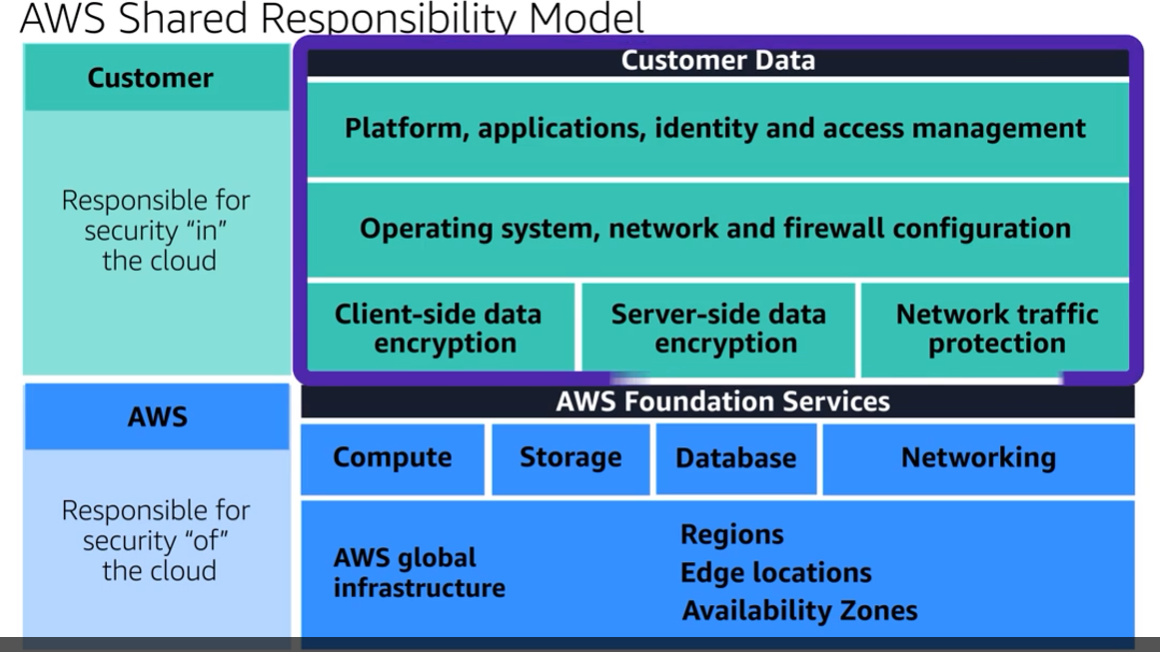
You do not treat your AWS environment as a single object. Rather, you treat the environment as a collection of parts that build upon each other. AWS is responsible for some parts of your environment and you (the customer) are responsible for other parts.
Two parts of responsibilities that need to be taken care of and from in EC2
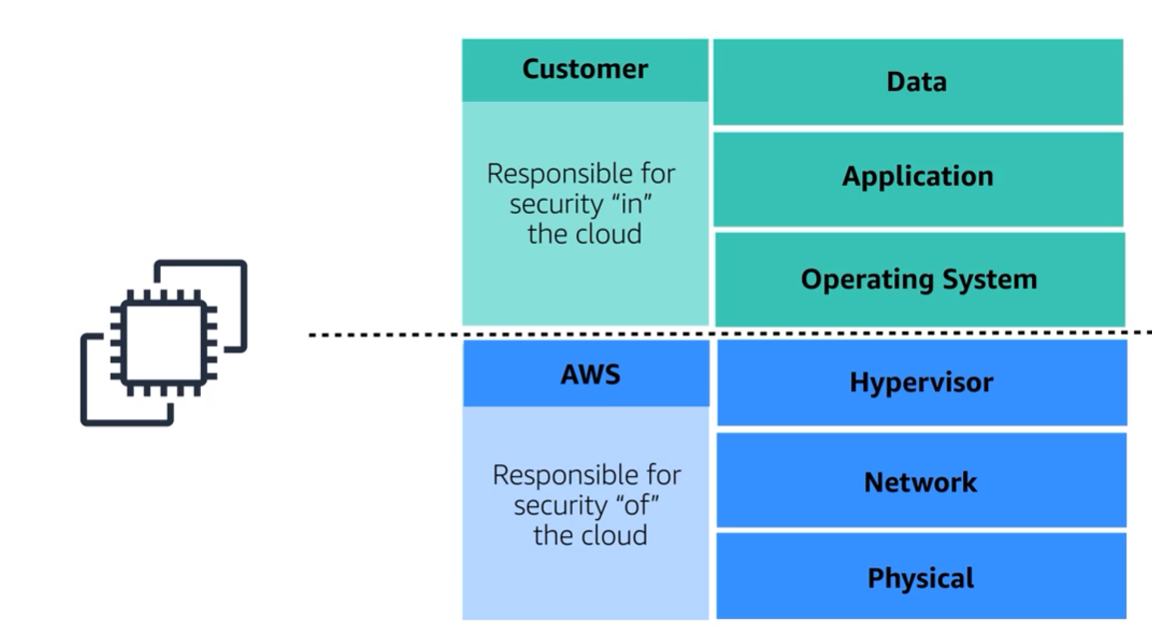
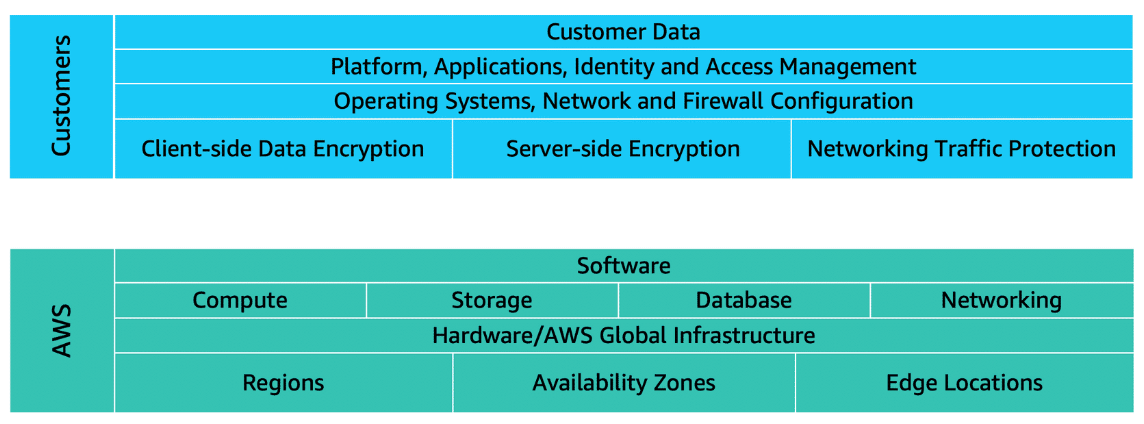
Customers: security IN the cloud
Customers are responsible for the security of everything that they create and put in the AWS Cloud.
When using AWS services, you, the customer, maintain complete control over your content. You are responsible for managing security requirements for your content, including which content you choose to store on AWS, which AWS services you use, and who has access to that content. You also control how access rights are granted, managed, and revoked.
The security steps that you take will depend on factors such as the services that you use, the complexity of your systems, and your company’s specific operational and security needs. Steps include selecting, configuring, and patching the operating systems that will run on Amazon EC2 instances, configuring security groups, and managing user accounts.
AWS: security OF the cloud
AWS operates, manages, and controls the components at all layers of infrastructure. This includes areas such as the host operating system, the virtualization layer, and even the physical security of the data centers from which services operate.
AWS is responsible for protecting the global infrastructure that runs all of the services offered in the AWS Cloud. This infrastructure includes AWS Regions, Availability Zones, and edge locations.
AWS manages the security of the cloud, specifically the physical infrastructure that hosts your resources, which include:
Physical security of data centers
Hardware and software infrastructure
Network infrastructure
Virtualization infrastructure
2. AWS Identity and Access Management(IAM)
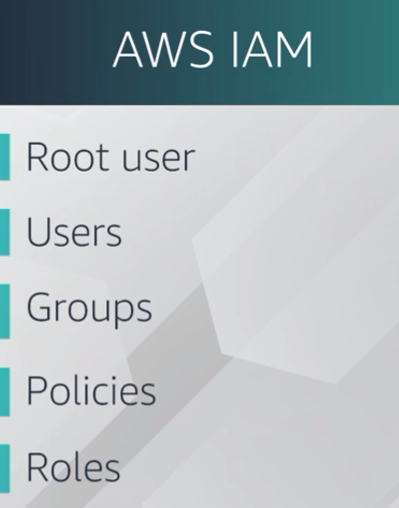
In IAM, you can create IAM users. When you create an IAM user, by default, it has no permissions. The user can't even log into the AWS account at first, it has absolutely zero permissions. It can not launch an EC2 instance. It can not create an S3 bucket. Nothing. You have to explicitly give the user permission to do anything in that account. Remember, by default, all actions are denied. You have to explicitly allow any action done by any user. You give people access only to what they need and nothing else. This idea is called the least privilege principle.
An IAM policy is a JSON document that describes what API calls a user can or cannot make.
AWS Identity and Access Management (IAM) enables you to manage access to AWS services and resources securely.
IAM gives you the flexibility to configure access based on your company’s specific operational and security needs. You do this by using a combination of IAM features, which are explored in detail in this lesson:
IAM users, groups, and roles
IAM policies
Multi-factor authentication
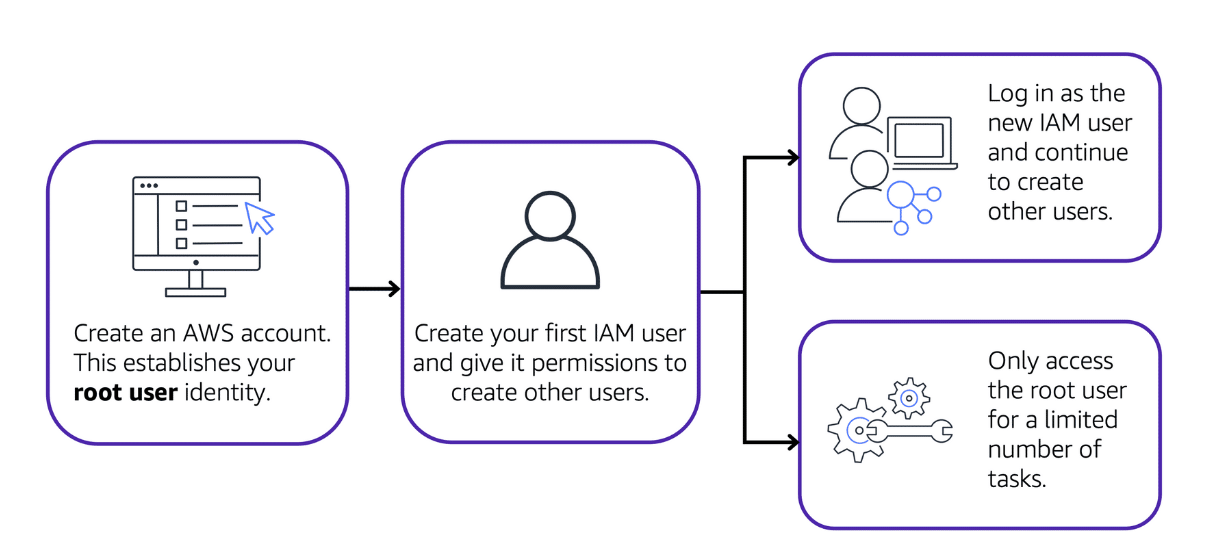
Best practice:
Do not use the root user for everyday tasks.
Instead, use the root user to create your first IAM user and assign it permissions to create other users.
Then, continue to create other IAM users, and access those identities for performing regular tasks throughout AWS. Only use the root user when you need to perform a limited number of tasks that are only available to the root user. Examples of these tasks include changing your root user email address and changing your AWS support plan. For more information, see “Tasks that require root user credentials” in the AWS Account Management Reference Guide(opens in a new tab).
Best practice:
We recommend that you create individual IAM users for each person who needs to access AWS.
Even if you have multiple employees who require the same level of access, you should create individual IAM users for each of them. This provides additional security by allowing each IAM user to have a unique set of security credentials.
IAM policies
An IAM policy is a document that allows or denies permissions to AWS services and resources.
IAM policies enable you to customize users’ levels of access to resources. For example, you can allow users to access all of the Amazon S3 buckets within your AWS account, or only a specific bucket.
Best practice:
Follow the security principle of least privilege when granting permissions.
By following this principle, you help to prevent users or roles from having more permissions than needed to perform their tasks.
For example, if an employee needs access to only a specific bucket, specify the bucket in the IAM policy. Do this instead of granting the employee access to all of the buckets in your AWS account.
IAM groups
An IAM group is a collection of IAM users. When you assign an IAM policy to a group, all users in the group are granted permissions specified by the policy.
Here’s an example of how this might work in the coffee shop. Instead of assigning permissions to cashiers one at a time, the owner can create a “Cashiers” IAM group. The owner can then add IAM users to the group and then attach permissions at the group level.
IAM roles
An IAM role is an identity that you can assume to gain temporary access to permissions.
Before an IAM user, application, or service can assume an IAM role, they must be granted permissions to switch to the role. When someone assumes an IAM role, they abandon all previous permissions that they had under a previous role and assume the permissions of the new role.
IAM roles are ideal for situations in which access to services or resources needs to be granted temporarily, instead of long-term.
3. AWS Organizations
Suppose that your company has multiple AWS accounts. You can use AWS Organizations(opens in a new tab) to consolidate and manage multiple AWS accounts within a central location.
When you create an organization, AWS Organizations automatically creates a root, which is the parent container for all the accounts in your organization.
In AWS Organizations, you can centrally control permissions for the accounts in your organization by using service control policies (SCPs). SCPs enable you to place restrictions on the AWS services, resources, and individual API actions that users and roles in each account can access.
Organizational units
In AWS Organizations, you can group accounts into organizational units (OUs) to make it easier to manage accounts with similar business or security requirements. When you apply a policy to an OU, all the accounts in the OU automatically inherit the permissions specified in the policy.
By organizing separate accounts into OUs, you can more easily isolate workloads or applications that have specific security requirements. For instance, if your company has accounts that can access only the AWS services that meet certain regulatory requirements, you can put these accounts into one OU. Then, you can attach a policy to the OU that blocks access to all other AWS services that do not meet the regulatory requirements.
In AWS Organizations, you can apply service control policies (SCPs) to the organization root, an individual member account, or an OU. An SCP affects all IAM users, groups, and roles within an account, including the AWS account root user.
You can apply IAM policies to IAM users, groups, or roles. You cannot apply an IAM policy to the AWS account root user.
4. Compliance
You'll need to devise a similar way to meet compliance and auditing in AWS. Depending on what types of solutions you host on AWS, you will need to ensure that you are up to compliance for whatever standards and regulations your business is specifically held to. If you run software that deals with consumer data in the EU, you would need to make sure that you're in compliance with GDPR, or if you run healthcare applications in the US you will need to design your architectures to meet HIPAA compliance requirements.
So, if you need specific standards for data storage, you can devise a way to either reach those requirements by building it yourself on top of AWS or using the features that already exist in many services.
AWS Artifact
AWS Artifact(opens in a new tab) is a service that provides on-demand access to AWS security and compliance reports and select online agreements. AWS Artifact consists of two main sections: AWS Artifact Agreements and AWS Artifact Reports.
- AWS Artifact Agreements
Suppose that your company needs to sign an agreement with AWS regarding your use of certain types of information throughout AWS services. You can do this through AWS Artifact Agreements.
In AWS Artifact Agreements, you can review, accept, and manage agreements for an individual account and for all your accounts in AWS Organizations. Different types of agreements are offered to address the needs of customers who are subject to specific regulations, such as the Health Insurance Portability and Accountability Act (HIPAA).
- AWS Artifact Reports
Next, suppose that a member of your company’s development team is building an application and needs more information about their responsibility for complying with certain regulatory standards. You can advise them to access this information in AWS Artifact Reports.
AWS Artifact Reports provide compliance reports from third-party auditors. These auditors have tested and verified that AWS is compliant with a variety of global, regional, and industry-specific security standards and regulations. AWS Artifact Reports remains up to date with the latest reports released. You can provide the AWS audit artifacts to your auditors or regulators as evidence of AWS security controls.
- Customer Compliance Center
The Customer Compliance Center contains resources to help you learn more about AWS compliance.
You can also access compliance whitepapers and documentation on topics such as:
- AWS answers to key compliance questions
- An overview of AWS risk and compliance
- An auditing security checklist
4.DDOS and AWS Shield
AWS Shield is a service that protects applications against DDoS attacks. AWS Shield provides two levels of protection: Standard and Advanced.
-
AWS Shield Standard automatically protects all AWS customers at no cost. It protects your AWS resources from the most common, frequently occurring types of DDoS attacks.
As network traffic comes into your applications, AWS Shield Standard uses a variety of analysis techniques to detect malicious traffic in real time and automatically mitigates it. -
AWS Shield Advanced is a paid service that provides detailed attack diagnostics and the ability to detect and mitigate sophisticated DDoS attacks.
It also integrates with other services such as Amazon CloudFront, Amazon Route 53, and Elastic Load Balancing. Additionally, you can integrate AWS Shield with AWS WAF by writing custom rules to mitigate complex DDoS attacks.
- UDP Flood
- HTTP level attack
- Slowloris attck
First attack, the low level network attacks like the UDP floods. Solution, security groups. The security groups only allow in proper request traffic. Things like weather reports use an entirely different protocol than the ones your customers use. Not on the list, you don't get to talk to the server. And what's more, security groups operate at the AWS network level, not at the EC2 instance level, like an operating system firewall might.
So massive attacks like UDP floods or reflection attacks just get shrugged off by the scale of the entire AWS Regions capacity, not your individual EC2's capacity. This is a case where our size is a huge advantage in your protection. I won't say it's impossible to overwhelm AWS, but the scale it would take, it would be too expensive for these bad actors. Slowloris attacks? Look at our elastic load balancer. Because the ELB handles the http traffic request first, so it waits until the entire message, no matter how fast or slow, is complete before sending it over to the front end web server. I mean, sure, you can try to overwhelm it, but remember how the ELB is scalable and how it runs at the region level?
To overwhelm ELB, you would once again have to overwhelm the entire AWS region. It's not theoretically impossible, but too massively expensive for anyone to pull off. For the sharpest, most sophisticated attacks, AWS also offers specialized defense tools called AWS Shield with AWS WAF. AWS WAF uses a web application firewall to filter incoming traffic for the signatures of bad actors. It has extensive machine learning capabilities, and can recognize new threats as they evolve and proactively help defend your system against an ever-growing list of destructive vectors.
5. Additional Security Services
1) At rest
By at rest, we mean when your data is idle. It's just being stored and not moving.
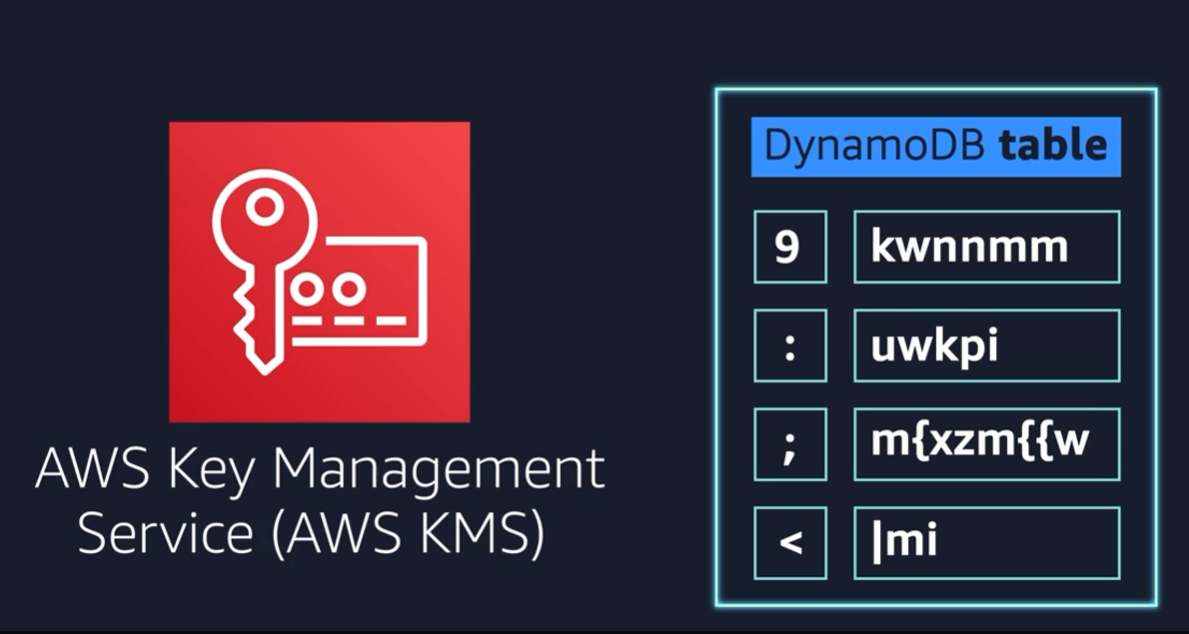
AWS Key Management Service (AWS KMS) enables you to perform encryption operations through the use of cryptographic keys. A cryptographic key is a random string of digits used for locking (encrypting) and unlocking (decrypting) data. You can use AWS KMS to create, manage, and use cryptographic keys. With AWS KMS, you can choose the specific levels of access control that you need for your keys. For example, you can specify which IAM users and roles are able to manage keys. Alternatively, you can temporarily disable keys so that they are no longer in use by anyone. Your keys never leave AWS KMS, and you are always in control of them.
2) In transit
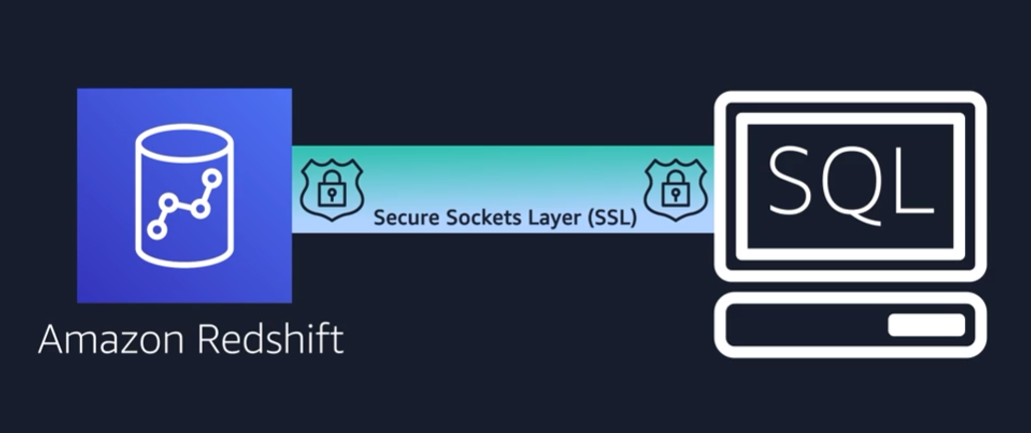
3) AWS WAF
AWS WAF is a web application firewall that lets you monitor network requests that come into your web applications.
AWS WAF works together with Amazon CloudFront and an Application Load Balancer. Recall the network access control lists that you learned about in an earlier module. AWS WAF works in a similar way to block or allow traffic. However, it does this by using a web access control list (ACL)to protect your AWS resources.
4) Amazon Inspector
They want to make sure that they are designing the application in accordance with security best practices. However, they have several other applications to develop, so they cannot spend much time conducting manual assessments. To perform automated security assessments, they decide to use Amazon Inspector.
Amazon Inspector helps to improve the security and compliance of applications by running automated security assessments. It checks applications for security vulnerabilities and deviations from security best practices, such as open access to Amazon EC2 instances and installations of vulnerable software versions.
5) Amazon GuardDuty
Amazon GuardDuty is a service that provides intelligent threat detection for your AWS infrastructure and resources. It identifies threats by continuously monitoring the network activity and account behavior within your AWS environment.
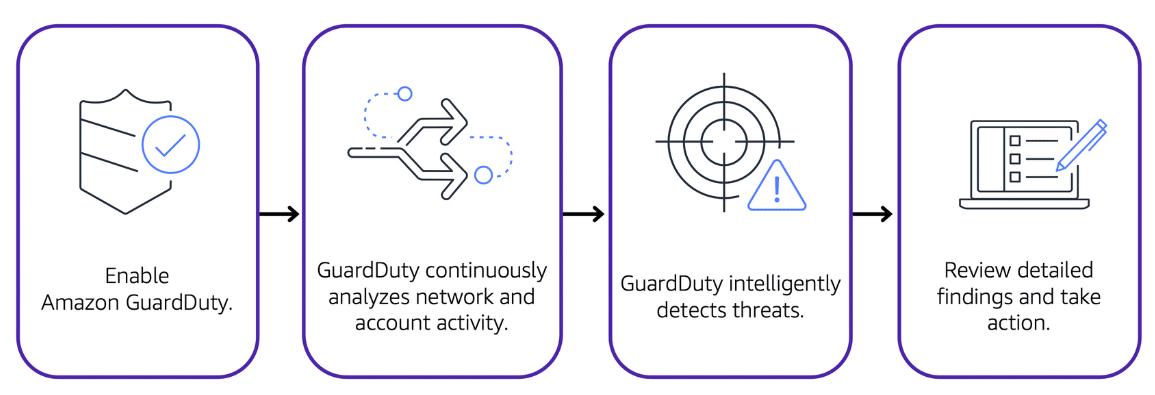
After you have enabled GuardDuty for your AWS account, GuardDuty begins monitoring your network and account activity. You do not have to deploy or manage any additional security software. GuardDuty then continuously analyzes data from multiple AWS sources, including VPC Flow Logs and DNS logs.
If GuardDuty detects any threats, you can review detailed findings about them from the AWS Management Console. Findings include recommended steps for remediation. You can also configure AWS Lambda functions to take remediation steps automatically in response to GuardDuty’s security findings.
etc
In order to give permissions to an identity, you need to create policies that either explicitly allow or deny a specific action in AWS. With IAM also comes identity federation. If you have an existing corporate identity store, you can federate those users to AWS, using role based access, which allows your users to use one login for both your corporate systems as well as AWS.