
Nuxt 3 프로젝트에 Vuetify, Pinia, Storybook 등을 적용하면서 겪은 에러와 해결 과정을 정리한 세팅 가이드입니다. (2025.02 기준)
- Package Manager: pnpm v9.15.4
- Node: v.22.14.0 (LTS)
🛠️ Nuxt 3 프로젝트 초기화
pnpm dlx nuxi@latest init <project-name>
📦 필수 패키지 설치
pnpm add pinia @pinia/nuxt
pnpm add vuetify
pnpm add -D vite-plugin-vuetify
pnpm add -D sass sass-loader
pnpm add -D typescript @types/node
pnpm add -D prettier eslint eslint-plugin-nuxt eslint-config-prettier
ESLint 설치 옵션:
✔ How would you like to use ESLint? · problems
✔ What type of modules does your project use? · esm
✔ Which framework does your project use? · vue
✔ Does your project use TypeScript? · typescript
✔ Where does your code run? · browser
The config that you've selected requires the following dependencies:

eslint, globals, @eslint/js, typescript-eslint, eslint-plugin-vue
✔ Would you like to install them now? · No / Yes
✔ Which package manager do you want to use? · pnpm
📚 Storybook
Storybook 설치
pnpm add -D @nuxtjs/storybook
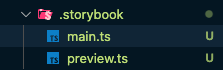
npx storybook-nuxt init.storybook/main.ts,preview.ts자동 생성 및 필요한 패키지들이 설치됩니다.
❌ 문제 발생: HRM 루프 및 버전 충돌
The CJS build of Vite's Node API is deprecated. See https://vite.dev/guide/troubleshooting.html#vite-cjs-node-api-deprecated for more details.
ℹ ℹ️ Storybook ready                                                                                                                      5:21:32 PM
info => Starting manager..
WARN No story files found for the specified pattern: components/**/*.stories.@(js|jsx|ts|tsx)
[5:21:33 PM] ℹ hmr update /node_modules/.pnpm/@nuxtjs+svg-sprite@1.0.2_magicast@0.3.5_rollup@4.32.1/node_modules/@nuxtjs/svg-sprite/dist/runtime/components/svg-icon.vue (x12)
info => Starting preview..
Writing Vite configs to /Users/hyeon/hyeon/dev/work/mobigen/city/yeosu/LGDP-YEOSU/frontend/portal/node_modules/.cache/storybook/c61c8fc26e26cedb7dcecce2c0096165d85420fc1c3542a21ea7b418784f9c53/public/logs/...
WARN The following packages are incompatible with Storybook 8.4.7 as they depend on different major versions of Storybook packages:
WARN - @storybook/addon-essentials@8.5.2
WARN Repo: https://github.com/storybookjs/storybook/tree/next/code/addons/essentials
WARN - @storybook/addon-interactions@8.5.2
WARN Repo: https://github.com/storybookjs/storybook/tree/next/code/addons/interactions
WARN - @storybook/builder-vite@8.5.2
WARN Repo: https://github.com/storybookjs/storybook/tree/next/code/builders/builder-vite/#readme
WARN - @storybook/test@8.5.2
WARN Repo: https://github.com/storybookjs/storybook/tree/next/code/lib/test
WARN - @storybook/vue3@8.5.2
WARN Repo: https://github.com/storybookjs/storybook/tree/next/code/renderers/vue3
WARN - storybook@8.5.2
WARN Repo: https://github.com/storybookjs/storybook/tree/next/code/lib/cli
WARN
WARN
WARN Please consider updating your packages or contacting the maintainers for compatibility details.
WARN For more on Storybook 8 compatibility, see the linked GitHub issue:
WARN https://github.com/storybookjs/storybook/issues/26031│ The following packages are incompatible with Storybook 8.5.2 as they depend on different │
│ major versions of Storybook packages: │
│ - @nuxtjs/storybook@8.3.3 │
│ Repo: https://storybook.nuxtjs.org 👉 오류 원인:
• Storybook이 8.5.2 버전인데 @nuxtjs/storybook이 8.3.3으로 설치됨
• Nuxt와 Storybook 간의 버전이 일치하지 않아 충돌 발생
• Storybook이 @nuxtjs/storybook과 호환되지 않는 패키지를 포함하고 있음
📌 현재 @nuxtjs/storybook은 정식 지원이 지연되고 있으므로, 최신 Storybook과의 버전 호환을 맞추려면 Storybook 공식 패키지를 사용하는 것이 좋습니다.
✅ 해결 방법
결국 @nuxtjs/storybook를 삭제하고 Storybook 공식 패키지를 사용했습니다.
pnpm remove @nuxtjs/storybook
pnpm add -D storybook @storybook/vue3 @storybook/vue3-vite @storybook/addon-essentials @storybook/addon-interactions @storybook/builder-vite @storybook/test @storybook/blocks
Storybook을 설치하며 버전 충돌로 인해 이런저런 에러가 많았습니다.
최종적으로 설치한 버전은 아래와 같습니다.
"@storybook/addon-essentials": "^8.5.2",
"@storybook/addon-interactions": "^8.5.2",
"@storybook/blocks": "^8.5.2",
"@storybook/builder-vite": "8.5.2",
"@storybook/test": "^8.5.2",
"@storybook/vue3": "^8.5.2",
"@storybook/vue3-vite": "^8.5.2",
"storybook": "^8.5.2",
만약 해당 오류 발생 시 .storybook/main.ts 파일을 수동 생성합니다.
[nuxi:nuxi 5:09:57 PM] ℹ Restarting Nuxt due to error: `SB_CORE-SERVER_0006 (MainFileMissingError): No configuration files have been found in your ~~
Storybook needs a "main.js" file, please add it.

You can pass a --config-dir flag to tell Storybook, where your main.js file is located at.

More info: https://storybook.js.org/docs/configure
main.ts
import type { StorybookConfig } from '@storybook/vue3-vite';
import vue from '@vitejs/plugin-vue';
import path from 'path';

const config: StorybookConfig = {
  stories: ['../components/**/*.mdx', '../components/**/*.stories.@(js|jsx|ts|tsx|mdx)'],
  addons: [
    '@storybook/addon-essentials',
    '@chromatic-com/storybook',
    '@storybook/addon-interactions',
  ],
  framework: {
    name: '@storybook/vue3-vite',
    options: {},
  },
  viteFinal: async (config) => {
    return {
      ...config,
      plugins: [...(config.plugins || []), vue()],
      resolve: {
        alias: {
          '~': path.resolve(__dirname, '../'),
          '@': path.resolve(__dirname, '../'),
        },
      },
    };
  },
};
export default config;
✅ 타입 체크 (vue-tsc)
pnpm add -D vue-tsctsconfig.json 설정
{
  // https://nuxt.com/docs/guide/concepts/typescript
  "extends": "./.nuxt/tsconfig.json",
  "compilerOptions": {
    "sourceMap": true,
    "noImplicitThis": false,
    "jsxFactory": "h",
    "jsxFragmentFactory": "Fragment",
    "types": [
      "nuxt",
      "vuetify",
      "@types/node",
      "@storybook/vue3",
      "d3",
      "dayjs",
      "lodash",
      "hls.js"
    ],
    "baseUrl": ".",
    "paths": {
      "@/*": ["./*"],
      "~/*": ["./*"]
    }
  }
}
🧩 VS Code 사용자 스니펫 설정
cmd + shift + p: configure snippets > vue.json
{
	"Vue 3 Script Setup Template": {
		"prefix": "vue-init",
		"body": [
			"<template>",
			"  <div></div>",
			"</template>",
			"",
			"<script setup lang=\"ts\">",
			"</script>",
			"",
			"<style lang=\"scss\" scoped>",
			"</style>"
		],
		"description": "Vue 3 template with script setup",
	},
}