간단한 스네이크 게임 구현하기 !
🍧 개념 정리
Java GUI 프로그래밍
자바에서는 Swing을 사용해 JPanel과 JFrame으로 화면을 그리고 이벤트를 처리함
- JFrame: 게임 창을 생성하는 기본 프레임
- JPanel: 게임 화면을 그릴 영역
- Graphics: 도형을 그리고 색을 칠할 때 사용하는 객체
JFrame frame = new JFrame("Snake Game");
frame.setSize(400, 400);
frame.setDefaultCloseOperation(JFrame.EXIT_ON_CLOSE);
frame.setVisible(true);
게임 루프와 타이머
게임 루프: 일정한 간격으로 화면을 업데이트하고, 뱀의 이동을 처리하는 역할
in Java: javax.swing.Timer를 활용해 일정 주기로 코드를 실행
Timer timer = new Timer(100, e -> {
    // 게임 업데이트 로직 (100ms마다 실행)
    repaint();  // 화면을 다시 그리는 메서드
});
timer.start();
키보드 입력 처리
방향 변경을 위해서 키보드 이벤트 처리 필요
KeyListener를 구현해서 방향키 입력 감지
- keyPressed(KeyEvent e): 키가 눌렸을 때 호출됨
frame.addKeyListener(new KeyAdapter() {
    @Override
    public void keyPressed(KeyEvent e) {
        int key = e.getKeyCode();
        if (key == KeyEvent.VK_UP) {
            // 위쪽 방향으로 이동
        } else if (key == KeyEvent.VK_DOWN) {
            // 아래쪽 방향으로 이동
        }
    }
});
2D 배열 또는 리스트 활용
뱀의 몸통과 먹이의 위치를 저장하기 위해 2D 배열이나 리스트가 필요
각 위치를 x,y 좌표로 저장하거나, 리스트로 머리와 몸통을 관리할 수 있음
List<Point> snake = new ArrayList<>();
snake.add(new Point(5, 5)); // 뱀의 머리 위치
충돌 체크
뱀과 화면 경계 / 뱀과 자신의 몸통 / 뱀과 먹이의 충돌을 확인
Java의 기본 도형 그리기
Graphics 객체를 사용
주요 메서드
- fillRect(x, y, width, height): 사각형을 채워서 그리기
- setColor(Color c): 도형의 색상 설정
public void paintComponent(Graphics g) {
    super.paintComponent(g);
    g.setColor(Color.GREEN);
    g.fillRect(20, 20, 20, 20); // 뱀의 머리
}
객체 지향 설계
뱀, 먹이, 맵 등을 클래스로 분리하면 코드가 깔끔
🍧 게임 만들어보기
1. 프로젝트 생성 및 기본 설정
- 새 프로젝트 생성
- 클래스 생성
- GameFrame: 게임 창 관리
- GamePanel: 게임 화면과 로직 관리
2. 게임 창 만들기
import javax.swing.*;

public class GameFrame extends JFrame {
    public GameFrame() {
        this.add(new GamePanel()); // 게임 화면 패널 추가
        this.setTitle("Snake Game");
        this.setDefaultCloseOperation(JFrame.EXIT_ON_CLOSE);
        this.setResizable(false); // 창 크기 고정
        this.pack(); // 내부 구성에 맞게 크기 조정
        this.setVisible(true); // 창을 화면에 표시
        this.setLocationRelativeTo(null); // 화면 중앙에 표시
    }

    public static void main(String[] args) {
        new GameFrame();
    }
}
3. 게임 화면 설정
맵과 격자 무늬 그리기
import javax.swing.*;
import java.awt.*;

public class GamePanel extends JPanel {
    static final int SCREEN_WIDTH = 400; // 창 가로 크기
    static final int SCREEN_HEIGHT = 400; // 창 세로 크기
    static final int UNIT_SIZE = 20; // 격자 칸 크기
    static final int GAME_UNITS = (SCREEN_WIDTH * SCREEN_HEIGHT) / (UNIT_SIZE * UNIT_SIZE);

    public GamePanel() {
        this.setPreferredSize(new Dimension(SCREEN_WIDTH, SCREEN_HEIGHT));
        this.setBackground(Color.BLACK); // 배경색 검정
    }

    @Override
    protected void paintComponent(Graphics g) {
        super.paintComponent(g);
        drawGrid(g); // 격자 무늬 그리기
    }

    private void drawGrid(Graphics g) {
        g.setColor(Color.GRAY); // 격자 선 색
        for (int i = 0; i < SCREEN_HEIGHT / UNIT_SIZE; i++) {
            g.drawLine(i * UNIT_SIZE, 0, i * UNIT_SIZE, SCREEN_HEIGHT); // 세로선
            g.drawLine(0, i * UNIT_SIZE, SCREEN_WIDTH, i * UNIT_SIZE); // 가로선
        }
    }
}
-> 실행하면 회색 격자 확인 가능
4. 뱀 만들기
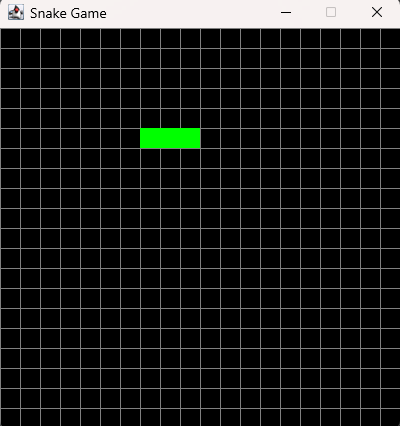
뱀의 머리 화면에 그려보기
1. GamePanel 클래스에 뱀의 좌표를 저장하는 배열 추가
2. 뱀 머리 그리기
import javax.swing.*;
import java.awt.*;

public class GamePanel extends JPanel {
    static final int SCREEN_WIDTH = 400; // 창 가로 크기
    static final int SCREEN_HEIGHT = 400; // 창 세로 크기
    static final int UNIT_SIZE = 20; // 격자 칸 크기
    static final int GAME_UNITS = (SCREEN_WIDTH * SCREEN_HEIGHT) / (UNIT_SIZE * UNIT_SIZE);

    static final int[] x = new int[GAME_UNITS]; // 뱀의 x 좌표
    static final int[] y = new int[GAME_UNITS]; // 뱀의 y 좌표
    static int bodyParts = 3; // 초기 몸통 길이

    public GamePanel() {
        this.setPreferredSize(new Dimension(SCREEN_WIDTH, SCREEN_HEIGHT));
        this.setBackground(Color.BLACK); // 배경색 검정
        startGame(); // 게임 시작
    }

    private void startGame() {
        // 뱀의 머리 위치 설정
        x[0] = 100;
        y[0] = 100;

        // 뱀의 몸통 위치 설정
        for (int i = 1; i < bodyParts; i++) {
            x[i] = x[i - 1] - UNIT_SIZE; // 머리의 왼쪽으로 배치
            y[i] = y[i - 1];             // 같은 y축
        }
    }

    @Override
    protected void paintComponent(Graphics g) {
        super.paintComponent(g);
        drawGrid(g); // 격자 무늬 그리기
        drawSnake(g); // 뱀 그리기
    }

    private void drawGrid(Graphics g) {
        g.setColor(Color.GRAY); // 격자 선 색
        for (int i = 0; i < SCREEN_HEIGHT / UNIT_SIZE; i++) {
            g.drawLine(i * UNIT_SIZE, 0, i * UNIT_SIZE, SCREEN_HEIGHT); // 세로선
            g.drawLine(0, i * UNIT_SIZE, SCREEN_WIDTH, i * UNIT_SIZE); // 가로선
        }
    }

    private void drawSnake(Graphics g) {
        g.setColor(Color.GREEN);
        for (int i = 0; i < bodyParts; i++) {
            g.fillRect(x[i], y[i], UNIT_SIZE, UNIT_SIZE); // 머리와 몸통
        }
    }
}
5. 뱀의 이동 구현
- Timer를 추가해서 뱀이 자동으로 이동하도록 설정
- 이동 로직 구현
import javax.swing.*;
import java.awt.*;
import java.awt.event.ActionEvent;
import java.awt.event.ActionListener;

public class GamePanel extends JPanel implements ActionListener {
    static final int SCREEN_WIDTH = 400; // 창 가로 크기
    static final int SCREEN_HEIGHT = 400; // 창 세로 크기
    static final int UNIT_SIZE = 20; // 격자 칸 크기
    static final int GAME_UNITS = (SCREEN_WIDTH * SCREEN_HEIGHT) / (UNIT_SIZE * UNIT_SIZE);

    static final int[] x = new int[GAME_UNITS]; // 뱀의 x 좌표
    static final int[] y = new int[GAME_UNITS]; // 뱀의 y 좌표
    static int bodyParts = 3; // 초기 몸통 길이

    static final int DELAY = 150; // 게임 속도 (ms)
    Timer timer;

    public GamePanel() {
        this.setPreferredSize(new Dimension(SCREEN_WIDTH, SCREEN_HEIGHT));
        this.setBackground(Color.BLACK);
        this.setFocusable(true);
        startGame(); // 게임 시작
    }

    private void startGame() {
        // 뱀의 초기 위치 설정
        x[0] = 100;
        y[0] = 100;
        for (int i = 1; i < bodyParts; i++) {
            x[i] = x[i - 1] - UNIT_SIZE; // 몸통은 머리의 왼쪽으로 배치
            y[i] = y[i - 1];
        }

        // Timer 시작
        timer = new Timer(DELAY, this);
        timer.start();
    }

    @Override
    public void actionPerformed(ActionEvent e) {
        move(); // 뱀 이동
        repaint(); // 화면 갱신
    }

    private void move() {
        // 몸통의 위치를 머리의 이전 위치로 이동
        for (int i = bodyParts; i > 0; i--) {
            x[i] = x[i - 1];
            y[i] = y[i - 1];
        }

        // 머리의 위치를 오른쪽으로 이동 (기본 방향)
        x[0] += UNIT_SIZE;
    }

    @Override
    protected void paintComponent(Graphics g) {
        super.paintComponent(g);
        drawGrid(g);
        drawSnake(g);
    }

    private void drawGrid(Graphics g) {
        g.setColor(Color.GRAY);
        for (int i = 0; i < SCREEN_HEIGHT / UNIT_SIZE; i++) {
            g.drawLine(i * UNIT_SIZE, 0, i * UNIT_SIZE, SCREEN_HEIGHT);
            g.drawLine(0, i * UNIT_SIZE, SCREEN_WIDTH, i * UNIT_SIZE);
        }
    }

    private void drawSnake(Graphics g) {
        g.setColor(Color.GREEN);
        for (int i = 0; i < bodyParts; i++) {
            g.fillRect(x[i], y[i], UNIT_SIZE, UNIT_SIZE);
        }
    }
}
6. 뱀의 방향 전환
KeyListener 구현하기
import java.awt.event.KeyAdapter;
import java.awt.event.KeyEvent;

public class GamePanel extends JPanel implements ActionListener {
    // 기존 필드 유지
    char direction = 'R'; // 초기 이동 방향 (Right)

    public GamePanel() {
        this.setPreferredSize(new Dimension(SCREEN_WIDTH, SCREEN_HEIGHT));
        this.setBackground(Color.BLACK);
        this.setFocusable(true); // 키보드 입력 활성화
        this.addKeyListener(new MyKeyAdapter()); // 키보드 입력 감지
        startGame();
    }

    @Override
    public void actionPerformed(ActionEvent e) {
        move(); // 뱀 이동
        repaint(); // 화면 갱신
    }

    private void move() {
        // 몸통의 위치를 머리의 이전 위치로 이동
        for (int i = bodyParts; i > 0; i--) {
            x[i] = x[i - 1];
            y[i] = y[i - 1];
        }

        // 머리의 위치를 방향에 따라 이동
        switch (direction) {
            case 'U': // 위쪽
                y[0] -= UNIT_SIZE;
                break;
            case 'D': // 아래쪽
                y[0] += UNIT_SIZE;
                break;
            case 'L': // 왼쪽
                x[0] -= UNIT_SIZE;
                break;
            case 'R': // 오른쪽
                x[0] += UNIT_SIZE;
                break;
        }
    }

    private class MyKeyAdapter extends KeyAdapter {
        @Override
        public void keyPressed(KeyEvent e) {
            switch (e.getKeyCode()) {
                case KeyEvent.VK_LEFT:
                    if (direction != 'R') direction = 'L'; // 왼쪽으로 전환 (현재 방향이 오른쪽이 아닐 때만)
                    break;
                case KeyEvent.VK_RIGHT:
                    if (direction != 'L') direction = 'R'; // 오른쪽으로 전환
                    break;
                case KeyEvent.VK_UP:
                    if (direction != 'D') direction = 'U'; // 위쪽으로 전환
                    break;
                case KeyEvent.VK_DOWN:
                    if (direction != 'U') direction = 'D'; // 아래쪽으로 전환
                    break;
            }
        }
    }
}
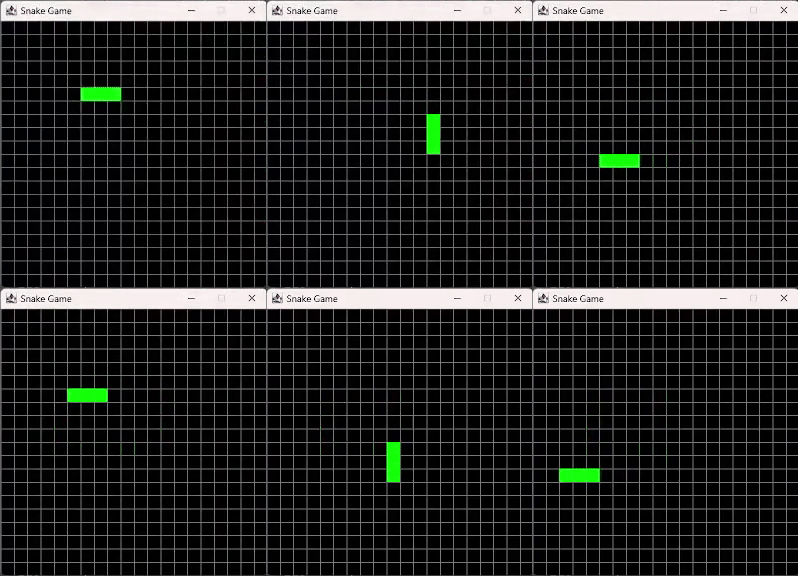
- direction: 뱀의 현재 방향 저장 / 초기값은 R
- switch: direction에 따라서 머리 위치 업데이트
- 키보드 입력 처리: 반대 방향으로는 즉시 전환 되지 않음
7. 게임 종료 조건 구현
종료 상태를 나타내는 플래그 추가
종료 시 메시지를 표시하며 타이머 중지
import javax.swing.*;
import java.awt.*;
import java.awt.event.ActionEvent;
import java.awt.event.ActionListener;
import java.awt.event.KeyAdapter;
import java.awt.event.KeyEvent;

public class GamePanel extends JPanel implements ActionListener {
    static final int SCREEN_WIDTH = 400; // 창 가로 크기
    static final int SCREEN_HEIGHT = 400; // 창 세로 크기
    static final int UNIT_SIZE = 20; // 격자 칸 크기
    static final int GAME_UNITS = (SCREEN_WIDTH * SCREEN_HEIGHT) / (UNIT_SIZE * UNIT_SIZE);

    static final int[] x = new int[GAME_UNITS]; // 뱀의 x 좌표
    static final int[] y = new int[GAME_UNITS]; // 뱀의 y 좌표
    static int bodyParts = 3; // 초기 몸통 길이

    static final int DELAY = 150; // 게임 속도 (ms)
    Timer timer;

    char direction = 'R'; // 초기 이동 방향 (오른쪽)
    boolean running = true; // 게임 실행 상태

    public GamePanel() {
        this.setPreferredSize(new Dimension(SCREEN_WIDTH, SCREEN_HEIGHT));
        this.setBackground(Color.BLACK);
        this.setFocusable(true); // 키보드 입력 활성화
        this.addKeyListener(new MyKeyAdapter()); // 키보드 입력 처리
        startGame();
    }

    private void startGame() {
        // 뱀의 초기 위치 설정
        x[0] = 100;
        y[0] = 100;
        for (int i = 1; i < bodyParts; i++) {
            x[i] = x[i - 1] - UNIT_SIZE; // 몸통은 머리의 왼쪽으로 배치
            y[i] = y[i - 1];
        }

        // Timer 시작
        timer = new Timer(DELAY, this);
        timer.start();
    }

    @Override
    public void actionPerformed(ActionEvent e) {
        if (running) {
            move(); // 뱀 이동
            checkCollisions(); // 충돌 확인
        }
        repaint(); // 화면 갱신
    }

    private void move() {
        // 몸통의 위치를 머리의 이전 위치로 이동
        for (int i = bodyParts; i > 0; i--) {
            x[i] = x[i - 1];
            y[i] = y[i - 1];
        }

        // 머리의 위치를 방향에 따라 이동
        switch (direction) {
            case 'U': // 위쪽
                y[0] -= UNIT_SIZE;
                break;
            case 'D': // 아래쪽
                y[0] += UNIT_SIZE;
                break;
            case 'L': // 왼쪽
                x[0] -= UNIT_SIZE;
                break;
            case 'R': // 오른쪽
                x[0] += UNIT_SIZE;
                break;
        }
    }

    private void checkCollisions() {
        // 화면 밖으로 나가면 종료
        if (x[0] < 0 || x[0] >= SCREEN_WIDTH || y[0] < 0 || y[0] >= SCREEN_HEIGHT) {
            running = false;
        }

        // 자신의 몸통과 부딪히면 종료
        for (int i = bodyParts; i > 0; i--) {
            if (x[0] == x[i] && y[0] == y[i]) {
                running = false;
                break;
            }
        }

        if (!running) {
            timer.stop(); // 타이머 중지
            showGameOverMessage(); // 종료 메시지 창 표시
        }
    }

    private void showGameOverMessage() {
        int response = JOptionPane.showConfirmDialog(this, "게임 오버입니다.\n다시 시작하시겠습니까?", "Game Over",
                JOptionPane.YES_NO_OPTION, JOptionPane.INFORMATION_MESSAGE);
        if (response == JOptionPane.YES_OPTION) {
            resetGame(); // 게임 초기화
        } else {
            System.exit(0); // 게임 종료
        }
    }

    private void resetGame() {
        // 뱀과 먹이 초기화
        bodyParts = 3;
        direction = 'R';
        running = true;

        // 뱀의 위치 재설정
        x[0] = 100;
        y[0] = 100;
        for (int i = 1; i < bodyParts; i++) {
            x[i] = x[i - 1] - UNIT_SIZE;
            y[i] = y[i - 1];
        }

        timer.start(); // 타이머 재시작
        repaint(); // 화면 갱신
    }


    @Override
    protected void paintComponent(Graphics g) {
        super.paintComponent(g);

        if (running) {
            drawGrid(g); // 격자 무늬 그리기
            drawSnake(g); // 뱀 그리기
        } else {
            drawGameOver(g); // 게임 종료 화면
        }
    }

    private void drawGrid(Graphics g) {
        g.setColor(Color.GRAY); // 격자 선 색상
        for (int i = 0; i < SCREEN_HEIGHT / UNIT_SIZE; i++) {
            g.drawLine(i * UNIT_SIZE, 0, i * UNIT_SIZE, SCREEN_HEIGHT); // 세로선
            g.drawLine(0, i * UNIT_SIZE, SCREEN_WIDTH, i * UNIT_SIZE); // 가로선
        }
    }

    private void drawSnake(Graphics g) {
        g.setColor(Color.GREEN);
        for (int i = 0; i < bodyParts; i++) {
            g.fillRect(x[i], y[i], UNIT_SIZE, UNIT_SIZE); // 머리와 몸통
        }
    }

    private void drawGameOver(Graphics g) {
        g.setColor(Color.RED);
        g.setFont(new Font("Ink Free", Font.BOLD, 50));
        FontMetrics metrics = getFontMetrics(g.getFont());
        g.drawString("Game Over", (SCREEN_WIDTH - metrics.stringWidth("Game Over")) / 2, SCREEN_HEIGHT / 2);
    }

    private class MyKeyAdapter extends KeyAdapter {
        @Override
        public void keyPressed(KeyEvent e) {
            switch (e.getKeyCode()) {
                case KeyEvent.VK_LEFT:
                    if (direction != 'R') direction = 'L'; // 왼쪽으로 전환
                    break;
                case KeyEvent.VK_RIGHT:
                    if (direction != 'L') direction = 'R'; // 오른쪽으로 전환
                    break;
                case KeyEvent.VK_UP:
                    if (direction != 'D') direction = 'U'; // 위쪽으로 전환
                    break;
                case KeyEvent.VK_DOWN:
                    if (direction != 'U') direction = 'D'; // 아래쪽으로 전환
                    break;
            }
        }
    }
}
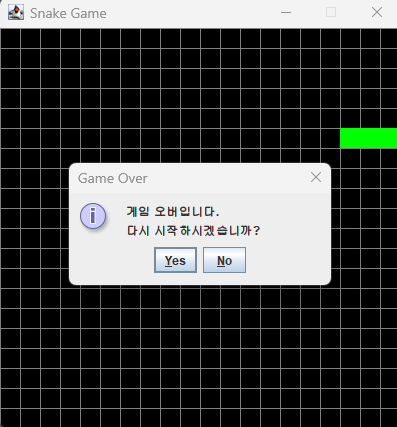
- boolean running으로 게임 실행 여부 관리
- checkCollisions()메서드에서 뱀이 화면 밖으로 나가거나, 자신의 몸과 부딪힐 때 게임 종료
- 게임이 종료되면 JOptionPane을 사용하여 메시지 창을 표시
- timer.stop()으로 게임 루프 멈춤
8. 먹이 추가 및 뱀의 성장
먹이 위치 랜덤 생성
이때 먹이의 위치가 뱀 위치랑 겹치면 안됨
import javax.swing.*;
import java.awt.*;
import java.awt.event.*;
import java.util.Random;

public class GamePanel extends JPanel implements ActionListener {
    static final int SCREEN_WIDTH = 400;
    static final int SCREEN_HEIGHT = 400;
    static final int UNIT_SIZE = 20;
    static final int GAME_UNITS = (SCREEN_WIDTH * SCREEN_HEIGHT) / (UNIT_SIZE * UNIT_SIZE);

    static final int[] x = new int[GAME_UNITS];
    static final int[] y = new int[GAME_UNITS];
    static int bodyParts = 3;

    static final int DELAY = 150;
    Timer timer;

    int foodX;
    int foodY;
    Random random = new Random();

    char direction = 'R';
    boolean running = true;

    public GamePanel() {
        this.setPreferredSize(new Dimension(SCREEN_WIDTH, SCREEN_HEIGHT));
        this.setBackground(Color.BLACK);
        this.setFocusable(true);
        this.addKeyListener(new MyKeyAdapter());
        startGame();
    }

    private void startGame() {
        bodyParts = 3;
        direction = 'R';
        running = true;

        x[0] = 100;
        y[0] = 100;
        for (int i = 1; i < bodyParts; i++) {
            x[i] = x[i - 1] - UNIT_SIZE;
            y[i] = y[i - 1];
        }

        spawnFood();
        timer = new Timer(DELAY, this);
        timer.start();
    }

    private void spawnFood() {
        boolean onSnake;
        do {
            onSnake = false;
            foodX = random.nextInt(SCREEN_WIDTH / UNIT_SIZE) * UNIT_SIZE;
            foodY = random.nextInt(SCREEN_HEIGHT / UNIT_SIZE) * UNIT_SIZE;

            for (int i = 0; i < bodyParts; i++) {
                if (foodX == x[i] && foodY == y[i]) {
                    onSnake = true;
                    break;
                }
            }
        } while (onSnake);
    }

    @Override
    public void actionPerformed(ActionEvent e) {
        if (running) {
            move();
            checkFoodCollision();
            checkCollisions();
        }
        repaint();
    }

    private void move() {
        for (int i = bodyParts; i > 0; i--) {
            x[i] = x[i - 1];
            y[i] = y[i - 1];
        }

        switch (direction) {
            case 'U':
                y[0] -= UNIT_SIZE;
                break;
            case 'D':
                y[0] += UNIT_SIZE;
                break;
            case 'L':
                x[0] -= UNIT_SIZE;
                break;
            case 'R':
                x[0] += UNIT_SIZE;
                break;
        }
    }

    private void checkFoodCollision() {
        if (x[0] == foodX && y[0] == foodY) {
            bodyParts++;
            spawnFood();
        }
    }

    private void checkCollisions() {
        if (x[0] < 0 || x[0] >= SCREEN_WIDTH || y[0] < 0 || y[0] >= SCREEN_HEIGHT) {
            running = false;
        }

        for (int i = bodyParts; i > 0; i--) {
            if (x[0] == x[i] && y[0] == y[i]) {
                running = false;
                break;
            }
        }

        if (!running) {
            timer.stop();
            showGameOverMessage();
        }
    }

    private void showGameOverMessage() {
        int response = JOptionPane.showConfirmDialog(this, "게임 오버입니다.\n다시 시작하시겠습니까?", "Game Over",
                JOptionPane.YES_NO_OPTION, JOptionPane.INFORMATION_MESSAGE);
        if (response == JOptionPane.YES_OPTION) {
            resetGame();
        } else {
            System.exit(0);
        }
    }

    private void resetGame() {
        startGame();
    }

    @Override
    protected void paintComponent(Graphics g) {
        super.paintComponent(g);

        if (running) {
            drawGrid(g);
            drawFood(g);
            drawSnake(g);
        } else {
            drawGameOver(g);
        }
    }

    private void drawGrid(Graphics g) {
        g.setColor(Color.GRAY);
        for (int i = 0; i < SCREEN_HEIGHT / UNIT_SIZE; i++) {
            g.drawLine(i * UNIT_SIZE, 0, i * UNIT_SIZE, SCREEN_HEIGHT);
            g.drawLine(0, i * UNIT_SIZE, SCREEN_WIDTH, i * UNIT_SIZE);
        }
    }

    private void drawFood(Graphics g) {
        g.setColor(Color.RED);
        g.fillRect(foodX, foodY, UNIT_SIZE, UNIT_SIZE);
    }

    private void drawSnake(Graphics g) {
        g.setColor(Color.GREEN);
        for (int i = 0; i < bodyParts; i++) {
            g.fillRect(x[i], y[i], UNIT_SIZE, UNIT_SIZE);
        }
    }

    private void drawGameOver(Graphics g) {
        g.setColor(Color.RED);
        g.setFont(new Font("Ink Free", Font.BOLD, 50));
        FontMetrics metrics = getFontMetrics(g.getFont());
        g.drawString("Game Over", (SCREEN_WIDTH - metrics.stringWidth("Game Over")) / 2, SCREEN_HEIGHT / 2);
    }

    private class MyKeyAdapter extends KeyAdapter {
        @Override
        public void keyPressed(KeyEvent e) {
            switch (e.getKeyCode()) {
                case KeyEvent.VK_LEFT:
                    if (direction != 'R') direction = 'L';
                    break;
                case KeyEvent.VK_RIGHT:
                    if (direction != 'L') direction = 'R';
                    break;
                case KeyEvent.VK_UP:
                    if (direction != 'D') direction = 'U';
                    break;
                case KeyEvent.VK_DOWN:
                    if (direction != 'U') direction = 'D';
                    break;
            }
        }
    }
}
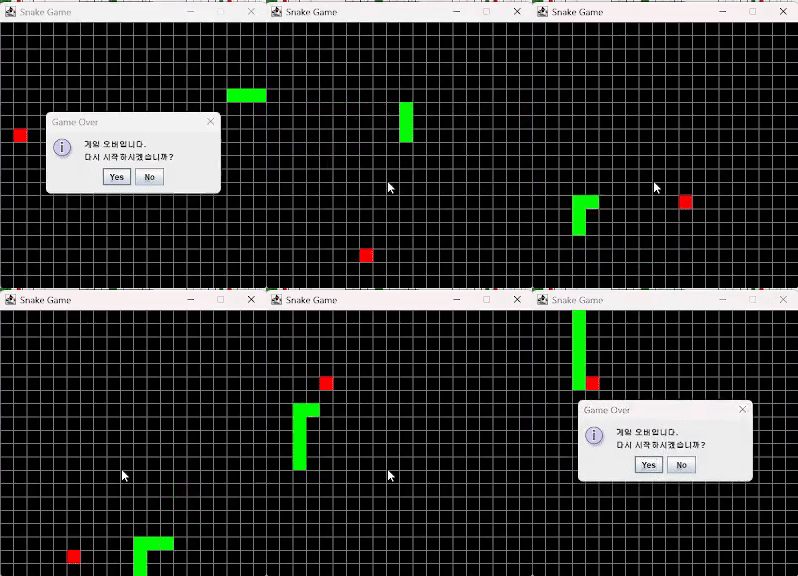
- 빨간색 사각형으로 표시된 먹이가 화면 래덤 위치에 나타남
- 뱀이 먹이를 먹으면 길이 1 증가, 새로운 먹이가 랜덤 위치에 생성됨
🍧 최종 코드
import javax.swing.*;
import java.awt.*;
import java.awt.event.*;
import java.util.Random;

public class GamePanel extends JPanel implements ActionListener {
    static final int SCREEN_WIDTH = 400;
    static final int SCREEN_HEIGHT = 400;
    static final int UNIT_SIZE = 20;
    static final int GAME_UNITS = (SCREEN_WIDTH * SCREEN_HEIGHT) / (UNIT_SIZE * UNIT_SIZE);

    static final int[] x = new int[GAME_UNITS];
    static final int[] y = new int[GAME_UNITS];
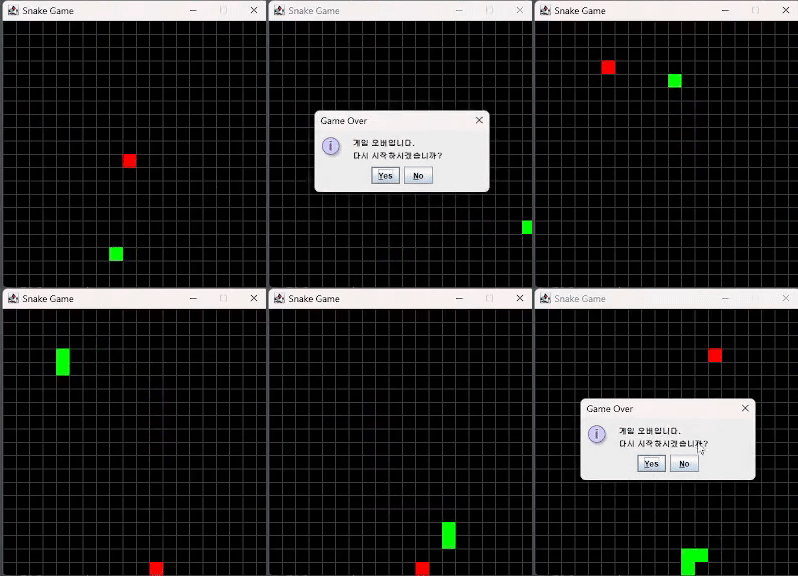
    static int bodyParts = 1; // 초기 길이 1

    static final int DELAY = 100; // 10fps에 맞춘 프레임 속도
    Timer timer;

    int foodX;
    int foodY;
    Random random = new Random();

    char direction; // 초기 방향은 랜덤으로 설정
    boolean running = true;

    public GamePanel() {
        this.setPreferredSize(new Dimension(SCREEN_WIDTH, SCREEN_HEIGHT));
        this.setBackground(Color.BLACK);
        this.setFocusable(true);
        this.addKeyListener(new MyKeyAdapter());
        startGame();
    }

    private void startGame() {
        bodyParts = 1; // 뱀의 초기 길이
        direction = randomInitialDirection(); // 초기 방향 랜덤 설정
        running = true;

        // 뱀의 머리 랜덤 위치
        x[0] = random.nextInt(SCREEN_WIDTH / UNIT_SIZE) * UNIT_SIZE;
        y[0] = random.nextInt(SCREEN_HEIGHT / UNIT_SIZE) * UNIT_SIZE;

        spawnFood(); // 먹이 생성
        timer = new Timer(DELAY, this);
        timer.start();
    }

    private char randomInitialDirection() {
        char[] directions = {'U', 'D', 'L', 'R'};
        return directions[random.nextInt(directions.length)];
    }

    private void spawnFood() {
        boolean onSnake;
        do {
            onSnake = false;
            foodX = random.nextInt(SCREEN_WIDTH / UNIT_SIZE) * UNIT_SIZE;
            foodY = random.nextInt(SCREEN_HEIGHT / UNIT_SIZE) * UNIT_SIZE;

            for (int i = 0; i < bodyParts; i++) {
                if (foodX == x[i] && foodY == y[i]) {
                    onSnake = true;
                    break;
                }
            }
        } while (onSnake);
    }

    @Override
    public void actionPerformed(ActionEvent e) {
        if (running) {
            move();
            checkFoodCollision();
            checkCollisions();
        }
        repaint();
    }

    private void move() {
        for (int i = bodyParts; i > 0; i--) {
            x[i] = x[i - 1];
            y[i] = y[i - 1];
        }

        switch (direction) {
            case 'U':
                y[0] -= UNIT_SIZE;
                break;
            case 'D':
                y[0] += UNIT_SIZE;
                break;
            case 'L':
                x[0] -= UNIT_SIZE;
                break;
            case 'R':
                x[0] += UNIT_SIZE;
                break;
        }
    }

    private void checkFoodCollision() {
        if (x[0] == foodX && y[0] == foodY) {
            bodyParts++;
            spawnFood();
        }
    }

    private void checkCollisions() {
        if (x[0] < 0 || x[0] >= SCREEN_WIDTH || y[0] < 0 || y[0] >= SCREEN_HEIGHT) {
            running = false;
        }

        for (int i = bodyParts; i > 0; i--) {
            if (x[0] == x[i] && y[0] == y[i]) {
                running = false;
                break;
            }
        }

        if (!running) {
            timer.stop();
            showGameOverMessage();
        }
    }

    private void showGameOverMessage() {
        int response = JOptionPane.showConfirmDialog(this, "게임 오버입니다.\n다시 시작하시겠습니까?", "Game Over",
                JOptionPane.YES_NO_OPTION, JOptionPane.INFORMATION_MESSAGE);
        if (response == JOptionPane.YES_OPTION) {
            resetGame();
        } else {
            System.exit(0);
        }
    }

    private void resetGame() {
        startGame();
    }

    @Override
    protected void paintComponent(Graphics g) {
        super.paintComponent(g);

        if (running) {
            drawGrid(g);
            drawFood(g);
            drawSnake(g);
        } else {
            drawGameOver(g);
        }
    }

    private void drawGrid(Graphics g) {
        g.setColor(Color.DARK_GRAY); // 진한 회색으로 변경
        for (int i = 0; i < SCREEN_HEIGHT / UNIT_SIZE; i++) {
            g.drawLine(i * UNIT_SIZE, 0, i * UNIT_SIZE, SCREEN_HEIGHT);
            g.drawLine(0, i * UNIT_SIZE, SCREEN_WIDTH, i * UNIT_SIZE);
        }
    }

    private void drawFood(Graphics g) {
        g.setColor(Color.RED);
        g.fillRect(foodX, foodY, UNIT_SIZE, UNIT_SIZE);
    }

    private void drawSnake(Graphics g) {
        g.setColor(Color.GREEN);
        for (int i = 0; i < bodyParts; i++) {
            g.fillRect(x[i], y[i], UNIT_SIZE, UNIT_SIZE);
        }
    }

    private void drawGameOver(Graphics g) {
        g.setColor(Color.RED);
        g.setFont(new Font("Ink Free", Font.BOLD, 50));
        FontMetrics metrics = getFontMetrics(g.getFont());
        g.drawString("Game Over", (SCREEN_WIDTH - metrics.stringWidth("Game Over")) / 2, SCREEN_HEIGHT / 2);
    }

    private class MyKeyAdapter extends KeyAdapter {
        @Override
        public void keyPressed(KeyEvent e) {
            switch (e.getKeyCode()) {
                case KeyEvent.VK_LEFT:
                    if (direction != 'R') direction = 'L';
                    break;
                case KeyEvent.VK_RIGHT:
                    if (direction != 'L') direction = 'R';
                    break;
                case KeyEvent.VK_UP:
                    if (direction != 'D') direction = 'U';
                    break;
                case KeyEvent.VK_DOWN:
                    if (direction != 'U') direction = 'D';
                    break;
            }
        }
    }
}

Developer's Logbook