jsoncpp 사용하게 된 계기
- 요즘 이미지 처리하는 작업을 하고 있는 데, OpenPose라는 Keypoint Detection하는 라이브러리를 사용하게 되었다.
( https://github.com/CMU-Perceptual-Computing-Lab/openpose ) - 근데 이미지에서 OpenPose를 돌리면 Keypoint 값들을 txt / CSV 형식으로 출력하는 게 아니라 JSON 형식 파일로 출력을 해줘서 이번에 JSON에 대해 공부해보게 되었다.
//  target.json
  "version": 1.3,
  "people": [
    {
      "person_id": [ -1 ],
      "pose_keypoints_2d": [
        332.057,
        110.042,
        0.857808,
        329.165,
        130.613,
        0.854567,
        ...

        ...
        271.479,
        325.256,
        0.729781,
        291.995,
        317.458,
        0.778235
      ],
      "face_keypoints_2d": [],
      "hand_left_keypoints_2d": [],
      "hand_right_keypoints_2d": [],
      "pose_keypoints_3d": [],
      "face_keypoints_3d": [],
      "hand_left_keypoints_3d": [],
      "hand_right_keypoints_3d": []
    }
  ]
}
"pose_keypoint_2d" 는
["Nose": 0, "Neck": 1, "RShoulder": 2, "RElbow": 3, "RWrist": 4,
"LShoulder": 5, "LElbow": 6, "LWrist": 7, "CHip":8,"RHip": 9, "RKnee": 10,
"RAnkle": 11, "LHip": 12, "LKnee": 13, "LAnkle": 14, "REye": 15,
"LEye": 16, "REar": 17, "LEar": 18, "Lfoot": 19,"Ltoe":20,"Lan":21,
"Rfoot": 22,"Rtoe":23,"Ran":24] 로 이루어져 있으며,
(아래 그림 참조)
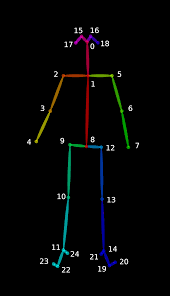
각 Keypoint마다 (x, y, 해당 좌표가 맞을확률)로 구성되어 있다.
이 Keypoint들 값들을 추출하기 위해 JSON 파일 파싱할 라이브러리리 중 jsoncpp를 사용하게 되었다.
jsoncpp란?
- jsoncpp는 C++ 환경에서 json 파싱 혹은 json 파일을 생성하는 것을 지원하는 라이브러리이다.
- 자세한 내용을 알고 싶으면 https://github.com/open-source-parsers/jsoncpp 참조하면 좋을 듯 하다.
오늘 작업한 코드
struct Keypoint{
        double x;
        double y;
        double prob;
};
std::map<int, Keypoint> Keypoints;


int read_json(char *str){
        Json::Value root;
        std::ifstream ifs(str, std::ifstream::in);
        Json::CharReaderBuilder builder;
        builder["collectComments"] = false;
        JSONCPP_STRING errs;

        if (!parseFromStream(builder, ifs, &root, &errs)) {
            std::cout << errs << std::endl;
            return EXIT_FAILURE;
        }


        Json::Value Target = root["people"];
        for(Json::ValueIterator it1 = Target.begin(); it1 != Target.end(); ++it1){
                Json::Value NewTarget = (*it1)["pose_keypoints_2d"];
                for(Json::ValueIterator it2 = NewTarget.begin(); it2 != NewTarget.end();){
                        static int key_id = 0;
                        Keypoint cur;

                        cur.x = (*it2++).asDouble();
                        cur.y = (*it2++).asDouble();
                        cur.prob = (*it2++).asDouble();

                        Keypoints.insert(std::pair<int, Keypoint>(key_id++, cur));
                }
        }
        return EXIT_SUCCESS;

}
(1) Keypoint 자료구조
struct Keypoint{
        double x;
        double y;
        double prob;
};
std::map<int, Keypoint> Keypoints;- x,y,확률 값이 double Type 자료형이라서 각각의 keypoint 값을 저장할 수 있도록 structure을 선언했다.
- 그 후, key 값으로 Keypoint structure을 조회할 수 있도록 map 컨테이너를 사용했다.
(2) jsoncpp constructor
int read_json(char *str){
        Json::Value root;
        std::ifstream ifs(str, std::ifstream::in);
        Json::CharReaderBuilder builder;
        builder["collectComments"] = false;
        JSONCPP_STRING errs;

        if (!parseFromStream(builder, ifs, &root, &errs)) {
            std::cout << errs << std::endl;
            return EXIT_FAILURE;
}- (Json::Value) : 파싱할 key에 접근하는 Constructor이다. 위 JSON 파일에서 "version", "people", "person_id" .. key에 접근하기 위해 root["version"]와 같은 식으로 사용하면 "version"에 해당하는 1.3이라는 Value 값을 추출할 수 있다.
- (std::ifstream) : 일반적으로는 c++에서 fstream을 사용해서 파일 스트림을 받지만, 파일 input/output 둘다 처리하는 게 아니라 input으로만 stream 받아오면 되기 때문에 ifstrem을 사용하게 되었다.
ifstream : https://www.cplusplus.com/reference/fstream/ifstream/?kw=ifstream
fstream : https://www.cplusplus.com/reference/fstream/fstream/?kw=fstream
-
(Json::CharReaderBuilder) : 파싱하면서 "주석 무시", "특수기호 무시" 등의 조건을 넣을 수 있다.
-
( parseFromStream() ) : Json::CharReaderBuilder, std::ifstream, Json::Value, JSONCPP_STRING 을 인자로 받으며 특정 파일에서 파싱할 수 있게 해준다.
(3) JSON 파싱 부분
         Json::Value Target = root["people"];
        for(Json::ValueIterator it1 = Target.begin(); it1 != Target.end(); ++it1){
                Json::Value NewTarget = (*it1)["pose_keypoints_2d"];
                for(Json::ValueIterator it2 = NewTarget.begin(); it2 != NewTarget.end();){
                        static int key_id = 0;
                        Keypoint cur;

                        cur.x = (*it2++).asDouble();
                        cur.y = (*it2++).asDouble();
                        cur.prob = (*it2++).asDouble();

                        Keypoints.insert(std::pair<int, Keypoint>(key_id++, cur));
                }
        }
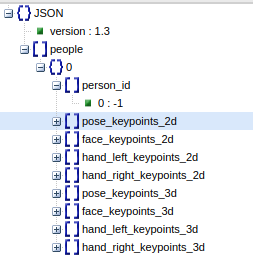
- (#1) JSON 파일이 요렇게 되있어서 먼저 "people" Value에 접근해야한다.
- (#2) "people"이 배열로 이루어져있기 때문에 for문으로 하나하나 조회한다.
- (#3) 다시 "pose_keypoints_2d" Value에 접근한다.
- (#4) "pose_keypoints_2d" Value를 (*it2)로 선언한다.
- (#5 ~ #10) keypoint_index에 따라 Keypoint의 x, y, prob를 저장한다.
- (#12) Keypoints map에 해당 Keypoint와 index를 함께 저장한다.