📌 파일
파일이란 의미있는 정보들을 한 덩어리로 모아 든 논리적 단위로써, 보조기억장치에 저장됨.
물론 실행 될 때는 메인 메모리를 사용함.
파일은 정보 덩어리로, 나름의 구성요소가 존재함.
-
파일이름
-
파일 실행에 필요한 정보
-
메타데이터
파일의 속성을 뜻함. 파일의 크기, 생성된 날짜, 위치 등
메타데이터의 중요한 것 중 하나: 파일 유형
평소 '확장자'라고 부르는 정보는 운영체제에 있어 상당히 중요한 정보이다.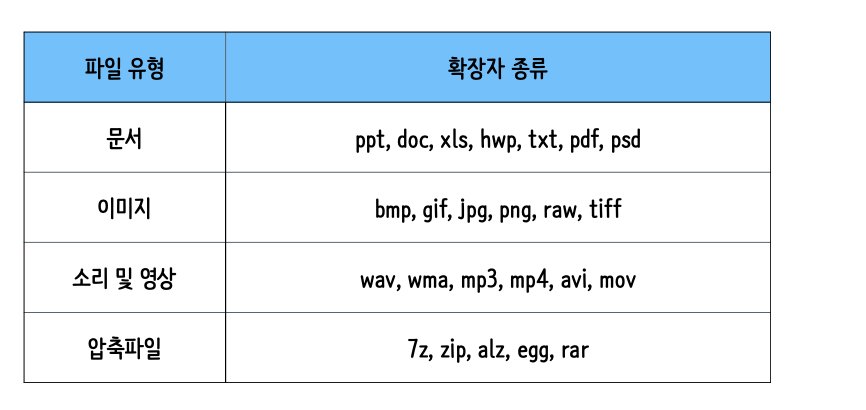
파일 연산을 위한 시스템 호출
파일을 다루는 모든 작업은 운영체제에 의해 이루어진다. 따라서 응용 프로그램이 파일에 접근하려면 시스템 호출을 제공받아야 한다.
<파일 관련 시스템 호출들>
-
파일생성, 파일열기, 파일읽기, 파일쓰기, 파일닫기, 파일삭제
파일 다루는 예제 코드
<23.py>
# 기본적인 파일 입출력 예제

with open("number_one.txt", "w") as f :
    f.write("one!")

with open("number_two.txt", "w") as f :
    f.write("two!")

with open("number_three.txt", "w") as f :
    f.write("three!")

with open("number_four.txt", "w") as f :
    f.write("four!")

import glob # 여러개의 파일을 한번에 처리하고 싶을 때 사용하는 모듈
  # 파일 네임의 패턴을 이용해 한꺼번에 접근하기

for filename in glob.glob("*.txt", recursive=True) :
    print(filename)

import fileinput # 파일 내용에 접근하고 싶다.
with fileinput.input(glob.glob("*.txt")) as fi :
    for line in fi:
        print(line)

import fnmatch
import os

for filename in os.listdir('.'): #현재 디렉토리에 있는 내용을 리스트업(.은 현재경로를 뜻함)
    if fnmatch.fnmatch(filename, "??????_*.txt"):
        print(filename)
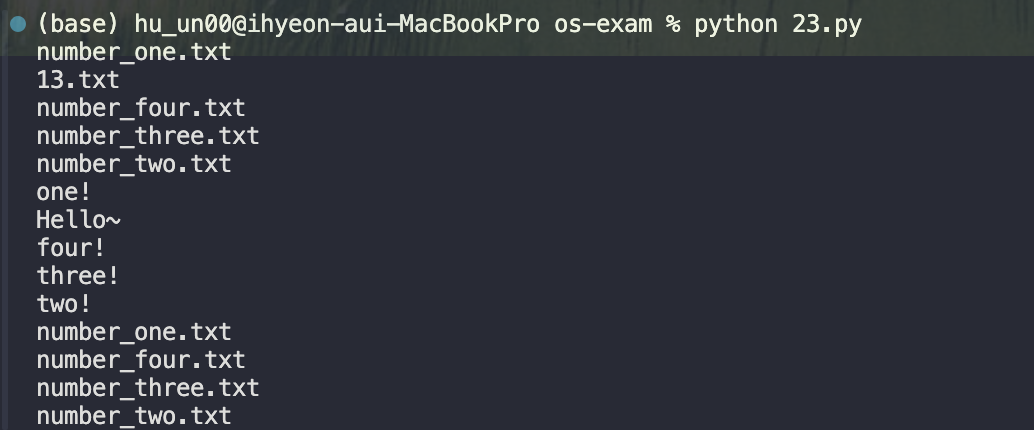
<실행결과>
<24.py>
# 파일 관련 예외는 운영체제와 관련이 있다 !

try:
    f = open("none.txt", "r")
    print(f.read())
    f.close()
except FileNotFoundError as e:
    print(e)
    print(issubclass(FileNotFoundError, OSError)) # FileNotFound가 os에러의 하위에러가 맞는지 Trrue, False로 확인
<실행결과>

<25.js>
// require: 시스템모듈 임포트해서 사용가능 함수
// fs: 파일을 다루고 싶을 때

const fs = require("fs")

fs.readFile("number_one.txt", "utf8", (err, data) => {

    if(err){
        console.log("파일을 읽는 도중 오류가 발생했습니다.",err)
        return;
    }

    console.log("파일 내용 :", data)
})

// 덮어쓰기
let content = "Sa Sa Sa"
fs.writeFile("number_four.txt", content, (err)=> {
    if(err){
        console.log("파일을 쓰는 도중 오류가 발생했습니다.", err)
        return;
    }
    console.log("파일 쓰기가 완료되었습니다.")
})

content = "It is fun, right?"
fs.appendFile("newfile.txt", content, (err)=> {
    if(err){
        console.log("파일을 쓰는 도중 오류가 발생했습니다.", err)
        return;
    }
    console.log("파일 생성 및 쓰기가 완료되었습니다.")
})

content = "It will get better"
fs.appendFile("newfile.txt", content, (err)=> {
    if(err){
        console.log("파일을 쓰는 도중 오류가 발생했습니다.", err)
        return;
    }
    console.log("파일 생성 및 쓰기가 완료되었습니다.")
})
<실행결과>

<newfile.txt>

📌 디렉터리
운영체제는 파일을 정돈할 수 있도록 디렉터리를 지원한다. 디렉터리는 한 개 이상의 파일을 가질 수 있고, 한개 이상의 디렉터리도 가질 수 있다.
디렉터리와 디렉터리는 부모와 자식 관계를 형성 할 수 있다.
가장 위에있는 최상위 디렉터리를 가리켜 '루트디렉터리' 라고 한다.
모든 파일은 루트디렉터리에서 부터 자기자긴에 이르기까지 고유한 경로를 가짐
-
윈도우 운영체제에서의 경로 예
C:\Users\username
-
유닉스 기반 운영체제에서의 경로 예
/Users/username/Documents
=> 이 경로들은 모두 절대 경로!
<상대경로>
현재 내가 위치해 있는 디렉토리에서 특정 파일까지의 경로
-
윈도우 운영체제에서의 상대경로 예
..\folder\document.txt
-
유닉스 기반 운영체제에서의 상대경로 예
../directory/document.txt
디렉토리와 파일을 구별해서 생각하기 쉽지만, 사실은 디렉터리도 파일의 일종이다 !
일반 파일에는 데이터가 저장되어 있지만, 디렉터리에는 파일 정보가 저장되어 있다.
디렉터리에 저장된 파일 정보는 테이블 형태로 관리된다.
테이블 행 하나하나를 가리켜 디렉터리 엔트리라고 부른다.실습 예제 코드
<26.py>
    # os 파일 시스템 관련 함수
  import os

  pwd = "/Users/hu_un00/Desktop/os-exam"

  # 디렉터리 내부 리스트 업
  filenames = os.listdir(pwd)
  # print(filenames) # pwd속 파일 이름들 주르륵 나옴.

  # 디렉터리인지 아닌지  여부
  print(os.path.isdir(filenames[0])) #filenames의 첫번째인 one_txt는 파일이     라서 디렉터리아니라고 나옴
  print(os.path.isdir(pwd + "/anyone")) # 폴더이므로 디렉터리라고 나옴

  # 파일인지 아닌지 여부
  print(os.path.isfile(filenames[0])) # 위와 반대
  print(os.path.isfile(pwd + "/anyone"))

  # 파일이름과 확장자 분리
  filepath = pwd + "/" + filenames[0]
  print(filepath)
  name, ext = os.path.splitext(filepath)
  print(name)
  print(ext)
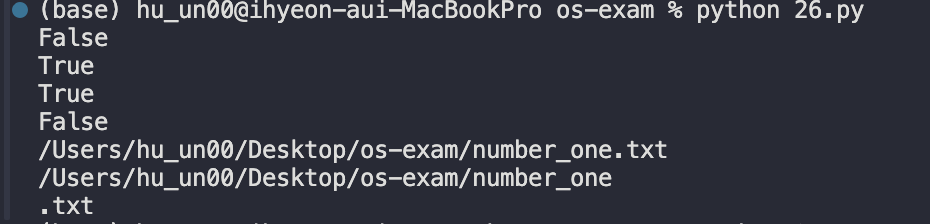
<결과>
<27.py>
    # 경로와 확장자 이용해 파일 찾고, 내용 읽기

  import os

  def searchFile(dirname, extension) :
      filenames = os.listdir(dirname)
      for filename in filenames :
          filepath = os.path.join(dirname, filename)
          if os.path.isdir(filepath) :
              searchFile(filepath, extension)
          elif os.path.isfile(filepath):
              name, ext = os.path.splitext(filepath)
              if ext == extension:
                  with open(filepath, "r", encoding="utf-8") as f :
                      print(f.read())

  searchFile("/Users/hu_un00/Desktop/os-exam", ".txt")
<진행결과>
=> txt파일 내용을 읽음<28.py>
    # 파일의 복사 또는 이동
   import os
   import shutil

   pwd = "/Users/hu_un00/Desktop/os-exam"
   filenames = os.listdir(pwd)

   for filename in filenames:
       if "tokyo" in filename:
           origin = os.path.join(pwd, filename)
           print(origin)
           # shutil.copy(origin, os.path.join(pwd,"copy.txt"))
           shutil.move(origin, os.path.join(pwd, "anyone"))
<실행결과>
1) copy.txt에 복사됨.
2)tokyo.txt 가 anyone폴더로 이동<29.py>
    # 파일 경로를 문자열이 아닌 객체로 다루기
   import os
   import pathlib

   for p in pathlib.Path.cwd().glob("*.txt"): #현재 워팅디렉토리 반환해주는 함수
       new_p = os.path.join(p.parent, p.name)
       print(new_p)
<실행결과>