결과가 자동으로 커밋됨 (오토커밋)
의도적으로 롤백해주기 위해 오토커밋을 해제해야함.
Statement
Select
- RS필요함
- Statement객체.executeQuery(sql문자열)
DELETE
- RS필요없음
- Statement객체.executeUpdate(sql문자열)
INSERT
- RS필요없음
- Statement객체.executeUpdate(sql문자열)
package statement;
import java.sql.Connection;
import java.sql.DriverManager;
import java.sql.ResultSet;
import java.sql.ResultSetMetaData;
import java.sql.SQLException;
import java.sql.Statement;

public class Statement_Insert_1 {
	public static void main(String[] args) {
		//1. db연동에 필요한 4가지 정보
		String driver = "oracle.jdbc.driver.OracleDriver"; //드라이버 클래스명
		String url = "jdbc:oracle:thin:@localhost:1521:xe"; //접속정보 및 sid
		String userid = "scott"; // 계정정보
		String passwd = "tiger";

		Connection con = null; // db접속객체
		Statement stmt=null;   // sql 실행, 결과 받는 객체
		ResultSet rs = null;

		//2. 드라이버 로딩
		try {
			Class.forName(driver);
			System.out.println("드라이버 로딩성공");

			//3. connection(db접속) 얻기
			con = DriverManager.getConnection(url, userid, passwd);//db접속 후 connection 객체 리턴
			System.out.println(con);

			// 4. String으로 sql 작성
			int deptno = 89;
			String deptname = "개발";
			String loc="서울";
//			String sql = String.format("insert into dept (deptno, dname, loc) values(%d, '%s', '%s')", deptno, deptname, loc);
			String sql = String.format("insert into dept values("+deptno+",'"+deptname+"','"+loc+"')");
			System.out.println(sql);
			//5. sql 실행 후 결과 얻기
			stmt =  con.createStatement(); // sql 실행할 객체 생성
			int num = stmt.executeUpdate(sql);

			String sql2 = "select * from dept";
			rs = stmt.executeQuery(sql2);
			while(rs.next()) {
				System.out.println(rs.getInt(1) + ":" + rs.getString(2) + ":" + rs.getString(3));
			}

			//6. 결과 출력
			System.out.println("실행된 레코드 갯수:" + num);


		} catch (ClassNotFoundException e) {
			System.out.println("드라이버 로딩실패");
			e.printStackTrace();
		} catch (SQLException e) {
			// TODO Auto-generated catch block
			e.printStackTrace();
		} finally {
			//7. 자원의 반납
			try {
				if(stmt!=null)stmt.close();
				if(con!=null)con.close();
			} catch (SQLException e) {
				// TODO Auto-generated catch block
				e.printStackTrace();
			}
		}
	}
}
PreparedStatement
sql문에서 데이터가 들어갈 위치에 ?가 들어감
?는 PreparedStatement객체.setInt(?의 인덱스값, 값)로 sql에 변수값을 편하게 적용시킬 수 있음
setString() 등 타입마다 메소드가 존재.
PreparedStatement 를 이용한 insert와 select
package preparedStatement;

import java.sql.Connection;
import java.sql.DriverManager;
import java.sql.PreparedStatement;
import java.sql.ResultSet;
import java.sql.SQLException;

public class JDBCTest2 {
	public static void main(String[] args) {
		//1. 4가지 정보
		String driver = "oracle.jdbc.driver.OracleDriver"; //드라이버 클래스명
		String url = "jdbc:oracle:thin:@localhost:1521:xe"; //접속정보 및 sid
		String userid = "scott"; // 계정정보
		String passwd = "tiger";

		Connection con = null;
		PreparedStatement pstmt = null;
		ResultSet rs = null;

		try {
			// 2 드라이버 생성
			Class.forName(driver);

			// 3 접속 얻기
			con = DriverManager.getConnection(url, userid, passwd);

			// 4 sql 작성
//			int deptno=13;
			String dname = "";
			String loc = "";
			String sql = "INSERT INTO dept (deptno, dname, loc)" + " VALUES (?, ?, ?)";

			pstmt = con.prepareStatement(sql);
			pstmt.setInt(1, 12);
			pstmt.setString(2, "개발");
			pstmt.setString(3, "서울");

			int num = pstmt.executeUpdate();
			System.out.println("실행된 레코드 갯수: " + num);
			pstmt.close();

			String sql2 = "select * from dept";
			pstmt = con.prepareStatement(sql2);
			rs = pstmt.executeQuery();
			while(rs.next()) {
				System.out.println(rs.getInt(1) + "\t" + rs.getString(2) + "\t" + rs.getString(3));
			}


		} catch (ClassNotFoundException e) {
			// TODO Auto-generated catch block
			e.printStackTrace();
		} catch (SQLException e) {
			// TODO Auto-generated catch block
			e.printStackTrace();
		} finally {
			try {
				rs.close();
				pstmt.close();
				con.close();
			} catch (SQLException e) {
				// TODO Auto-generated catch block
				e.printStackTrace();
			}

		}

	}
}
DAO 패턴과 DTO 패턴
DeptDAO클래스에서 데이터베이스에 연결하고 sql문을 실행하는 역할을 하게끔 하고싶음
main에서 DeptDAO객체를 이용하여 DB를 이용할 수 있음
1행에 대한 정보를 주고받을 때는 DeptDTO객체에 멤버변수를 담아서 주고받을 수 있음
또한 여러행이라면 ArrayList에 넣어서 주고받음
ArrayList에 각 레코드 1행의 객체를 만들어 담아서 반환
레코드 1행의 역할을 할 객체는 DeptDTO 모델이라고 만들거임
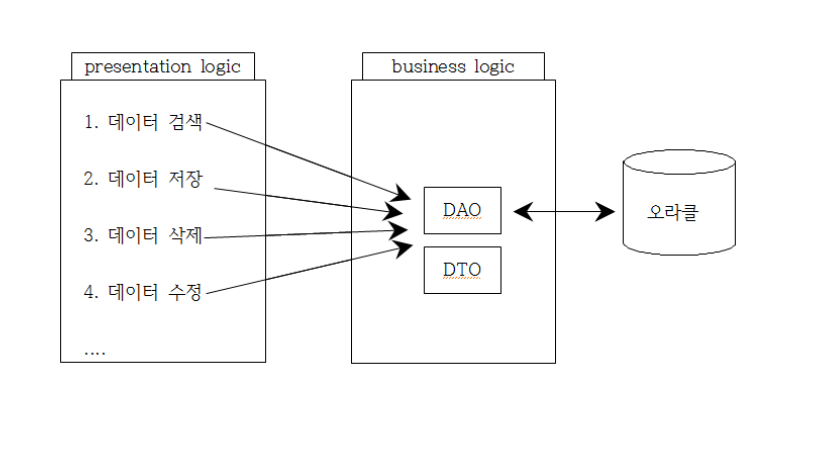
< 구성 >
main : 메인
DeptDTO : 전달할 객체가 될 클래스
DeptDAO : DB연동 클래스
package com.simpeDAO;

import java.sql.Connection;
import java.sql.DriverManager;
import java.sql.PreparedStatement;
import java.sql.ResultSet;
import java.sql.SQLException;
import java.util.ArrayList;

// DB 연동 클래스
public class DeptDAO {


	String driver = "oracle.jdbc.driver.OracleDriver"; //드라이버 클래스명
	String url = "jdbc:oracle:thin:@localhost:1521:xe"; //접속정보 및 sid
	String userid = "scott"; // 계정정보
	String passwd = "tiger";


	public DeptDAO() {
		super();
		try {
			Class.forName(driver);
			System.out.println("드라이버 로딩성공");
		} catch (ClassNotFoundException e) {
			// TODO Auto-generated catch block
			System.out.println("드라이버 로딩실패");
			e.printStackTrace();
		}
	}


	public ArrayList<DeptDTO> selectAllDept() {
		// TODO Auto-generated method stub
		Connection con = null;
		PreparedStatement pstmt = null;
		ResultSet rs = null;

		ArrayList<DeptDTO> list = new ArrayList<DeptDTO>();

		try {
			con = DriverManager.getConnection(url, userid, passwd);
			System.out.println(con);

			String sql = "select deptno x, dname, loc from dept";

			pstmt = con.prepareStatement(sql);

			rs = pstmt.executeQuery();

			while (rs.next()) {
				int deptno = rs.getInt("x");
				String dname = rs. getString("dname");
				String loc = rs.getString("loc");
//				System.out.println(rs.getInt(1) + "\t" + rs.getString(2) + "\t" + rs.getString(3));

				DeptDTO dto = new DeptDTO(deptno, dname, loc);
				list.add(dto);
			}

		} catch (SQLException e) {
			// TODO Auto-generated catch block
			e.printStackTrace();
		} finally {
			try {
				if(rs!=null)rs.close();
				if(pstmt!=null)pstmt.close();
				if(con!=null)con.close();
			} catch (SQLException e) {
				// TODO Auto-generated catch block
				e.printStackTrace();
			}
		}

		return list;
	}

	public int insertDept(DeptDTO row) {

		Connection con = null;
		PreparedStatement pstmt = null;

		int num=0;

		try {
			// 3. 접속
			con = DriverManager.getConnection(url, userid, passwd);

			// 4. sql문을 작성
			String sql = "insert into dept(deptno, dname, loc) values (?,?,?)";

			// 5. p stmt
			pstmt = con.prepareStatement(sql);
			pstmt.setInt(1, row.getDeptno());
			pstmt.setString(2, row.getDname());
			pstmt.setString(3, row.getLoc());

			num = pstmt.executeUpdate();


		} catch (SQLException e) {
			// TODO Auto-generated catch block
			e.printStackTrace();
		}

		return num;
	}
}
SERVICE_DAO패턴
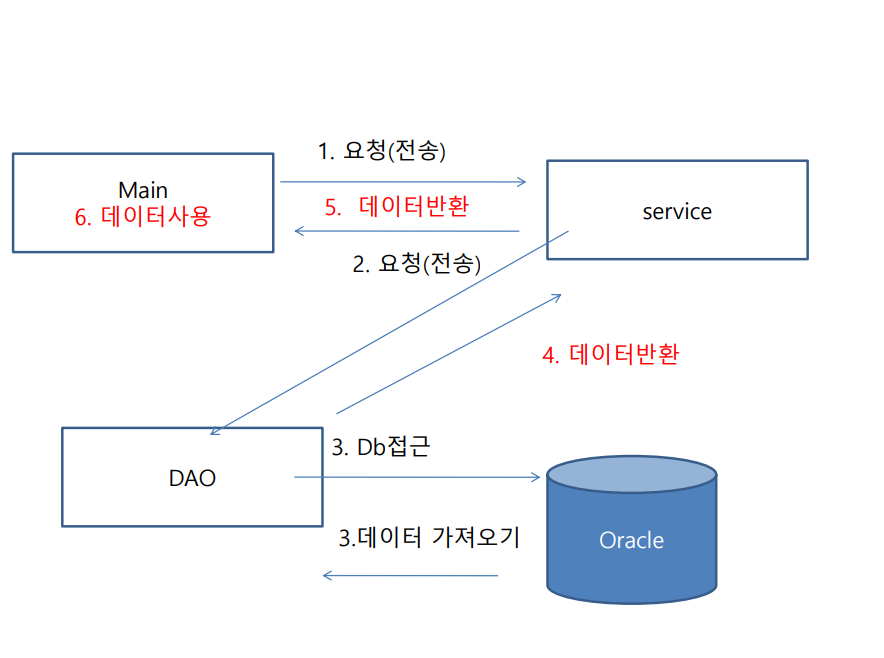
< 구성 >
OracleMain : 메인
Dept : 전달할 객체가 될 클래스
OracleService : OracleDAO객체를 멤버변수로 가진 has a 관계 클래스, 메인에 호출받아서 OracleDAO를 호출함.
OracleDAO : DB와 연동되어 다양한 SQL작업을 수행하는 클래스
OracleService
package com.service;

import java.sql.SQLException;
import java.util.ArrayList;

import com.dao.OracleDAO;
import com.dto.Dept;
import com.exception.RecordNotFoundException;

public class OracleService {

	OracleDAO dao;


	public OracleService() {
		super();
		dao = new OracleDAO();
	}


	public ArrayList<Dept> select() throws SQLException {
		ArrayList<Dept> list = dao.select();
		return list; //메인으로 리턴
	}


	public int insert(Dept xx) throws SQLException {
		int num = dao.insert(xx);
		return num;
	}

	public int delete(int deptno) throws SQLException {
		return dao.delete(deptno);
	}

}
OracleDAO
package com.dao;

import java.sql.Connection;
import java.sql.DriverManager;
import java.sql.PreparedStatement;
import java.sql.ResultSet;
import java.sql.SQLException;
import java.util.ArrayList;

import com.dto.Dept;
import com.exception.RecordNotFoundException;

public class OracleDAO {

	String driver = "oracle.jdbc.driver.OracleDriver"; //드라이버 클래스명
	String url = "jdbc:oracle:thin:@localhost:1521:xe"; //접속정보 및 sid
	String userid = "scott"; // 계정정보
	String passwd = "tiger";


	public OracleDAO() {
		super();

		try {
			Class.forName(driver);
			System.out.println("드라이버 로딩 성공");
		} catch (ClassNotFoundException e) {
			e.printStackTrace();
		}
	}


	public ArrayList<Dept> select() throws SQLException {
		ArrayList<Dept> list = new ArrayList<Dept>();
		Connection con = null;
		PreparedStatement pstmt = null;
		ResultSet rs = null;

		con = DriverManager.getConnection(url, userid, passwd);

		String sql = "select deptno x, dname, loc from dept";
		pstmt= con.prepareStatement(sql);
		rs = pstmt.executeQuery();
		while(rs.next()) {
			int deptno = rs.getInt("x");
			String dname = rs.getString(2);
			String loc = rs.getString("loc");

			Dept dto = new Dept(deptno, dname, loc);
			list.add(dto);
		}

		if(rs!= null) rs.close();
		if(pstmt!= null) pstmt.close();
		if(con!= null) con.close();

		return list;
	}


	public int insert(Dept xx) throws SQLException {
		Connection con = null;
		PreparedStatement pstmt = null;

		con = DriverManager.getConnection(url, userid, passwd);

		String sql = "INSERT INTO dept(deptno, dname, loc) VALUES (?, ?, ?)";
		pstmt = con.prepareStatement(sql);
		pstmt.setInt(1, xx.getDeptno());
		pstmt.setString(2, xx.getDname());
		pstmt.setString(3, xx.getLoc());

		int num = pstmt.executeUpdate();

		if(pstmt!=null)pstmt.close();
		if(con!=null)con.close();

		return num;
	}

	public int delete(int deptno) throws SQLException {
		int num=0;

		Connection con = null;
		PreparedStatement pstmt = null;

		con = DriverManager.getConnection(url, userid, passwd);

		String sql = "DELETE from dept where deptno=?";

		pstmt = con.prepareStatement(sql);
		pstmt.setInt(1, deptno);

		num = pstmt.executeUpdate();

		return num;

	}
}
궁금한 점
- 위 코드에 디커플링과 싱글톤 디자인을 적용할 수 있는가?
- close()에 예외처리 경고메세지가 안뜨면 굳이 예외처리하지 않아도 되는가?

코딩 프로?