컬렉션 팩토리
java 9에서 작은 컬렉션 객체를 쉽게 만들 수 있는 방법을 제공해주었다. Arrays.asList 또는 List.of와 같은 메서드를 제공해주었다. 예제를 보면서 확인해보자.
우리는 보통 List에 요소를 더 해줄 경우 add() 메서드를 사용하여 추가해준다.
아래는 친구 이름을 포함하는 그룹을 만드는 과정이다.
    List<String> friends = new ArrayList<>();
    friends.add("Jisu");
    friends.add("Smile");
    friends.add("Suji");
하지만 Arrays.asList()를 이용해서도 쉽게 List에 값을 더 해줄 수 있다.
List<String> friends2 = Arrays.asList("Jisu", "Smile", "Suji");그렇다면 차이점이 무엇일까?
Import를 보면 이해할 수 있다!
	import java.util.ArrayList;

  List<String> friends = new ArrayList<>();
  friends.add("Jisu");
  friends.add("Smile");
  friends.add("Suji");

	import java.util.Arrays;

  List<String> friends2 = Arrays.asList("Jisu", "Smile", "Suji");
Arrays.asList()는 정적 클래스인 ArrayList를 리턴한다.
java.util.ArrayList 클래스와는 다른 클래스이다.
java.util.Arrays.ArrayList는 set(), get(), contains() 메서드를 가지고 있긴하지만 사이즈를 바꿀 수 있는 add() 메서드는 지원하지 않는다. 이유는 위에 말했듯이 정적 클래스를 리턴하기 때문이다. 즉
만약에 asList로 선언한 List에 add()를 해준다면 UnsupportedOperationException이 나오는 것을 확인할 수 있다.
- Arrays.asList와 List.of 의 차이점
생성자로 리스트를 만드는 것과 달리 메서드를 통해 리스트를 만들 경우 반환되는 리스트들은 불변 리스트이게 된다. 즉 추가, 삭제가 불가능하다. Arrays.asList는 요소를 변경하는 set() 동작에는 가능하지만 List.of는 모두UnsupportedOperationException가 나오게 된다.
또한 asList는 null값을 가질 수 있으나 List.of는 null 값을 가질 수 없다.
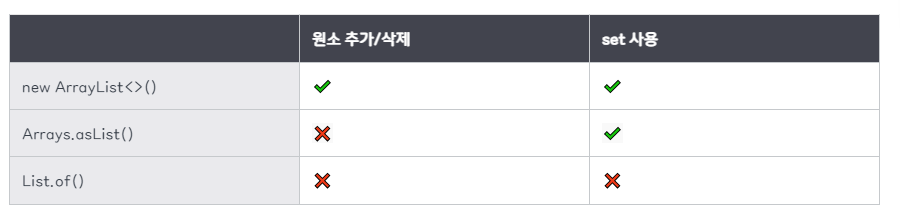
그렇다면 불변 객체의 이점은 무엇일까?
- 스레드 안전성 : 불변 객체는 동기화 없이도 여러 스레드에서 안전하게 공유하고 접근할 수 있음
- 코드 간소화 : 불변 객체는 동시성을 위해 설계할 필요가 없으므로 코드 간소화가 가능
- 향상된 성능 : 동일한 상태를 유지하므로 캐시하고 재사용 가능
리스트 팩토리
List.of를 이용해서도 간단하게 리스트를 만들 수 있다.
        List<String> friend3 = List.of("Jisu", "Smile", "Suji");
        System.out.println(friend3);
하지만 List.of 또한 정적 리스트를 만들기 때문에 변경할 수 없는 리스트가 된다. 또한 위에 설명했듯이 of는 set()도 불가능하다.
하지만 이렇게 변경이 불가능하다는 것이 꼭 좋지 못한것은 아니다. 프로그래밍에서 적절한 제약은 좋은 결과를 주기 때문이다. 팩토리 메서드를 활용해 자신에게 맞는 리스트를 구현해서 사용하면 되는 것이다.
즉, 데이터 처리 형식을 설정하거나 데이터를 변환할 필요가 없다면 사용하기 간편한 팩토리 메서드를 이용할 것을 권장한다.
집합 팩토리
		Set<String> setFriends = Set.of("bubu", "Suji", "wonwon");
        System.out.println(setFriends);

        // 오류
        Set<String> setFriends = Set.of("bubu", "bubu", "Suji", "wonwon");
        System.out.println(setFriends);
Set을 통해 집합 팩토리 메서드를 만들게 된다면 만약 "bubu" 라는 요소가 중복이 된다면 IllegalArgumentException: duplicate element: bubu와 같은 exception이 나올 것이다. 집합은 오직 고유의 요소만 포함할 수 있다는 원칙을 보여준다.
맵 팩토리
Map 또한 팩토리 메서드를 이용해서 구현할 수 있다.
Map<String, Integer> ageOfFriends = Map.of("bubu", 20, "Suji", 22, "won", 26);키와 값을 번갈아 입력하는 방법으로 맵을 만들 수 있다.
다른 팩토리 메서드를 이용해서도 구현할 수 있다. Map.ofEntries는 많의 양의 객체를 인수를 받을 때 사용하기 좋다.
    Map<String, Integer> ageOfFriends2 = Map.ofEntries(
        entry("Raphael", 30),
        entry("Olivia", 25),
        entry("Thibaut", 26));
entry()는 객체를 만드는 새로운 팩토리 메서드이다.
리스트와 집합 처리
java 8에서 List, Set 인터페이스에 removeIf, replaceAll, sort와 같은 메서드가 추가되었다.
- removeIf : 프리디케이트를 만족하는 요소를 제거한다.
- replaceAll : UnaryOperator 함수를 이용해 요소를 바꾼다.
- sort : 리스트를 정렬한다.
removeIf 메서드
ArrayList.removeIf(Predicate<? super E> filter)는 인자로 Predicate를 받습니다. Predicate는 람다 표현식으로 전달할 수 있으며, 리스트에서 아이템을 필터링하는 조건을 표현하고 있습니다.
public class Example {
    public static void main(String[] args) {
        List<Store> storeState = new ArrayList<>();

        storeState.add(new Store("영업 중"));
        storeState.add(new Store("마감"));
        storeState.add(new Store("영업 중"));
        storeState.add(new Store("마감"));
        storeState.add(new Store("마감"));

        System.out.println("List after removing '마감':");

        for (int i = 0; i < storeState.size(); i++){
            if (storeState.get(i).getResult().equals("마감")){
                storeState.remove(i);
            }
        }

        for (Store getHotProjectRes : storeState) {
            System.out.println(getHotProjectRes.getResult());
        }
		// 결과 : 영업 중, 영업 중, 마감

        storeState.removeIf(project -> project.getResult().equals("마감"));

        for (Store project : storeState) {
            System.out.println(project.getResult());
        }
		// 결과 : 영업 중, 영업 중
    }
}

class Store {
    private String result;

    public Store(String pj_recruit) {
        this.result = pj_recruit;
    }

    public String getResult() {
        return result;
    }
}
위와 같이 만약 remove를 사용해서 삭제를 진행한다면 list의 사이즈가 remove를 하는 동시에 줄어들기 때문에 마지막에 "마감"이 한번 출력된 것을 확인할 수 있다.
하지만 removeIf는 내부적으로 스트림을 사용하여 조건에 맞는 요소를 찾아서 제거하기 때문에 깔끔하게 결과가 출력되는 것을 확인할 수 있습니다.
replaceAll 메서드
replaceAll 메서드를 이용해 리스트의 각 요소를 새로운 요소로 바꿀 수 있다.
기존 컬렉션의 map을 이용하여 할 수 있겠지만 이것은 새로운 컬렉션을 만드는 방법이다.
        List<String> strList = List.of("a12", "b12", "c12");
        List<String> collect = strList.stream()
                .map(code -> Character.toUpperCase(code.charAt(0)) + code.substring(1))
                .collect(Collectors.toList());
        for (String s : collect) {
            System.out.println(s);
        }
내가 원하는 것은 기존의 컬렉션의 수정하는 것이다. 이럴 경우 replaceAll 메서드를 사용해주면 좋다. (또한 여기서 List.of는 수정도 불가능하기 때문에 strList를 수정할 수 있는 방법은 없을 것이다.)
        List<String> strList = new ArrayList<>(List.of("a12", "b12", "c12"));
        strList.replaceAll(code -> Character.toUpperCase(code.charAt(0)) + code.substring(1));
        for (String s : strList) {
            System.out.println(s);
        } // 결과 : A12, B12, C12
strList 기존 컬렉션을 replaceAll을 통해 수정해보았다.
맵 처리
Map 인터페이스에도 몇 가지 디폴트 메서드가 추가되었다.
forEach 메서드
Map을 사용할 때 forEach 메서드를 사용하지 않는다면 상당히 번거로운 작업을 거쳐야한다. 아래는 forEach를 사용하지 않고 사용한 예제인데 Map.Entry를 이용하여 Map에 저장된 모든 key-value 쌍을 각각의 key-value를 하나의 객체로 얻을 수 있다.
        Map<String, Integer> friends = new HashMap<>();
        friends.put("영희", 15);
        friends.put("숙희", 18);
        friends.put("벙수", 21);

        for (Map.Entry<String, Integer> entry : friends.entrySet()){
            String name = entry.getKey();
            Integer age = entry.getValue();
            System.out.println(name + " " + age);
        }
위와 같이 복잡한 코드를 forEach를 이용하여 간단하게 구현할 수 있다
friends.forEach((name, age) -> System.out.println(name + " " + age));Map 인터페이스는 BiConsumer(키와 값을 인수로 받음)를 인수로 받는 forEach 메서드를 지원하기 때문에 쉽게 구현할 수 있게 되었다.
정렬 메서드
Map에서는 comparingByValue()와 comparingByKey()를 이용하여 정렬을 해줄 수 있다. (역 정렬도 가능하다.)
        friends.entrySet()
                .stream()
                .sorted(Map.Entry.comparingByValue())
//                .sorted(Map.Entry.<String, Integer>comparingByValue().reversed())
                .forEachOrdered(System.out::println);
		// 결과 : 영희=15, 숙희=18, 벙수=21
getOrDefault 메서드
기존에는 찾으려는 키가 존재하지 않으면 null이 반환되기 때문에 NPE를 방지하기 위하여 결과가 널인지 if문이나 다른 검증을 통하여 확인해야 했다. 하지만 이런 문제를 getOrDefault를 이용하여 쉽게 해결할 수 있다.
        Map<String, Integer> friends = new HashMap<>();
        friends.put("영희", 15);
        friends.put("숙희", 18);
        friends.put("벙수", 21);

		System.out.println(friends.getOrDefault("숙희", 0)); // 18
        System.out.println(friends.getOrDefault("명희", 0)); // 0 (결과 없음)
계산 패턴
맵의 키가 존재하는 여부에 따라 어떤 동작을 실행하고 결과를 저장하고 싶을 경우가 있다. 이럴 경우 사용할 수 있는 메서드가 3가지가 있다.
- computeIfAbsent : 제공된 키에 해당하는 값이 없으면 null, 키를 이용해 새 값을 계산하고 추가
public class MapExam {
    public static void main(String[] args) {
        Map<String, Integer> friends = new HashMap<>();
        friends.put("영희", 15);
        friends.put("숙희", 18);
        friends.put("벙수", 21);
        friends.put("지수", null);

        friends.computeIfAbsent("영희", MapExam::calculateAge);
        System.out.println(friends.get("영희"));

        friends.computeIfAbsent("지수", MapExam::calculateAge);
        System.out.println(friends.get("지수"));
    }

    private static Integer calculateAge(String key) {
        if (key.equals("지수")){
            return 28;
        }
        return 26;
    }

	// 영희의 나이 : 15
	// 지수의 나이 : 28
}
위의 결과를 보면 지수의 나이는 null 값으로 들어가 있기 때문에 새 값을 곗나하여 넣어준 것을 확인할 수 있다.
- computeIfPresent : 제공된 키가 존재하면 새 값을 계산하고 맵에 추가
        friends.computeIfPresent("영희", (key, value) -> value + 1);
        System.out.println("영희의 나이 : " + friends.get("영희"));

        friends.computeIfPresent("효효", (key, value) -> value + 1);
        System.out.println("효효의 나이 : " + friends.get("효효"));

		// 영희의 나이 : 16
		// 효효의 나이 : null
제공된 키가 없다면 아무것도 수행하지 않는 것을 확인할 수 있다.
- compute : 제공된 키로 새 값을 계산하고 맵에 저장
삭제 패턴
키에 해당하는 Map 항목을 제거하는 remove 메서드를 제공한다.
        Map<String, Integer> friends = new HashMap<>();
        friends.put("영희", 15);
        friends.put("숙희", 18);
        friends.put("벙수", 21);
        friends.put("지수", null);

        friends.remove("벙수", 21);
        System.out.println(friends); // {지수=null, 영희=15, 숙희=18}
교체 패턴
- replaceAll() : BiFunction을 적용한 각 항목의 값을 교체한다. (이전에 봤던 List의 replaceAll() 이랑 동작이 비슷하다)
        Map<String, Integer> friends = new HashMap<>();
        friends.put("영희", 15);
        friends.put("숙희", 18);
        friends.put("벙수", 21);
        friends.put("지수", 20);

friends.replaceAll((name, age) -> age + 1); // {지수=21, 영희=16, 벙수=22, 숙희=19}- replace : 키가 존재하면 맵의 값을 바꾼다.
friends.replace("지수", 25); // {지수=25, 영희=15, 벙수=21, 숙희=18}합침 패턴
merge 메서드를 이용하면 값을 좀더 유연하게 합칠 수 있다. 이 메서드는 BiFunction을 인수로 받는다.
        Map<String, String> friends = new HashMap<>();
        friends.put("영희", "14");
        friends.put("숙희", "16");
        friends.put("벙수", "12");
        friends.put("지수", "41");

        Map<String, String> friends2 = new HashMap<>();
        friends.put("진혁", "27");
        friends.put("인회", "12");
        friends.put("유미", "30");
        friends.put("봉균", "24");

        Map<String, String> everyFriend = new HashMap<>(friends);
        friends2.forEach((key, value) -> everyFriend.merge(
                key, value, (name, age) -> name + " " + age));

        System.out.println(everyFriend);
		// 결과 : {유미=30, 봉균=24, 지수=20, 영희=15, 진혁=27, 벙수=21, 숙희=18, 인회=12}
ConcurrentHashMap
동시성에 친화적이며 최신 기술을 반영한 HashMap 버전이다. 내부 자료구조의 특정 부분만 잠궈 동시 추가, 갱신 작업을 혀용한다. 스트림에서 봤던 것과 비슷한 종류의 3 가지 연산을 제공한다.
- forEach : 쌍에 주어진 액션 실행
- reduce : 모든 쌍을 제공된 리듀스 함수를 이용해 결과를 합침
- search : 널이 아닌 값을 반환할 때까지 각 쌍에 함수를 적용
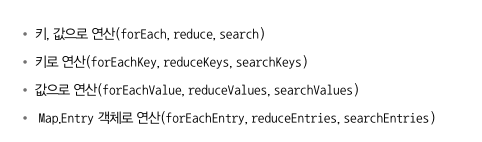
ConcurrentHashMap의 연산은 상태를 잠그지 않고 연산을 수행한다는 점을 주목해야 한다. 연산에 제공한 함수는 계산이 진행되는 동안 바뀔 수 있는 객체, 값, 순서 등에 의존하지 않아야 한다. 또한 연산에 병렬성 기준값을 지정해야 한다.
계수
ConcurrentHashMap에서는 mappingCount 메서드를 제공한다. size() 메서드 대신 새 코드에서는 int를 반환하는 mappingCount 메서드를 사용하는 것이 좋다. 그래야 메핑 개수가 int의 범위를 넘어서는 이후의 상황을 대처할 수 있다.
집합뷰
ConcurrentHashMap에서는 집합 뷰를 반환하는 keySet이라는 메서드를 제공한다. newKeySet 메서드를 이용해 ConcurrentHashMap으로 유지되는 집합을 만들 수 있다.